


 Video Converter Ultimate
 Snimač zaslona
 Video popravak
Kako praktično ukloniti naljepnice s fotografija i videozapisa
Ako volite gledati videozapise, smatra se da ne želite nailaziti na smetnje dok gledate. No, nažalost, ponekad se dogodi da vaši videozapisi imaju nalijepljene naljepnice, što je frustrirajuće tijekom gledanja. Također, neke fotografije imaju naljepnice pa ne možete u potpunosti uživati u ljepoti fotografije zbog tih iritantnih naljepnica. Srećom, ovaj će vam članak ponuditi najbolje načine za rješavanje tog problema. Otkrit ćete i izvrsne alate koje možete koristiti. Pročitajte ovaj članak kako biste naučili kako ukloniti naljepnice s fotografija i videozapisa.

1. dio: Najbolje metode za uklanjanje naljepnica s fotografija
Jedan od najboljih alata za uklanjanje naljepnica s fotografija koji možete isprobati je FVC Free Watermark Remover. Ovaj internetski alat može vam pomoći ukloniti nepotrebne elemente s vaših fotografija, poput vodenih žigova, naljepnica, logotipa, potpisa i još mnogo toga. Osim toga, podržava najčešće korištene formate slika, kao što su JPEG, PNG, BMP itd. Također, vaša će fotografija biti spremljena u istom formatu nakon što uklonite naljepnice. Štoviše, ovaj besplatni alat za uklanjanje vodenog žiga omogućuje vam da mišem nacrtate poligonalni obris ili laso na svojoj slici kako biste odabrali područje za uklanjanje naljepnica. Ali to nije sve. Postoji još jedan način za uklanjanje naljepnica s fotografije. Ako je naljepnica postavljena na rub ili u kut fotografije, možete upotrijebiti funkciju izrezivanja (Cropping tool). Zahvaljujući jednostavnom sučelju i postupku, FVC Free Watermark Remover je praktičan za svakog korisnika, posebice za neprofesionalne korisnike.
Slijedite ove jednostavne i detaljne upute za uklanjanje naljepnice sa svojih fotografija.
Korištenje alata za uklanjanje vodenog žiga
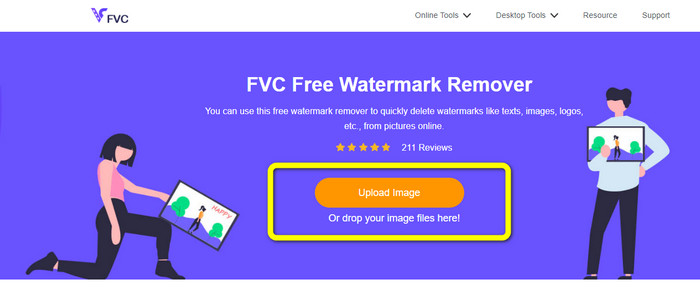
Korak 1: Posjetite web-stranicu FVC Free Watermark Remover kako biste uklonili naljepnice. Kliknite gumb Upload Image za umetanje fotografije s naljepnicom.
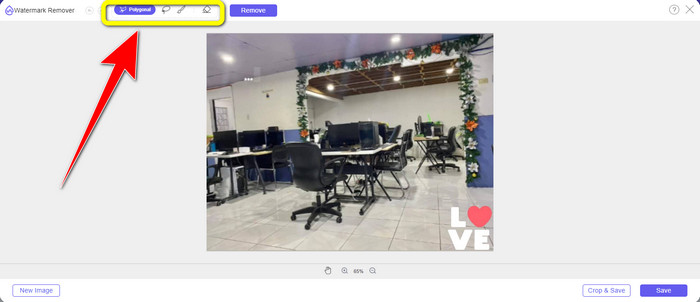
Korak 2: Nakon dodavanja fotografije, možete koristiti alate za uklanjanje vodenog žiga kako biste uklonili naljepnice s fotografije. Možete koristiti alat Polygonal, alat Lasso i alat Brush.
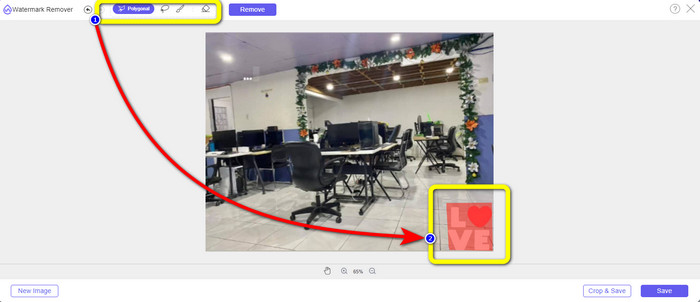
Korak 3: Sljedeći je korak označiti naljepnicu na fotografiji pomoću alata za uklanjanje vodenog žiga.
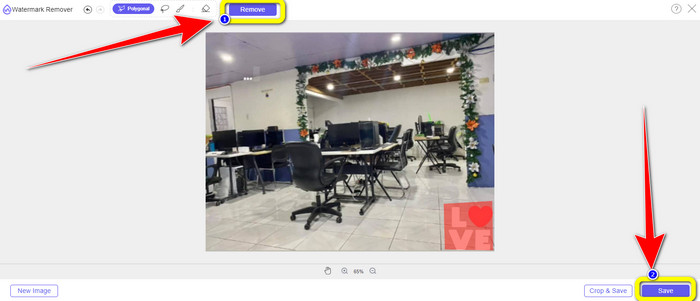
Korak 4: Kada označite naljepnicu na fotografiji, kliknite gumb Remove. Pričekajte da se postupak uklanjanja dovrši i zatim kliknite gumb Save.click-remove-button-save.jpg
Korištenje alata za obrezivanje
Koristite ove korake u nastavku ako želite izrezati svoju fotografiju kako biste uklonili naljepnicu.
Korak 1: Nakon učitavanja fotografije s naljepnicom, odaberite gumb Crop & Save.
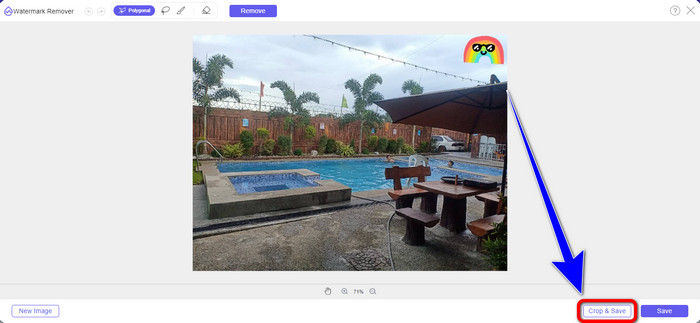
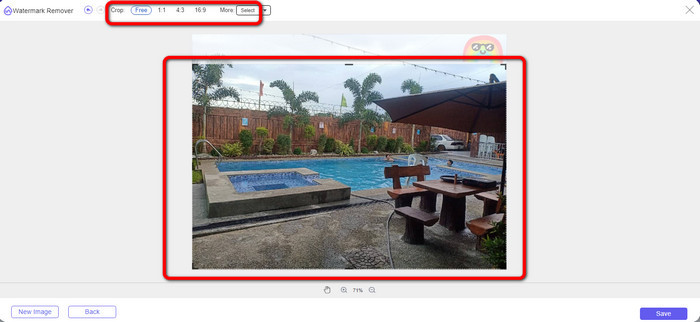
Korak 2: U ovom dijelu imate dva načina za izrezivanje fotografije. Možete odabrati mogućnosti izrezivanja u gornjem dijelu sučelja, ovisno o tome kako želite izrezati fotografiju. Također možete odabrati opciju Free kako biste ručno izrezali fotografiju i uklonili naljepnicu.
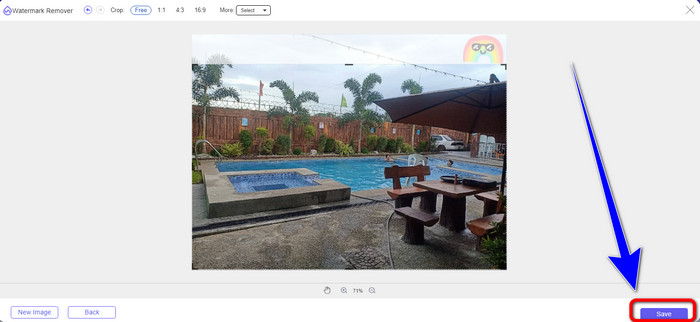
Korak 3: Kada završite s izrezivanjem fotografije, kliknite gumb Save kako biste spremili fotografiju.
Korištenje Snapseeda
Snapseed je idealan i učinkovit alat za korisnike Androida i iOS-a za uklanjanje naljepnica s fotografija. Ovaj softver nudi alat za iscjeljivanje (Healing) koji vam omogućuje potpuno uklanjanje svih neželjenih objekata ili elemenata, poput vodenih žigova s fotografija. Naljepnicu možete uspješno ukloniti s tek nekoliko klikova. Osim toga, fotografiju možete odmah objaviti na drugim društvenim mrežama, poput Facebooka, Instagrama i Twittera, uz očuvanje izvorne kvalitete. Međutim, trebate znati da ova aplikacija ima mnogo zbunjujućih opcija za nove korisnike.
Korak 1: Preuzmite Snapseed na svoj Android ili iOS uređaj.
Korak 2: Na sučelju kliknite ikonu Plus na zaslonu kako biste dodali fotografiju s naljepnicom.
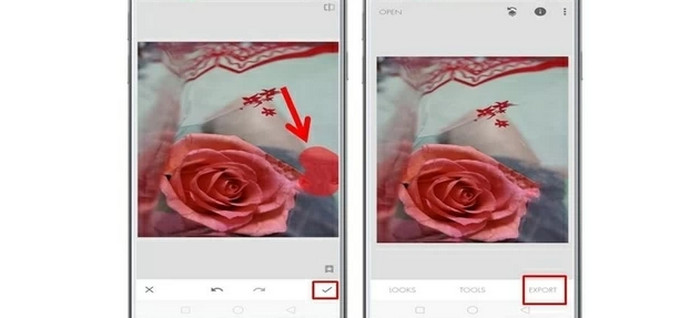
Korak 3: Odaberite Tools i zatim ikonu Healing.
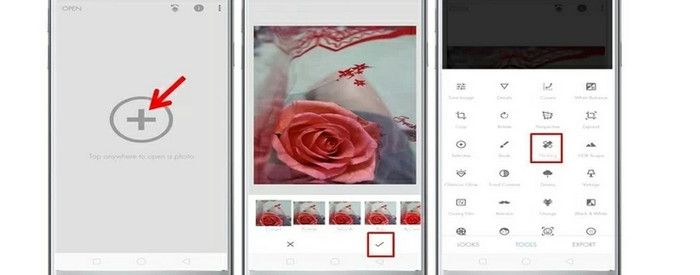
Korak 4: Pritisnite ikonu Check i Export za spremanje fotografije.
2. dio: Kako ukloniti naljepnice s videozapisa
Video Converter Ultimate je najbolji alat ako tražite izvanredan i vrhunski program za uklanjanje naljepnica iz videozapisa. Ovaj program može ukloniti ometajuće elemente iz vaših videozapisa, poput naljepnica, vodenih žigova, logotipa, potpisa i slika. Dodatno, ne morate dugo čekati da se postupak spremanja dovrši, jer nakon uklanjanja naljepnica možete vrlo brzo spremiti svoje videozapise. Također, Video Converter Ultimate ima mnoštvo alata za uređivanje koje možete koristiti. Ako planirate skratiti ili izrezati video na savršenu duljinu, možete upotrijebiti alat Video Trimmer. Na taj način možete slobodno obrezati svoj videozapis.
Osim videa, ako želite pretvoriti slike, još uvijek se možete osloniti na ovaj alat. Također nudi alat za pretvaranje slika koji podržava nekoliko formata slika, kao što su JPG, PNG, BMP, WEBP, itd. Najbolja stvar je što više ne morate kupovati ovu aplikaciju. Ovo se može koristiti bez trošenja. Na kraju, ima jednostavno sučelje i osnovne metode, koje su savršene za sve korisnike. Slijedite jednostavne načine u nastavku za uklanjanje naljepnica sa svojih videozapisa.
Korak 1: Najprije preuzmite Video Converter Ultimate klikom na gumb Download u nastavku. Ako ste korisnik sustava Windows, odaberite gumb za preuzimanje za Windows, a drugi gumb ako ste korisnik Maca. Zatim pokrenite aplikaciju nakon završetka instalacije.
Besplatno preuzimanjeZa Windows 7 ili novijiSigurno preuzimanje
Besplatno preuzimanjeZa MacOS 10.7 ili novijiSigurno preuzimanje
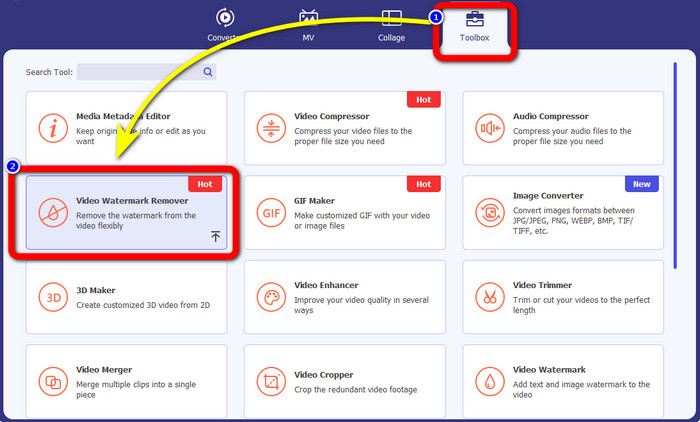
Korak 2: Kada se sučelje prikaže, odaberite karticu Toolbox. Zatim pronađite Video Watermark Remover i kliknite na njega.
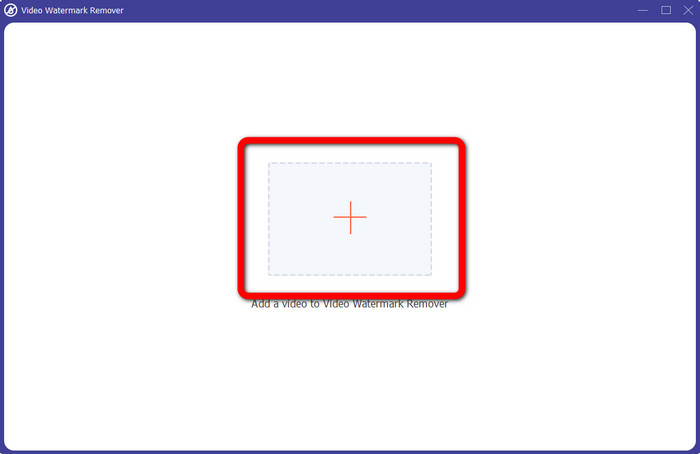
Korak 3: Pojavit će se novo sučelje. Kliknite gumb s oznakom Plus kako biste priložili video s naljepnicom.
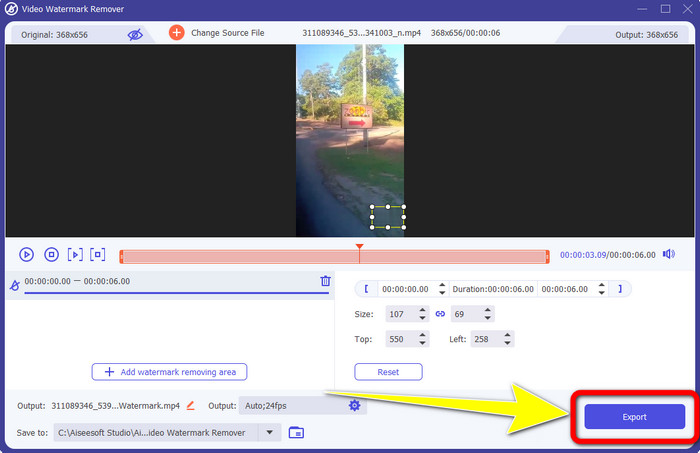
Korak 4: Nakon što priložite video, kliknite područje Add watermark removing. Na vašem će se videozapisu pojaviti mali okvir. Povucite okvir na područje s naljepnicom kako biste ga prekrili. Treću kutiju možete koristiti za pomicanje okvira po zaslonu. Također možete promijeniti veličinu okvira.
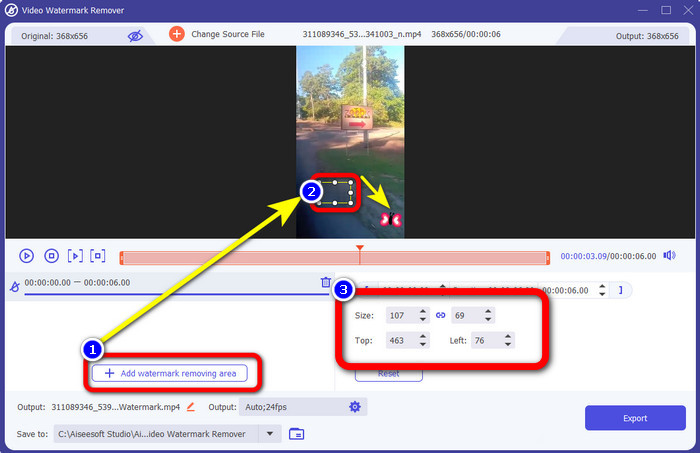
Korak 5: Kada prekrijete naljepnicu, kliknite gumb Export. Pričekajte brz postupak uklanjanja i zatim možete spremiti svoj konačni rezultat.
Dio 3: Često postavljana pitanja o uklanjanju naljepnica s fotografija i videozapisa
1. Mogu li ukloniti naljepnicu sa svoje fotografije bez gubitka kvalitete?
Da, možete! Morate koristiti FVC Free Watermark Remover. Uz pomoć ove internetske aplikacije možete ukloniti naljepnicu sa slika bez gubitka kvalitete.
2. Možete li ukloniti emojije iz videa?
Apsolutno da! Emojije na videozapisu možete jednostavno ukloniti pomoću programa Video Converter Ultimate. Sve što trebate učiniti jest preuzeti ga i koristiti alat za uklanjanje vodenog žiga iz videa.
3. Mogu li ukloniti naljepnicu sa svoje Instagram priče?
Definitivno da! Možete koristiti alat za uklanjanje vodenog žiga, poput FVC Free Watermark Remover, kako biste uklonili naljepnicu sa svoje Instagram priče.
Zaključak
Ovaj vam članak prikazuje mnogo načina kako ukloniti naljepnice s fotografija i videozapisa koristeći različite aplikacije. No, neke od njih zahtijevaju plaćenu verziju za uklanjanje neograničenog broja datoteka. Ako želite besplatan alat za uklanjanje vodenog žiga, možete koristiti FVC Free Watermark Remover.
-
 Kako ukloniti osobe s fotografija: jednostavan i brz postupak
 Želite li se riješiti ljudi sa svoje fotografije? Pročitajte ovaj članak jer ćemo vam pokazati najbolje i najjednostavnije metode za uklanjanje osoba s fotografija pomoću aplikacija.
-
 Jednostavni načini kako ukloniti iSkysoft logotip s videa
 Pročitajte i naučite najbolji postupak za uklanjanje iSkysoft logotipa pomoću različitih aplikacija. Dat ćemo vam najizvrsnije rješenje koje želite.
-
 Najlakši načini kako ukloniti Snapchat tekst sa snimke zaslona
 Uklonimo Snapchat tekst s fotografija i videozapisa pomoću pouzdanih online i offline alata. Ponudit ćemo vam jednostavne načine. Isprobajte sada i pokušajmo!
