


 Video Converter Ultimate
 Snimač zaslona
 Video popravak
Kako brzo ukloniti vodeni žig iz videozapisa
Trebate li na jednostavan način ukloniti vodeni žig s videa? Onda vam je potreban pravi alat. Primjerice, korisnici žele ukloniti taj tekst vodenog žiga ili logo kako bi video gledali u potpunom doživljaju. Ipak, ovaj je zadatak složen za neke uređivače, jer svi ne nude učinkovit uklanjač vodenog žiga u svom skupu alata. U pravilu biste za ovaj zadatak trebali kupiti skup uređivač, a i tada se događa da ne daje dobre rezultate. No danas ćemo vam predstaviti najbolje rješenje za vaš problem, bilo da koristite računalo ili iOS uređaj. Osim toga, sav softver koji vam nudimo pažljivo je odabran. Zato, bez daljnjeg odugovlačenja, uronimo u ovaj članak i saznajmo kako ukloniti vodeni žig s bilo kojeg videa.

Dio 1. Ultimativno rješenje za uklanjanje vodenog žiga iz bilo kojeg videozapisa na Windows i Mac
Naučiti kako ukloniti vodeni žig s videa jednostavan je zadatak uz najbolji video uređivač Video Converter Ultimate. Ne trebate imati veliko iskustvo u montaži, jer ovaj alat nudi interaktivno i lako razumljivo sučelje. Štoviše, pruža brojne napredne funkcije koje možete koristiti, poput spajanja, rezanja, korekcije boje, okretanja unatrag, poboljšavanja kvalitete i mnogo toga.
Što se tiče danas, mnogi korisnici su već preuzeli ovaj alat i svi su zadovoljni jer su to učinili. Impresivno zar ne? Želite li isprobati ovaj alat? U tom slučaju, provjerimo dolje navedene korake i vidimo je li ovaj alat najbolje rješenje za naš problem s vodenim žigom.

FVC Video Converter Ultimate
5.689.200+ preuzimanja- Najbolji je izbor za sve koji žele ukloniti svoj vodeni žig na bilo kojem videozapisu.
- Ovaj vrhunski alat jedini je koji funkcionira kao pretvarač, kroper, spajanje, rezač.
- Dostupno na svim desktop platformama za preuzimanje, kao što su Windows i Mac.
- Jednostavan je za korištenje, ali je najodaniji s obzirom na problem na njihovom videu.
Besplatno preuzimanjeZa Windows 7 ili novijiSigurno preuzimanje
Besplatno preuzimanjeZa MacOS 10.7 ili novijiSigurno preuzimanje
Korak 1. Preuzmite ovaj vrhunski alat na svoje računalo, odaberite koristite li Windows ili Mac. Nakon preuzimanja slijedite postupak instalacije i kliknite Start Now kako biste pokrenuli alat na svom sustavu.
Besplatno preuzimanjeZa Windows 7 ili novijiSigurno preuzimanje
Besplatno preuzimanjeZa MacOS 10.7 ili novijiSigurno preuzimanje
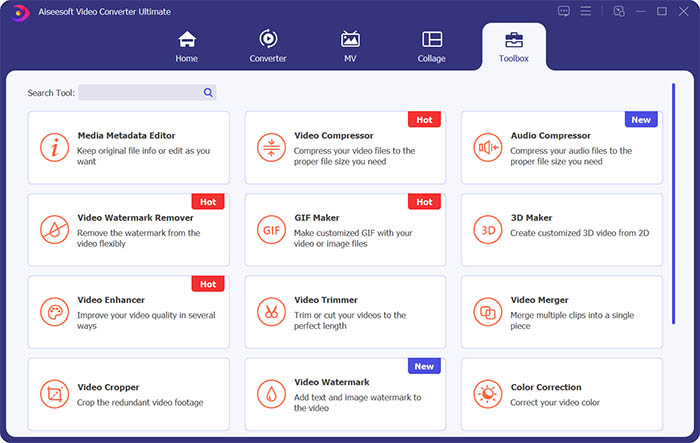
Korak 2. Idite na odjeljak Toolbox i kliknite Video Watermark Remover kako biste uklonili vodeni žig s videa.
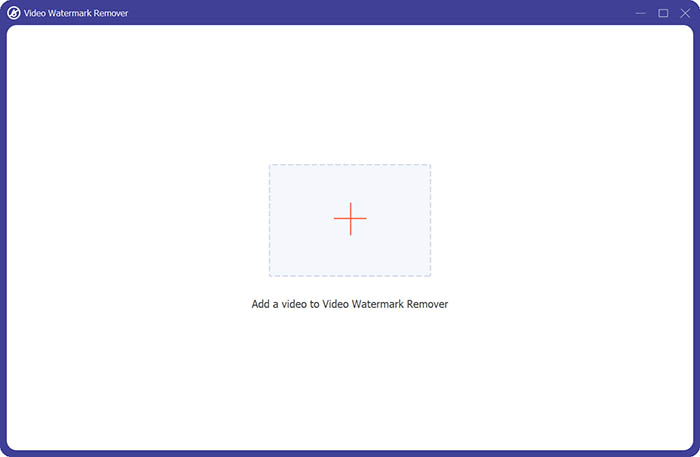
Korak 3. Zatim kliknite središnji znak plus kako biste uvezli video s kojeg želite ukloniti vodeni žig.
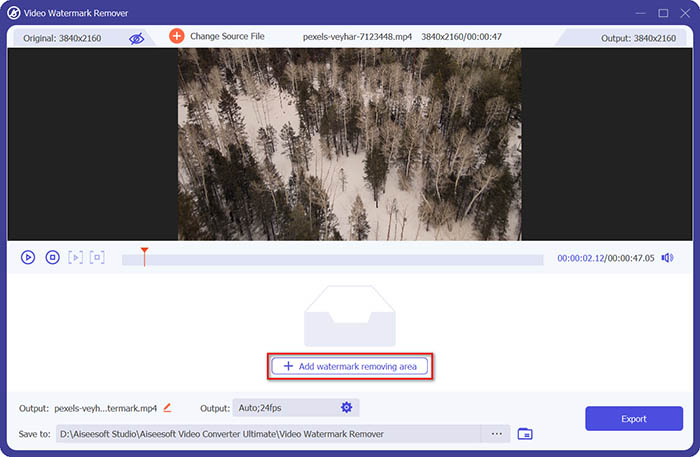
Korak 4. Nakon što dodate video u uklanjač vodenog žiga, kliknite gumb Add watermark removing area kako biste označili područje vodenog žiga.
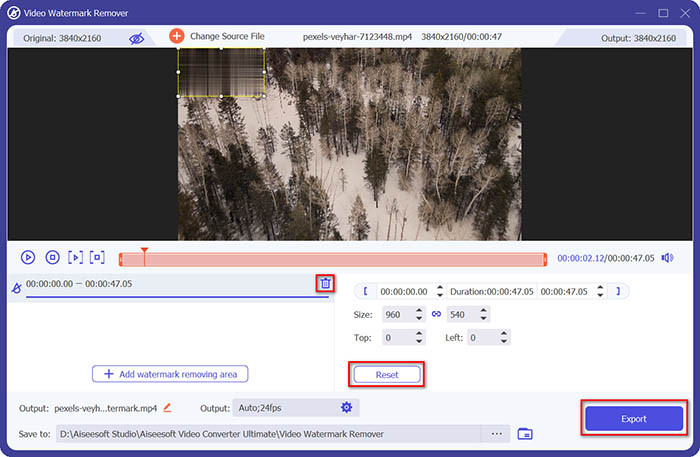
Korak 5. Na kraju kliknite gumb Export kako biste dobili video bez vodenog žiga.
Dio 2. Kako ukloniti vodeni žig s bilo kojeg videa na iPhoneu
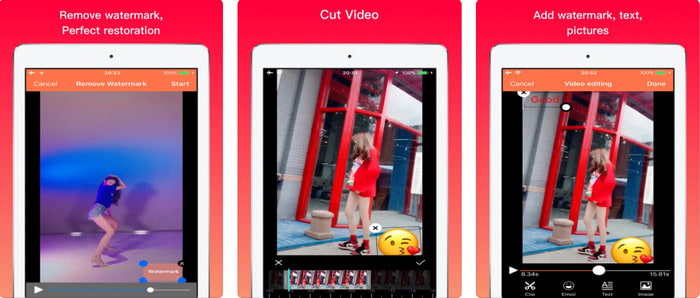
Video Eraser - Remove Logo 4+ već pomaže mnogim korisnicima iOS‑a s njihovim problemima vezanima uz vodene žigove. Aplikacija se može besplatno preuzeti iz App Storea, ali nudi i kupnju unutar aplikacije za nabavu pro verzije. Iako alat pruža učinkovit način uklanjanja vodenog žiga, i dalje se javljaju određeni problemi, primjerice kvaliteta videa nije ista nakon izvoza. Vodeni žig više je zamagljen nego uklonjen. Također, učitavanje datoteke zna biti problem jer traje dugo, čak i kad video ima manje od 30 sekundi. No ako želite naučiti kako ukloniti vodeni žig s videa na iPhoneu, slijedite korake u nastavku.
Korak 1. Preuzmite alat iz App Storea, zatim ga otvorite i pritisnite + kako biste uvezli video s vodenim žigom.
Korak 2. Kliknite gumb information i odaberite Remove Watermark, kliknite na vodeni žig i pritisnite Start.
Korak 3. Nakon postupka vodeni žig je uklonjen s videa.
Dio 3. Kako se riješiti vodenog žiga na bilo kojem videozapisu na webu
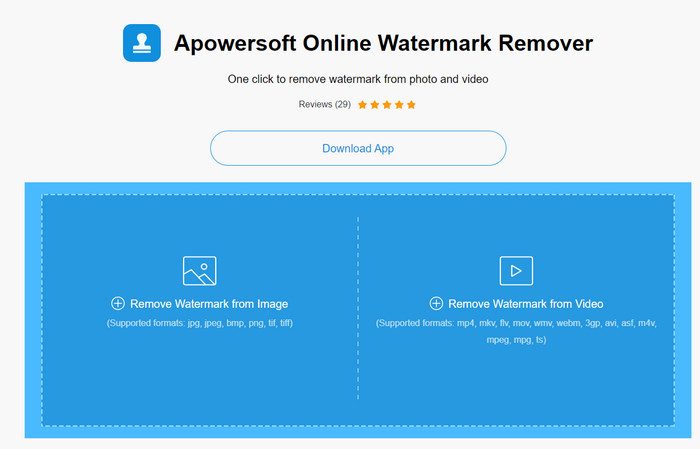
Apowersoft Online Watermark Remover besplatan je i lako dostupan web‑alat koji možete koristiti za uklanjanje vodenih žigova. Ovaj mrežni alat pruža učinkovit način uklanjanja vodenog žiga iako ga ne morate preuzeti, jer je web‑baziran. Iako je učinkovit uklanjač vodenog žiga, morat ćete imati stabilnu internetsku vezu kako biste dovršili postupak, u suprotnom ćete ga morati ponoviti. Dakle, ako ste ograničenog budžeta i želite naučiti kako ukloniti vodeni žig s videa online, onda je ovo alat za vas.
Korak 1. U svom omiljenom web‑pregledniku potražite Apowersoft Online Watermark Remover i otvorite ga.
Korak 2. Pritisnite Remove Watermark from Video kako biste učitali datoteku s vodenim žigom. Pričekajte da se učitavanje dovrši.
Korak 3. Na videu držite lijevi klik miša i povucite ga preko vodenog žiga; kad se vodeni žig nađe unutar isprekidane linije, možete otpustiti tipku. Pritisnite Erase kako biste pokrenuli postupak uklanjanja, zatim kliknite Download kako biste ga spremili na računalo.
Dio 4. Često postavljana pitanja o uklanjanju vodenih žigova iz videozapisa
Zašto se moram riješiti vodenog žiga na videu?
Moramo ukloniti dosadni vodeni žig da bismo uživali u videozapisu kao cijelom iskustvu. Primjenjivo je samo za osobnu upotrebu, ali može biti posljedica ako ga koristite za iskorištavanje ako ga objavite na internetu i dobijete od rada drugoga.
Koji su drugi načini uklanjanja vodenih žigova?
Ako želite, možete prikriti vodeni žig ili ga zamijeniti svojim vodenim žigom. Ovaj proces se preklapa; najbolje funkcionira samo ako je vodeni žig mali ili sa strane videozapisa. Ili možete izrezati videozapis s vodenim žigom na njemu, a zatim ga spojiti s drugim videozapisom. Ovaj postupak rezanja najbolje funkcionira samo ako je vodeni žig iskočio. Postoje dva različita načina uklanjanja vodenih žigova: zamagljivanje i izrezivanje videozapisa. Ova dva rade s alatima koje smo gore predstavili.
Kako dodati vodeni žig u Photoshop?
Ako želite dodati vodeni žig u Photoshopu, kliknite ovu poveznicu i pažljivo je pročitajte kako biste u potpunosti shvatili postupak.
Zaključak
Uz alate predstavljene u ovom članku možete lako ukloniti vodeni žig s videa besplatno ili možete koristiti vrhunski alat i kupiti ga. Iako su uklanjači vodenog žiga opisani u ovom članku jednostavni za korištenje, i dalje smatramo da Video Converter Ultimate nudi najjednostavnije, a ujedno i najučinkovitije sučelje. Ako ga želite imati, možete kliknuti gumb za preuzimanje iznad, isprobati ga i vidjeti odgovara li vam.
-
 Dva najbolja načina kako pretvoriti DivX u MKV format [riješeno]
 Zašto moram pretvoriti DivX u MKV? Koje pretvarače mogu koristiti? Imate li istu misao? Zatim će vam ovaj članak pomoći da saznate više o DivX-u i MKV-u.
-
 2 Ultimate MPG pretvarača za pretvaranje MPG u WMV besplatno
 Želite li besplatno pretvoriti MPG u WMV? U tom slučaju imate sreće jer smo otkrili da postoje dva alata pomoću kojih možete pretvoriti svoje MPG datoteke.
-
 Kako promijeniti iTunes M4V u MKV na Mac i Windows [najbrži način]
 Ako trebate pretvoriti M4V u MKV na Macu, morate pročitati ovaj članak. Kao što pružamo činjenice o pretvaračima koje će vam pomoći u procesu pretvorbe.
