


 Video Converter Ultimate
 Snimač zaslona
 Video popravak
Smjernica za jednostavno i učinkovito uklanjanje VSDC vodenog žiga na videozapisima
Ne možete pogriješiti ako za osnovno uređivanje videa na Windowsu odaberete VSDC Video Editor. Ovaj nelinearni program može pružiti sve što tražite od uređivača videa. Donosi skup funkcija za uređivanje koje možete koristiti kako biste na kraju dobili izvrstan rezultat. S porastom popularnosti ovog alata, mnogi korisnici imaju pitanja o njemu, a jedno od najpoznatijih trenutno je: ima li besplatni VSDC video editor vodeni žig? Imate li ista pitanja kao i ostala publika na internetu? Kako bismo odgovorili na pitanja koja mnogi postavljaju, dat ćemo vam odgovor koji trebate; nastavite čitati kako biste sve bolje razumjeli.

Dio 1. Ima li VSDC besplatni video Editor vodeni žig
Iako koristite besplatnu verziju VSDC-a za uređivanje videozapisa ili filmova koje imate, VSDC vodeni žigovi nisu uključeni nakon što ih izvezete. Tako možete besplatno uživati u videu koji ovdje uređujete bez vodenog žiga. Da biste koristili druge značajke za uređivanje videozapisa koje ima, bolje je kupiti alat da ih otključate. Iako je besplatan uređivač, alat ne može ukloniti vodeni žig koji ste dodali videozapisu. Nekima je to problem, a drugi koriste njegovu značajku cijepanja i rezanja kako bi uklonili vodeni žig, iako je dobro ako je sa strane. Ali ako je vodeni žig u sredini, biste li htjeli koristiti video rezač? Naravno da ne! Alati u nastavku mogu vam pomoći da jednostavno uklonite VSDC vodeni žig koji se nalazi u vašem videozapisu.
Dio 2. Kako ukloniti vodeni žig s videa na VSDC na 2 dostupna načina
FVC Video Converter Ultimate – Ultimate Watermark Remover za Windows i Mac
FVC Video Converter Ultimate je najnapredniji i AI‑om pokretan softver koji možete koristiti za uklanjanje vodenog žiga iz VSDC‑a. Ovaj alat vam omogućuje da ručno nadjačate funkciju za uklanjanje vodenog žiga koju nudi, što mnogi drugi programi ne dopuštaju. Precizno uklanja vodeni žig iz videa, a da ne ostavlja trag područja na kojem se vodeni žig prvotno nalazio.
Štoviše, ovaj alat također ima robusne značajke i funkcije koje ne možete pronaći u drugom softveru. Iako ovaj alat podržava AI tehnologiju, ne morate brinuti o specifikacijama vašeg računala jer alat radi na jeftinijim Windows i macOS-ima. Što se tiče performansi, superioran je, koristi niske specifikacije na računalima, radi i na Windowsima i na Macu te ima povišene performanse u uvozu i izvozu. Ne preostaje ništa drugo tražiti osim korak-po-korak vodiča o tome kako ukloniti vodeni žig iz videa u VSDC-u uz pomoć u nastavku.
Korak 1. Preuzmite softver sada na svoje računalo klikom na donji gumb za preuzimanje. Nakon toga slijedite postupak instalacije i postavljanja koji se traži, a zatim kliknite Start Now da biste otvorili alat na svom računalu.
Besplatno preuzimanjeZa Windows 7 ili novijiSigurno preuzimanje
Besplatno preuzimanjeZa MacOS 10.7 ili novijiSigurno preuzimanje
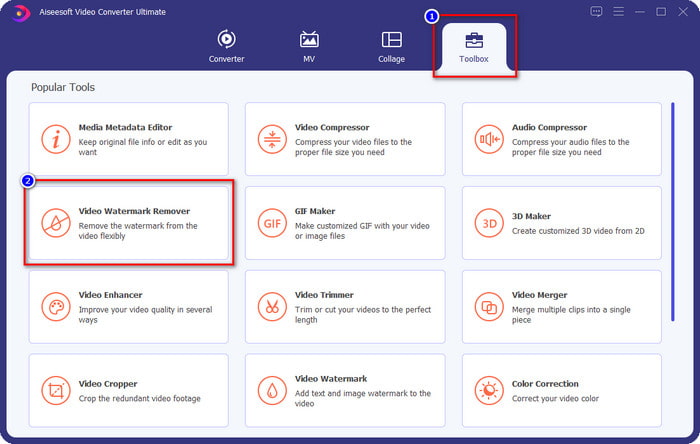
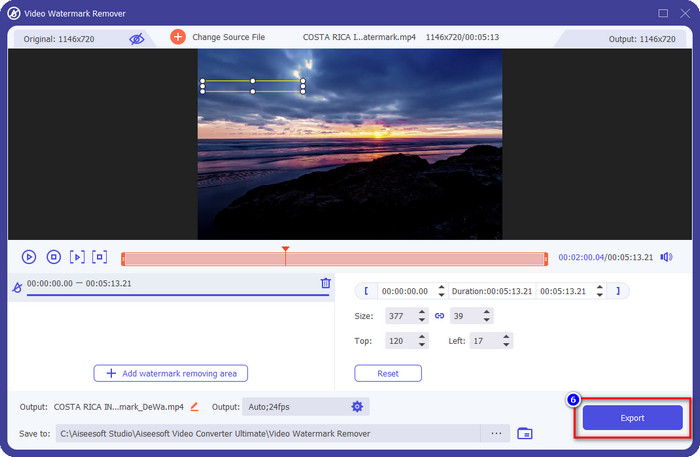
Korak 2. Nakon pokretanja softvera, idite na odjeljak Toolbox i odaberite Video Watermark Remover kako biste koristili ultimativni alat ovog programa za uklanjanje vodenog žiga.
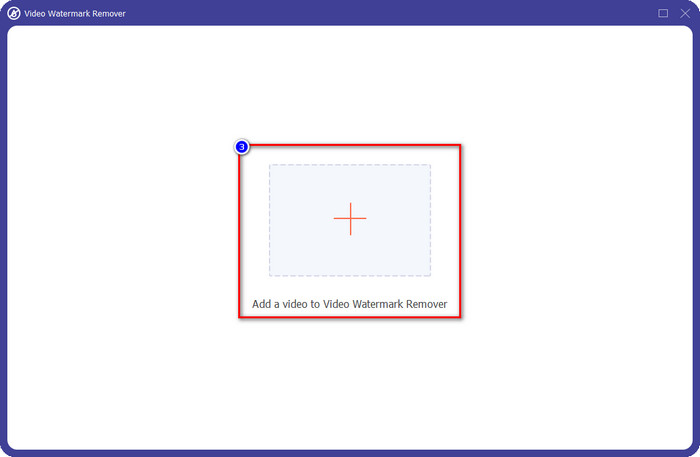
Korak 3. U prozoru koji će se pojaviti na vašem zaslonu kliknite ikonu + za učitavanje videa s vodenim žigom.
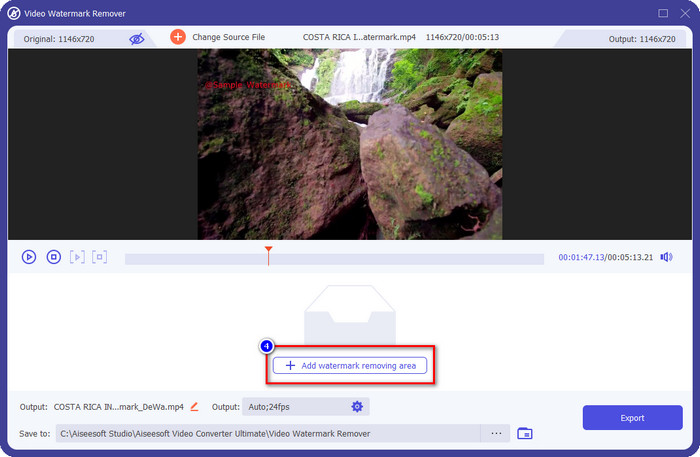
Korak 4. Da biste koristili uklanjanje vodenog žiga, kliknite Add Watermark Removing Area.
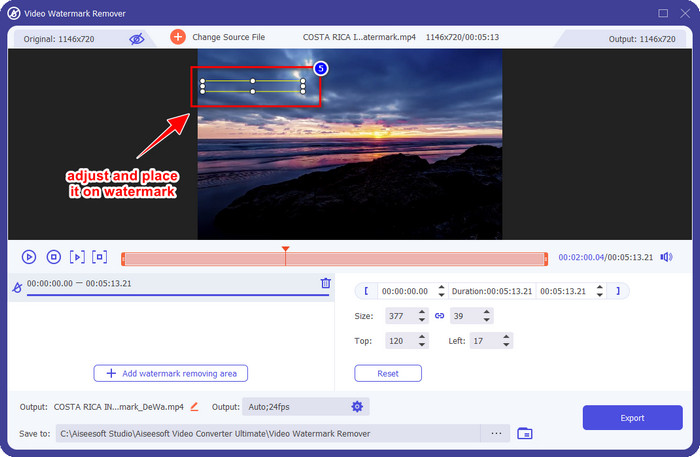
Korak 5. Postavite okvir za odabir na područje s vodenim žigom i pobrinite se da ga u potpunosti prekrijete kako, kad izvezete video, ne biste vidjeli vodeni žig na videu i mogli uživati u gledanju.
Korak 6. Sada kada je vodeni žig prekriven, kliknite gumb Export da biste spremili video bez vodenog žiga.
Kapwing
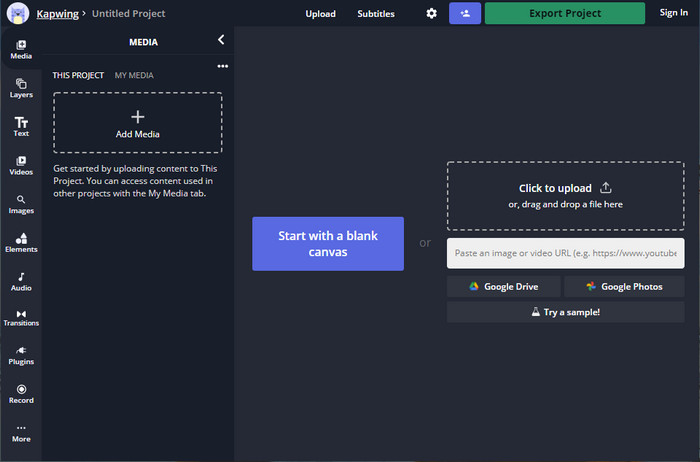
Jedan od najboljih načina da uklonite vodeni žig iz besplatnog VSDC video editora jest korištenje stranice Kapwing.com. Ovaj uređivač vodenih žigova omogućuje vam brzo uklanjanje postojećeg vodenog žiga s videa kako bi izgledao izvrsno. Iako niste profesionalac u obavljanju ovog zadatka, ne trebate brinuti ako odaberete ovaj alat zbog njegova intuitivnog i cjelovitog sučelja. Učenje korištenja postaje brže. Ovaj alat je odličan izbor, ali postoje i nedostaci pri njegovoj uporabi; na primjer, besplatna verzija ne može izvoziti video duži od 60 minuta, ima ograničenja i potrebno je prijaviti se kako biste uklonili Kapwingov vodeni žig pri izvozu.
Korak 1. Otvorite web alat i učitajte datoteku povlačenjem i ispuštanjem ovdje.
Korak 2. Nakon učitavanja datoteke, idite na Elements i kliknite oblik koji želite među dostupnima ovdje.
Korak 3. Držite i postavite oblik preko vodenog žiga. Imajte na umu da ova metoda ne radi dobro ako video ima više boja; dobro funkcionira samo ako se na tom dijelu videa koristi jednostavna paleta jedne boje.
Korak 4. Kliknite Export Video, a zatim kliknite Export MP4 kako biste spremili konačni rezultat.
Povezano:
Kako ukloniti vodene žigove s Photobucketa
Kako ukloniti vodeni žig s GIF‑a
Dio 3. Često postavljana pitanja o tome Ima li besplatni video uređivač VSDC vodeni žig
Mogu li izvesti 4K video u VSDC‑u?
Da, ovaj alat može izvesti videozapise u 4k razlučivosti ako to želite. Međutim, proces traje više vremena od ostalih video razlučivosti, kao što su 1080 i 720. Iako će renderiranje potrajati isto toliko vremena, alat i dalje može proizvesti video kvalitetu ultra visoke razlučivosti poput 4k ako je potrebno.
Kako ukloniti vodeni žig u VSDC‑u?
Preuzmite alat, zatim ga pokrenite da biste nastavili, kliknite Dodaj objekt i ispod njega kliknite Video. Otvorite Video Filter; tada će se prikazati opcije; kliknite Filteri; kliknite DeLogo. Uz DeLogo, sada možete prikriti vodeni žig videa na VSDC-u. Radi samo s tek nedavno ažuriranom verzijom alata; ako ga ne možete pronaći, morate ažurirati ono što koristite preuzimanjem novije verzije.
Je li VSDC najbolji video editor za korištenje?
Nije najbolji, ali ga možemo smatrati alatom koji morate isprobati jer pruža osnovne značajke uređivanja koje će vam možda trebati da napravite impresivan video. Iako je učenje kako ga koristiti je strmo, drugi korisnici obično troše vrijeme na učenje ovog softvera, a ne na uređivanje. Čak i ako nije među 10 najboljih uređivača videa, još uvijek se smatra odličnim alatom za njegovu svrhu uređivanja.
Zaključak
Da biste uklonili VSDC vodeni žig, trebat ćete pouzdan alat za uklanjanje vodenog žiga, poput dva softvera spomenuta u ovom članku. Uz navedene korake za svaki od njih, možete odabrati onaj za koji mislite da će najbolje odgovarati vašim potrebama i biti koristan za uklanjanje vodenog žiga s vašeg videa. No, ako želite višenamjenski softver koji možete koristiti za uklanjanje i dodavanje vodenog žiga, uređivanje videa, konverziju i još mnogo toga, morate odabrati FVC Video Converter Ultimate. Zašto? Jednostavno zato što je to najbolji univerzalni softver koji će vam trebati na računalu. Je li vam čitanje ovog članka bilo korisno? Ako jest, možete nam dati pet zvjezdica u nastavku ako ste zadovoljni ovim člankom.
-
 Vodič o tome što je vodeni žig na fotografiji [Ažurirano 2022.]
 Što je vodeni žig na fotografiji? Trebamo li dodati jednu? Kako to možemo ukloniti? Sve što će vam trebati nalazi se ovdje pa nastavite čitati ovaj blog.
-
 Kako jednostavno ukloniti vodeni žig s Wondershare DVD Creatora
 Ovaj članak pokriva informacije o tome kako ukloniti vodeni žig s Wondershare DVD Creator. Da biste dobili sve potrebne informacije, ovo morate pročitati.
-
 Jednostavno uklonite vodeni žig iz PDF-a jednostavnim koracima
 Uklonite vodeni žig iz PDF-a slijedeći ove jednostavne korake. Naučite kako jednostavno ukloniti vodene žigove iz PDF datoteke pomoću ovih nevjerojatnih alata.
