


 Video Converter Ultimate
 Snimač zaslona
 Video popravak
Kako ukloniti vodeni žig u SmartDrawu na 2 moguća načina
Ako trebate jednostavan i moćan način za izradu grafikona, crteža i karata, a zatim ih želite predstaviti u kvaliteti na razini poduzeća, tada koristite SmartDraw. Uz pomoć SmartDrawa možete iskoristiti svoju maštu i pretvoriti je u stvarnost. Je li alat besplatan? Možete koristiti sedmodnevno besplatno probno razdoblje koje on nudi i tako besplatno koristiti alat, ali s vodenim žigom. Rad s vodenim žigom na izvezenoj datoteci mogao bi vam predstavljati problem. Ovdje vam predstavljamo ovaj blog‑članak jer u njemu navodimo samo najbolje alate na tržištu koji učinkovito uklanjaju vodeni žig. Ostanite i pročitajte informacije u nastavku kako biste naučili kako ukloniti vodeni žig u SmartDrawu na dva učinkovita načina.

Dio 1. Kako ukloniti vodeni žig u Smart Drawu kupnjom licencnog ključa [Službena verzija]
Kako ukloniti vodeni žig iz SmartDrawa? To je prvi način koji ćemo vam predstaviti, a to je kupnja licencnog ključa za ovaj alat. Ova vam platforma nudi različite vrste planova koje možete dobiti, a koji će biti od koristi vašem kraju. Osim toga, ne možete kupiti jednomjesečni pristup ovom alatu, tako da ako planirate kupiti njegov licencni ključ, bit će vam naplaćen mjesečno, ali ukupni iznos koji ćete platiti je u godišnjoj verziji. Ako cijenite izvedbu ovog alata i želite ga kupiti, možete slijediti korake koje dodajemo u nastavku.
Koraci za uklanjanje vodenog žiga u SmartDrawu pomoću licencnog ključa:
Korak 1. Otvorite službenu web‑stranicu SmartDrawa i provjerite pristupate li pravoj stranici kako biste imali sigurnu transakciju.
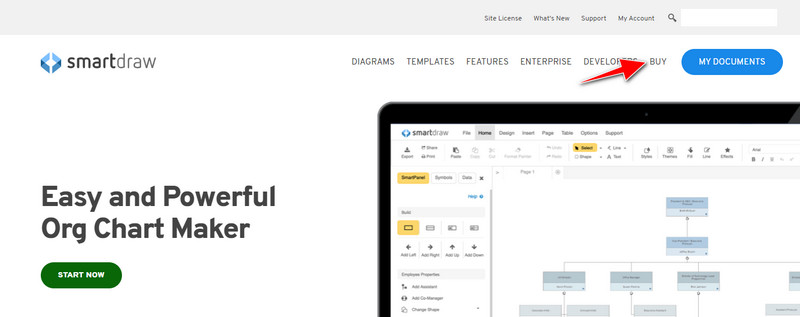
Korak 2. Na web‑stranici kliknite Buy kako biste vidjeli dostupne planove.
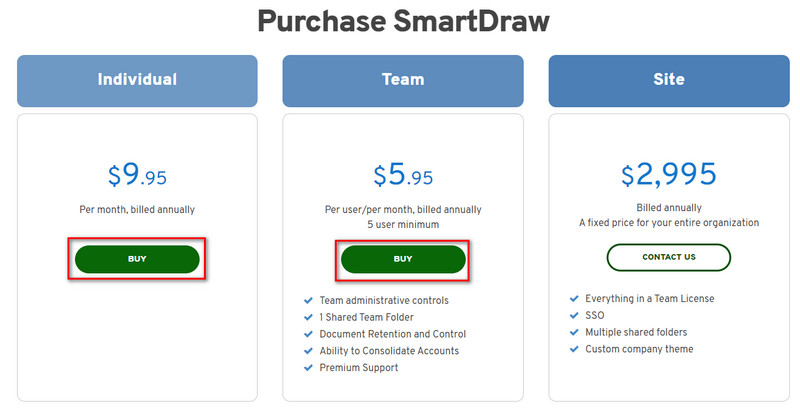
Korak 3. SmartDraw možete kupiti kao Individual, Team ili Site. Kliknite Buy Now ako ćete kupiti verziju za Individual ili Team.
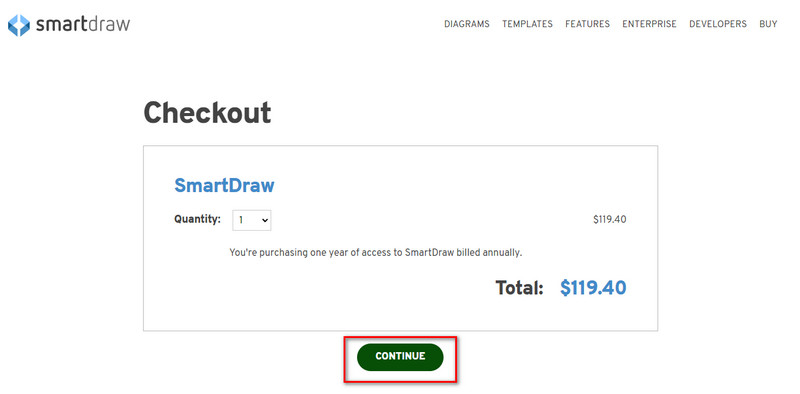
Korak 4. S desne strane vidjet ćete ukupan iznos za alat na godišnjoj razini; kliknite Continue za nastavak postupka.
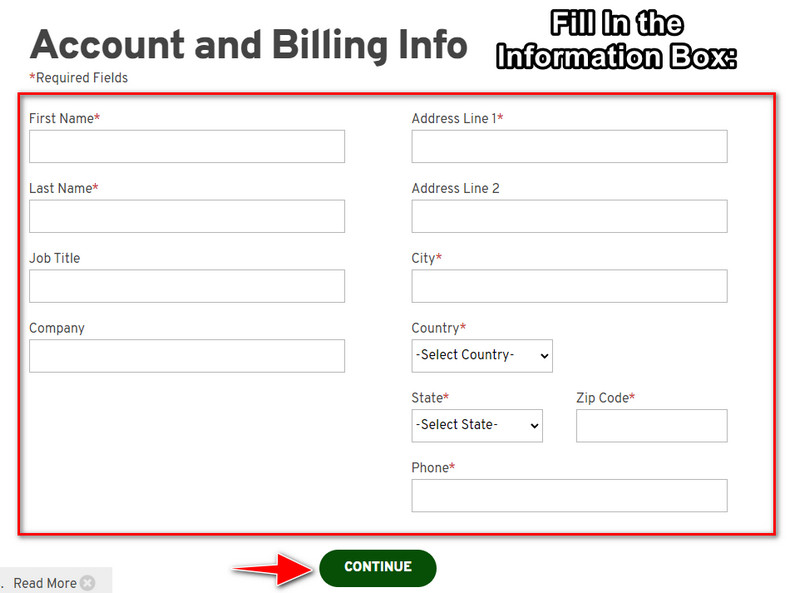
Korak 5. Dodajte podatke o računu i naplati koje je potrebno ispuniti, zatim pritisnite Continue kako biste nastavili i dobili licencni ključ.
Dio 2. Kako besplatno ukloniti vodeni žig u Smart Drawu pomoću web usluge [besplatno]
Kako ukloniti vodeni žig iz probne verzije SmartDrawa bez kupnje? Tada ćete trebati koristiti FVC Free Watermark Remover Online. Ovaj uklanjatelj vodenog žiga spreman je za vašu uporabu. Ne trebate nikakvo posebno znanje da biste uklonili vodeni žig sa svoje slike jer je ovaj alat jednostavan za rukovanje. Čak i ako ste stručnjak, i dalje možete koristiti ovaj softver za uklanjanje neželjenih vodenih žigova ili objekata sa svoje slike. Uz pomoć ovog alata za uklanjanje vodenog žiga na vašoj slici neće ostati nijedan trag koji on ne može ukloniti. Želite isprobati ovaj softver umjesto kupnje licencnog ključa? Ako je tako, slijedite ovaj vodič u nastavku kako biste učinkovito uklonili vodeni žig sa slika.
Koraci za besplatno uklanjanje vodenog žiga SmartDrawa na grafikonu ili dijagramu:
Korak 1. Umjesto da ručno tražite web‑alat u pregledniku, možete kliknuti ovu poveznicu da biste ga otvorili; otvorit će se u novoj kartici vašeg preglednika.
Korak 2. Mišem povucite i ispustite grafikon ili dijagram koji ste napravili u SmartDrawu kako biste ga učitali.
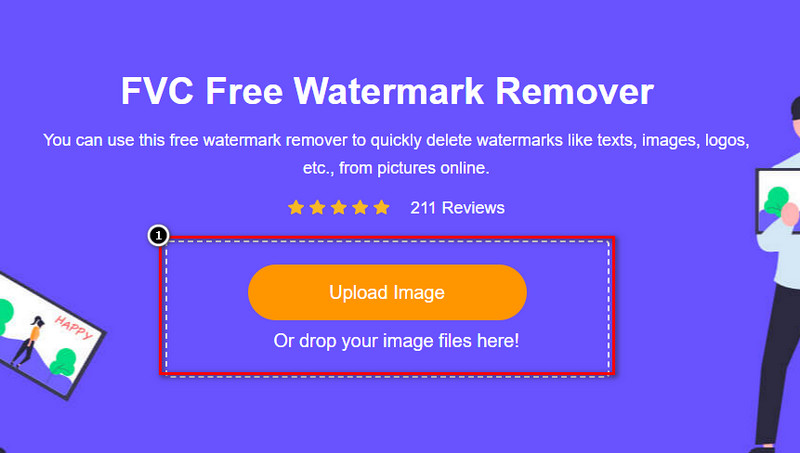
Korak 3. Sada kada je mrežni alat za uklanjanje vodenog žiga pokrenut, odaberite alat kojim želite označiti vodeni žig na slici.
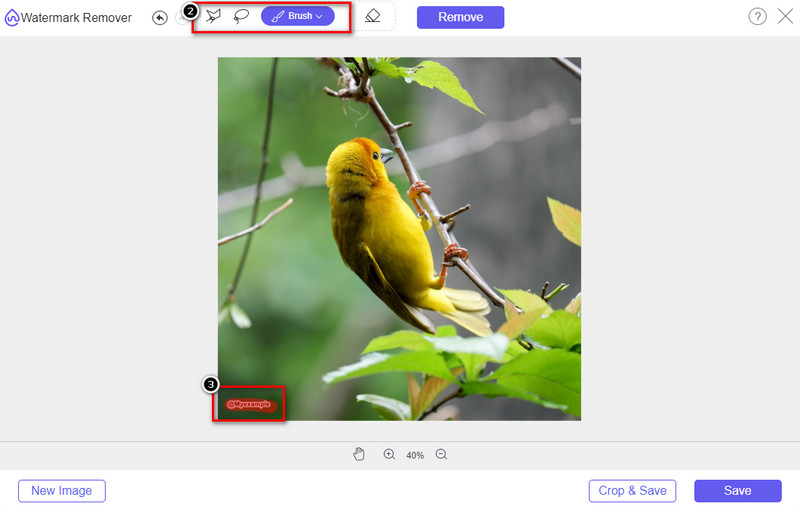
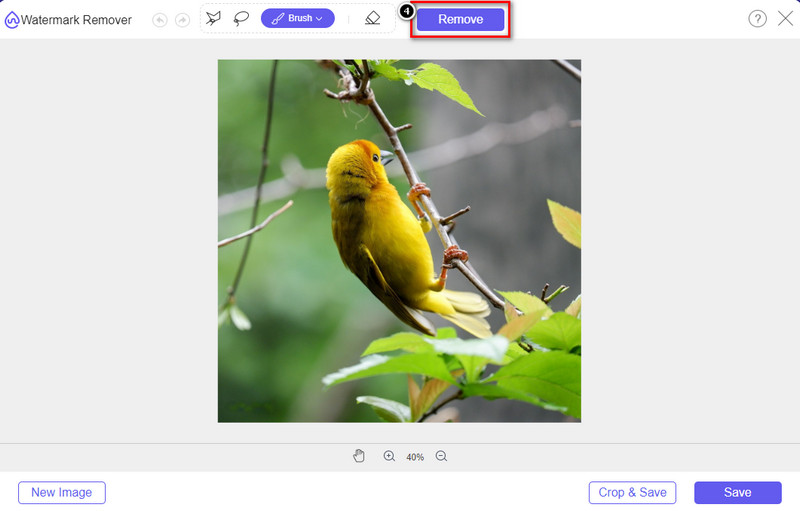
Korak 4. Nakon što označite vodeni žig ili logo na učitanoj slici, pritisnite Remove.
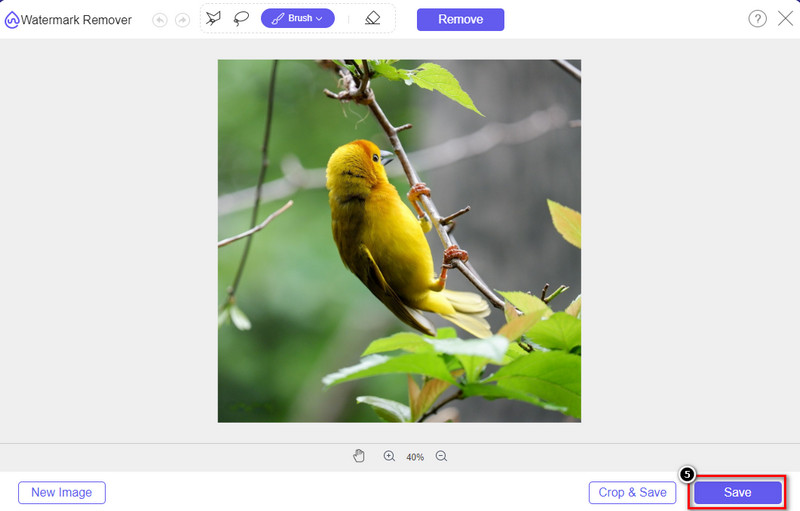
Korak 5. Pričekajte da se završi postupak uklanjanja vodenog žiga, a zatim kliknite Save da biste preuzeli grafikon ili dijagram koji ste učitali. Na zaslonu će se pojaviti mapa; sada provjerite verziju grafikona ili dijagrama koji ste izradili, ali bez vodenog žiga.
Prednosti korištenja alata FVC Free Watermark Remover Online:
◆ Preuzimanje aplikacije nije potrebno jer je dostupna na webu.
◆ Podržava širok raspon slika i može učinkovito ukloniti vodene žigove.
◆ To je namjenski alat za uklanjanje vodenog žiga koji proizvodi visokokvalitetni ispis.
◆ Vodeni žig se ne dodaje konačnom rezultatu nakon izvoza.
◆ Nema ograničenja u broju korištenja i veličini datoteke.
Dio 3. Dodatni dio – Kako napraviti grafikon, grafikon ili dijagram na SmartDrawu s detaljnim koracima
Prethodni dio vas uči kako se riješiti SmartDraw vodenog žiga. U ovom dijelu naučit ćemo vas kako napraviti grafikon, grafikon i dijagram uz pomoć SmartDrawa; možete slijediti korake koje smo dodali u nastavku da biste znali kako to učiniti.
Korak 1. Idite na njegovu službenu web‑stranicu kako biste izradili graf, grafikon ili dijagram.
Korak 2. Kada otvorite službenu web‑stranicu, kliknite Start Now i otvorite svoj račun.
Korak 3. S lijeve strane odaberite koju vrstu predloška želite imati ili izraditi.
Korak 4. Dodajte podatke u svaki dijagram toka. S lijeve strane web‑stranice bit će dodatne opcije koje možete koristiti.
Korak 5. Kliknite gumb Export, odaberite format koji želite i kliknite ga da biste pokrenuli postupak. Ako koristite besplatnu verziju, pojavit će se vodeni žig; možete slijediti korake iz 2. dijela kako biste uklonili vodeni žig.
Daljnje čitanje:
Kako ukloniti B612 vodeni žig sa svojih slika
Kako besplatno ukloniti WOW Slider vodeni žig
Dio 4. Često postavljana pitanja o tome kako ukloniti SmartDraw vodeni žig
Može li SmartDraw izvesti PNG slike?
Da, možete imati prozirni grafikon u PNG formatu. Međutim, dodat će vodeni žig ako koristite besplatnu verziju. Možete kupiti službenu verziju, tako da će na izvezenoj slici biti vodeni žig.
Kolika je cijena SmartDrawa?
Ako namjeravate kupiti plan na SmartDrawu, možete kupiti njegov plan počevši od $ 5,95. Ostale cijene možete provjeriti na službenoj web stranici.
Koja je prednost kupnje premium verzije SmartDrawa?
Možete dobiti kontrolu administratora tima, mapu tima, premium podršku i izvoz slika bez vodenog žiga za pojedinačne planove. Za ostale premium prednosti koje možete dobiti, posjetite službenu web stranicu i pogledajte koje značajke i funkcije možete dobiti.
Zaključak
Sada kada znate kako spremiti SmartDraw bez vodenog žiga na dva načina koja smo dodali. Ili ga kupite ili koristite alat za uklanjanje vodenog žiga na izvezenoj datoteci. Ako vam se ne sviđa kupiti alat, morate ga koristiti jer je to najučinkovitiji web alat za uklanjanje vodenog žiga. Ako mislite da vam je ovaj članak pomogao riješiti problem, ocijenite nas s 5 zvjezdica.
-
 4 najbolja načina za uklanjanje vodenog žiga s GIF-a [online i offline]
 Trebate ukloniti vodeni žig iz GIF-a? Pomoću alata u ovom članku naučit ćete različite stilove s različitim alatima za uklanjanje vodenih žigova dostupnim na vašoj platformi.
-
 5 najjednostavnijih načina za uklanjanje metapodataka iz bilo koje medijske datoteke
 Kako ukloniti metapodatke? Je li teško to učiniti? Trebam li kupiti ili koristiti besplatni alat za uklanjanje oznaka? Sva ova pitanja imaju odgovore u ovom članku.
-
 Izvanredan Photobucket uklanjanje vodenih žigova na mreži i izvan mreže
 Naučite kako ukloniti Photobucket vodeni žig sa svojih fotografija pomoću ovih nevjerojatnih Photobucket alata za uklanjanje vodenih žiga. Pročitajte ovaj članak da biste saznali načine.
