


 Video Converter Ultimate
 Snimač zaslona
 Video popravak
6 najboljih softvera za reverser koji možete koristiti za preokrenuti video na Windows i Mac
Preokretanje videa može stvoriti novu poruku koja može natjerati publiku da razmišlja ili zadivi. Ovaj video efekt korišten je kako bi video bio zanimljiv i prenio poruku na drugačiji način. Puno glazbenih spotova poput Breezeblock by the Aljt postavljeno je u obrnutom videu na YouTubeu. Dakle, da biste saznali više o tome kako preokrenuti videozapise, slijedite ovaj vodič. Budući da vam pomaže da preokrenete videozapis lakše nego ikad.

Dio 1. Najbolji 1 i 2 izvanmrežni softver i naučite kako preokrenuti video na Windows i Mac
Vrh 1. Video Converter Ultimate
Mnogo je programa za uređivanje videa koji žele dominirati tržištem, ali fenomenalni pretvarač i dalje je najbolji izbor. Video Converter Ultimate već je koristilo i uz njegovu pomoć riješilo svoj problem milijun korisnika, primjerice kad je riječ o pitanjima poput kako premotati video unatrag. Ovaj alat omogućuje vam da sami uređujete video, ali uz dojam profesionalne obrade. Čak i ako nemate iskustva u montaži, ovaj je alat najbolji za vas – a prikladan je i za iskusne korisnike. Osim toga, mnogi programi za uređivanje nemaju tako napredne funkcije kakve nudi ovaj softver. Ako želite znati više o ovom programu, prijeđimo na korake u nastavku i pratimo ih točno.
Korak 1. Najprije preuzmite softver na svoj tvrdi disk, zatim ga instalirajte i slijedite postupak postavljanja.
Besplatno preuzimanjeZa Windows 7 ili novijiSigurno preuzimanje
Besplatno preuzimanjeZa MacOS 10.7 ili novijiSigurno preuzimanje
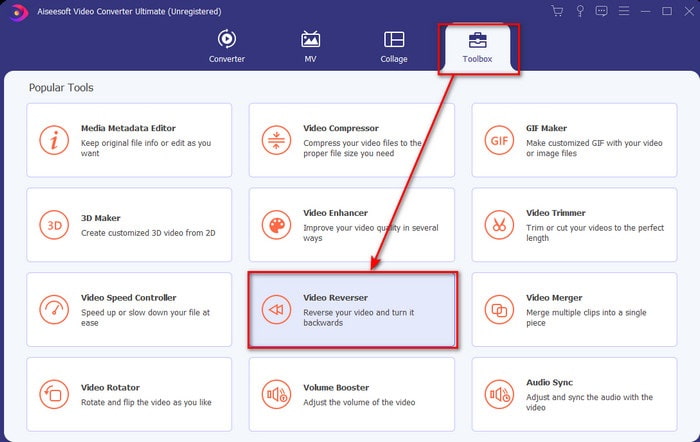
Korak 2. Zatim pokrenite alat i u odjeljku Toolbox (Alatni okvir) pronađite Video Reverser (Premotavanje videa).
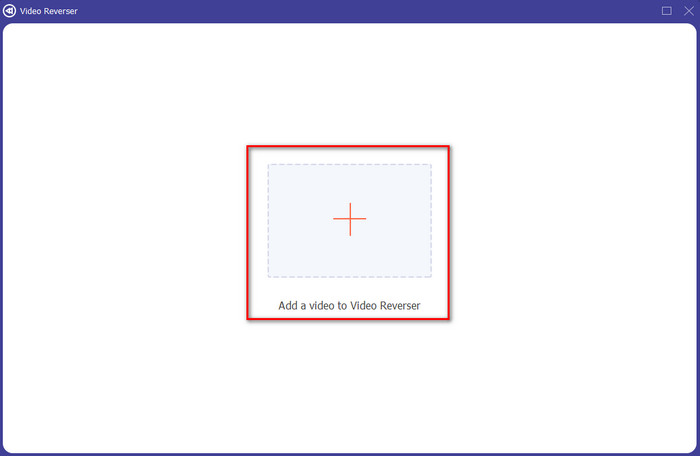
Korak 3. Kliknite na + i u mapi odaberite video koji želite premotati unatrag. Zatim kliknite Open (Otvori) kako biste prešli na sljedeći korak.
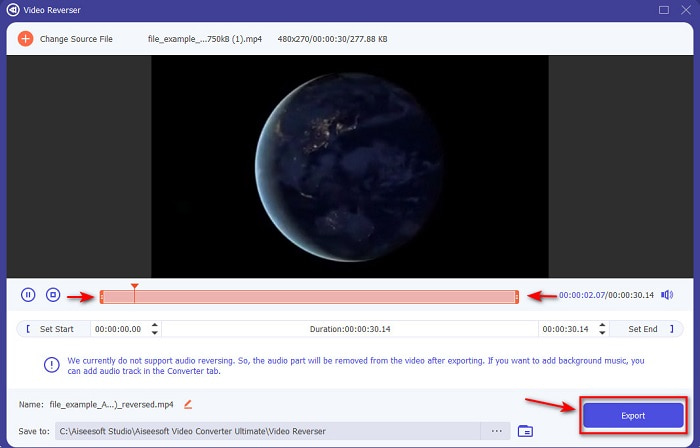
Korak 4. Zatim prilagodite duljinu videa pomicanjem oznaka za playback in and out (početak i kraj reprodukcije). Da biste preuzeli video premotan unatrag, kliknite Export (Izvezi).
Korak 5. Pričekajte nekoliko sekundi da se izvoz dovrši. Kada je gotovo, možete ponovno pogledati video tako da kliknete na premotanu datoteku u mapi. I uživajte u reprodukciji unatrag bez zastoja koju vam donosi Ultimate Converter Ultimate.
Pros
- Profesionalni konačni rezultat može se lako izvesti ako koristite ovaj alat.
- Ima puno nevjerojatnih značajki koje vaš video čine fenomenalnim.
- U ovom alatu može se izvršiti neograničeno okretanje unatrag.
Protiv
- Potrebno je prvo preuzeti da biste ga mogli koristiti.
- Nije besplatno, ali se isplati ako kupite ovaj fenomenalan profesionalni alat.
Povezano:
Vrh 2. Jednostavan Video Maker
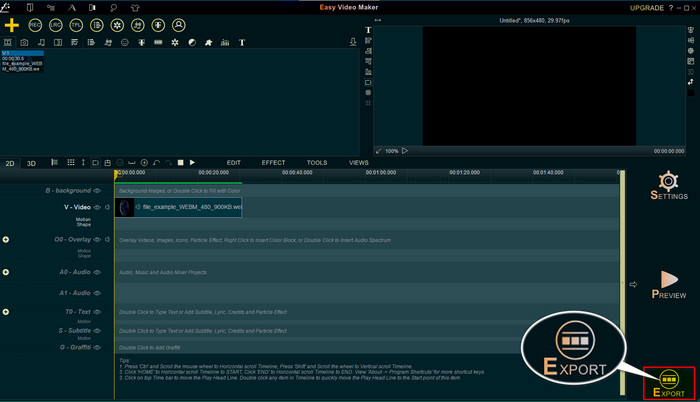
Easy Video Maker je praktičan alat koji možete koristiti i koji nudi srednje napredne mogućnosti uređivanja videa koje će vam trebati. Također, ovim alatom možete vizualno poboljšati svoj video jer podržava prijelaze, efekte, spajanje i još mnogo toga. Međutim, sučelje alata izgleda kao da je iz 90-ih, vrlo je zastarjelo. Osim toga, alat je težak za korištenje pri izradi i uređivanju videa, ali mu je radna učinkovitost odlična. Format koji ovaj alat podržava za završni izlaz je MP4. Ako želite koristiti ovaj alat, slijedite korake u nastavku.
Korak 1. Preuzmite službeni Easy Video Maker s interneta.
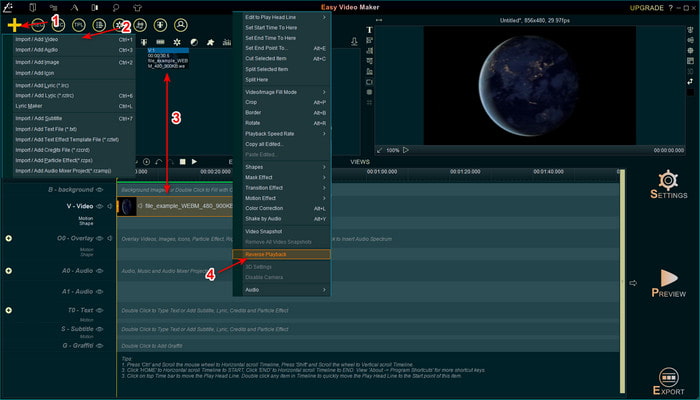
Korak 2. Zatim pokrenite alat, kliknite gumb add (dodaj) i Import/ Add Video (Uvezi/Dodaj video). Prevucite datoteku na Timeline (vremensku liniju) i desnim klikom kliknite na video. Kliknite Reverse Playback (Reprodukcija unatrag) kako biste premotali video unatrag.
Korak 3. Pritisnite Export (Izvezi) da biste spremili datoteku na svoj disk.
Pros
- Alat je besplatan za preuzimanje.
- Podržava uređivanje srednje razine koje će vam trebati.
- Naučiti kako se ovo koristiti potrajat će neko vrijeme, ali ćete se naviknuti.
Protiv
- Pokretanje alata učitava se puno dulje od očekivanog, a sučelje izgleda prestaro. Nije retro osjećaj već doslovno star.
- Ne možete izvesti više od 5 minuta videozapisa u njegovu besplatnu verziju.
Dio 2. Najbolji 3 i 4 online alat za preokrenuti video
Vrh 3. Ezgif
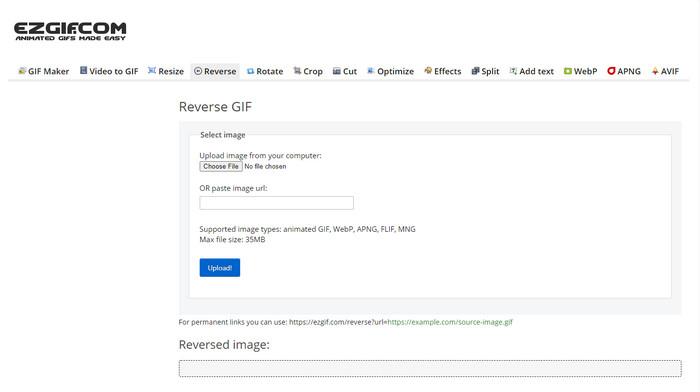
Ezgif ima funkciju koju možete koristiti za premotavanje isječka unatrag besplatno, online. Također, sadrži i druge funkcije uređivanja, poput izrade GIF-ova, promjene veličine, obrezivanja, optimizacije i još mnogo toga. Međutim, ako pokušate umetnuti datoteku veću od 35 MB u ovaj web-alat, možete očekivati da vam neće dopustiti premotavanje jer je datoteka prevelika. Dakle, ako namjeravate premotati dulji video, ovaj alat nije najbolji izbor zbog svojih ograničenja. Ipak, rad njegovog alata za premotavanje odličan je za besplatno premotavanje kraćih isječaka.
Pros
- Nema potrebe da ga preuzimate na radnu površinu.
- Fleksibilan i učinkovit.
- Prilagođen korisniku.
Protiv
- Ograničava vaše okretanje unatrag na samo 35 mb, što je vrlo malo za korištenje.
- Preuzimanje obrnute datoteke na vaš pogon traje puno više vremena od očekivanog.
Vrh 4. Clideo
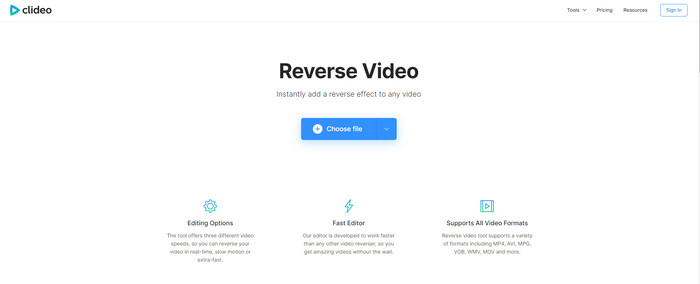
Još jedan online alat koji možete koristiti za premotavanje videa je Clideo. Vizualni izgled alata vrlo je minimalistički, ali uspješan. Cjelokupan izgled čišći je od Ezgifa i djeluje profesionalnije. No, kako se kaže, izgled može zavarati – učitavanje datoteka ovdje je jako sporo, osobito ako je datoteka veća od 40 MB. Zbog toga budite sigurni da imate dovoljno slobodnog vremena i strpljenja samo za učitavanje datoteke. Ipak, alat podržava mnogo funkcija za uređivanje koje možete koristiti da besplatno poboljšate svoj video.
Pros
- Besplatno ga mogu koristiti svi koji imaju internetsku vezu.
- Web korisničko sučelje je općenito odlično.
- Dostupne su nevjerojatne značajke uređivanja.
Protiv
- Prijenos i preuzimanje videozapisa za obrnuto će potrajati mnogo vremena od očekivanog.
- Ogroman vodeni žig je uključen nakon što izvezete obrnuti video.
Dio 3. Top 5 i 6 aplikacija za preokrenuti video na iPhone/Android
Vrh 5. Obrnuti video: Reproduciraj unatrag 4+
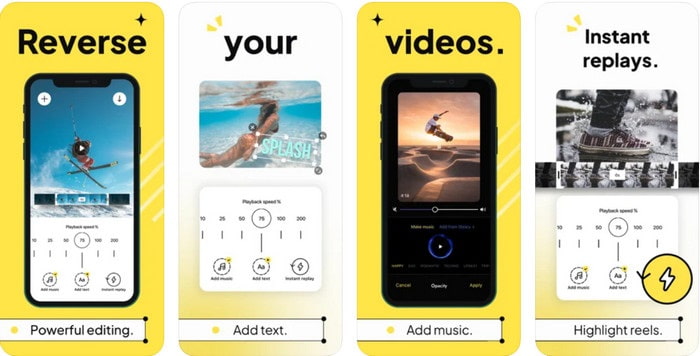
Reverse Video: Play Backwards 4+ dostupna je samo korisnicima iOS-a i koristi se za uređivanje videouradaka koji se reproduciraju unatrag. Sučelje ove aplikacije jednostavno je za razumijevanje, a možete dodavati i tekst i glazbu u pozadini. Iako aplikaciju možete preuzeti besplatno, brojni osvrti tvrde da je riječ o „novčanoj prijevari“. Također navode da su bili prisiljeni ostaviti recenziju od 5 zvjezdica kako bi pristupili funkcijama alata. Ako je ipak želite sami isprobati, ne očekujte ništa posebno, jer ova aplikacija nije najbolji izbor za premotavanje unatrag.
Pros
- Već postiže 4,5 zvjezdice u ocjeni.
- Ovdje je dobro koristiti video preokret.
Protiv
- Većina recenzija ovdje ne govori o aplikaciji. A većina se ponavlja i govori o glupostima.
- Samo učitavanje jedne datoteke traje zauvijek.
- Kvaliteta videozapisa izvezenog besplatno je loša.
Top 6. Reverse Movie FX - čarobni video
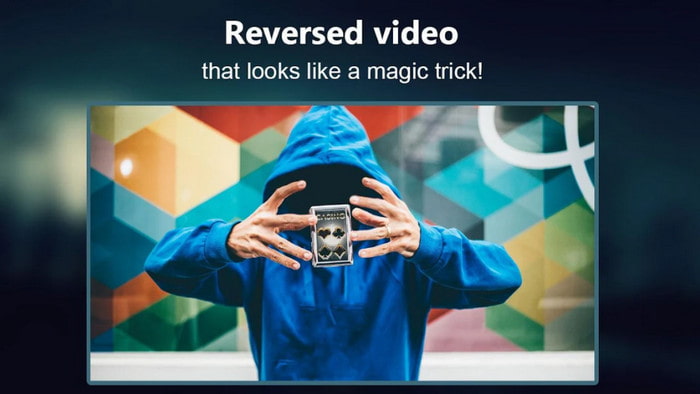
Premotavanje filma uz pomoć ove Android aplikacije koju možete preuzeti s Play Storea, Reverse Movie FX - magic video. Već je koristi mnogo korisnika koji vole snimati filmove premotane unatrag, a nudi i podršku za petlju (loop) i pozadinsku glazbu. Iako alat naizgled nema mana, kvaliteta izlazne video datoteke je lošija. U osnovi, ako premotate video u 1080p, očekujte rezultat u 720p ili nižoj rezoluciji. Osim toga, sadrži oglase, pa budite oprezni jer se neki pojavljuju iznenada. Ipak, premotavanje je ovdje jednostavno i bolje nego u Reverse Video: Play Backwards 4+.
Pros
- Izvrsno je stvoriti obrnuti isječak, film ili video na svom telefonu.
- Lako razumljivo korisničko sučelje.
- 4,5 zvjezdice u recenzijama aplikacija.
Protiv
- Aplikacija ima puno oglasa koji iskaču niotkuda.
- Manje i veće greške su još uvijek u aplikaciji. Na primjer, ako pokušate preokrenuti videozapis, ponekad piše pogreška.
Dio 4. Često postavljana pitanja o obrnutom videu
Koja je razlika između invertnog i obrnutog?
Preokrenite fokus na pretvaranje nečega u drugu stranu ili drugi položaj; može biti naopako ili naopako. Na primjer, ako invertirate broj 12, rezultat će biti 21. Dok je obrnuto iz jednog smjera vraćanje u izvorni smjer. Na primjer, ako je sat unatrag, brojit će se do 12, 11, 10, 9, 8, 7, 6 i tako dalje.
Može li se videoefekat premotavanja koristiti kao prijelazi?
Da, umjesto da koristite dobar 'stari animirani prijelaz, zašto ne biste pokušali istražiti umjetnost premotavanja videa unatrag. Samo dodavanje obrnute na to može biti vrlo učinkovito, pogotovo ako niste toliko iskusni u uređivanju videa. I samo koristeći ovo kao svoj prijelaz, možete napraviti izvrstan video koji može iznenaditi druge ljude, čak i vas. Zatim dodajte glazbu u pozadini kao završni dodir kako bi bila nevjerojatna.
Mogu li gledati videozapis unatrag na VLC-u?
Da, već možete gledati obrnute isječke, film ili bilo koju vrstu videozapisa na VLC-u. Ali ako nije unaprijed napravljen ili trebamo reći da nije već u obrnutom smjeru kada ga tamo igrate. Onda je tužno reći da ne podržava reprodukciju videozapisa unatrag. Dakle, prije nego što ga reproducirate na VLC-u, preokrenite ga uz pomoć alata na popisu.
Zaključak
Kao rezultat vaše strpljivosti u čitanju i marljivom praćenju koraka u ovom članku o tome kako premotati video unatrag, sada imate znanje i sposobnost da sami obavljate premotavanje. Sada trebate odabrati najbolji softver za premotavanje kako biste postigli najbolji učinak i učinili svoj video izvanrednim. A prije svega, najbolji alat za premotavanje na ovom popisu je, dakako, fenomenalni Video Converter Ultimate. Dakle, sada je pravo vrijeme da ga preuzmete, isprobate i sami ovdje napravite efekt premotavanja unatrag.
Besplatno preuzimanjeZa Windows 7 ili novijiSigurno preuzimanje
Besplatno preuzimanjeZa MacOS 10.7 ili novijiSigurno preuzimanje
-
 Kako se pridružiti VOB video zapisima s DVD-a na sustavima Windows i Mac
 Kako se pridružiti VOB video zapisima s DVD-a na sustavima Windows i Mac? Evo 2 učinkovite metode kombiniranja izvađenih VOB datoteka i spajanja izravno s DVD-a.
-
 6 najboljih spajanja AVI: Kako se pridružiti AVI video datotekama na sustavima Windows i Mac
 Kad se želite pridružiti AVI video zapisima za DVD, iz članka možete saznati o značajkama 6 najboljih AVI stolara, uključujući besplatne mrežne alate, kao i o radnim površinama.
-
 [Vodič] 2 vrhunske metode za pridruživanje MXF videozapisima Sony X70
 Ako ste snimili neke MXF videozapise sa Sony X70, koje su najbolje metode za pridruživanje MXF datotekama? Evo 2 učinkovite metode kombiniranja videozapisa s visokom kvalitetom.
