


 Video Converter Ultimate
 Snimač zaslona
 Video popravak
U detaljnim recenzijama o 5 najboljih dostupnih aplikacija za pojačalo zvuka
Svi ljudi u cijelom svemiru vole glazbu, bilo da je riječ o popu, metalu, rocku, jazzu i tako dalje. Ipak, ne pružaju svi zvučnici tako dobar izlaz zvuka da nam izazovu trnce po koži. Također, kupnja pojačala može stajati više od sto dolara, ili još gore, više od tisuću. Nije li to skupo? No mnogo novca možemo uštedjeti ako pokušamo koristiti ova najbolja pojačala dostupna na svim platformama. A sada, ako želiš koristiti aplikaciju za pojačavanje zvuka, onda pročitaj popis u nastavku – sve će te koštati manje od gore spomenutog iznosa, a ipak ćeš dobiti odlično pojačalo.

Dio 1. Fenomenalno pojačalo zvuka dostupno za PC i Mac
Ako želiš ostvariti 8D ili 16D efekt bez velikog troška za opremu za pojačavanje zvuka, onda pokušaj koristiti Video Converter Ultimate. Za razliku od klasične pojačivačke opreme, s ovim alatom potrošit ćeš manje, a ne moraš raditi komplicirano postavljanje niti čitati debele upute da bi znao kako ga koristiti. Osim toga, ovaj desktop softver odličan je za poboljšavanje videa, zvuka, GIF-ova i još mnogo toga. Iako je alat plaćen, vrlo je jednostavan za korištenje, bez kompliciranja, a nudi napredne značajke koje možeš lako primijeniti na svom videu i zvuku. Dakle, ako želiš naučiti kako koristiti ovaj softver, obavezno slijedi korake u nastavku.
Koraci za korištenje pojačivača glasnoće (Volume Booster) u Video Converter Ultimateu:
Korak 1. Prije svega, preuzmi softver na disk svog PC-ja ili Maca. Zatim ga instaliraj na računalo i ručno odradi jednostavnu početnu konfiguraciju.
Besplatno preuzimanjeZa Windows 7 ili novijiSigurno preuzimanje
Besplatno preuzimanjeZa MacOS 10.7 ili novijiSigurno preuzimanje
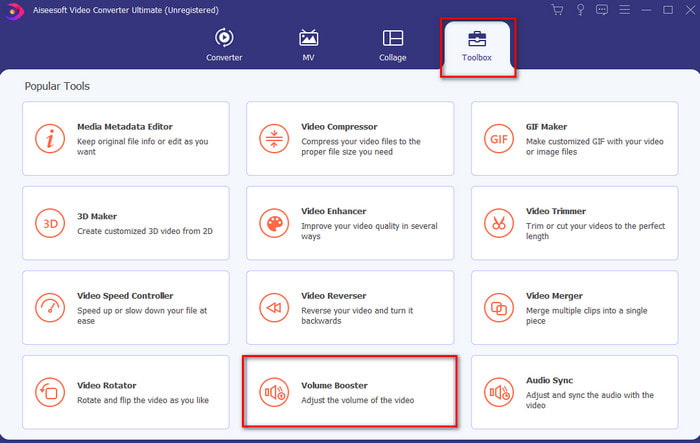
Korak 2. U odjeljku Toolbox klikni na Volume Booster.
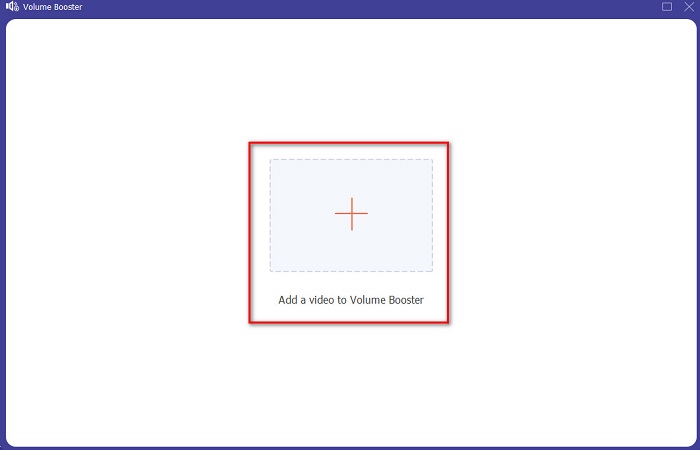
Korak 3. Klikni gumb + kako bi odabrao datoteku kojoj želiš pojačati zvuk. Zatim pritisni Open za nastavak.
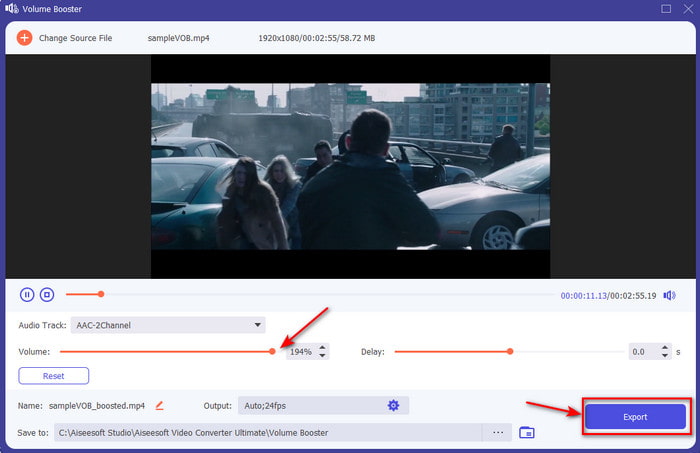
Korak 4. U sučelju sada možeš povući klizač glasnoće kako bi zvuk bio glasniji i jasniji. Kada završiš s podešavanjem zvuka, klikni Export.
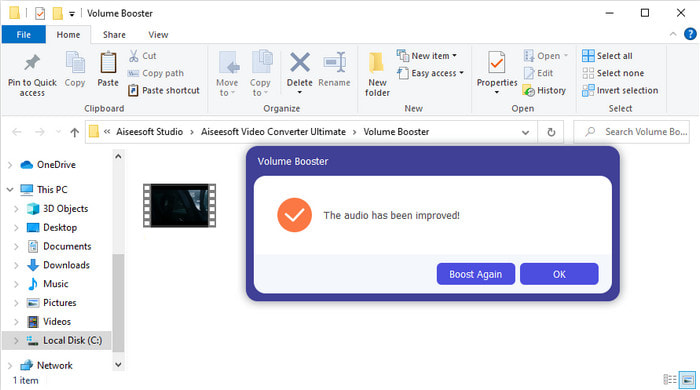
Korak 5. Pričekaj nekoliko sekundi da se proces dovrši, a kada je gotovo, na ekranu će se pojaviti upravitelj datoteka s datotekom koju si pojačao. Klikni na datoteku kako bi je poslušao.
Pros
- Ovaj softver je jednostavan za korištenje i može učiniti vaš audio zvuk fenomenalnim.
- Izvedbu softvera jako cijene njegovi korisnici.
- Dostupan je i lako se može preuzeti na PC i Mac.
Protiv
- Ovaj softver ne podržava mobilne uređaje.
- Ovaj alat se plaća, ali nije toliko skup u usporedbi s ostalim desktop alatima.
Povezano:
Kako povećati glasnoću MP4 videa
Kako popraviti kašnjenje zvuka u VLC-u
Dio 2. 4 najbolje aplikacije za pojačalo zvuka dostupne na iOS i Android mobilnim telefonima
1. Pojačavanje glasnoće – Pojačalo zvuka 4+ (iOS)
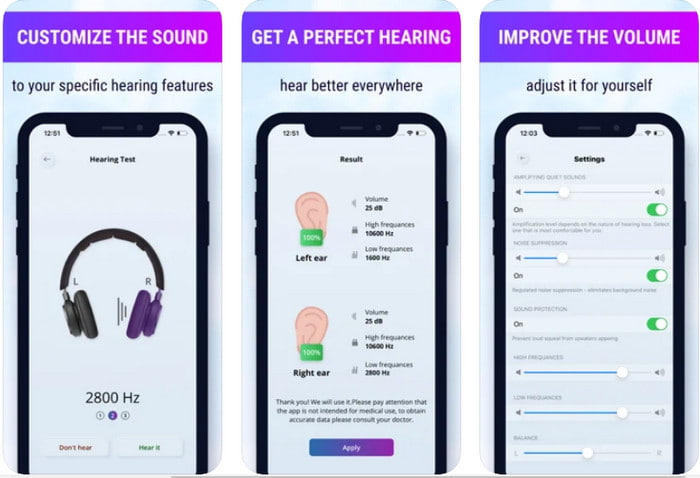
Korisnici iOS-a mogu jednostavno besplatno preuzeti aplikaciju Volume Boost- Sound Amplifier 4+. Ova aplikacija može lako pojačati zvuk bez ikakve muke pomoću automatskog podešavanja, ali moguće je i ručno nadjačavanje. Štoviše, aplikacija je odlična za korištenje kao pojačalo, no ne radi s Bluetooth zvučnicima ni s bežičnim slušalicama ili EarPodsima/AirPodsima. Također, možeš očekivati dosta rušenja aplikacije i neizbježne oglase kad je otvoriš. Iako je aplikacija besplatna za preuzimanje, postoji kupnja unutar aplikacije za uklanjanje oglasa i korištenje dodatnih funkcija.
Pros
- Besplatno preuzimanje na bilo koji iOS uređaj.
- Jednostavno pojačajte zvuk svog zvučnika do 30 db.
- Intuitivno sučelje i postavljanje.
Protiv
- Doživite mnogo rušenja, zamrzavanja i bugova još uvijek u ovoj aplikaciji.
- Oglase treba izbjegavati.
2. Extra Volume Booster - glasan zvučnik (Android)
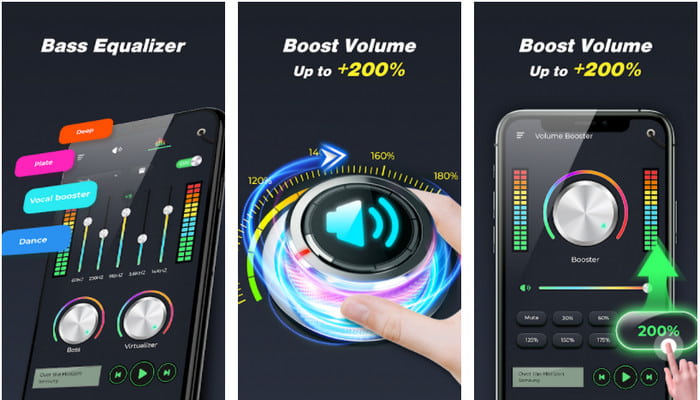
Ako korisnici iOS-a imaju aplikaciju za pojačavanje zvuka telefona, i korisnici Androida trebali bi imati nešto poput Extra Volume Booster. Nadalje, mnogi su korisnici već zadovoljni radom ove aplikacije jer je izvrsna u pojačavanju i boostanju zvuka. Međutim, kad otvoriš ovu aplikaciju, svi zvukovi koji se generiraju na tvom telefonu – poput zvona za pozive, alarma, obavijesti i ostalog – bit će pojačani. To znači da nema odvojene postavke za te značajke. Iako je alat besplatan, u neku ruku je bolji od mnogih plaćenih aplikacija na Androidu, pa čak i na iOS-u. Ali ako glasnoću pojačaš do 200%, možeš očekivati oštećenje ugrađenih zvučnika ili Bluetooth zvučnika koji ne mogu podnijeti zvuk te razine glasnoće 200%.
Pros
- Pojednostavljenu verziju pojačala možete preuzeti na Android uređajima.
- Iako sučelje aplikacije nije puno, izvrsno je.
- U ovoj aplikaciji dostupna su različita pojačanja i pojačanja.
Protiv
- Očekujte da ćete tijekom korištenja aplikacije naići na bezbroj oglasa.
- Tijekom korištenja alata postoji mogućnost da će se CPU ili telefon zagrijati.
3. Pojačavanje zvučnika: pojačalo glasnoće i pojačalo zvuka 3D (Android)
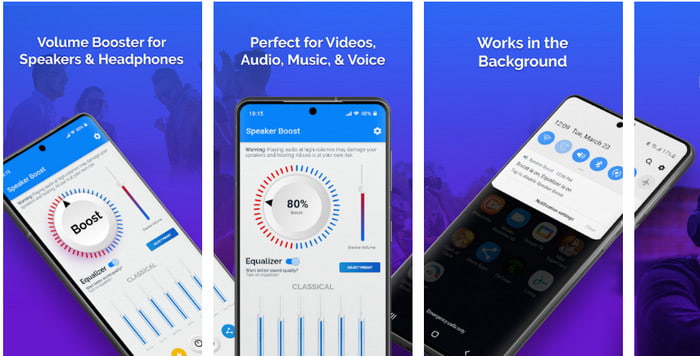
Još jedna Android aplikacija koju možeš koristiti, a koja pruža izvrsno surround pojačavanje zvuka, jest Speaker Boost. Kao i Extra Volume Booster, ova je aplikacija vrlo precizna i puno jednostavnija za korištenje čak i ako nemaš iskustva. Također, ovaj alat možeš preuzeti besplatno, ali ima kupnje unutar aplikacije koje bi ti se mogle svidjeti, primjerice uklanjanje napornih oglasa i drugo. Iako se čini da je alat sasvim korektan za korištenje, kupnja unutar aplikacije ovdje će te koštati više nego kod ostalog softvera na ovom popisu. Još jedna stvar koja zabrinjava mnoge korisnike jest to što aplikacija radi zaobilazeći blokatore oglasa te postoji mogućnost da se radi o špijunskom softveru.
Pros
- On-point za jednostavno pojačavanje zvuka, a opet je moćan za korištenje.
- Preuzmite alat besplatno bez ikakvih problema s pojačavanjem zvukova.
- Izvršite ručnu promjenu na ekvilajzeru.
Protiv
- Ovaj alat je nepotpun, što u osnovi znači da je pod eksperimentalnim.
- Kada pojačate zvuk, čut ćete neka izobličenja.
4. Boom: pojačavač basa i ekvilajzer 4+ (iOS)
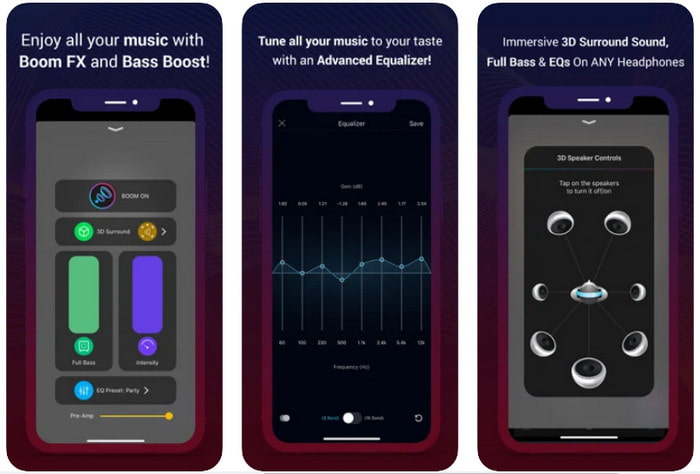
Ako tražiš naprednu aplikaciju za pojačavanje zvuka, onda je Boom: Bass Booster odličan izbor. Ipak, ova aplikacija dostupna je samo na iOS uređajima i ne možeš je pronaći na Android uređajima. Dosad je ovaj alat dobio mnogo pohvala korisnika, ali neki formati nisu podržani za pojačavanje. Također, kad koristiš ovu aplikaciju, možeš očekivati i poneke bugove i rušenja. Osim toga, aplikacija može biti zbunjujuća i pomalo zavaravajuća za nove korisnike. Iako se čini da je njezina izvedba solidna, i dalje je potrebno unapređenje kako bi aplikacija bila još bolja.
Pros
- Neke od naprednih značajki dostupne su ovdje.
- Prijenosna pojačala koja možete jednostavno koristiti.
- Aplikacija dobiva 4,1 zvjezdicu od 5 zvjezdica.
Protiv
- Nije najbolji izbor za početnike zbog zbunjujuće strukture sučelja.
- Većina audio formata nije podržana za pojačanje ovom aplikacijom.
- Problemi s greškama i kašnjenjima još uvijek se događaju s aplikacijom.
Dio 3. Često postavljana pitanja o pojačalima zvuka
Što je db?
Db znači decibele i ovo je mjerna jedinica za izražavanje glasnoće ili snage zvučnog vala. Također, uz pomoć decibela lako možemo odrediti koji zvuk možemo sigurno čuti nakon dužeg vremena. A svih 85 decibela ispod je vrlo sigurno za čuti.
Koji su nedostaci glasnog zvuka?
Kod nas je vrlo uobičajeno da kada smo izloženi glasnim zvukovima, sluh može biti oštećen. Ali jeste li znali da to može rezultirati mučninom, glavoboljom, stresom, umorom i još mnogo toga. Dakle, ako namjeravate koristiti pojačalo, koristite ga ispravno i nemojte ga pretjerano koristiti kako biste izbjegli neizbježne štetne učinke.
Zašto čujem neke pukotine na zvučnicima?
Ovaj problem je vrlo uobičajen za zvučnike s vrlo ograničenim hertcima koji mogu podnijeti. Dakle, ako pojačate zvuk, provjerite može li ga zvučnik podnijeti. A ako čujete neko pucketanje, morate odmah smanjiti zvuk. Međutim, ako čujete neke pucketanje čak i ako smanjite zvuk onda je prekasno.
Zaključak
Sve aplikacije i softver prikazani ovdje izvrsni su za korištenje kao pojačalo. Iako se gore navedeni programi međusobno razlikuju, njihove su funkcije slične. Međutim, ako tražiš najbolje pojačalo zvuka za PC i Mac, onda bi Video Converter Ultimate trebao biti taj izbor. Jer nudi iznimno napredne značajke koje možeš lako koristiti. Dakle, ako se pitaš je li to najbolji izbor, prvo ga preuzmi na disk svog računala i slijedi gore navedene korake.
Besplatno preuzimanjeZa Windows 7 ili novijiSigurno preuzimanje
Besplatno preuzimanjeZa MacOS 10.7 ili novijiSigurno preuzimanje
-
 [Jednostavno] Kako popraviti nesinkronizirani audio i video
 Pretpostavimo da ćete'planirati svoj stream za sutra, ali kada provjerite svoje postavke, zvuk i video nisu sinkronizirani. Pročitajte ovaj članak kako biste saznali više o ovom problemu.
-
 7 jednostavnih koraka kako riješiti probleme s kašnjenjem zvuka OBS-a [riješeno]
 Mučite li se s gledanjem videoisječka nakon snimanja zbog kašnjenja zvuka kada koristite OBS Studio? Pročitajte članak u nastavku da biste saznali kako učinkovito popraviti nesinkronizirani zvuk.
-
 Kako besplatno dodati audio i glazbu u videozapise na računalu / telefonu
 Ovaj članak prikazuje 4 jednostavna načina za besplatno dodavanje zvuka u videozapis. Bez obzira koji audio zapis želite dodati u svoj videozapis, ovdje možete dobiti zadovoljavajuće rezultate.
