


 Video Converter Ultimate
 Snimač zaslona
 Video popravak
Saznajte više o 5 najboljih video uređivača za PC i usporedite
Mnogo ljudi danas voli snimati videozapise kako bi sačuvali nezaboravne trenutke, a većina ih to koristi i za zarađivanje novca. Poput vlogera i influencera, oni stalno snimaju sebe i ono što rade za svoje obožavatelje, ali i kako bi stekli veću popularnost od drugih influencera ili vlogera. Dakle, ako ste budući vlogger ili influencer koji voli snimati samoga sebe, tada svakako morate razmisliti o tome da imate najbolji Windows 10 video editor kako biste unaprijedili i izradili impresivan video, dobili više lajkova, pregleda, pretplatnika, a dugoročno i zaradu. Prije svega, želimo vam čestitati jer ste već napravili prvi korak prema tome da postanete uspješan vlogger ili influencer. No odabir pravog alata koji ćete koristiti jedan je od ključnih koraka na koji ćete naići. Zato smo sada prikupili različite video editore, i dalje jednako učinkovite, među kojima možete odabrati u nastavku.

Dio 1. Top 5 Windows video uređivača na mreži i izvan mreže
Vrh 1. Video Converter Ultimate
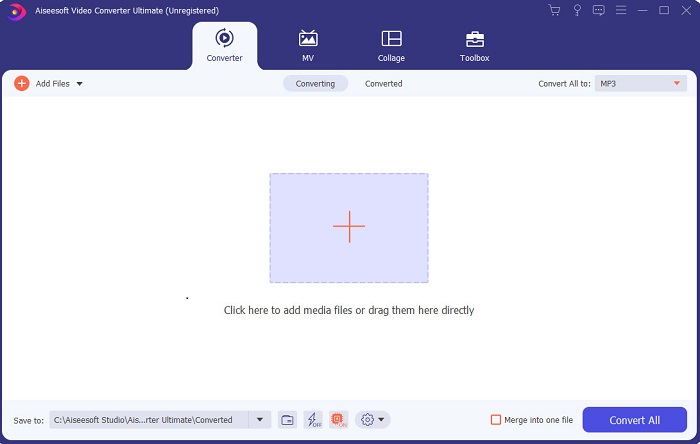
Ako želite imati prednost i izrađivati vrhunske videouratke kakve imaju vaši idoli, tada koristite FVC Video Converter Ultimate. Ovaj konverter i Windows video editor već je pomogao mnogim korisnicima da postanu poznati diljem svijeta, a možda ste sljedeći upravo vi. Većina poznatih influencera, vlogera i video montažera koristi ga kao svoj alat za montažu, poboljšavanje, pojačavanje i još mnogo toga. Dakle, ako želite imati profesionalan rezultat poput svojih idola i na tome zarađivati pravi novac, morate odmah preuzeti ovaj softver kako biste postali nova internetska senzacija i najbolje izdanje sebe. Također smo naveli prednosti i nedostatke kako biste ovaj alat bolje razumjeli.
Besplatno preuzimanjeZa Windows 7 ili novijiSigurno preuzimanje
Besplatno preuzimanjeZa MacOS 10.7 ili novijiSigurno preuzimanje
Pros
- Za početnike, ovaj alat je pravi izbor za njih. Budući da pruža jednostavne upute koje trebate slijediti i lakše ih razumjeti. Uglavnom, na mjestu je.
- Za profesionalce, za razliku od ostalih video uređivač za PC ovaj alat ima puno futurističkih značajki. Na primjer, ako želite poboljšati kvalitetu zvuka i poboljšati video, onda možete koristiti ovaj alat. Također, ako vaš zvuk nije sinkroniziran s videom, ima značajku sinkronizacije zvuka za to.
- Sve u svemu, ovo je fenomenalan pretvarač i uređivač na koji se možete osloniti. Pogotovo ako želite iznenađujuće ući u svijet vlogera i influencera.
- Softver za uređivanje se može preuzeti i ne postoje alati za uređivanje koji imaju iste značajke kao što je ovaj.
Protiv
- Ovaj alat nije besplatan, ali je niska cijena. Drugim riječima, jeftin je i proizvodi visokokvalitetne rezultate.
Vrh 2. Windows Movie Maker
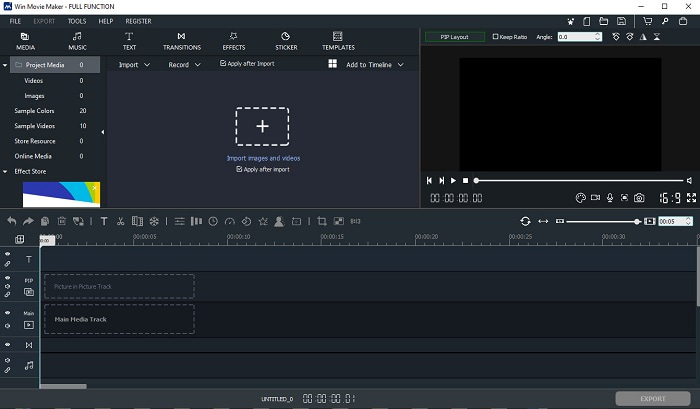
Ovaj video editor za Windows 7, 8, 10 i XP jedan je od najboljih za izradu i montažu. Windows Movie Maker već su preuzeli mnogi korisnici kako bi montirali vlastite videozapise jer nudi napredne mogućnosti uređivanja. Međutim, alat može biti prezahtjevan za one koji su novi u izradi i montaži videa. Ako ste pak profesionalac ili barem imate iskustva u montaži, svakako ga trebate isprobati. Alat ima i premium verziju, koja je vrlo slična besplatnoj, ali u izvoznim datotekama nema vodeni žig.
Pros
- Za početnike ovaj alat nije idealan, ali je odličan za komplicirano uređivanje.
- Za profesionalce, značajke koje su ovdje predstavljene su izvedive ako imate iskustva.
- Omogućuje prijelaz, efekte i naljepnice itd.
Protiv
- Alat je malo uznemirujući zbog funkcija alata koje možete učiniti ovdje. Također, nadmoćan je i nema upute kako njime upravljati.
- Ako koristite besplatnu verziju ovog alata očekujte da ćete imati vodeni žig na samom videozapisu nakon što ga izvezete.
Vrh 3. OpenShot
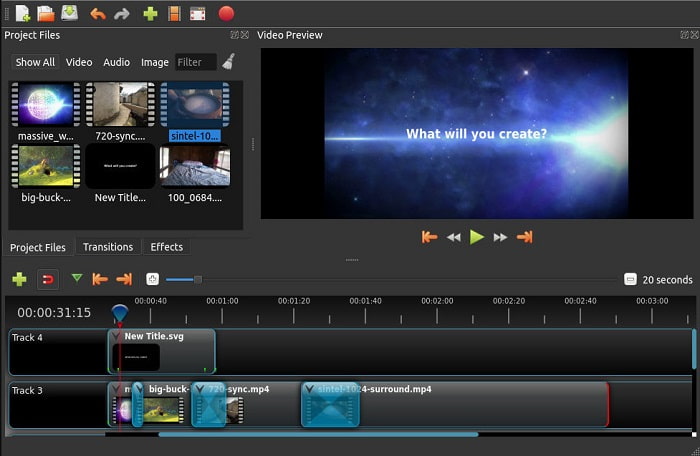
Još jedan besplatan program za montažu videa bez vodenog žiga je Openshot. Nudi jednostavnije i razumljivije funkcije nego Windows Movie Maker. Štoviše, nakon instalacije alata slijedi kratki obilazak njegovih funkcija. Ipak, objašnjene su samo osnovne značajke. Budući da ovaj alat nudi isključivo osnovne mogućnosti uređivanja, ne ostavlja puno prostora za kreativnost. Osim toga, sučelje je zbog monokromatskih boja pomalo monotono za gledanje.
Pros
- Za početnike, ovo je jednostavnija verzija programa Windows Movie Maker. Možete dodati efekte, prijelaze i još mnogo toga.
- Za profesionalce je u redu da ga koriste, ali nije najbolje.
- Softver je u redu ako dolazi s jednostavnim uređivanjem.
Protiv
- Ne može se promijeniti dosadno sučelje i manje je interaktivno.
- Neki veći i manji bugovi i dalje su prisutni ovdje čak i nakon ažuriranja.
Vrh 4. Lightworks
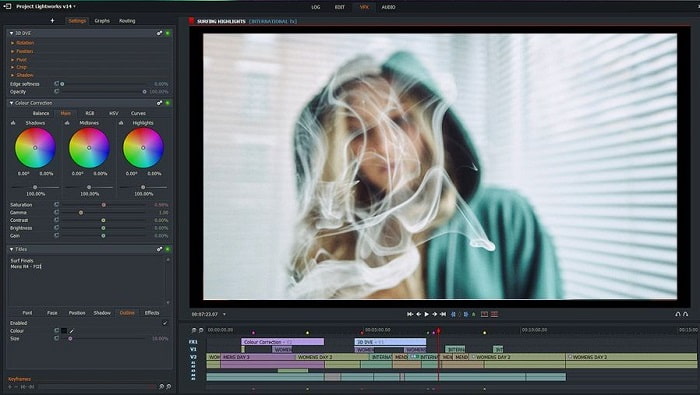
Lightworks je besplatan video editor za Windows, ali ima i premium verziju. Međutim, kada smo pokušali preuzeti alat, prikazala se poruka da .exe datoteka može naštetiti računalu, pa ga nismo instalirali, nego smo detaljno istražili ovaj program. Ako ga instalirate na disk, morat ćete se prvo registrirati prije korištenja. Mogućnosti uređivanja koje nudi prilično su zahtjevne za početnike, ali i za napredne korisnike mogu biti teške. Ipak, nema mjesta brizi, jer ga možete naučiti koristiti kroz praksu.
Pros
- Za početnike, alat je previše kompliciran i može biti previše za rukovanje. Pogotovo ako želite isprobati jednostavno uređivanje.
- Za profesionalce, možete koristiti značajke uređivanja u stvarnom vremenu koje ovaj alat nudi. Iako su neke značajke nove i većina ih se plaća.
- Ukupna izvedba alata klasificirana je kao klasa A u uređivanju i izradi videa.
Protiv
- Ako želite imati izlaz od 1080px, morate kupiti alat. Čak i prije nego što ga uopće budete mogli koristiti, morat ćete se registrirati.
- Softver ima štetnu .exe datoteku pa je preuzmite na vlastitu odgovornost.
Top 5. ClipChamp
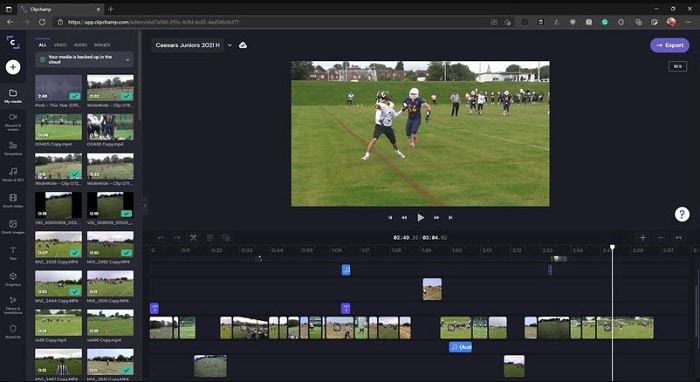
Ovaj mrežni alat dodatno nudi više mogućnosti ako nadogradite paket. Također je jedan od najjednostavnijih alata za pristup, koje možete koristiti za montažu videa bez preuzimanja posebnog softvera. Clipchamp je izvrstan alat za korištenje, ali morate se registrirati prije nego što mu pristupite. Ovaj mrežni Windows 10 video editor ima slične značajke kao Lightworks, ali funkcionira putem interneta. Ipak, ako ovdje uvozite video datoteke radi uređivanja, morate računati na sporiji proces uvoza. Prednost je u tome što ne morate preuzimati alat da bi radio.
Pros
- Za početnike, ovaj alat morate isprobati, ali proces uređivanja i umetanja videa ovdje je malo sporiji.
- Za profesionalce je u redu koristiti i uređivati jednostavne videozapise s ograničenim resursima.
- Općenito, alat je lakše razumjeti od Windows Movie Makera.
Protiv
- Ovisno o internetu, što znači da ako imate spor internet, očekujte nestabilan proces.
- Potreban vam je obrazac za registraciju prije nego što uopće možete koristiti web alat.
Dio 2. Usporedni grafikon za 5 video uređivača za Windows
| Značajka/e | Video Converter Ultimate | Windows Movie Maker | OpenShot | Svjetlosni radovi | ClipChamp |
| Uređivanje videa kao što je obrezivanje, rezanje, spajanje i tako dalje. |  | | | | |
| Video Enhancer | |  | | | |
| Vodeni žig | | | | | |
| Program podržan | Alat za radnu površinu | Alat za radnu površinu | Alat za radnu površinu | Web-bazirani alat | Web-bazirani alat |
| Raspon cijena | Za 1 mjesec: $25.00 Za godinu dana: $31.20 | $39,95 Jednokratno plaćanje | Besplatno, ali možete donirati | QScan Pro QScan Pro – aktivacije mjesečne pretplate $59.99 | Kreator- $9/mjesečno Poslovni- $19/ mjesečno |
| Za doživotnu licencu: $55.20 | QScan Maks QScan Max – aktivacije mjesečne pretplate $119.99 | Business Platinum – $39/ mjesečno |
Dio 3. Često postavljana pitanja o Windows Video Editoru
Koji je najbolji Mac Video Editor koji mogu koristiti?
Iako su ovdje predstavljeni alati svi Windows editori, osim Video Converter Ultimatea, ako želite saznati koji su drugi Mac video editori dostupni, kliknite na ovu poveznicu i odaberite s popisa.
Zašto se moji videozapisi ne mogu reproducirati na Androidu?
Postoji mnogo razloga zašto se videozapisi ne mogu reproducirati na vašem Androidu. Kako biste saznali razloge, važno je odmah ih otkriti i riješiti problem čitanjem članka Kako popraviti videozapise koji se ne reproduciraju na Android telefonima.
Kako komprimirati svoje dugačke videozapise i podijeliti ih na YouTubeu?
Trenutačno možete učitati maksimalnu veličinu datoteke od 256, stoga je najbolji način rješenja da je komprimirate. Ako želite podijeliti svoje videozapise na YouTubeu, naučimo kako smanjiti veličinu datoteke i objaviti je na YouTubeu.
Zaključak
Prije nego što postanete jedan od vlogera ili influencera kojima se stalno divite, morat ćete savladati vlastitu montažu. Upravo danas imate priliku koristiti fenomenalan editor koji nudi mogućnosti uređivanja i kvalitetu poput one u Hollywoodu. Tako ćete impresionirati svoje gledatelje, pratitelje, ali i samoga sebe. Zato zasjajte poput dijamanta i dopustite da vam zraka svjetlosti otvori put do uspjeha uz pomoć alata FVC Video Converter Ultimate.
-
 Najbolji MP4 uređivač za Windows i Mac u 2025
 Bilo da koristite svoje računalo za uređivanje MP4 videa ili samo radite na telefonu, ovdje ćete moći pronaći neke sjajne opcije, uključujući najbolji MP4 uređivač za Windows i Mac.
-
 Kako besplatno dodati audio i glazbu u videozapise na računalu / telefonu
 Ovaj članak prikazuje 4 jednostavna načina za besplatno dodavanje zvuka u videozapis. Bez obzira koji audio zapis želite dodati u svoj videozapis, ovdje možete dobiti zadovoljavajuće rezultate.
-
 Kako izrezati i spojiti pjesme na mreži - 4 najbolja načina koja biste trebali znati
 Kada želite izrezati i spojiti pjesme na mreži kako biste stvorili glazbeno djelo, iz članka možete saznati više o 4 najbolja mrežna alata za isjecanje pjesama i kombiniranje datoteka.
