


 Video Converter Ultimate
 Perekam Layar
 Perbaikan Video
Unduh 5 Alat Terbaik yang Tersedia untuk Membuat Video 2x Lebih Cepat dalam Beberapa Klik
Ada kalanya Anda perlu mempercepat sebuah video, misalnya menjadi 2x video speed. Karena ada beberapa bagian yang ingin Anda lewati atau mungkin Anda ingin video diputar lebih cepat agar durasinya berkurang. Jadi, jika Anda ingin belajar cara mempercepat video Anda, lanjutkan membaca artikel ini. Untuk mendapatkan cukup gambaran dan pengetahuan tentang cara melakukannya dan mengapa kecepatan 2x layak digunakan.

Bagian 1. Apa itu video 2x?
Menonton cepat adalah tindakan menonton video yang dipercepat ke kecepatan pemutaran alaminya. Hanya dengan mengatur kecepatan video yang kita tonton; itu dapat membantu kita dengan cara yang berbeda. Jadi, jika Anda ingin tahu apa manfaat dari membawa video kecepatan alami Anda menjadi kecepatan video 2x. Kemudian baca detail di bawah ini untuk mengetahui lebih lanjut.
Manfaat menonton video dengan kecepatan dipercepat.
Jika Anda memutar video dengan kecepatan 2x, Anda dapat dengan mudah menentukan apakah video tersebut layak ditonton atau tidak. Ini mungkin berlaku untuk video dengan durasi panjang dan sebagian besar waktu membosankan untuk menonton semuanya dengan kecepatan normal.
Ini memungkinkan kita untuk menghemat banyak waktu daripada kecepatan pemutaran normal. Dalam hal ini, jika Anda harus menonton 2 video atau lebih dengan durasi 15 menit, lebih baik menontonnya 2x lebih cepat. Untuk menyerap detail lebih cepat daripada menontonnya dengan kecepatan normal. Jadi, alih-alih menonton 1 video dalam 15 menit, Anda dapat menonton 2 dalam rentang waktu tersebut.
Sebagian besar orang yang suka menonton video yang diputar dengan pemutaran cepat adalah mereka yang suka menghafal semuanya dalam satu menit. Ini bekerja paling baik untuk orang sibuk atau mereka yang terburu-buru.
Ini akan meningkatkan dan melatih fokus dan keterampilan mendengarkan Anda lebih baik jika Anda memutar video dengan kecepatan 2x daripada kecepatan normal. Jadi sekarang, Anda memiliki ide tentang apa keuntungan dari mempercepat video. Sekarang adalah waktu yang tepat untuk melanjutkan ke alat yang akan membantu Anda mempercepat video Anda. Bagian selanjutnya akan berbicara tentang berbagai alat yang perlu Anda gunakan.
Bagian 2. Cara Membuat Video 2x
Jika Anda ingin membuat video 2x lebih cepat, cobalah menggunakan editor video fenomenal, yaitu Video Converter Ultimate. Alat ini sudah membantu banyak penggunanya dengan berbagai masalah, terutama dalam konversi, membuat GIF, peningkatan kualitas, dan lainnya. Jadi, membuat pemutaran video Anda lebih cepat dapat dilakukan dengan mudah dengan bantuan alat ini. Selain itu, saat Anda meningkatkan kecepatan video, Anda juga bisa melihat pratinjau kecepatan 2x di bawahnya. Untuk menentukan apakah kecepatan video tersebut sudah sesuai untuk Anda. Sekarang, mari lanjut ke cara mengubah kecepatan pemutaran video Anda dengan mengikuti langkah-langkah di bawah ini.
Langkah Cara Mempercepat Video Hingga 2X Kecepatan
Langkah 1. Unduh alat ini ke desktop Anda, lalu instal setelah proses pengunduhan selesai.
Unduh GratisUntuk Windows 7 atau yang lebih baruUnduhan Aman
Unduh GratisUntuk MacOS 10.7 atau yang lebih baruUnduhan Aman
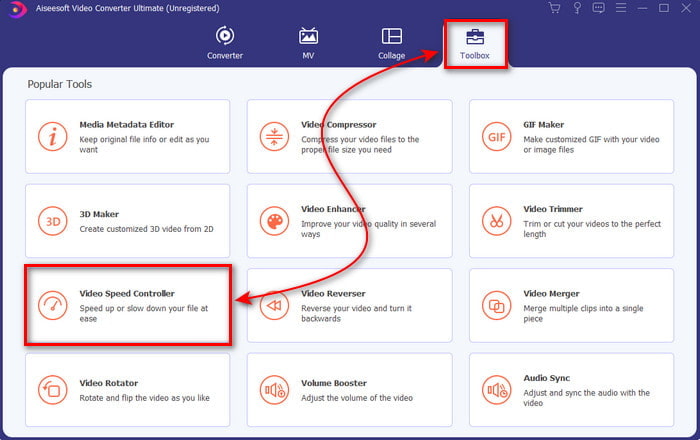
Langkah 2. Lalu pergi ke Toolbox dan cari Video Speed Controller.
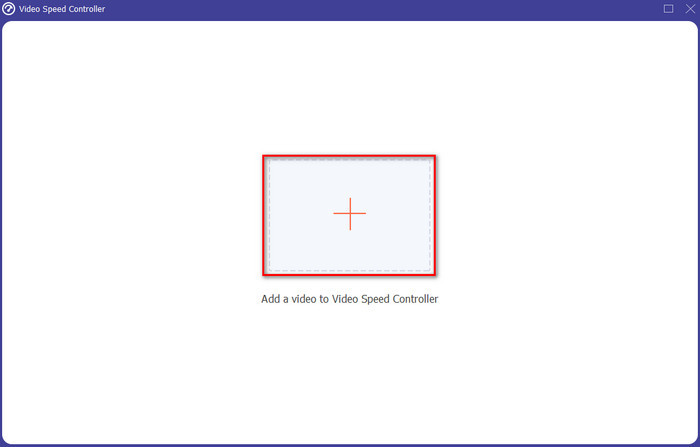
Langkah 3. Klik tombol + untuk memasukkan file yang ingin Anda tonton dengan kecepatan video 2x dan klik Open untuk melanjutkan.
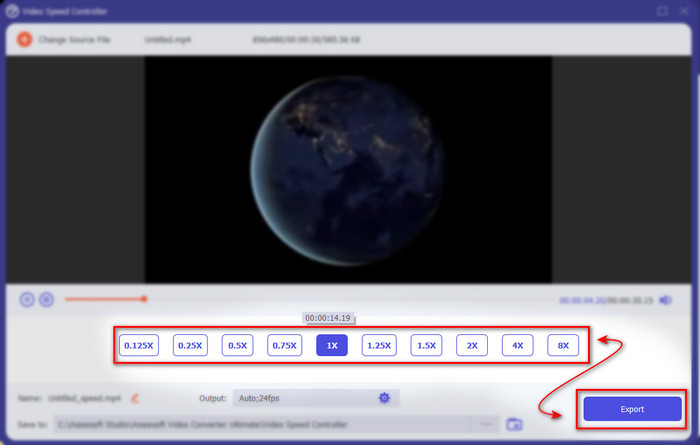
Langkah 4. Setelah memasukkan file, pilih 2x pada daftar kecepatan video yang tersedia. Lalu untuk menyimpan kecepatan video, klik tombol Export..
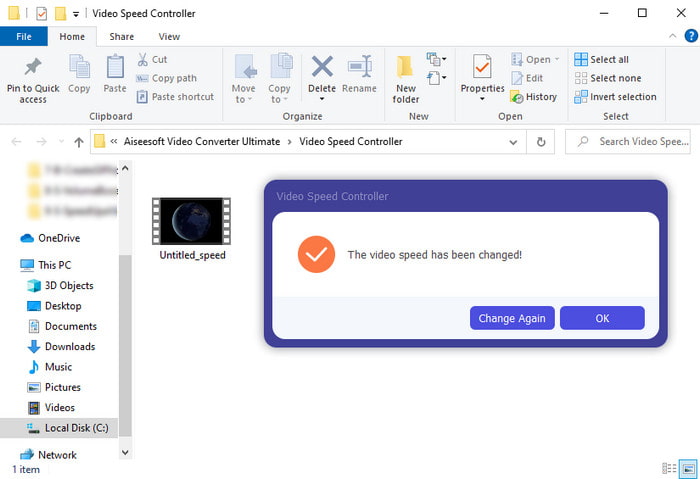
Langkah 5. Setelah file diekspor, sebuah folder akan muncul di layar Anda; klik file tersebut untuk menonton versi video yang sudah dipercepat.
Bagian 3. Cara Memutar Video dengan Kecepatan 2x
1. Pemutar Media VLC
Pemutar media paling terkenal yang dapat Anda unduh di PC atau Mac adalah VLC Media Player. Alat desktop ini sering digunakan oleh pengguna yang gemar menonton klip film. Selain itu, alat ini mendukung hampir semua format yang kita kenal di web. Namun, beberapa video dengan codec yang rumit tidak dapat diputar di sini seperti AVI atau MKV tertentu. Jadi, jika Anda ingin tahu cara membuat video 2x speed dengan VLC Media Player, ikuti langkah-langkah di bawah ini.
Langkah 1. Unduh VLC ke desktop Anda lalu buka aplikasinya.
Langkah 2. Seret dan jatuhkan file ke antarmuka lalu klik file video yang Anda masukkan ke sana.
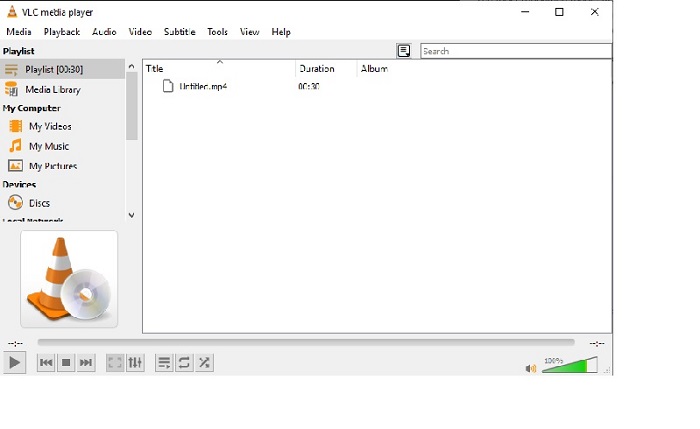
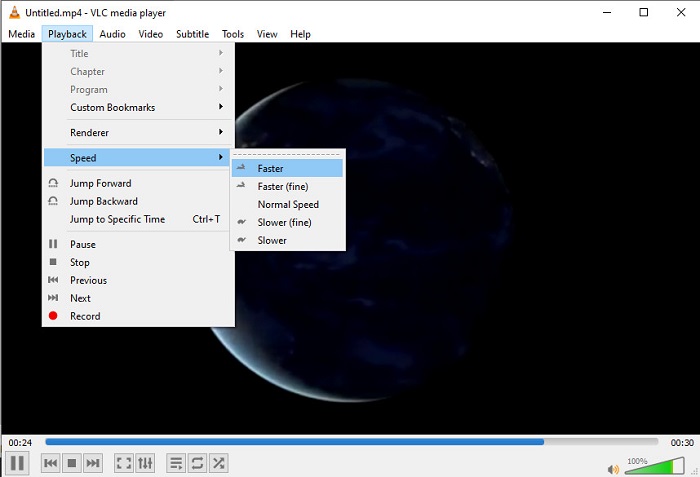
Kemudian pergi ke Playback dan klik Speed untuk mengubah kecepatan asli video.
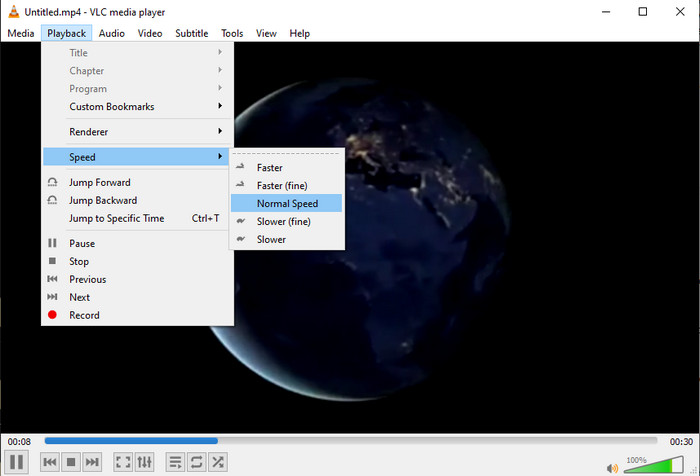
Langkah 3. Dan jika Anda ingin mengembalikan kecepatan ke normal, pergi ke Playback dan klik Speed lalu pilih kecepatan normal.
2. Pemutar Waktu Cepat
Pemutar media bawaan Mac siap membantu Anda memutar video dengan kecepatan playback video 2x. QuickTime Player adalah pemutar media prainstal yang akan Anda temukan di Mac. Berbeda dengan VLC, alat ini tidak perlu diunduh ke desktop Anda. Sayangnya, jika Anda pengguna Windows Anda tidak bisa menggunakan alat ini karena tidak mendukung PC Windows. Meskipun alat ini dapat diakses di Mac, masih ada banyak fitur yang tidak didukung seperti format tertentu. Karena sebagian besar format yang dikembangkan Windows tidak dapat diputar di sini. Jadi sekarang, jika Anda menggunakan Mac, coba ikuti langkah-langkah di bawah ini.
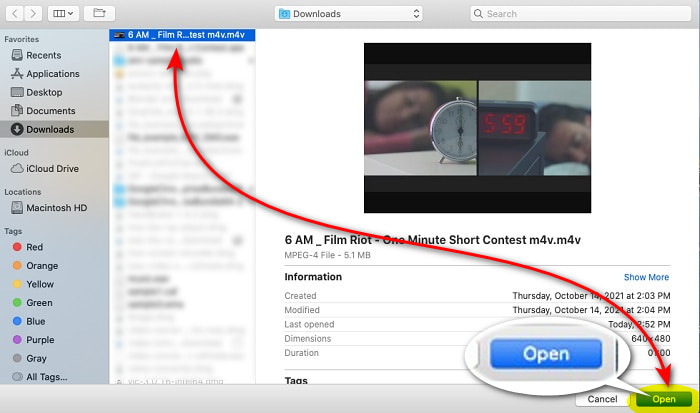
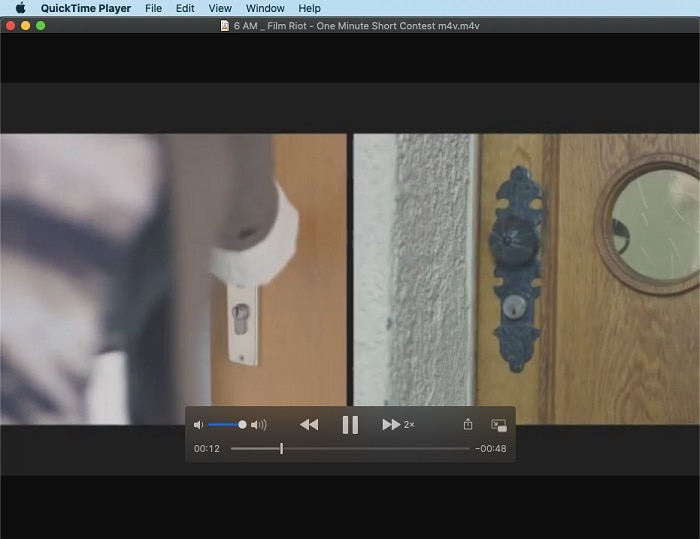
Langkah 1. Cari QuickTime di Finder kemudian jalankan alatnya. Klik File dan Open File untuk mencari video dan buka file tersebut.
Langkah 2. Saat video sedang diputar, klik tombol fast-forward untuk mempercepatnya.
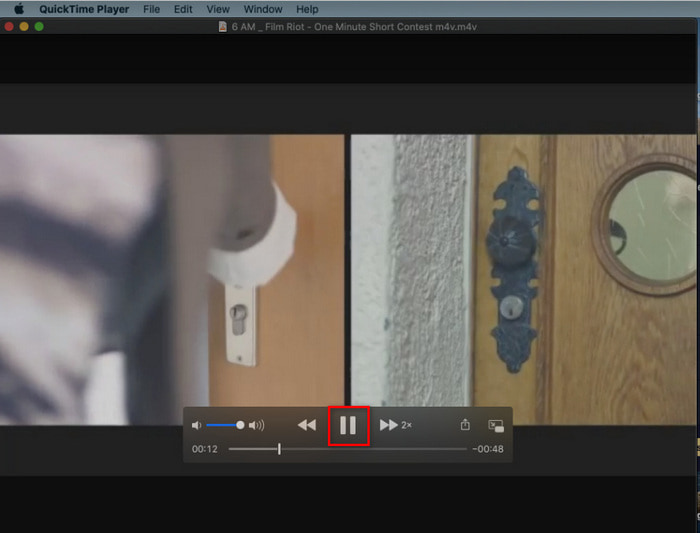
Langkah 3. Dan jika Anda ingin menghentikan kecepatan yang dipercepat, klik tombol pause/play.
3. Pemutar Media Windows
Jika Mac memiliki pemutar media prainstal sendiri, maka Windows juga memiliki pemutar media khasnya sendiri, yaitu Windows Media Player. Sama seperti QuickTime, alat ini sudah terpasang di Windows dan siap digunakan untuk menonton dan membuat video 2x lebih cepat dari kecepatan biasanya. Namun, kami menganggap fitur percepatan pada alat ini yang paling buruk karena menghilangkan tampilan visual dan melompat dari detik ke detik alih-alih memutar dengan cepat. Tetapi jika itu tidak menjadi masalah bagi Anda, ikuti langkah-langkah di bawah ini tentang cara mempercepatnya.
Langkah 1. Jalankan alat ini di desktop Windows Anda.
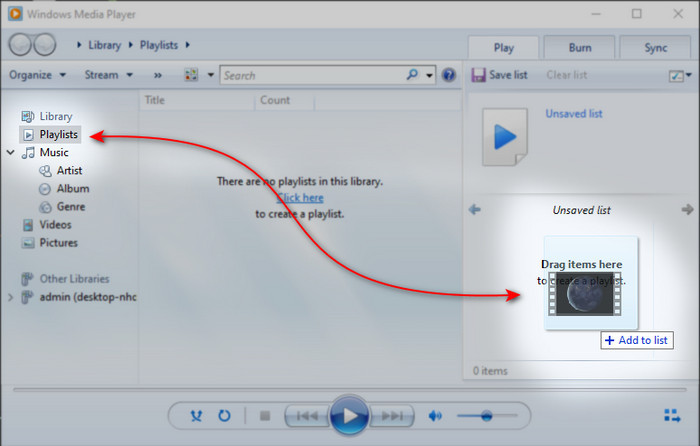
Langkah 2. Klik Playlist lalu drag and drop file video ke kotak kecil di sisi kanan.
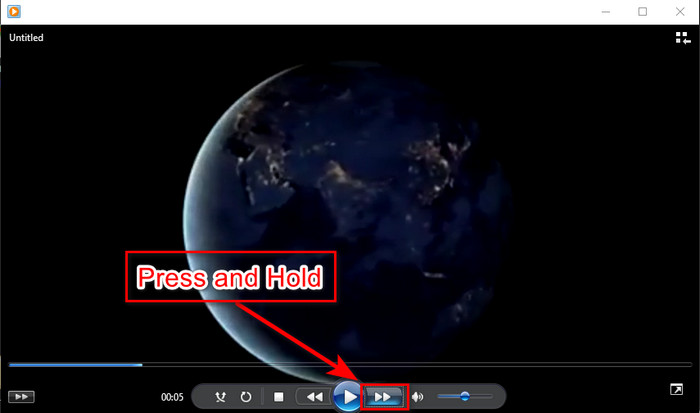
Langkah 3. Video akan otomatis diputar, untuk mempercepat klik dan tahan tombol fast-forward dan lepaskan untuk menghentikannya.
Bagian 4. FAQ tentang 2x Video
Mana yang lebih baik: gerak lambat atau mempercepat?
Sebenarnya, itu tergantung pada situasi di mana Anda seharusnya menggunakannya. Meskipun kedua penyesuaian yang akan Anda lakukan akan membantu Anda. Jadi, jika Anda menonton tutorial atau ingin mengungkapkan trik pesulap, gunakan gerakan lambat. Namun, jika Anda sedang terburu-buru dan perlu menonton banyak klip video, maka Anda harus menontonnya untuk mempercepat pemutaran.
Bisakah saya merekam ke dalam pemutaran gerakan super cepat?
Ya, Anda dapat menggunakan selang waktu untuk membuat video berdurasi satu jam menjadi satu menit atau detik. Tapi tidak seperti mempercepat, time lapse jauh lebih cepat dari kecepatan biasa 2x, 4x, 8x.
Apa kerugian menonton video dengan kecepatan 2x?
Meskipun menonton video dengan kecepatan seperti ini dapat banyak membantu Anda, ada banyak kerugian bermain dengan kecepatan itu yang dapat terjadi pada Anda. Misalnya, jika memutar video menjadi kebiasaan Anda maka kecepatan normal video akan menjadi lebih lambat.
Kesimpulan
Sekarang setelah Anda mengetahui berbagai alat yang dapat digunakan untuk menonton video dengan kecepatan 2x, ini adalah waktu yang tepat untuk memilih mana yang Anda sukai. Kami berharap artikel ini membantu Anda memilih mana yang lebih baik. Entah Anda akan menggunakan pemutar media untuk menyesuaikan kecepatan atau menggunakan editor seperti Video Converter Ultimate. Apa pun solusi yang Anda pilih, semuanya cukup baik untuk digunakan oleh Anda sebagai pengguna.
-
 4 Pemain VOB Terbaik untuk Ponsel Android untuk Penggunaan Berbeda
 Saat Anda mengunduh video VOB dan ingin menontonnya di Android, Anda dapat memilih salah satu yang paling cocok dari 4 pemain VOB teratas berikut dalam artikel ini.
-
 5 Alternatif Windows Media Player Terbaik untuk Ponsel Android
 Karena Anda tidak dapat mengunduh Windows Media Player untuk Android, Anda harus membaca artikel ini dan mempelajari tentang 5 alternatif terbaik untuk Windows Media Player.
-
 5 Pemutar Video Terbaik untuk iPhone yang Tidak Boleh Anda Lewatkan di Tahun 2025
 Untuk memutar video dalam semua format dan mendapatkan pengalaman menonton yang lebih baik di iPhone, Anda harus membaca artikel ini dan mempelajari tentang 5 pemutar video terbaik untuk iPhone 12/11/X/8/7/6.
