


 Video Converter Ultimate
 Perekam Layar
 Perbaikan Video
Mempercepat Video di Android dengan Aplikasi Bermanfaat di Android [2025]
Saat ini ponsel adalah teknologi paling serbaguna yang kita gunakan setiap hari. Perangkat ini membantu kita berkomunikasi, merekam, mengedit hal-hal seperti memotong, memangkas, mempercepat, dan banyak lagi meskipun kita tidak punya banyak peralatan untuk melakukan set‑up. Jadi hari ini kita akan membahas cara mempercepat video di Android dengan bantuan aplikasi pihak ketiga yang bisa Anda unduh. Informasi tambahan, ponsel Android Anda tidak memiliki fitur bawaan untuk mempercepat video agar bisa menonton video dengan lebih cepat. Jadi jika Anda menginginkannya, lanjutkan membaca artikel ini karena kami mengumpulkan berbagai aplikasi yang bisa Anda andalkan.

Bagian 1. Cara Mempercepat Video di Android
1. FilmoraGo
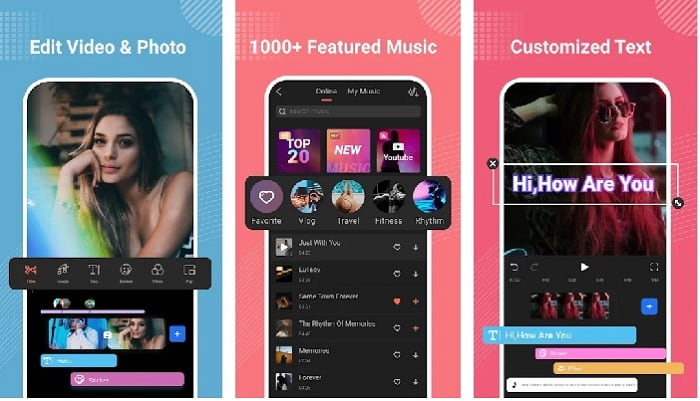
Filmora mengembangkan sebuah aplikasi yang bisa diunduh ke Android Anda untuk merasakan fitur yang hampir sama dengan alat versi desktop. Filmora Go adalah salah satu editor video gratis terbaik yang bisa Anda gunakan untuk membuat video yang memukau. Selain itu, alat ini memiliki fitur lengkap yang kemungkinan besar akan Anda gunakan meskipun Anda tidak berpengalaman dalam mengedit video. Namun, versi gratisnya hanya mendukung fitur contoh yang bisa Anda gunakan. Seperti fitur mempercepat video di Android, fitur ini gratis tetapi memiliki keterbatasan. Meskipun alat ini tampak sempurna, ada beberapa keluhan yang ingin disampaikan pengguna pada ulasan aplikasi ini.
Pro
- Ini adalah editor video gratis namun kuat yang dapat Anda gunakan di perangkat Android Anda.
- Alat ini menerima salah satu ulasan terbaik yang pernah kami lihat dan menerima 4,6 bintang.
- Alat ini telah membangun reputasi sebagai salah satu editor terbaik di desktop.
Kontra
- Kehilangan file terkadang terjadi di sini.
- Terkadang mengekspor file menjadi kacau meskipun Anda mengeditnya.
- Sebagian besar waktu audio dan video tidak sinkron.
2. Hyper Timelapse
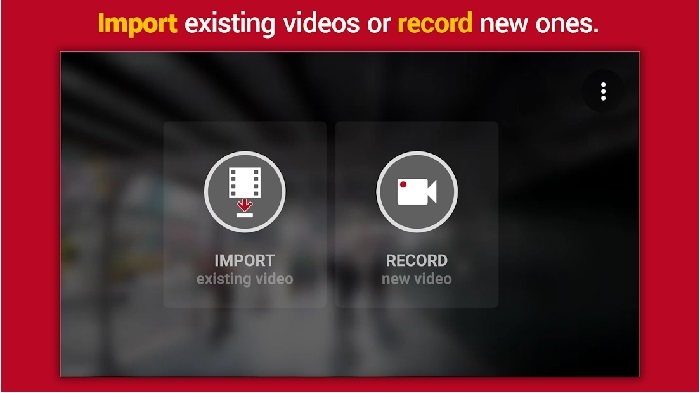
Hyper Timelapse adalah salah satu aplikasi untuk mempercepat pemutaran video di Android yang bisa Anda unduh secara gratis. Aplikasi ini sudah meraih rating 4,1 bintang yang cukup bagus. Namun, ulasan tentang aplikasi ini cukup buruk dibaca karena banyak sekali keluhan. Saat kami mencoba menggunakan aplikasinya, antarmukanya tidak terlalu buruk, fitur percepatnya bagus tetapi ketika kami mengekspor, aplikasi langsung crash. Lalu kami mencoba menggunakan fitur time lapse dan ukuran file videonya menjadi semakin besar setiap menit berlalu. Intinya, Anda tidak bisa mengambil video time lapse yang berdurasi panjang di sini.
Pro
- Aplikasi ini sangat mudah digunakan bahkan jika Anda seorang pemula.
- Ini memiliki selang waktu bawaan.
- Antarmuka alat ini tidak oke.
Kontra
- Kerusakan dan bug masih terjadi di alat ini.
- Itu tidak menyimpan hasil akhir karena setiap kali Anda melakukannya macet.
3. Lap It
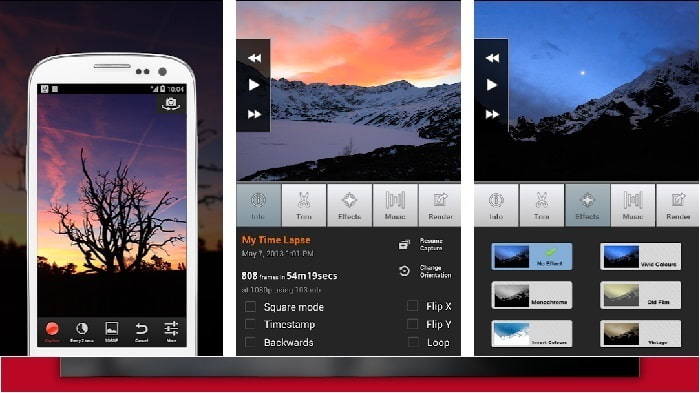
Jika Anda mencari sebuah aplikasi untuk mempercepat video di Android maka cobalah menggunakan Lapse It. Alat ini merupakan gabungan dari dua alat di atas karena Anda bisa membuat time lapse, stop motion, dan melakukan pengeditan. Walaupun terdengar sangat bagus digunakan di Android, aplikasi ini tetap mendapat rating terendah di artikel ini. Aplikasi ini hanya mendapatkan 3,5 bintang dan banyak komentar di ulasan yang menganggap aplikasi ini tidak ada gunanya. Namun beberapa komentar juga mengatakan bahwa alat ini dulu adalah aplikasi andalan mereka untuk membuat video yang memukau, tetapi sekarang sudah banyak aplikasi yang lebih baik daripada alat ini.
Pro
- Ini memiliki fitur unik dan kuat yang disukai banyak pengguna.
- Aplikasi ini dapat memiliki rendering terbaik di Android.
- Menyesuaikan video dapat dilakukan dengan mudah dengan bantuan aplikasi ini di Android.
Kontra
- Alat berubah dari kelas S ke D karena kerusakan dan bug masih terjadi bahkan setelah pembaruan dilakukan.
- Instruksi tidak jelas tentang cara menjalankannya.
- Di setiap akhir video selalu ada iklan pop-up yang datang.
Bagian 2. Ingin Pengendali Kecepatan Lebih Profesional? Coba Video Converter Ultimate!
Video Converter Ultimate adalah alat paling unik yang kemungkinan besar akan Anda gunakan jika ingin mendapatkan hasil yang luar biasa. Mempercepat video di sini bisa dilakukan dengan sangat mudah dengan bantuan alat ini. Selain itu, fitur keseluruhan dari alat ini jauh lebih hebat dibandingkan alat Android di atas. Namun, perangkat lunak ini tidak dapat digunakan di perangkat Android karena tidak didukung. Meskipun demikian, saat digunakan di ponsel (melalui komputer) Anda tidak akan pernah mengalami hang, crash, maupun bug ketika menggunakannya. Jadi, jika Anda ingin belajar cara mempercepat video di Android maka ikuti langkah‑langkah di bawah ini.
Langkah 1. Hal pertama yang harus Anda lakukan adalah mengunduh alatnya. Instal setelah proses pengunduhan selesai, lalu lakukan pengaturan cepat dan klik Finish untuk melanjutkan.
Unduh GratisUntuk Windows 7 atau yang lebih baruUnduhan Aman
Unduh GratisUntuk MacOS 10.7 atau yang lebih baruUnduhan Aman
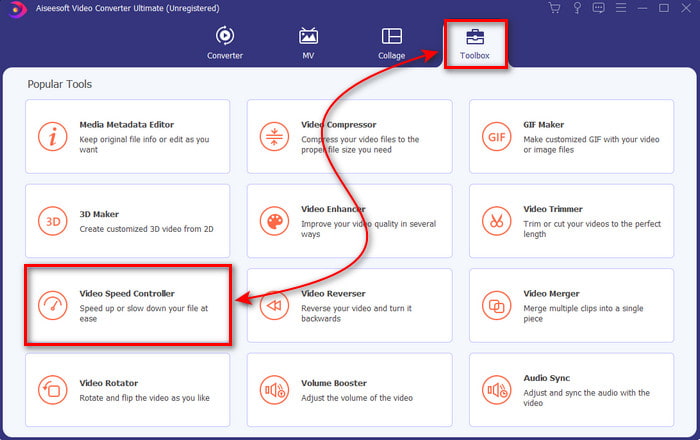
Langkah 2. Selanjutnya, pergi ke Toolbox dan cari Video Speed Controller, klik untuk membukanya.
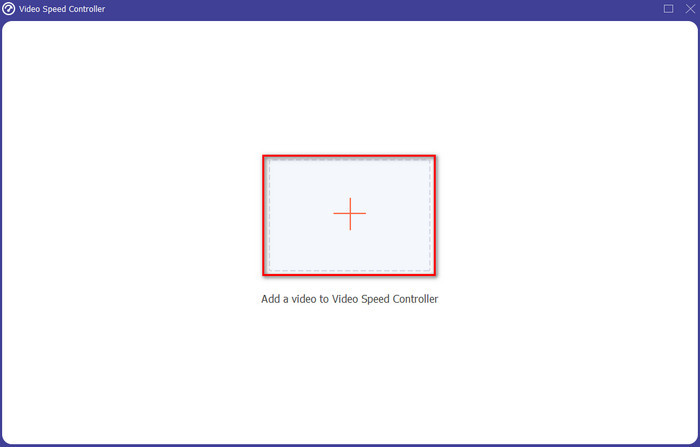
Langkah 3. Lalu sebuah antarmuka akan muncul, klik tombol + untuk memasukkan file. Setelah mengkliknya sebuah folder akan muncul, kemudian pilih file yang ingin Anda percepat dan klik Open.
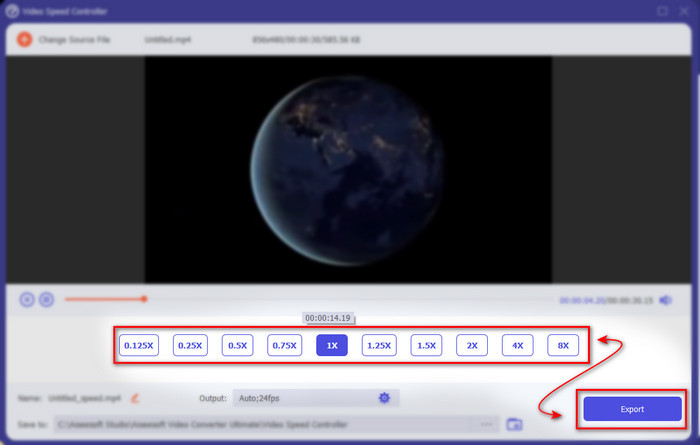
Langkah 4. Sebuah antarmuka baru akan muncul lagi, lalu pilih kecepatan yang Anda inginkan pada kotak‑kotak kecil tersebut. Jika Anda sudah siap mengekspor file yang sudah dipercepat, klik Export.
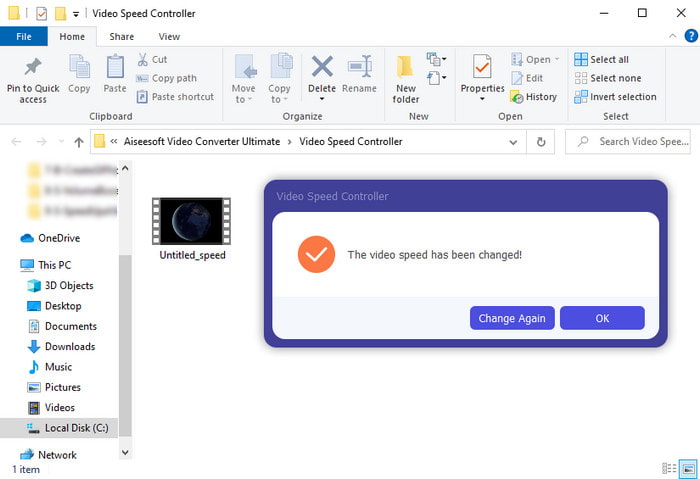
Langkah 5. Tunggu sebentar dan jika proses video selesai, sebuah folder akan muncul yang berisi file video yang sudah Anda percepat. Klik file video tersebut untuk menonton versi yang sudah dipercepat.
Bagian 3. FAQ tentang Mempercepat Video di Android
Apakah mempercepat video saya merusak kualitasnya?
Jika Anda akan mempercepat video, maka jangan berharap ada perubahan dalam kualitas video. Namun, jika aplikasi yang Anda gunakan tidak mendukung output video berkualitas tinggi, maka output video akan berkurang secara otomatis.
Bisakah saya menonton video dalam gerakan lambat?
Tentu saja bisa! Dengan bantuan 5 Pemutar Video Slow Motion Terbaik klik tautan ini untuk menuju ke tulisan baru.
Mengapa saya perlu mempercepat video saya?
Ada banyak alasan mengapa Anda perlu memutar video dalam kecepatan 2x atau lebih. Jadi, jika Anda ingin mengetahui alasannya maka cobalah membaca artikel yang membahas apa itu video 2x.
Kesimpulan
Sebagai penutup, semua alat yang disajikan di sini bagus digunakan jika Anda memiliki ponsel Android, namun ada satu alat yang paling menonjol. Dan alat yang luar biasa itu adalah Video Converter Ultimate karena jika Anda menggunakan alat ini, Anda tidak akan pernah mengalami bug dan masalah. Tetapi alat ini tidak tersedia di ponsel Android, jadi jika Anda ingin mencobanya maka unduhlah sekarang ke desktop Anda untuk menikmati semua fitur lengkap dari perangkat lunak yang luar biasa ini.
-
 Cara Memutar File MKV di iPad 2025
 Bagaimana cara memutar file MKV di iPad 2? Bisakah saya mengonversi MKV ke MP4 untuk diputar di iPad Pro/Air/2? Posting ini membagikan 2 cara mudah untuk memainkan MKV di iPad.
-
 [Solusi] VLC Tidak Memutar DVD, Cara Memperbaikinya
 Bisakah VLC memutar DVD? Mengapa VLC tidak mau memutar DVD saya? Bagaimana cara mendapatkan VLC untuk memutar DVD di Windows 10? Posting ini membagikan 3 tips untuk memperbaiki masalah VLC tidak memutar DVD.
-
 [Terselesaikan] Memutar File MP4 di Chromebook 2025
 Bisakah Anda memutar video di Chromebook? Bagaimana cara memutar file MP4 dari USB di Chromebook? Posting ini membagikan 3 cara memutar MP4 di Chromebook.
