


 Video Converter Ultimate
 Perekam Layar
 Perbaikan Video
Kenali Lebih Banyak Tentang 5 Editor Video Terbaik untuk PC dan Bandingkan
Saat ini banyak orang senang merekam video untuk menyimpan momen berkesan dan sebagian besar menggunakannya untuk menghasilkan uang. Seperti para vlogger dan influencer, mereka selalu merekam diri mereka sendiri saat melakukan sesuatu untuk para penggemarnya, juga untuk meraih popularitas lebih tinggi dibanding influencer atau vlogger lainnya. Jadi, jika Anda adalah calon vlogger atau influencer yang suka merekam diri sendiri, Anda perlu mempertimbangkan untuk memiliki editor video Windows 10 terbaik agar bisa meningkatkan dan membuat video yang mengesankan, mendapatkan lebih banyak suka, tayangan, pelanggan, dan juga keuntungan dalam jangka panjang.Sebelum kita mulai, kami ingin mengucapkan selamat karena Anda sudah mengambil langkah pertama untuk menjadi vlogger atau influencer yang sukses. Namun memilih alat yang tepat untuk digunakan adalah salah satu bagian paling krusial yang akan Anda hadapi. Karena itu, kami telah mengumpulkan berbagai editor video yang tetap efektif untuk Anda pilih di bawah ini.

Bagian 1. Top 5 Windows Video Editor Online dan Offline
Teratas 1. Video Converter Ultimate
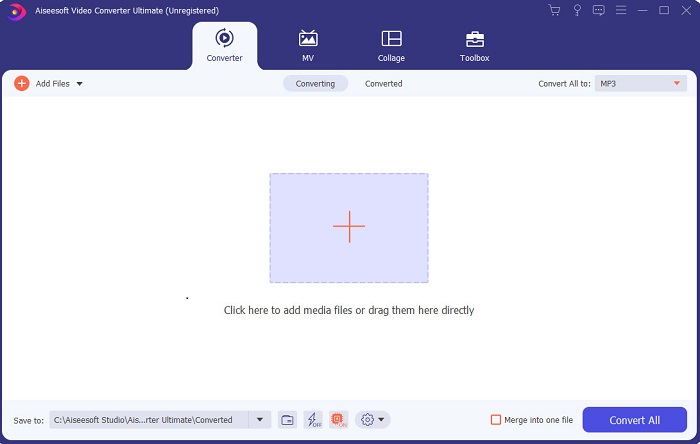
Jika Anda ingin punya keunggulan dan menghasilkan video terbaik seperti idola Anda, gunakanlah FVC Video Converter Ultimate. Konverter dan editor video Windows ini sudah membantu banyak penggunanya menjadi populer di seluruh dunia dan mungkin Anda yang berikutnya. Kebanyakan influencer, vlogger, dan editor video terkenal memakai ini sebagai alat mengedit, meningkatkan kualitas, memperkuat efek, dan banyak lagi. Jadi, jika Anda ingin hasil akhir yang profesional seperti idola Anda dan benar‑benar menghasilkan uang darinya, Anda harus segera mengunduh software ini untuk menjadi sensasi baru di internet sekaligus versi terbaik dari diri Anda. Kami juga menyediakan kelebihan dan kekurangan agar Anda lebih memahami alat ini.
Unduh GratisUntuk Windows 7 atau yang lebih baruUnduhan Aman
Unduh GratisUntuk MacOS 10.7 atau yang lebih baruUnduhan Aman
Pro
- Untuk pemula, alat ini adalah pilihan yang tepat untuk mereka. Karena memberikan instruksi sederhana untuk Anda ikuti dan lebih mudah dipahami. Pada dasarnya, ini tepat sasaran.
- Untuk para profesional, tidak seperti yang lain editor video untuk PC alat ini memiliki banyak fitur futuristik. Misalnya, jika Anda ingin meningkatkan kualitas audio dan video, Anda dapat menggunakan alat ini. Juga, jika audio Anda tidak disinkronkan dengan video, ia memiliki fitur sinkronisasi audio untuk memperbaikinya.
- Secara keseluruhan, ini adalah konverter dan editor fenomenal yang dapat Anda andalkan. Terutama jika Anda ingin membuat pintu masuk yang mengejutkan ke dunia vlogger dan influencer.
- Perangkat lunak editor dapat diunduh dan tidak ada alat editor yang memiliki fitur yang sama seperti ini.
Kontra
- Alat ini tidak gratis tetapi harganya murah. Dengan kata lain, murah dan menghasilkan output berkualitas tinggi.
2. Teratas Windows Movie Maker
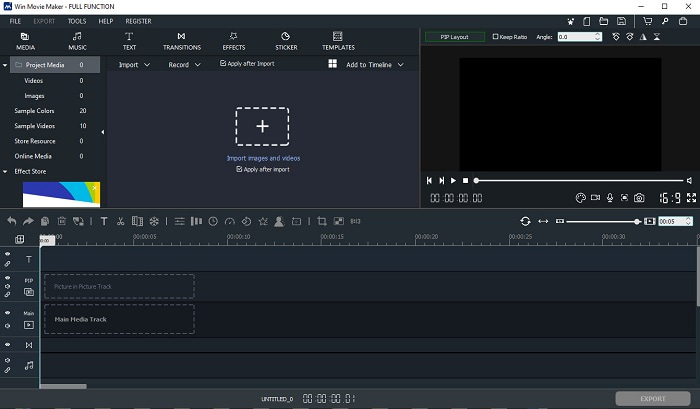
Editor video untuk Windows 7, 8, 10, dan XP ini adalah salah satu yang terbaik untuk membuat dan mengedit video. Windows Movie Maker sudah diunduh banyak pengguna untuk mengedit video mereka sendiri, karena menyediakan fitur pengeditan yang cukup rumit. Namun alat ini terasa terlalu “berat” bagi pemula dalam membuat dan mengedit video. Tetapi jika Anda adalah seorang pro atau minimal sudah berpengalaman mengedit, Anda wajib mencoba alat ini. Alat ini memiliki versi premium yang sangat mirip dengan versi gratisnya, hanya saja hasil ekspornya tidak memiliki watermark.
Pro
- Untuk pemula, alat ini tidak ideal tetapi sangat bagus untuk melakukan pengeditan yang rumit.
- Bagi para profesional, fitur-fitur yang dihadirkan di sini bisa dilakukan jika Anda memiliki pengalaman.
- Ini memberikan transisi, efek, dan stiker dll.
Kontra
- Alatnya agak mengganggu karena fungsi alat bisa anda lakukan disini. Juga, itu luar biasa dan tidak memiliki instruksi tentang cara mengoperasikannya.
- Jika Anda menggunakan versi gratis dari alat ini, harap memiliki tanda air di video itu sendiri setelah mengekspornya.
Top 3. OpenShot
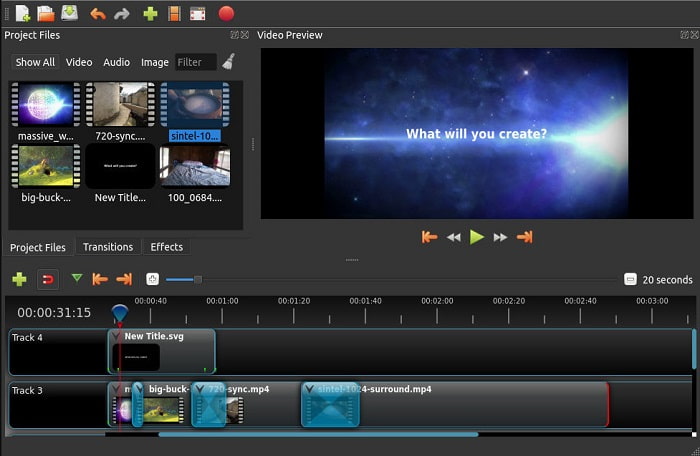
Software edit video gratis tanpa watermark lainnya adalah Openshot. Fungsinya lebih mudah dipahami dibanding Windows Movie Maker. Selain itu, setelah Anda memasang alat ini akan ada tur singkat mengenai fungsi‑fungsinya. Meski demikian, yang dijelaskan hanya fitur dasar saja. Alat ini memang hanya menyediakan fitur pengeditan dasar, yang berarti ruang kreativitas Anda cukup terbatas. Selain itu, tampilan antarmukanya terlihat agak membosankan karena menggunakan warna monokrom.
Pro
- Untuk pemula, ini adalah versi Windows Movie Maker yang lebih sederhana. Anda dapat menambahkan efek, transisi, dan lainnya.
- Bagi para profesional, tidak apa-apa bagi mereka untuk menggunakannya tetapi itu bukan yang terbaik.
- Perangkat lunaknya baik-baik saja jika dilengkapi dengan pengeditan sederhana.
Kontra
- Tidak dapat mengubah antarmuka yang membosankan dan kurang interaktif.
- Beberapa bug besar dan kecil masih ada di sini bahkan setelah pembaruan.
Top 4. Lightworks
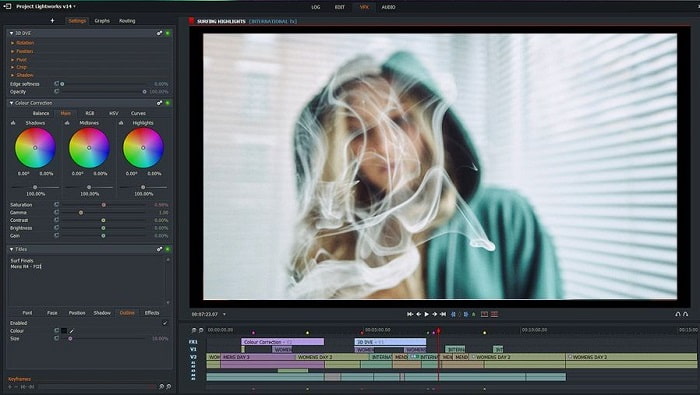
Lightworks adalah editor video gratis untuk Windows namun juga memiliki versi premium. Saat kami mencoba mengunduh alat ini, muncul peringatan bahwa file .exe‑nya dapat membahayakan komputer kami, sehingga kami tidak jadi memasangnya dan melakukan riset lebih jauh tentang alat ini. Jika Anda memasangnya ke drive, Anda harus melakukan registrasi terlebih dulu sebelum bisa menggunakannya. Fitur pengeditannya cukup banyak dan terasa berat bagi pemula, bahkan bagi yang sudah pro pun sedikit menantang. Namun tidak perlu khawatir, Anda bisa mempelajarinya dengan mencoba langsung.
Pro
- Untuk pemula, alat ini terlalu rumit dan terlalu banyak untuk ditangani. Apalagi jika Anda ingin mencoba dan sekedar melakukan editing sederhana.
- Untuk profesional, Anda dapat menggunakan fitur pengeditan waktu nyata yang disediakan alat ini. Meskipun beberapa fitur baru dan sebagian besar berbayar.
- Performa keseluruhan alat ini tergolong kelas-A dalam mengedit dan membuat video.
Kontra
- Jika Anda ingin memiliki output 1080px, Anda harus membeli alatnya. Dan bahkan sebelum Anda dapat menggunakannya, Anda harus mendaftar.
- Perangkat lunak ini memiliki file .exe yang berbahaya, jadi unduh dengan risiko Anda sendiri.
5. ClipChamp Teratas
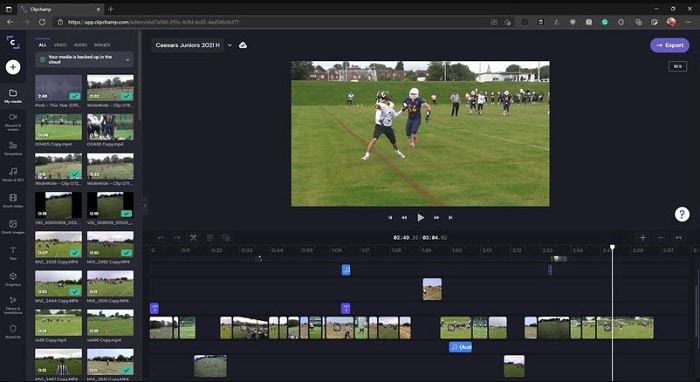
Alat online ini menyediakan fitur tambahan jika Anda meng-upgrade paketnya. Ini adalah salah satu alat yang mudah diakses untuk mengedit video tanpa perlu mengunduh software khusus. Clipchamp adalah alat yang bagus untuk digunakan, tetapi Anda harus mendaftar terlebih dahulu sebelum bisa mengaksesnya. Editor video Windows 10 online ini memiliki fitur yang mirip dengan Lightworks, hanya saja berjalan secara online. Namun, jika Anda mengimpor file video ke sini untuk diedit, Anda harus siap dengan proses impor yang cukup lambat. Keuntungannya, Anda tidak perlu mengunduh alat apa pun agar dapat berfungsi.
Pro
- Untuk pemula, alat ini harus dicoba tetapi proses mengedit dan memasukkan video di sini sedikit lebih lambat.
- Bagi para profesional, tidak apa-apa menggunakan dan mengedit video sederhana dengan sumber daya terbatas.
- Secara keseluruhan, alat ini lebih mudah dipahami daripada Windows Movie Maker.
Kontra
- Ketergantungan internet yang berarti jika Anda memiliki internet yang lambat maka perkirakan proses yang tidak stabil.
- Perlu formulir pendaftaran bahkan sebelum Anda dapat menggunakan alat web.
Bagian 2. Bagan Perbandingan untuk 5 Editor Video untuk Windows
| Fitur | Video Converter Ultimate | Windows Movie Maker | OpenShot | Lightworks | ClipChamp |
| Video Editing seperti trimming, cutting, merging dan lain sebagainya. |  | | | | |
| Penambah Video | |  | | | |
| tanda air | | | | | |
| Program yang Didukung | Alat berbasis desktop | Alat berbasis desktop | Alat berbasis desktop | Alat berbasis web | Alat berbasis web |
| Kisaran harga | Selama 1 bulan: $25.00 Selama setahun: $31.20 | $39.95 Pembayaran satu kali | Gratis tetapi Anda dapat menyumbang | QScan Pro QScan Pro – Aktivasi Langganan Bulanan $59.99 | Pencipta- $9/bulanan Bisnis- $19/ bulanan |
| Untuk Lisensi Seumur Hidup: $55.20 | QScan Maks QScan Max – Aktivasi Langganan Bulanan $119.99 | Platinum Bisnis – $39/ bulanan |
Bagian 3. FAQ tentang Windows Video Editor
Apa Editor Video Mac terbaik yang dapat saya gunakan?
Meski alat‑alat yang disajikan di sini semuanya adalah editor untuk Windows kecuali Video Converter Ultimate, jika Anda ingin tahu editor video lain untuk Mac, silakan klik tautan ini dan pilih dari daftar yang tersedia.
Mengapa video saya tidak dapat diputar di Android?
Ada banyak alasan mengapa video tidak bisa diputar di Android Anda. Untuk mengetahui apa saja penyebabnya, Anda perlu segera mencari tahu dan memperbaikinya dengan membaca Cara Memperbaiki Video yang Tidak Bisa Diputar di Ponsel Android.
Bagaimana cara mengompres video panjang saya dan membagikannya di YouTube?
Saat ini Anda hanya bisa mengunggah file hingga ukuran maksimal 256, jadi cara terbaik mengatasinya adalah dengan mengompres video tersebut. Jika Anda ingin membagikan video di YouTube, mari pelajari cara mengurangi ukuran file dan mengunggahnya ke YouTube.
Kesimpulan
Sebelum Anda menjadi salah satu vlogger atau influencer yang selama ini Anda kagumi, Anda harus punya kemampuan untuk mengedit video sendiri. Saat ini adalah kesempatan Anda untuk memakai editor fenomenal yang menawarkan fitur dan kualitas pengeditan layaknya film Hollywood. Dengan begitu, Anda akan mengesankan penonton, pengikut, bahkan diri Anda sendiri. Jadi, bersinarlah secerah berlian dan biarkan sinar itu membuka jalan menuju kesuksesan dengan bantuan FVC Video Converter Ultimate.
-
 Editor MP4 Terbaik untuk Windows dan Mac pada tahun 2025
 Baik Anda menggunakan komputer untuk mengedit video MP4 atau hanya bekerja di ponsel, Anda akan dapat menemukan beberapa opsi hebat di sini, termasuk editor MP4 terbaik untuk Windows dan Mac.
-
 Cara Menambahkan Audio dan Musik ke Video secara Gratis di Komputer / Telepon Anda
 Artikel ini menunjukkan 4 cara mudah untuk menambahkan audio ke video secara gratis. Tidak peduli trek audio mana yang ingin Anda tambahkan ke video Anda, Anda bisa mendapatkan hasil yang memuaskan di sini.
-
 Cara Memotong dan Menggabungkan Lagu Online – 4 Cara Terbaik yang Harus Anda Ketahui
 Saat Anda ingin memotong dan menggabungkan lagu secara online untuk membuat karya musik, Anda dapat mempelajari lebih lanjut tentang 4 alat online terbaik untuk memotong lagu dan menggabungkan file dari artikel.
