


 Video Converter Ultimate
 Perekam Layar
 Perbaikan Video
Pemahaman Mendalam Tentang 5 Editor Video Gerak Lambat yang Tersedia
Apakah Anda menyukai olahraga pukulan berkecepatan tinggi seperti balap, tinju, bisbol, bola voli, dan lainnya? Semua olahraga tersebut memerlukan kamera berkecepatan tinggi hanya untuk melakukan analisis gerakan. Jika Anda ingin menganalisis setiap gerakan dari tiap atlet, cobalah membaca ulasan tentang pembuat video gerak lambat terbaik yang dapat Anda gunakan. Selain itu, dengan bantuan alat di bawah ini, Anda tidak memerlukan peralatan tambahan apa pun selain desktop, internet, atau ponsel Anda. Selagi kita lanjut, bacalah penjelasan tiap alat dengan saksama dan pilih mana yang paling cocok untuk Anda gunakan.

Bagian 1. 3 Pembuat Video Gerak Lambat Terbaik untuk PC Windows, Mac, dan Online
1. Video Converter Ultimate
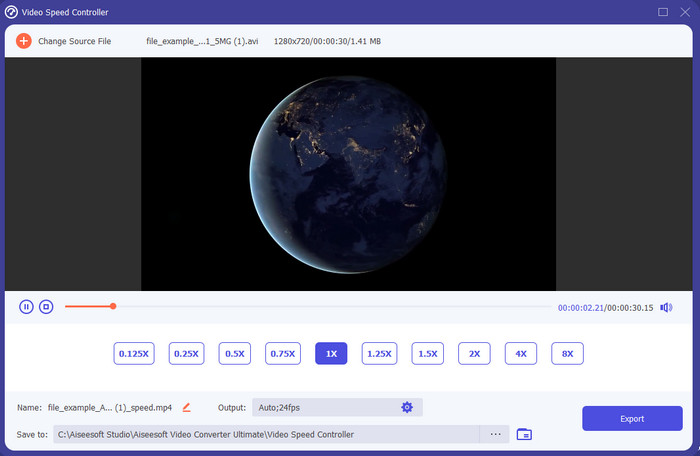
Ingin tahu mana di antara editor video gerak lambat yang paling bagus untuk mengubah pemutaran video Anda menjadi slow motion? Cobalah menggunakan Video Converter Ultimate karena alat ini bukan hanya yang terbaik, tetapi juga luar biasa. Alat ini sudah memiliki banyak fitur canggih yang akan Anda sukai meski Anda belum mahir mengedit. Bahkan jika Anda sudah profesional, software ini tetap menjadi pilihan terbaik apa pun level kemampuan editing Anda. Selain itu, Anda dapat dengan cepat menambahkan efek gerak lambat pada video tanpa harus membaca panduan atau menonton video tutorial. Sebab, alat ini memberikan instruksi yang jauh lebih sederhana dibandingkan alat di bawah ini. Meski alat ini berbayar, harganya tetap tidak terlalu tinggi. Jika Anda ingin tahu lebih banyak tentang alat ini, bacalah fitur-fitur utamanya di bawah ini.
Fitur Utama dari Video Converter Ultimate:
◆ Aplikasi pembuat video gerak lambat canggih dengan petunjuk dasar.
Antarmuka alat yang mudah digunakan.
Sesuaikan kecepatan video dengan mudah di Pengontrol Kecepatan Video.
Mendukung lebih dari 200+ format video dan audio.
Dapat diunduh dan diakses di sistem operasi PC dan Mac.
Unduh GratisUntuk Windows 7 atau yang lebih baruUnduhan Aman
Unduh GratisUntuk MacOS 10.7 atau yang lebih baruUnduhan Aman
2. Satuan Waktu Kontinum Boris
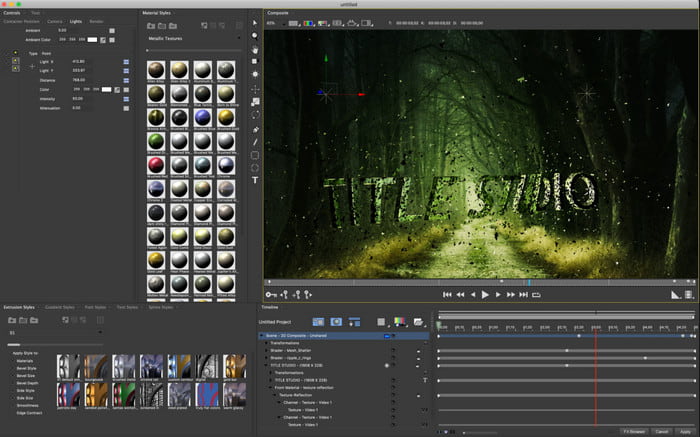
Boris Continuum Time Unit adalah pilihan terbaik jika Anda ingin memiliki aplikasi pembuat video gerak lambat yang benar-benar tangguh. Tidak ada alat lain yang dapat menandingi kemampuan yang diberikan alat ini untuk menghasilkan output profesional. Selain itu, alat ini memiliki fitur pengeditan sangat detail yang mungkin ingin Anda coba. Meskipun alat ini lebih unggul dibandingkan alat-alat lain, harganya benar-benar sangat mahal. Juga, jika Anda ingin mencoba menggunakan alat ini, Anda harus memiliki unit desktop dengan spesifikasi tinggi karena Anda tidak akan bisa menjalankannya di desktop versi lama.
Pro
- Alat terbaik untuk digunakan untuk melakukan pengeditan berat.
- Ini kompatibel dengan semua platform.
- Antarmuka alat ini lebih mirip alat pro.
Kontra
- Perangkat lunak ini adalah yang paling mahal dalam penulisan ini.
- Dibutuhkan unit sistem bermutu tinggi.
- Bukan pilihan terbaik untuk pemula yang tidak memiliki latar belakang pengeditan.
3. VEED.IO
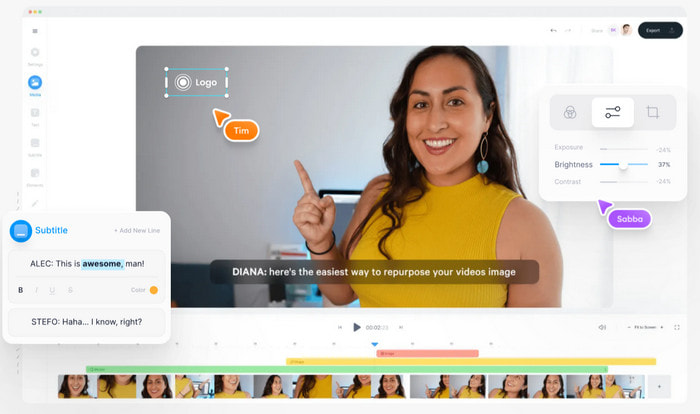
Jadi, jika Anda tidak ingin mengeluarkan uang sepeser pun dan memiliki koneksi internet, cobalah mengakses VEED.IO. Ini adalah software terbaik untuk membuat video gerak lambat secara online karena sederhana dan mudah diakses. Tampilan antarmuka secara keseluruhan sangat rapi dengan instruksi yang jelas, sehingga sangat praktis untuk semua orang. Namun, Anda hanya dapat mengunggah file berukuran kurang dari 50 MB dan jika ingin menambahkan file dengan ukuran lebih besar, alat ini akan meminta Anda untuk melakukan upgrade. Selain itu, jika Anda tidak membeli versi berbayar, harap maklum bahwa hasil akhir videonya akan memiliki watermark.
Pro
- Dapat diakses dengan mudah oleh siapa saja dengan konektivitas internet.
- Tidak ada iklan yang mengganggu di situs web.
- Mudah ditangani oleh para pemula dalam mengedit.
Kontra
- Fitur alat sangat terbatas pada versi gratis alat ini.
- tergantung internet. Jadi, jika internet Anda lambat, maka perkirakan kecepatan pengunggahan, pengunduhan, dan pengeditan lambat. Juga, Anda tidak dapat mengakses alat ini jika Anda tidak memiliki koneksi internet.
Bagian 2. 2 Aplikasi Video Gerak Lambat Terbaik di Android dan iOS
1 SloPro
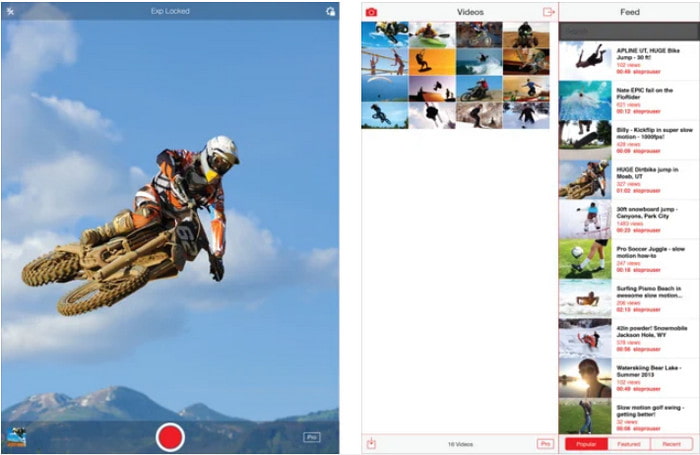
SloPro adalah aplikasi video gerak lambat terbaik yang dapat Anda unduh gratis di iOS. Aplikasi ini dapat memutar ulang video dalam gerak lambat hingga 500 sampai 1000 fps. Selain itu, Anda bisa memanipulasi video dari cepat ke gerak lambat atau sebaliknya. Walaupun aplikasi ini bisa menjadi pilihan yang bagus, tetap saja ada banyak kekurangan. Misalnya, hasil video akan tersimpan di galeri aplikasi, bukan di Camera Roll. Juga, jika Anda mencoba menggunakan 1000 fps, videonya menjadi bermasalah (buggy) menurut para pengguna yang sudah mencobanya. Meski begitu, aplikasi ini tetap bagus karena gratis digunakan dan proses memperlambat video bisa dilakukan dengan sangat mudah di sini.
Pro
- Pemutaran gerak lambat terbaik yang dapat Anda gunakan di iOS secara gratis.
- Itu sudah menerima peringkat yang adil dan bintang 3,3.
- Sederhana dan mudah digunakan.
Kontra
- Hasil akhir tidak langsung disimpan di galeri.
- Semua video yang disimpan di galeri SloPro adalah acak dan tidak dikategorikan dengan benar.
- Jika Anda menggunakan 1000 fps maka harapkan output video buggy.
2. Pembuat Video Gerak Lambat
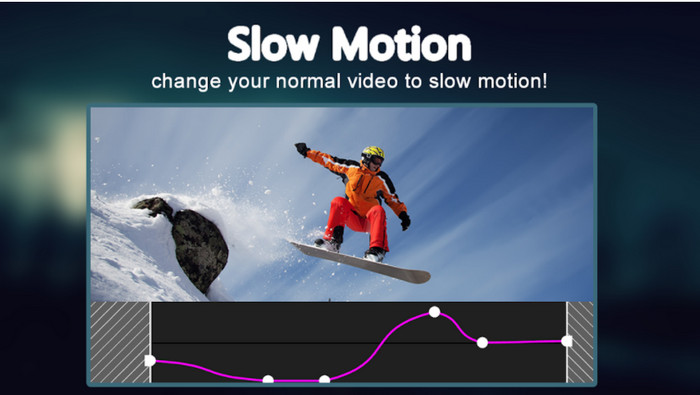
Salah satu pembuat video gerak lambat terbaik yang dapat Anda unduh gratis di ponsel Android adalah Slow Motion Video Maker. Dengan bantuan aplikasi ini, Anda dapat melakukan pemutaran cepat (fast forward) dan gerak lambat pada video dengan mudah. Namun, aplikasi ini memiliki banyak iklan mengganggu yang muncul tiba-tiba. Selain itu, pemutaran gerak lambat yang bisa Anda atur hanya sampai 0,5 saja. Tetapi secara keseluruhan, aplikasi ini tetap bagus untuk memperlambat video di Android, hanya saja iklannya sangat mengurangi kenyamanan penggunaan.
Pro
- Aplikasi ini gratis untuk diunduh di Play store.
- Sangat bagus digunakan untuk memperlambat video dengan lancar.
- Aplikasi ini mudah dikelola.
Kontra
- Ini memiliki banyak iklan sial muncul entah dari mana.
- Mengunduh video mungkin membutuhkan banyak waktu karena tidak mempercepat pemrosesan.
Bagian 3. FAQ tentang Pembuat Video Gerak Lambat
Apa peran FPS?
Ini digunakan untuk menghitung rangkaian bingkai berurutan yang ditampilkan di panel layar Anda. Hal ini paling sering terlihat di setiap motion capture seperti di video game, kamera, film, bahkan mata kita bisa melihat 30 sampai 60 fps.
Berapa tingkat FPS terbaik pada gerakan lambat?
FPS ideal yang dapat Anda gunakan untuk menonton video dalam pemutaran gerakan lambat adalah antara 120 atau 240 fps. Jadi, jika Anda ingin memiliki pemutaran gerakan lambat yang lebih detail, maka buatlah FPS lebih tinggi.
Bagaimana cara memutar video dalam pemutaran gerakan cepat?
Untuk mendapatkan gambaran tentang cara memutar video dalam kecepatan tinggi, cobalah klik tautan ini. Pelajari 5 alat terbaik yang dapat Anda gunakan untuk mempercepat video.
Kesimpulan
Sebagai kesimpulan, semua alat yang disajikan di sini adalah pembuat video gerak lambat terbaik yang bisa Anda temukan di web. Artikel ini juga telah membantu dan mempermudah pencarian Anda. Namun, ada satu alat khusus yang mungkin ingin Anda gunakan untuk membuat video Anda menjadi lebih baik, yaitu Video Converter Ultimate. Semua fitur canggih yang dapat Anda gunakan di sini benar-benar luar biasa dan tetap mudah digunakan. Selain itu, jika Anda masih ragu, cobalah mengunduh alat ini terlebih dahulu dan mencobanya sendiri.
-
 Aplikasi Android Terbaik untuk Memutar File MOV di Ponsel Anda
 Mengalami kesulitan karena rekaman MOV Anda tidak dapat diputar di android Anda? Jadi, dalam hal ini Anda sedang mencari pemutar MOV terbaik untuk android.
-
 5 Pemutar AVI Hebat untuk Menonton dan Memutar File AVI [Web & Desktop]
 Pelajari pemutar AVI yang dapat Anda gunakan untuk memutar dan menonton file .avi. Lanjutkan membaca di bawah ini dan pilih pemutar media mana yang lebih baik dari yang lain.
-
 Cara Efektif tentang Cara file MKV di Xbox One S 2021
 Temukan cara yang dapat membantu Anda memutar file MKV di Xbox One S menggunakan beberapa konverter terbaik.
