


 Video Converter Ultimate
 Perekam Layar
 Perbaikan Video
Pelajari 3 Cara Cara Mengkonversi VOB ke AVI Online dan Offline
File VOB digunakan untuk menyimpan aliran pribadi dan menggunakan kompresi video lossy seperti MPEG-2. Juga, mereka memiliki struktur yang hampir sama jika kita membandingkan keduanya. Namun, file .vob memiliki batasan dan spesifikasi bahkan sebelum Anda dapat menggunakannya. Dan karena itu Anda tidak dapat dengan mudah memutar file VOB di pemutar media lokal Anda. Jadi sekarang, untuk menghemat waktu Anda mencari cara membukanya, kami sarankan Anda perlu mengonversinya dengan memilih konverter di bawah ini. Dalam hal ini, kami mempersembahkan kepada Anda konverter terbaik yang dapat kami buat dan pelajari cara mengonversi VOB ke AVI online atau offline dengan alat yang ada dalam daftar.
Bagian 1. Bagaimana Mengonversi VOB ke AVI Online
Jika Anda memiliki anggaran terbatas, kami menyarankan Anda menggunakan alat gratis. Setelah kami menelusuri internet, kami menemukan sebuah alat yang dikenal sebagai konverter online terbaik, yaitu FVC Free Video Converter. Selain itu, alat ini memberikan kemudahan bagi setiap pengguna yang pernah mencobanya, dan semuanya terkesan dengan kinerja alat ini. Jadi, jika Anda juga ingin terkesan dengan bagusnya konverter ini, cobalah mengubah file VOB ke format AVI dengan mengikuti langkah‑langkah di bawah ini.
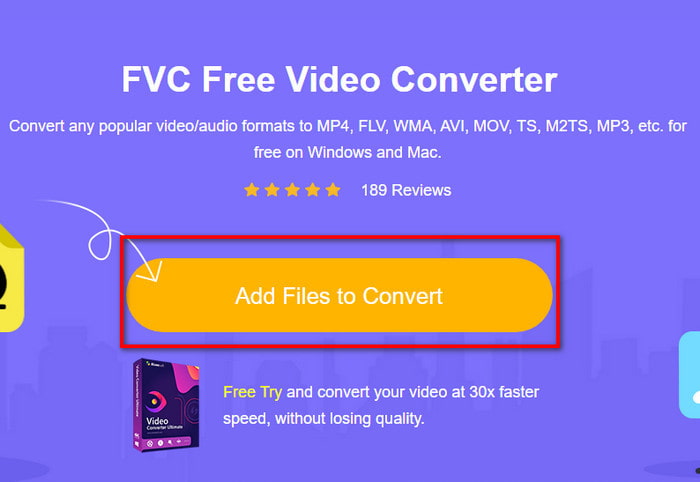
Langkah 1. Untuk langsung menuju situs web konverter, klik tautan ini.
Langkah 2. Di situs web, klik Add Files to Convert untuk mengunduh penginstal. Tidak perlu khawatir karena ukurannya hanya beberapa KB saja. Lalu klik lagi untuk meluncurkan alat dan cari file di folder Anda, jika sudah menemukannya klik Open untuk melanjutkan.
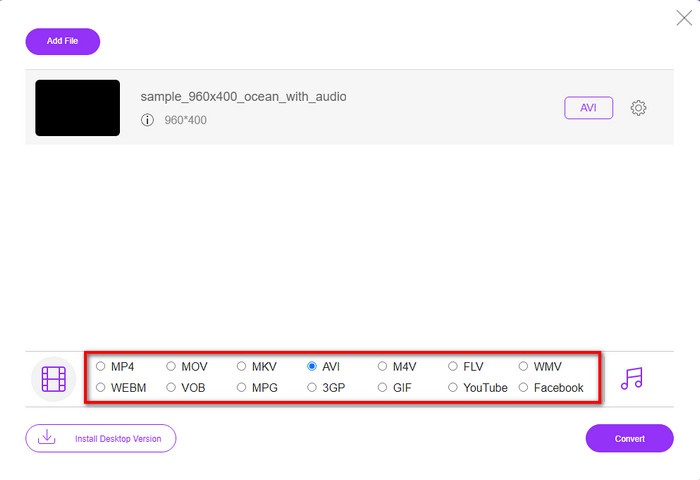
Langkah 3. Antarmuka baru FVC akan muncul di layar Anda. Pada daftar di bagian bawah, pilih format AVI atau format lain apa pun yang Anda inginkan sebagai hasil konversi.
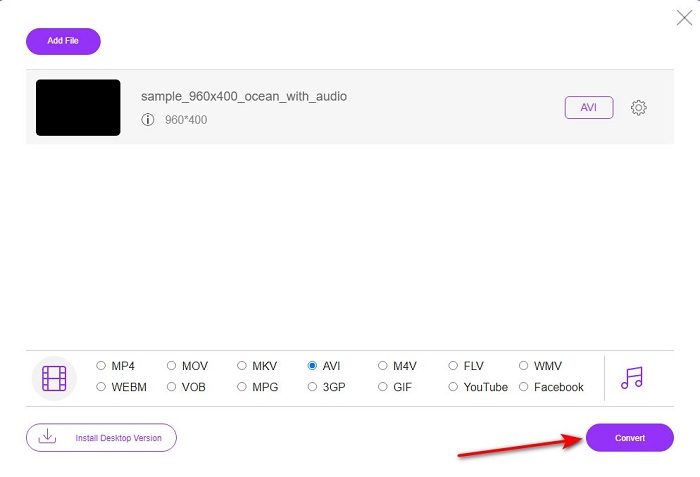
Langkah 4. Setelah memilih format, mulai proses mengonversi file dengan mengklik Convert.
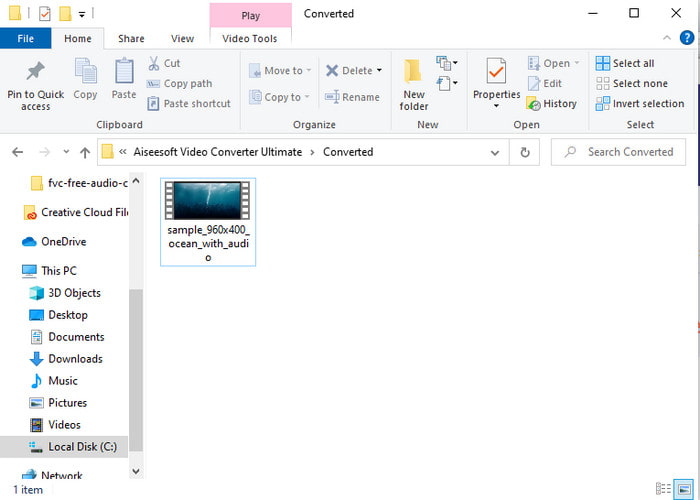
Langkah 5. Proses ini diperkirakan kurang dari satu menit. Jika proses konversi sudah selesai, sebuah folder akan muncul berisi file yang baru dikonversi.
Bagian 2. Bagaimana Mengkonversi VOB ke AVI di Windows dan Mac
Gunakan Konverter Fenomenal: FVC Video Converter Ultimate
Jika Anda ingin mengunduh konverter VOB ke AVI maka ini harus menjadi yang terbaik dari pilihan terbaik yang ingin Anda buat. FVC Video Converter Ultimate selalu sesuai dengan namanya sebagai alat pamungkas yang menyelesaikan setiap situasi pamungkas yang dapat Anda hadapi, terutama dalam mengonversi. Perangkat lunak ini jauh berbeda dari dua alat yang disebutkan. Mungkin Anda berpikir mengapa, dan itu hanya karena ini sangat cocok untuk siapa saja, baik Anda seorang profesional atau pemula. Performa keseluruhan yang kami alami ketika kami mencoba alat ini sudah luar biasa dan kami terkesan betapa cepatnya konversi dapat dilakukan. Dan sekarang, jika Anda ingin mengalami konversi yang fenomenal, yang sedang kita bicarakan, ikuti langkah-langkah yang ditunjukkan di bawah ini.
Langkah 1. Sebelum Anda dapat menggunakannya, Anda perlu mengunduhnya terlebih dahulu. Setelah pengunduhan selesai, instal, lakukan pengaturan awal, lalu klik Start Now.
Unduh GratisUntuk Windows 7 atau yang lebih baruUnduhan Aman
Unduh GratisUntuk MacOS 10.7 atau yang lebih baruUnduhan Aman
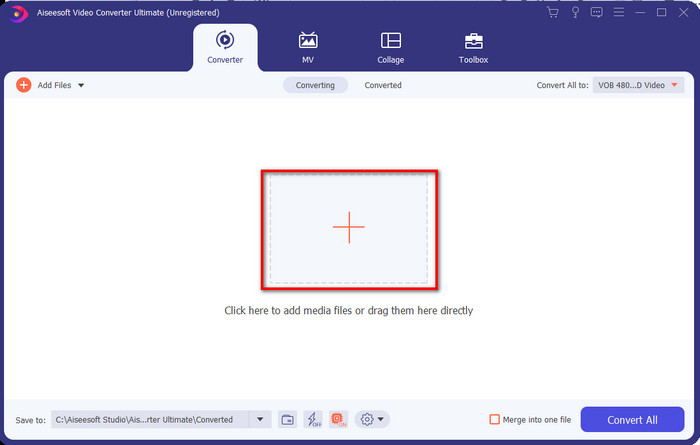
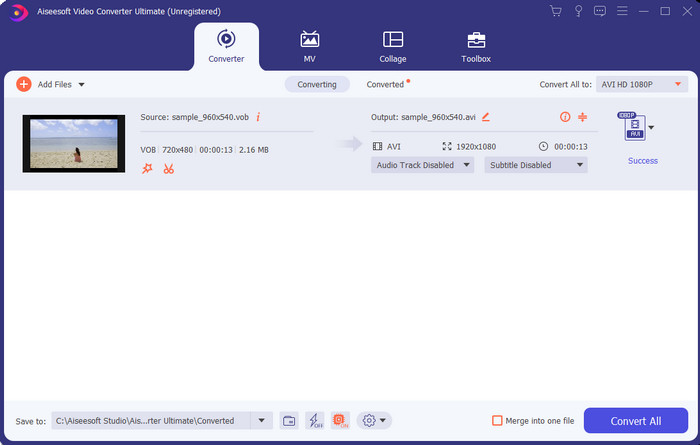
Langkah 2. Setelah instalasi selesai, buka perangkat lunaknya. Kemudian sebuah antarmuka seperti ini akan muncul di layar Anda. Di bagian tengah antarmuka klik tombol + dan sebuah folder akan muncul di layar. Klik Open untuk melanjutkan ke langkah berikutnya.
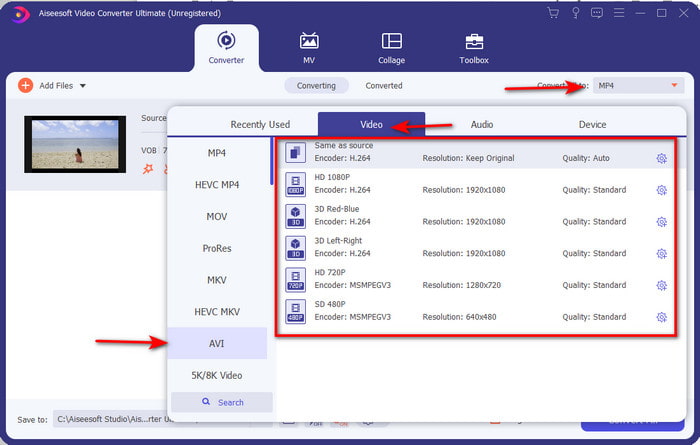
Langkah 3. Klik tombol Convert All di sisi kiri atas antarmuka dan pilih format AVI dari daftar kategori video.
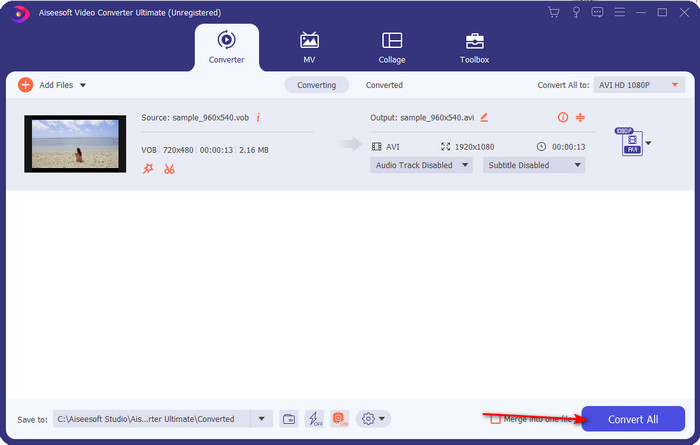
Langkah 4. Jika sudah selesai memilih format, tekan Convert All untuk memulai konversi.
Langkah 5. Anda tidak perlu khawatir harus menunggu terlalu lama karena proses ini hanya memakan waktu beberapa detik. Setelah itu, sebuah folder akan otomatis terbuka di layar Anda berisi file media hasil konversi yang baru saja Anda buat. Lalu klik file tersebut untuk menonton dan menikmati versi terbaru file .vob Anda.
Gunakan Alat Gratis: HandBrake
Jika Anda mencari alat gratis, maka HandBrake bisa membantu, dan tidak memerlukan koneksi internet untuk berfungsi, sama seperti FVC Video Converter Ultimate. Selain itu, alat ini gratis diunduh dan digunakan oleh siapa saja yang memiliki komputer di rumah, kantor, atau di mana pun. Namun, jika Anda mengunduh alat ini, Anda perlu mengunduh file terpisah bernama .NET 5.0 sebelum dapat menggunakannya. Beberapa pengguna merasa ini agak mengganggu karena setelah mengunduh alatnya, Anda masih harus mengunduh file lain lagi. Namun, jika Anda ingin melakukan proses konversi yang efektif dan gratis, cobalah gunakan HandBrake untuk mengonversi VOB ke AVI dan ikuti langkah‑langkah di bawah ini.
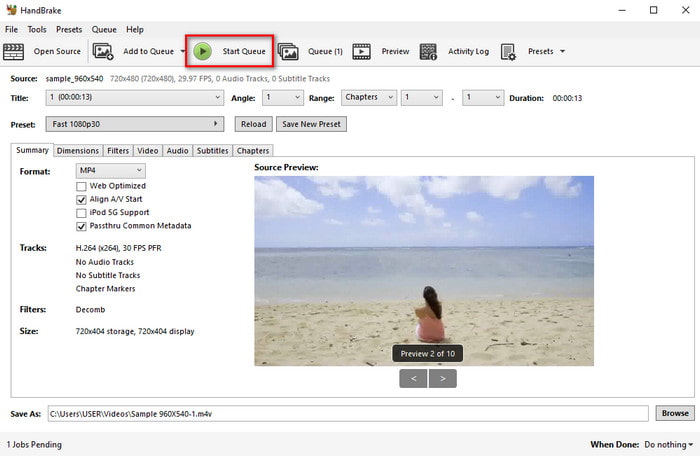
Langkah 1. Instal alat ini terlebih dahulu di drive komputer Anda.
Langkah 2. Klik File dan cari file .vob di folder Anda.
Langkah 3. Klik Format dan pilih dari daftar yang tersedia, lalu klik Start Queue.
Bagian 3. Konverter Terbaik yang Digunakan untuk Mengonversi File VOB ke Format AVI
| Fitur | Pengonversi Video Gratis FVC | FVC Video Converter Ultimate | HandBrake |
| Mengonversi Format |  | | |
| Perangkat Keras & Akselerasi Konversi |  | | |
| Konektivitas Internet | | | |
| Penambah atau Pengeditan Video | | | |
| Program yang Didukung | Alat berbasis web | Alat berbasis desktop | Alat berbasis desktop |
Bagian 4. FAQ tentang VOB dan AVI
Apa saja file lain yang dapat berisi VOB?
VOB adalah format DVD multi-pleks dan karena itu dapat berisi tidak hanya video dan audio tetapi juga subtitle, konten navigasi, dan menu juga.
Mengapa saya tidak dapat memutar file VOB di pemutar media saya?
Salah satu alasan VOB tidak dapat diputar di pemutar media Anda adalah karena format ini hanya mendapat dukungan yang sangat terbatas pada pemutar media. Anda dapat klik di sini untuk mendapatkan pemutar VOB yang tersedia. Jika Anda masih mengalami masalah ini, salah satu solusi yang memungkinkan adalah mengonversinya dengan konverter yang telah disebutkan di atas.
Mengapa file VOB terlalu besar?
Satu-satunya alasan format ini begitu besar adalah karena berisi data berbeda yang seharusnya dimiliki DVD. Juga, kami tidak dapat mengabaikan kemungkinan durasi video. Atau klik di sini untuk mempelajari cara mengompresi file VOB.
Kesimpulan
Jadi sekarang, jika Anda ingin mengonversi file VOB maka dapat dilakukan dengan mudah dengan bantuan alat yang tersedia di atas. Selain itu, FVC Video Converter Ultimate adalah konverter yang sangat menonjol di antara alat online dan offline lainnya yang disebutkan. Karena Anda dapat mengonversi VOB ke AVI di Windows dan bahkan di Mac dengan mudah. Jika Anda masih tidak tahu apa yang harus digunakan maka kami sangat menyarankan Anda harus mengunduh alat fenomenal untuk mengalami keluaran eksplisit dan kagum.
-
 VOB ke MP4 - 3 Cara Mengonversi File VOB ke MP4 Secara Gratis dalam Massal
 Artikel ini memperkenalkan 3 konverter VOB ke MP4 gratis dan tutorial terkait. Anda dapat mengonversi file VOB ke MP4 secara gratis di Windows / Mac / online dengan mudah.
-
 Cara Terbaik untuk Mengonversi VOB ke FLV [Termasuk Gratis & Online]
 Ingin mengonversi file VOB ke file FLV? Anda dapat dengan mudah menyelesaikan tugas dengan konverter desktop atau online. Baca panduan ini dan pelajari cara mengubah VOB ke FLV dengan mudah dan cepat.
-
 Apa itu File VOB dan Cara Mengubah File VOB menjadi GIF Gratis
 Apakah Anda ingin tahu lebih banyak tentang file VOB dan cara membagikannya setelah di-rip? atau Mengapa Anda perlu mengonversi VOB ke GIF? Kemudian baca artikel ini dengan seksama.
