


 Video Converter Ultimate
 Perekam Layar
 Perbaikan Video
Proses Konversi Offline dan Online: Cara Terbaik untuk Mengonversi OGV ke FLV
Saat menggunakan video OGV, format kompresi video lossy ini dapat membuat Anda kesal karena gambar menjadi buram setelah dilakukan penyesuaian. Namun, keadaan akan membaik jika Anda mengonversi OGV ke format FLV terlebih dahulu sebelum membagikannya secara online; tantangan utamanya hanyalah menemukan program konverter video yang mudah digunakan namun tetap bertenaga. Untungnya, kami memiliki yang terbaik untuk penggunaan offline dan online agar Anda dapat dengan mudah mengonversi OGV ke FLV. Cukup ikuti langkah-langkah yang disajikan dalam artikel ini demi kenyamanan Anda.

Bagian 1. Cara Mengonversi OGV ke FLV dengan Mudah [Offline]
Sejujurnya, ada banyak konverter video yang tersedia secara online, tetapi hanya sedikit yang dapat mendukung konversi OGV. Karena format tersebut tidak umum bagi kebanyakan penonton video, para pengembang konverter tidak terlalu memperhatikan untuk menyertakannya dalam dukungan format file mereka. Untuk alasan inilah Video Converter Ultimate menjadi sangat berguna. Perangkat ini sepenuhnya mendukung input OGV dan memungkinkan Anda mengonversi file video OGV ke format FLV dengan cepat. Perlu juga dicatat bahwa perangkat ini dapat mengubah video OGV Anda sekaligus mengeditnya dengan berbagai alat praktis. Semua yang Anda butuhkan ada di Video Converter Ultimate. Karena itu, kami menyediakan langkah-langkah paling sederhana untuk Anda ikuti:
Langkah 1: Sebelum Anda dapat menggunakan perangkat lunak ini, Anda harus menginstalnya terlebih dahulu di desktop. Anda dapat melakukannya dengan mengklik salah satu tombol Unduh Gratis di bawah ini, sesuai dengan sistem operasi yang Anda gunakan. Tunggu hingga file .exe atau .dmg selesai diunduh, dan setelah selesai, buka file tersebut untuk memulai proses instalasi. Terakhir, Anda dapat meluncurkan perangkat lunak segera setelah selesai dengan mengklik Mulai Sekarang.
Unduh GratisUntuk Windows 7 atau yang lebih baruUnduhan Aman
Unduh GratisUntuk MacOS 10.7 atau yang lebih baruUnduhan Aman
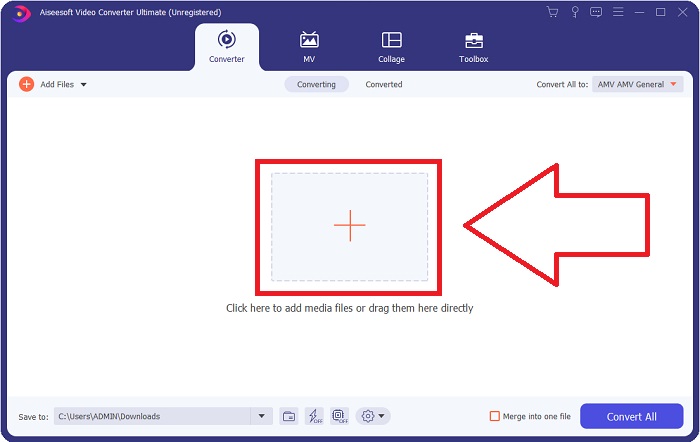
Langkah 2: Setelah jendela muncul, Anda akan melihat antarmuka dengan tombol + di tengah. Untuk mengimpor file video yang ingin Anda konversi, klik tombol tersebut atau seret dan jatuhkan langsung file ke dalam program.
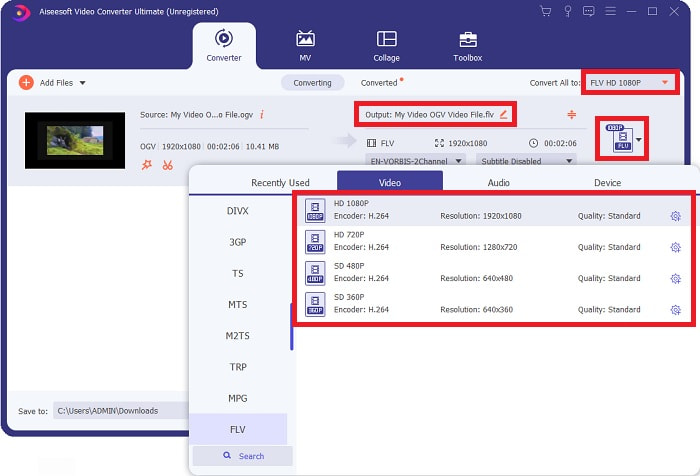
Langkah 3: Di bagian kanan, terlihat format file saat ini dari video Anda. Klik bagian tersebut, dan semua format yang dapat Anda pilih akan ditampilkan. Dalam hal ini, gulir ke bawah dan pilih FLV, atau Anda bisa langsung mencarinya di bilah pencarian di bawah. Sekarang, di sisi kanan tab, Anda juga dapat memilih kualitas video yang Anda inginkan untuk file hasil konversi.
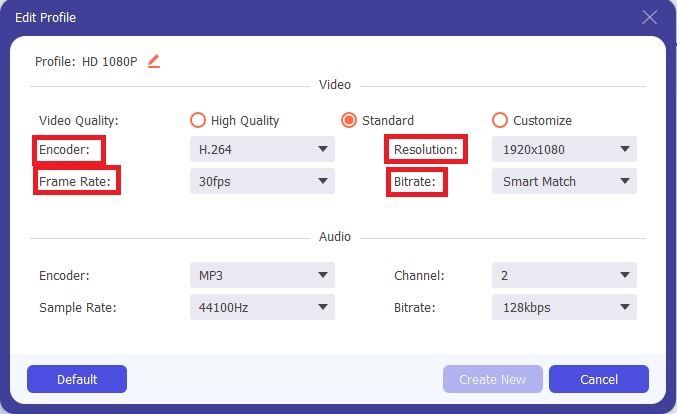
Langkah 4: Jika Anda mencari lebih banyak opsi, Anda dapat menemukannya dengan mengklik ikon roda gigi di sebelah kualitas video yang Anda pilih. Dengan ini, Anda dapat mengedit lebih lanjut resolusi video dan opsi lain seperti frame rate, sample rate, bitrate, dan encoder. Setelah puas, cukup klik tombol Buat Baru di pojok kanan bawah untuk menyimpan perubahan.
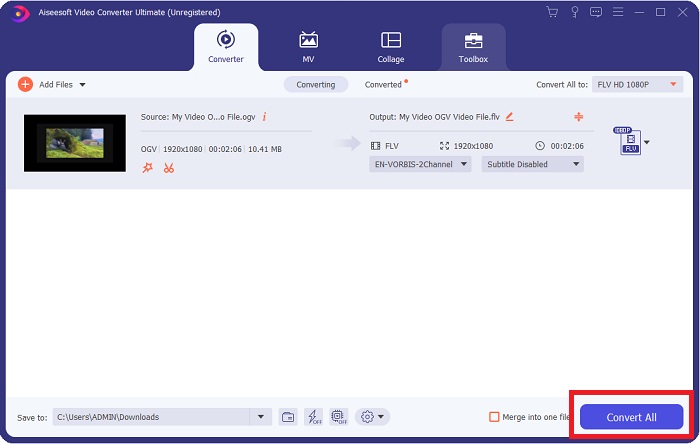
Langkah 5: Setelah selesai dengan semua penyesuaian, Anda dapat memulai proses konversi dengan benar dengan mengklik tombol Konversi Semua di pojok kanan bawah dan menunggu hingga proses selesai.
Bagian 2. Metode Lain yang Tersedia untuk Mengonversi OGV ke FLV [Online]
Jika waktu tidak memungkinkan dan Anda perlu mengonversi file OGV ke FLV secepat mungkin, Anda tidak perlu khawatir karena kami tetap menyediakan solusinya. Anda dapat menggunakan versi online dari perangkat lunak tersebut yang tetap memberikan kenyamanan maksimal dengan proses konversi yang lancar. FVC Free Video Converter Online adalah alat web yang dapat dengan mudah mengubah file OGV menjadi FLV dan tetap menawarkan opsi resolusi serta kualitas audio yang sama. Untuk menggunakannya, berikut langkah-langkah yang perlu Anda ikuti:
Langkah 1: Klik tautan ini, dan Anda akan diarahkan ke konverter online tersebut. Di tengah halaman, terdapat tombol bertuliskan Tambah File untuk Dikonversi. Anda harus mengkliknya untuk mengunduh peluncur yang diperlukan untuk mengimpor file video yang ingin Anda konversi.
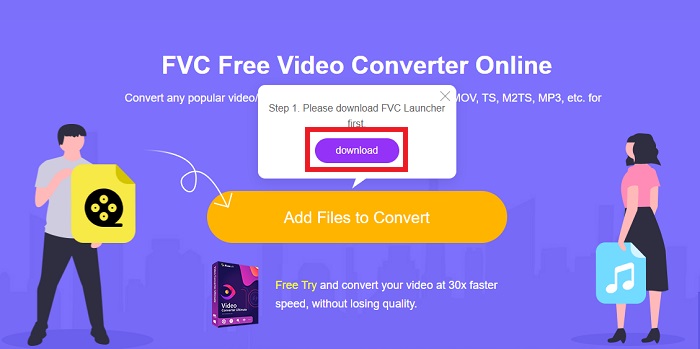
Langkah 2: Setelah selesai, Anda dapat mengunggah file dengan mengklik kembali tombol tersebut. Sebuah antarmuka akan muncul jika unggahan berhasil. Dari sana, Anda dapat memilih FLV di antara format lain yang ditawarkan di bagian bawah jendela.
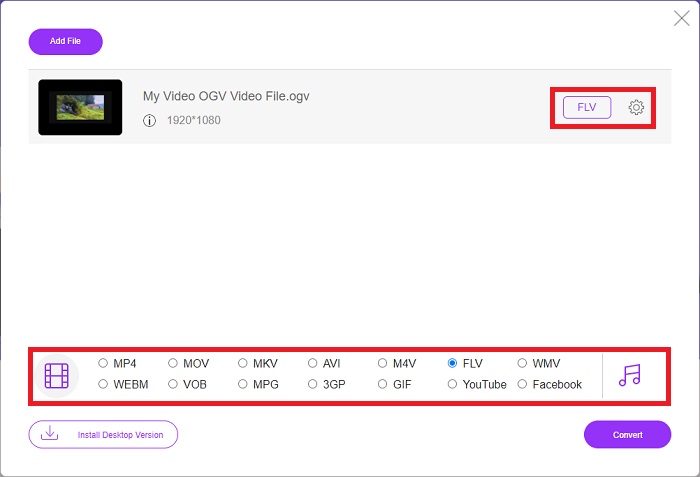
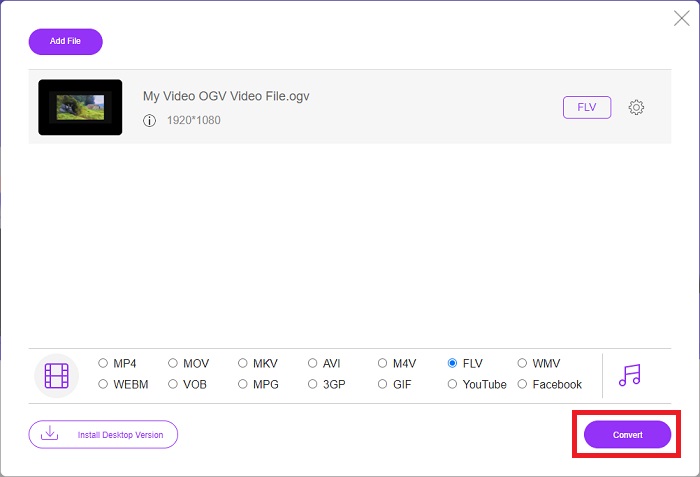
Langkah 3: Serupa dengan sebelumnya, Anda juga dapat menemukan ikon roda gigi di sisi paling kanan yang memungkinkan Anda mengedit video lebih lanjut. Dengan mengkliknya, Anda dapat menemukan pengaturan video dan audio untuk mengedit encoder, resolusi, frame rate, dan lainnya. Klik OK dan klik tombol Konversi di pojok kanan bawah untuk memulai proses konversi.
Bagian 3. Pengetahuan yang Diperluas Tentang OGV dan FLV
Jika Anda ingin tahu lebih banyak tentang kedua file yang dibandingkan, di sini kami menyediakan semua informasi yang diperlukan yang mungkin ingin Anda baca:
Metode penyandian video Ogg Vorbis biasanya dapat ditautkan dengan file yang memiliki ekstensi file .ogv. Ogg Vorbis adalah format kompresi audio sumber terbuka dan tidak dipatenkan. Format wadah untuk file audio, video, dan informasi dikenal sebagai Ogg, sedangkan teknologi kompresi audio dinamai Vorbis. Format file OGV adalah wadah untuk file video. Aliran video yang ditautkan dengan satu atau lebih codec video, seperti Theora dan DivX, dapat ditemukan di file OGV. Pengguna dapat memutar materi yang direkam di dalam file konten pada beberapa perangkat media menggunakan file-file ini.
Di sisi lain, file video yang disimpan dalam format wadah Adobe Flash Video (FLV) adalah file FLV. Adobe Flash Player terutama menggunakannya untuk menawarkan konten video online seperti film dan episode TV. Juga, penting untuk dicatat bahwa ini adalah format terbuka yang didukung oleh berbagai aplikasi non-Adobe/Macromedia. Untuk perbandingan yang lebih spesifik dari keduanya, kami membuat tabel khusus untuk Anda.
| Ogg Vorbis (OGV) | Video Flash Adobe (FLV) | |
| Ekstensi File | .ogv | .flv |
| Pengembang | Yayasan Xiph.Org | Adobe Systems Incorporated |
| Program Pendukung | MPlayer Klasik, VLC Media Player, Jriver Media Center, MPUI | RealPlayer, Apple QuickTime Player, Mplayer, VLC Media Player |
| Keuntungan | OGG memiliki keuntungan karena bebas paten, diakui secara umum, dan didukung secara native oleh sebagian besar browser. Akibatnya, jika Anda ingin mengunggah film ke situs web Anda, format ini adalah pilihan yang baik. | Kelebihan Flash adalah dapat membantu situs web yang ingin menggabungkan konten gerak dan interaktif. Prosedurnya mudah dan, pada akhirnya, mungkin memiliki dampak yang signifikan. Semua orang juga menggunakan Flash untuk game dasar di masa jayanya. |
| Kekurangan | Meskipun digunakan secara luas, format video OGG memiliki beberapa kelemahan. Safari dan Internet Explorer, misalnya, hanya mendukung sebagian; dengan demikian, pengguna mungkin tidak melihat video Anda dengan benar di browser ini. | Kerugiannya, tentu saja, adalah format FLV menjadi lebih tidak populer dalam beberapa tahun terakhir. Pembuatan konten FLV mungkin memakan waktu lama dan mahal. Kerugian lainnya adalah materi Flash tidak dapat diputar di perangkat iOS, sangat membatasi kemampuannya untuk menarik pengikut baru. |
Bagian 4. FAQ tentang Konversi OGV dan FLV
Apakah OGG dan OGV sama?
Ini adalah subset yang cocok dari video/Ogg jenis media video Ogg dengan ekstensi file. ogv. Aplikasi Ogg lainnya menggunakan ekstensi file. ogv dengan jenis media application/ogg Since. ogx adalah superset dari video/ogg.
Apakah kualitas FLV lebih baik dari MP4?
MP4 dikatakan memiliki pengkodean digital video dan audio berkualitas tinggi. Pendapat publik tentang FLV tidak terlalu jelas, meskipun kelebihan dan kekurangan FLV jarang berfokus pada kualitas format file itu sendiri. Dengan tingkat kompresi yang lebih tinggi, MP4 memiliki kehilangan kualitas yang lebih sedikit. Di sini Anda dapat melihat cara mengonversi file FLV ke MP4.
Apakah FLV lossless atau lossy seperti OGV?
Format file FLV untuk Flash Video mendukung dua versi codec berbagi layar (Video layar), yang merupakan metode penyandian screencast. Format ini didasarkan pada ubin bitmap dan hilang ketika kedalaman warna dikurangi dan dikompresi menggunakan Zlib.
Kesimpulan
Terlepas dari berapa banyak waktu yang Anda miliki dalam mengonversi file video Anda, perangkat lunak dan perangkat online-nya akan memberikan yang paling nyaman bagi Anda. Jadi, singkatnya, Video Convert Ultimate dan Free Video Converter adalah hal pertama yang harus Anda pikirkan ketika berbicara tentang konversi video agar Anda dapat menghemat waktu menjelajah internet dan menemukan yang terbaik. Di sini, kami memberikan yang terbaik untuk Anda.
-
 Cara Terbaik untuk Mengonversi VOB ke FLV [Termasuk Gratis & Online]
 Ingin mengonversi file VOB ke file FLV? Anda dapat dengan mudah menyelesaikan tugas dengan konverter desktop atau online. Baca panduan ini dan pelajari cara mengubah VOB ke FLV dengan mudah dan cepat.
-
 4 Aplikasi Konverter RMVB ke FLV Gratis Terbaik di Desktop atau Online
 Artikel ini akan memberi tahu Anda perangkat lunak dan aplikasi web konverter RMVB ke FLV terbaik yang dapat mengonversi file RMVB (RealMedia Variable Bitrate) ke video FLV.
-
 Cara Mengompres File OGV tanpa Kehilangan Kualitas
 Tidak dapat mengirim file OGV besar ke orang lain? Nah, artikel ini akan memperkenalkan Anda 2 cara mudah untuk membantu Anda mengompres file OGV dengan mudah.
