


 Video Converter Ultimate
 Perekam Layar
 Perbaikan Video
5 Cara Cepat & Mudah Mengubah MKV ke FLV Gratis [Online & Offline]
Tidak bisa membagikan file MKV Anda di internet karena ukurannya terlalu besar? Mengapa tidak mengonversinya saja, bukan memampatkannya berlebihan hingga kualitasnya menurun? Masalah ini bisa teratasi jika Anda membaca penjelasan di bawah ini sebelum mengirimkannya. Tidak perlu menghabiskan satu jam untuk membaca artikel ini, jadi tanpa berlama-lama lagi, mari kita cari tahu enam konverter yang bisa Anda gunakan untuk mengonversi MKV ke FLV.

Bagian 1. Konverter MKV ke FLV Terbaik untuk Diunduh
FVC Video Converter Ultimate dapat membantu Anda mengubah MKV ke FLV dengan mudah dan efektif tanpa perlu bersusah payah. Konverter fenomenal ini sangat berbeda dari konverter lain dalam daftar ini maupun konverter lain yang sudah atau belum pernah Anda gunakan. Ini adalah pengode dan pengawas kode (codec) kelas atas yang dapat Anda unduh di PC atau Mac Anda, dan bekerja dengan sangat mulus secara offline bahkan jika Anda tidak memiliki desktop berspesifikasi tinggi.

FVC Video Converter Ultimate
4.987.355+ Unduhan- Konversi MKV ke FLV, AVI, MP4, MOV, atau ke dalam 200+ format yang tersedia di Windows & Mac.
- Jadikan format MKV Anda kompatibel dengan semua desktop dan perangkat.
- Itu dapat melakukan konversi batch untuk format MKV Anda atau format lain.
- Konverter anti-bodoh untuk digunakan oleh siapa saja.
- Mendukung output definisi tinggi dan bahkan kualitas video hingga 4k.
Unduh GratisUntuk Windows 7 atau yang lebih baruUnduhan Aman
Unduh GratisUntuk MacOS 10.7 atau yang lebih baruUnduhan Aman
Langkah-langkah Mengonversi MKV ke FLV dengan FVC Video Converter Ultimate
Langkah 1. Unduh aplikasi ke penyimpanan Anda, lalu ikuti proses instalasinya.
Unduh GratisUntuk Windows 7 atau yang lebih baruUnduhan Aman
Unduh GratisUntuk MacOS 10.7 atau yang lebih baruUnduhan Aman
Langkah 2. Setelah instalasi selesai, buka aplikasi untuk menambahkan file MKV; Anda dapat drag-drop file ke antarmuka atau klik tombol Add Files.
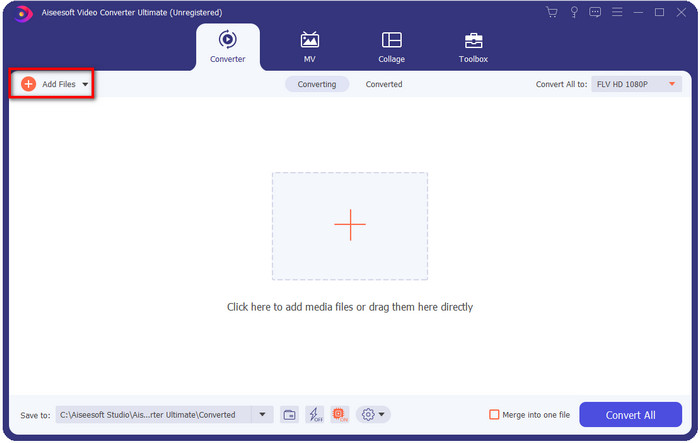
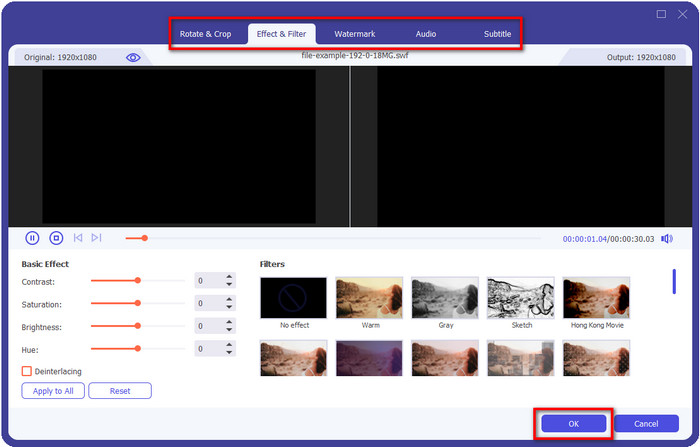
Jika Anda ingin mengedit file MKV sebelum mengonversinya, Anda dapat mengeklik tombol wand untuk menambahkan sentuhan “ajaib” pada hasil Anda, seperti menambah Efek, Crop, menambah Subtitle, dan lainnya. Untuk menyimpan efek yang telah Anda tambahkan ke video, klik OK.
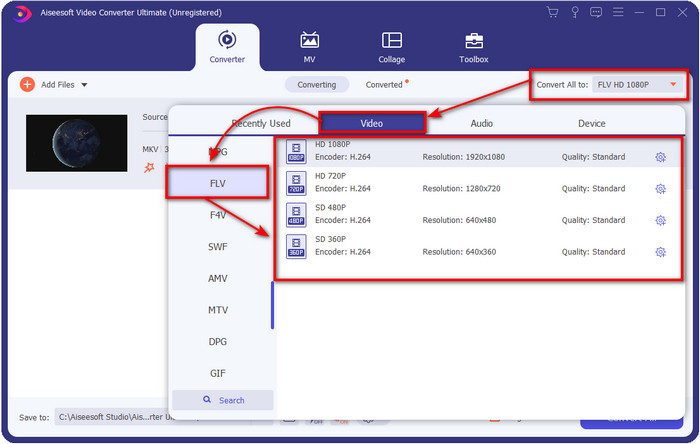
Langkah 3. Klik tombol drop-down dan pilih format FLV pada daftar setelan.
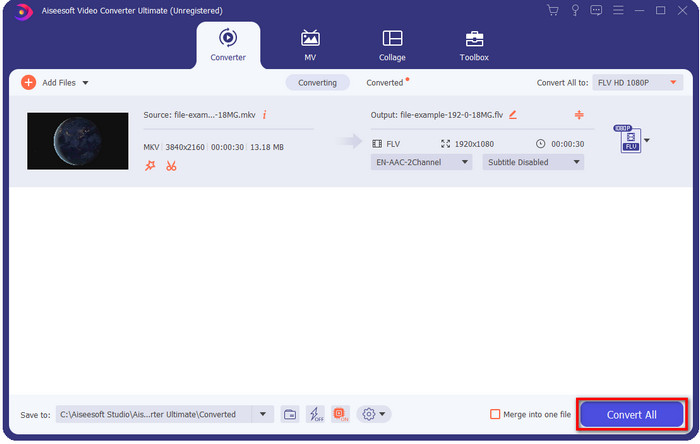
Langkah 4. Klik tombol Convert All untuk mulai mengubah MKV ke FLV secara gratis. Sebuah folder akan muncul setelah proses selesai dengan file FLV yang baru.
Bagian 2. 4 Konverter MKV ke FLV Berbasis Web Terbaik
1. Konverter Video Online Gratis FVC
FVC Free Video Converter Online menghadirkan konverter MKV ke FLV online gratis yang sederhana namun mengesankan dan tersedia di semua browser. Alat ini juga mendukung berbagai format berskala menengah yang dapat Anda pilih dan unggah. Meskipun alat ini bergantung pada koneksi internet, proses konversi dan pengunggahan file di sini lebih mudah dan cepat. Ingin tahu cara menggunakannya? Ikuti langkah-langkah di bawah ini.
Pro
- Ini tersedia untuk digunakan oleh siapa saja dengan internet.
- Antarmuka yang ramah pengguna dan mudah dipahami.
- Tidak ada batasan untuk ukuran file.
- Pengaturan lanjutan untuk video dan audio.
Kontra
- Format skala menengah.
Langkah 1. Untuk membuka konverter online, klik tautan ini.
Langkah 2. Tekan tombol Add Files to Convert untuk menambahkan file dari folder di komputer Anda, lalu klik Open.
Unduh Versi Desktop untuk mengonversi file secara batch.
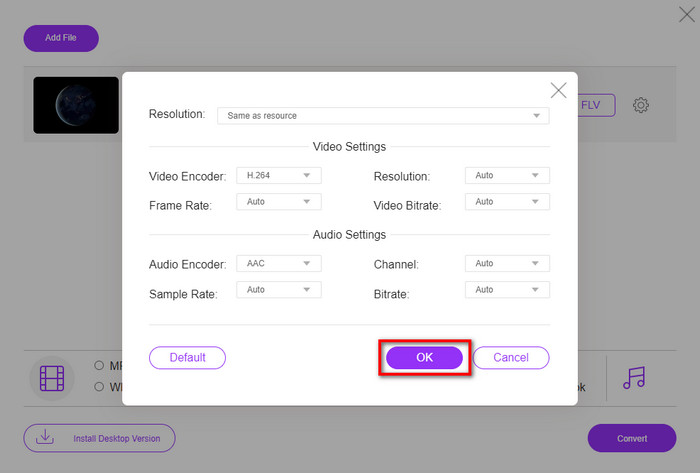
Meskipun Anda tidak bisa mengedit video di sini, Anda bisa mengubah pengaturan video dan audio dengan mengeklik tombol gear.
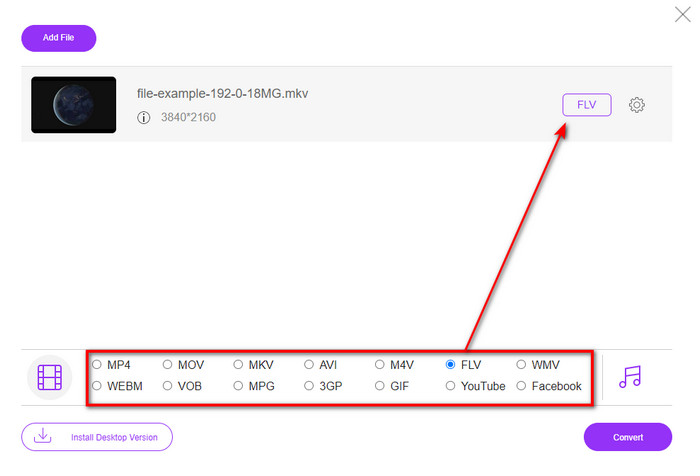
Langkah 3. Pilih format FLV di bawah daftar setelan.
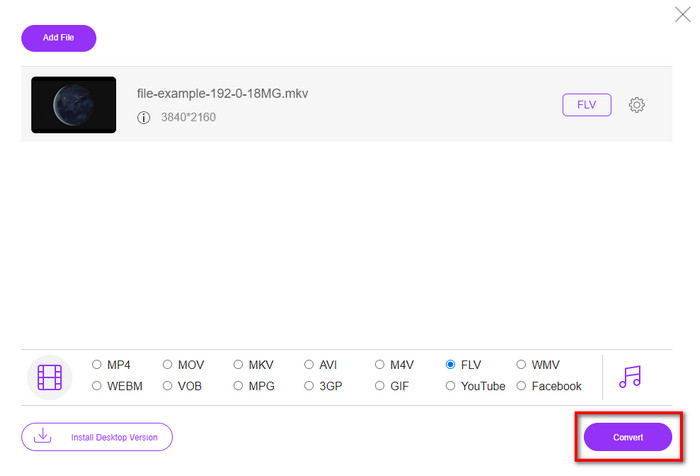
Langkah 4. Klik Convert untuk memulai proses konversi.
2. konverter m
Salah satu konverter MKV ke FLV online yang paling aman yang bisa Anda gunakan adalah Mconverter. Selain mengonversi format video dan audio, Anda juga dapat mengonversi gambar, arsip, dokumen, dan banyak lagi format media lainnya di sini. Walaupun konverter ini gratis digunakan, ada batasan ukuran untuk setiap file yang bisa Anda masukkan.
Pro
- Konversi video, audio, dokumen, dan lainnya secara online.
- Ini mendukung banyak konversi.
- Mudah digunakan.
Kontra
- Ukuran file tidak boleh melebihi 200MB.
- Beberapa iklan saat mengonversi file.
Langkah 1. Buka Mconverter di browser Anda, seret file .mkv, lalu jatuhkan ke dalam kotak.
Langkah 2. Klik format FLV, dan proses akan otomatis dimulai.
Langkah 3. Setelah selesai, file akan otomatis terunduh ke penyimpanan Anda.
3. Freeconvert.com
Freeconvert.com akan membantu Anda mengonversi MKV ke FLV secara online dan gratis. Konverter web ini memiliki antarmuka yang mudah dipahami sehingga siapa saja bisa menggunakannya. Namun, konverter online ini hanya mendukung format berskala kecil yang dapat Anda pilih, dan ada cukup banyak iklan di antarmukanya.
Langkah 1. Cari Freeconvert.com di mesin pencari Anda.
Langkah 2. Klik Choose File untuk mengunggah file .mkv dari folder komputer Anda, tekan tombol drop-down dan pilih format FLV.
Langkah 3. Klik Convert FLV untuk mulai mengonversi, dan untuk mengunduhnya, klik Download FLV.
Pro
- Konverter online gratis yang dapat Anda gunakan.
- Konverter web yang aman dan sederhana.
- Ini mendukung file 1GB untuk dikonversi.
Kontra
- Ini mendukung format skala kecil.
- Proses konversi dan pengunduhan akan memakan banyak waktu Anda.
4. Pengonversi Video Online Movavi
Movavi Online Video Converter adalah salah satu konverter yang direkomendasikan untuk mengonversi MKV ke FLV secara online. Ini adalah versi web gratis dari Movavi Video Converter yang digunakan banyak pengguna di seluruh web karena efisiensi yang ditawarkannya dan tampilan profesionalnya.
Langkah 1. Buka browser favorit Anda dan cari situs web Movavi.
Langkah 2. Tekan +Add Your Media untuk menambahkan file yang ingin Anda konversi. Klik tombol drop-down dan tekan Video; temukan format FLV dan klik.
Langkah 3. Tekan Convert untuk memulai proses konversi.
Pro
- Tidak ada antarmuka web iklan.
- Konverter langsung dapat digunakan siapa saja.
- Ini mendukung format skala menengah.
Kontra
- Proses konversi format membutuhkan waktu lebih lama.
- Bergantung pada internet seperti konverter web lainnya.
Bagian 3. Bagan Perbandingan
| Fitur | FVC Video Converter Ultimate | Pengonversi Video Gratis FVC Online | mconverter | Freeconvert.com | Pengonversi Video Online Movavi |
| Mengubah Kemampuan Format |  | | | | |
| Ketergantungan internet |  | | | | |
| Konversi Batch | | | | | |
| Fitur Pengeditan Lanjutan | | | | | |
| Platform yang Tersedia | Alat Berbasis Desktop | Alat Berbasis Web | Alat Berbasis Web | Alat Berbasis Web | Alat Berbasis Web |
MKV vs.FLV
Format wadah multimedia Matroska, dirilis pada tahun 2002, adalah format sumber terbuka yang dapat mencakup sejumlah trek video, audio, gambar, dan subjudul. Jadi, Anda dapat menggunakannya untuk menyimpan klip video pendek, acara TV, dan film dengan mudah. Ini cukup populer untuk anime fan-subbbing.
Adobe Flash Player menggunakan FLV untuk mengirimkan konten video seperti film dan acara TV. Saat ini, Adobe tidak lagi mengembangkan pemutar dan merekomendasikan pengguna untuk menghapusnya karena alasan keamanan. Namun, Anda masih dapat menggunakan format FLV di banyak program non-Adobe/Macromedia.
Bagian 4. FAQ tentang Konversi MKV ke FLV
Mengapa file MKV terlalu besar?
Ada dua alasan utama mengapa file MKV berukuran sangat besar. Alasan pertama adalah karena format ini dapat menampung konten dan elemen tanpa batas untuk video, audio, dan metadata dalam satu file. Alasan kedua, jika durasi video Anda panjang, maka ukuran file ini juga akan ikut membesar. Namun, Anda bisa mengompres file MKV dengan bantuan kompresor MKV yang bisa Anda gunakan. Tetapi jika Anda menginginkan cara yang lebih mudah, sebaiknya pertimbangkan untuk mengonversi file MKV ke MP4, AVI, MOV, FLV, dan sebagainya.
Apakah MKV lebih baik daripada AVI?
MKV dan AVI hampir merupakan format yang serupa karena keduanya dapat memuat video definisi tinggi dengan ukuran file yang besar. Namun, kedua kontainer ini memiliki tujuan dan struktur yang berbeda sehingga menjadikannya unik. Sebagai contoh, format AVI adalah format yang tidak terkompresi yang dapat menampung konten video mentah dan sangat cocok untuk keperluan pemutaran. Format ini juga menjadi dasar pengembangan file MKV. Meskipun file MKV memiliki kompresor, konten dan elemennya jauh lebih banyak daripada yang dapat ditampung oleh AVI. Jadi, jika Anda ingin mempertahankan kualitas tinggi video Anda, pilihlah format MKV. Namun jika Anda menginginkan kompatibilitas yang lebih luas, maka AVI adalah pilihannya. Jika Anda ingin tahu cara mengonversi MKV ke AVI, klik tautan ini.
Apakah Handbrake menangani konversi MKV ke FLV?
Handbrake dapat menangani pekerjaan ini, tetapi konverter ini tidak mendukung program macOS dan Windows yang tidak 10 di atas.
Kesimpulan
Sebagai penutup, sekarang Anda sudah tahu cara mengonversi MKV ke FLV secara online dan offline. Alat-alat di atas bukan dipilih secara acak, melainkan kami pilih sesuai dengan preferensi pengguna. Dari hasil pencarian dan penelusuran kami, keenam alat ini terbukti paling baik dalam menjalankan tugasnya sebagai konverter. Namun, FVC Video Converter Ultimate melampaui ekspektasi kami sebagai sebuah konverter. Ingin tahu kemampuan lain dari konverter fenomenal ini? Kalau begitu, tunggu apa lagi? Anda harus segera mengunduhnya sekarang.
-
 MKV ke MOV - Cara Mengonversi MKV ke MOV
 Bagaimana cara saya mengonversi MKV ke MOV di Mac? Bisakah iMovie membaca MKV? Apa artinya format MOV? Posting ini memberi tahu 2 cara sederhana untuk membantu Anda mengonversi MKV ke MOV dengan konverter video online dan profesional gratis.
-
 Cara Mengonversi Video MKV ke GIF Animasi tanpa Photoshop/FFmpeg
 Setelah mengunduh dan menonton film MKV di komputer, Anda mungkin ingin berbagi momen indah dengan teman atau di Internet sebagai GIF. Pada artikel ini, Anda dapat mempelajari tentang 2 cara termudah untuk mengonversi MKV ke GIF.
-
 Tips dan Trik Cara Mengonversi File MKV ke MP3 [2025]
 Kesulitan memilih konverter yang tepat untuk MKV ke MP3? Kemudian lanjutkan membaca posting ini karena kami menyajikan solusi yang berbeda pada satu masalah.

