


 Video Converter Ultimate
 Perekam Layar
 Perbaikan Video
 Unduhan Aman
Cara Mengonversi MP4 ke M4A di Windows / Mac (Gratis & Online)
MP4 adalah format file yang tersebar luas yang digunakan dengan banyak stasiun dan pemutar video. File MP4 dapat menyimpan video, audio, dan konten lainnya. Sekarang, banyak orang lebih suka mendengarkan trek audio dari video MP4. Untuk menjaga kualitas, mengonversi MP4 ke M4A adalah ide bagus. M4A adalah singkatan dari MPEG 4 Audio. Sebagian besar program dapat memutar file M4A, termasuk iTunes, QuickTime, Windows Media Player, dan lainnya.

Anda mungkin ingin tahu bagaimana mengekstrak audio dari file MP4. Ada banyak cara untuk mengubah file MP4 menjadi file M4A. Lihat postingan ini untuk mengetahui cara mengonversi MP4 ke M4A agar bisa didengarkan nanti di perangkat seluler Anda.
Bagian 1. Cara Online Gratis Terbaik untuk Mengonversi MP4 ke M4A tanpa Penurunan Kualitas
FVC Free Online Video Converter adalah konverter file MP4 ke M4A gratis yang dapat mengonversi format MP4 tidak hanya ke M4A, tetapi juga ke format lain seperti MP3, WAV, M4R, WMA, AIFF, AC3, dan sebagainya. Alat ini memungkinkan Anda melakukan konversi batch sehingga Anda dapat mengonversi beberapa video MP4 menjadi M4A sekaligus. Selain itu, alat online gratis ini juga memungkinkan Anda mengonversi video MP4 ke MOV, AVI, FLV, dan format video lainnya.
Langkah 1. Buka https://www.free-videoconverter.net/free-online-video-converter/ di browser Anda. Klik tombol Add Files to Convert lalu unduh dan instal peluncurnya.

Langkah 2. Unggah video MP4 yang ingin Anda konversi, lalu klik Open untuk melanjutkan.
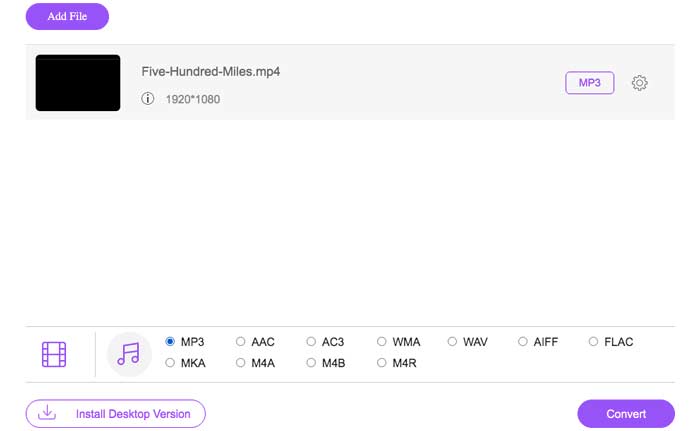
Langkah 3. Setelah mengunggah file video ke aplikasi ini, klik ikon Audio dan pilih format M4A sebagai format keluaran.
Langkah 4. Terakhir, klik tombol Convert di sudut kanan bawah. Tunggu beberapa saat, dan Anda akan mendapatkan audio M4A dari file MP4 tersebut.
Bagian 2. Bagaimana Mengkonversi MP4 ke M4A dengan Gratis Audio Converter
FVC Free Audio Converter adalah freeware yang memungkinkan Anda mengonversi file MP4 ke M4A dengan mudah. Itu mampu mengubah file video atau audio apa pun ke M4A, MP3, WAV, dll. Anda dapat mengunduh dan menginstalnya di PC Windows Anda untuk memulai konversi.
Unduh GratisUntuk Windows 7 atau yang lebih baruUnduhan Aman
Unduh GratisUntuk MacOS 10.7 atau yang lebih baruUnduhan Aman
Langkah 1. Luncurkan konverter audio ini di komputer Anda. Klik tombol Add File(s) untuk mengunggah file MP4 ke program ini.

Langkah 2. Temukan opsi Output formats dan pilih M4A sebagai format keluaran dari daftar tarik-turun.
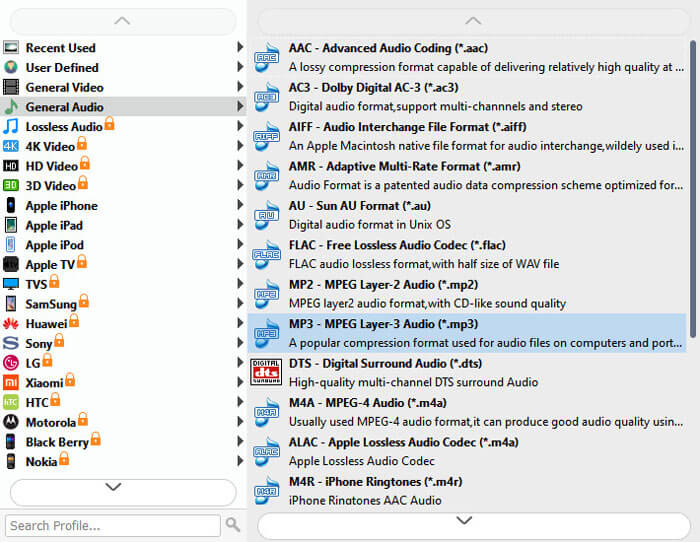
Langkah 3. Klik tombol Convert untuk mulai mengubah file MP4 menjadi M4A.
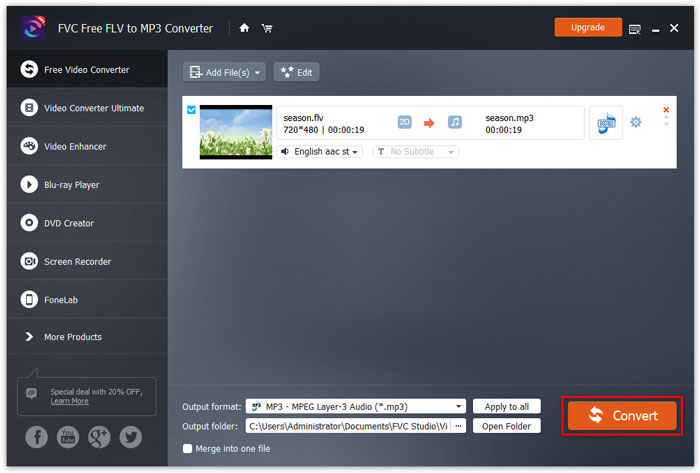
Selain M4A, Anda dapat menggunakannya untuk mengonversi MP4 ke MP3, AAC, atau format audio lainnya.
Bagian 3. Bagaimana Mengkonversi MP4 ke M4A Menggunakan iTunes
Untuk mengonversi MP4 ke M4A dengan iTunes untuk Windows atau Mac, Anda perlu mengubah pengaturan impor iTunes dan kemudian menggunakan opsi menu Konversi untuk membuat salinan M4A.
Langkah 1. Buka iTunes di PC Windows atau Mac Anda.
Langkah 2. Pilih Edit, lalu klik Preferences di bilah menu. Setelah itu, masuk ke tab General, dan klik Import Settings.
Langkah 3. Temukan dan klik menu di sebelah Import Using, lalu pilih format enkode yang ingin Anda gunakan untuk mengonversi video. Kemudian, klik OK.
Langkah 4. Pilih lagu-lagu di perpustakaan Anda yang ingin Anda konversi. Setelah itu, pilih File, lalu klik Create New Version, kemudian buat versi M4A.
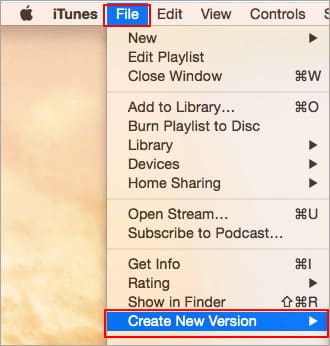
File audio yang dikonversi akan muncul di perpustakaan Anda di samping file asli.
Bagian 4. FAQ Konversi MP4 ke M4A
1. Apa itu file M4A?
File dengan ekstensi file M4A adalah file Audio MPEG-4. M4A sering ditemukan di Apple's iTunes Store sebagai format unduhan lagu.
2. Bagaimana cara membuka file M4A?
Program yang membuka file M4A termasuk iTunes, QuickTime, Windows Media Player, dll. Tablet dan ponsel Android, iPhone, iPad, dan iPod touch juga mendukung pemutaran file M4A.
3. Bagaimana cara menggabungkan file MP4 secara online?
FVC Free Online Video Merger dapat membantu Anda menggabungkan atau menyatukan berbagai format video MP4 maupun format video lainnya seperti MOV, AVI, FLV, dan banyak lagi secara online.
4. Dapatkah Windows Media Player mengonversi MP4 ke M4A?
Tidak. Windows Media Player hanya mendukung konversi file video ke MP3 atau WAV.
Kesimpulan
Tiga cara di atas dapat membantu Anda mengubah MP4 menjadi M4A secara gratis tanpa banyak usaha. Jika Anda lebih suka membuat konversi secara online, FVC Free Online Video Converter adalah pilihan yang bagus. Jika file MP4 Anda berukuran besar, FVC Free Audio Converter atau iTunes akan lebih andal untuk mengonversi file MP4 ke M4A.
-
 Bagaimana mengkonversi MP4 ke WMV untuk Mac / Windows
 Posting ini membagikan cara mengonversi video MP4 ke format WMV di Mac atau Windows. Kami juga akan menawarkan Anda beberapa opsi, termasuk perangkat lunak desktop dan konverter online berbasis web. Siap untuk mengetahui alat konversi MP4 ke WMV terbaik?
-
 Cara Mengonversi WMV ke MP3 di Desktop dan Online
 Anda dapat menemukan perangkat lunak pengonversi video gratis dari studio FVC. Semua format video / audio didukung, termasuk MP4, MOV, TS, AVI, WMV, FLAC, MP3, dll.
-
 Cara Mengonversi AVCHD ke Video MP4 secara Gratis di Windows / Mac / Online
 Ada 5 cara mudah untuk mengonversi video AVCHD ke MP4 di komputer Anda. Anda dapat mengonversi video AVCHD ke MP4 secara batch tanpa kehilangan kualitas dengan konverter apa pun di sini.
