


 Video Converter Ultimate
 Perekam Layar
 Perbaikan Video
 Unduhan Aman
Cara Mudah Menghapus Tanda Air Dari Gambar Wisuda
Tanda air merusak pemandangan setiap kali Anda melihatnya di foto apa pun, dan itu merusak kualitas foto. Anda akan melihat tanda air pada foto setiap kali pencipta tidak ingin karyanya dicuri. Dan jika Anda seorang pelajar, Anda mungkin akan melihat tanda air pada foto kelulusan Anda, yang menunjukkan nama studio atau fotografer yang mengambilnya.
Jika Anda ingin menghapus watermark pada foto wisuda Anda, Anda memerlukan alat yang dapat membantu menghapus watermark tersebut. Dalam artikel ini, kami mencantumkan tiga penghapus watermark yang paling sering digunakan, dan Anda juga akan mempelajari langkah-langkah untuk menghapus watermark dari foto wisuda.

Bagian 1. Cara Menghapus Tanda Air Dari Gambar Wisuda Online
Ada banyak alat penghapus watermark yang akan Anda lihat di internet. Namun, tidak semuanya gratis dan mudah digunakan. Juga, di bagian ini, Anda akan tahu cara menghilangkan tanda air dengan mudah dan efisien.
FVC Free Watermark Remover adalah penghapus watermark online yang memungkinkan Anda menghapus watermark pada foto wisuda dengan mudah. Alat online ini populer karena Anda tidak perlu mengunduh apa pun sebelum menggunakannya. Selain itu, alat ini mendukung format gambar yang paling umum, seperti PNG, JPG, JPEG, BMP, dan lainnya. Bahkan setelah Anda menghapus watermark pada gambar, file yang Anda unduh tetap akan memiliki format gambar yang sama seperti sebelumnya.
Dengan menggunakan penghapus tanda air ini, Anda dapat memilih dari preset penghapus dalam memilih area tanda air. Anda dapat memilih antara poligonal, laso, atau kuas. Selanjutnya, Anda dapat menggunakan alat ini untuk menghapus hal-hal lain yang tidak perlu pada gambar Anda.
Pro
- Ini memiliki antarmuka perangkat lunak yang beroperasi dengan cepat.
- Ini aman untuk digunakan.
- Ini 100% gratis untuk digunakan.
- Tersedia di semua browser web, termasuk Google, Firefox, dan Safari.
Kontra
- Ini bergantung pada internet.
Cara menghilangkan watermark pada gambar kelulusan menggunakan FVC Free Watermark Remover:
Langkah 1. Di browser yang Anda gunakan, cari FVC Free Watermark Remover. Anda dapat mengklik tautan ini untuk langsung menuju halaman web mereka.
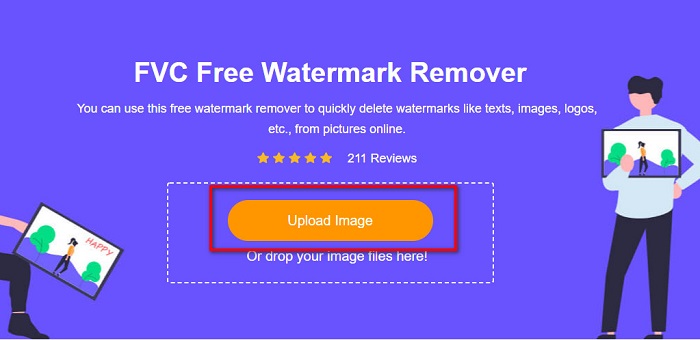
Langkah 2. Pada antarmuka utama perangkat lunak, klik tombol Upload Image. Folder di komputer Anda akan muncul dan Anda dapat memilih foto wisuda lalu mengunggahnya.
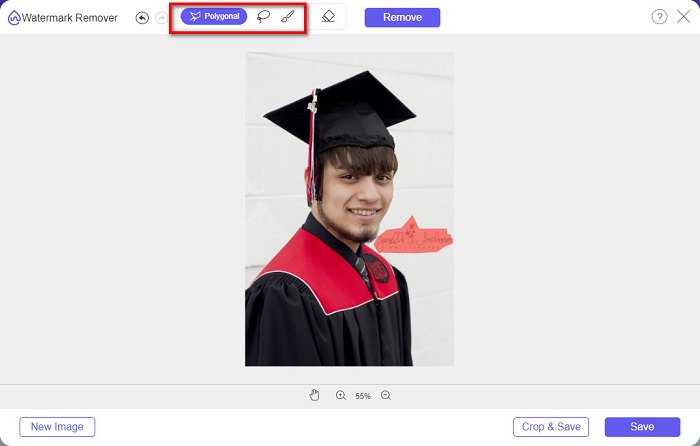
Langkah 3. Selanjutnya, pilih alat penghapus yang ingin Anda gunakan untuk menghapus watermark. Pilih di antara Polygonal, Lasso, atau Brush. Lalu, pilih area watermark yang ingin Anda hilangkan.
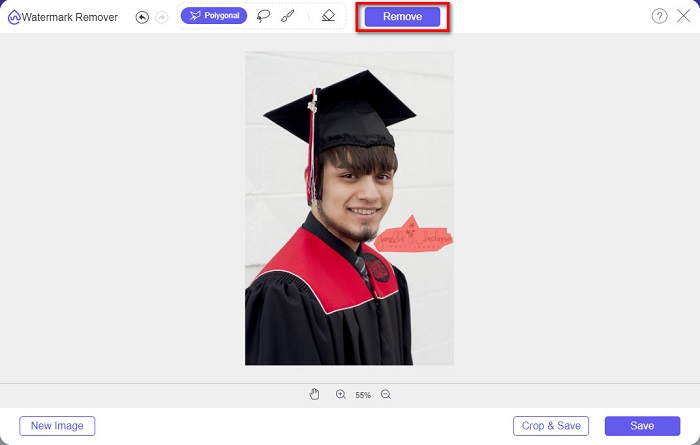
Langkah 4. Setelah memilih area watermark, klik tombol Remove untuk menghapus watermark.
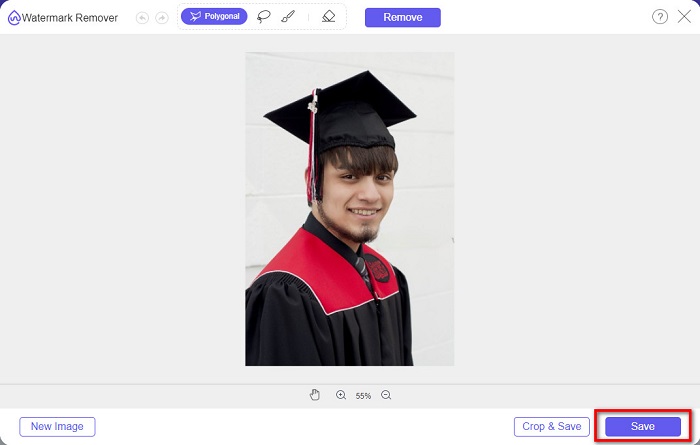
Langkah 5. Anda akan melihat watermark sudah hilang. Klik tombol Save untuk mengunduh gambar ke perangkat Anda. Selain itu, alat penghapus watermark online ini juga dapat digunakan sebagai penghapus watermark Photobucket.
Part 2. Cara Menghilangkan Watermark Dari Gambar Wisuda Menggunakan Inpaint
Orang terkadang mengubah tanda air untuk mendapatkan foto ke tampilan aslinya. Tapi bagaimana mereka melakukannya? Profesional menggunakan editor foto dan mengecat label piksel demi piksel, menghasilkan beberapa jam kerja. Namun, ada alat lain yang akan membantu Anda membuat hidup Anda mudah. Pada bagian ini, Anda akan mempelajari cara menggunakan Inpaint dan kelebihannya.
Inpaint adalah penghapus watermark online yang juga dapat membantu Anda menghapus watermark pada foto wisuda. Aplikasi perangkat lunak online ini juga memiliki versi yang dapat diunduh di Windows dan Mac. Selain itu, alat ini memungkinkan Anda menghapus objek yang tidak diinginkan pada foto, seperti logo, teks, objek, dan lain-lain. Yang lebih mengejutkan, ia memiliki fitur untuk memperbaiki foto lama dan mengembalikannya ke kualitas aslinya. Inpaint juga menyediakan alat penghapus untuk memilih area watermark yang ingin Anda buang.
Pro
- Ini memiliki antarmuka perangkat lunak yang mudah digunakan.
- Hal ini memungkinkan Anda untuk melakukan retouching wajah digital.
- Ini memungkinkan Anda untuk mengisi area hitam Panorama.
- Dapat diakses di hampir semua browser web, seperti Google dan Firefox.
Kontra
- Ini bergantung pada internet.
Cara menghilangkan watermark pada gambar kelulusan menggunakan Inpaint:
Langkah 1. Cari Inpaint di browser Anda, lalu buka halaman web mereka. Setelah itu, pada antarmuka utama perangkat lunak, klik tombol Upload Image untuk mengunggah foto wisuda Anda.
Langkah 2. Selanjutnya, pilih alat penghapus yang ingin Anda gunakan untuk menandai area watermark. Pilih di antara marker tool, lasso tool, dan polygonal lasso tool.
Langkah 3. Lalu, dengan menggunakan alat yang Anda pilih, tandai area watermark yang ingin Anda hilangkan.

Langkah 4. Terakhir, klik tombol Erase untuk menghapus watermark pada foto wisuda Anda. Kemudian klik tombol Download untuk mengunduh fotonya.
Bagian 3. Cara Menghilangkan Watermark Dari Gambar Wisuda Menggunakan Photoshop
Adobe Photoshop adalah perangkat lunak pengeditan paling terkenal yang digunakan banyak profesional. Tetapi yang tidak diketahui banyak pengguna adalah bahwa ini bukan hanya perangkat lunak pengeditan; itu juga dapat menghapus tanda air yang tidak diinginkan pada foto Anda. Untuk mempelajari cara menghapus tanda air dari foto Anda, baca bagian ini secara menyeluruh.
Adobe Photoshop adalah perangkat lunak pengedit foto yang paling populer dengan banyak fitur pengeditan. Banyak profesional menggunakan aplikasi ini karena Anda dapat mengedit gambar secara profesional dengan berbagai cara. Photoshop memiliki beragam alat yang memungkinkan Anda mengedit gambar secara detail. Selain itu, program ini menghasilkan output berkualitas tinggi yang dapat Anda bagikan di platform media sosial mana pun.
Pro
- Ini memiliki banyak fitur pengeditan lanjutan untuk digunakan.
- Ini berisi banyak alat yang digunakan untuk mengedit.
- Ini menghasilkan output berkualitas tinggi.
- Ini memungkinkan Anda untuk mengedit dan membuat gambar baik cetak maupun web.
Kontra
- Ini memiliki antarmuka perangkat lunak yang sulit digunakan.
- Anda perlu membeli aplikasi untuk mengunduhnya.
Cara menghilangkan tanda air pada foto Anda menggunakan Adobe Photoshop:
Langkah 1. Unduh Adobe Photoshop ke perangkat Anda, lalu jalankan aplikasinya. Pada antarmuka utama, buka gambar di Photoshop.
Langkah 2. Pilih area watermark. Anda dapat menggunakan Pen tool, Quick Selection tool, atau Magic Wand tool.
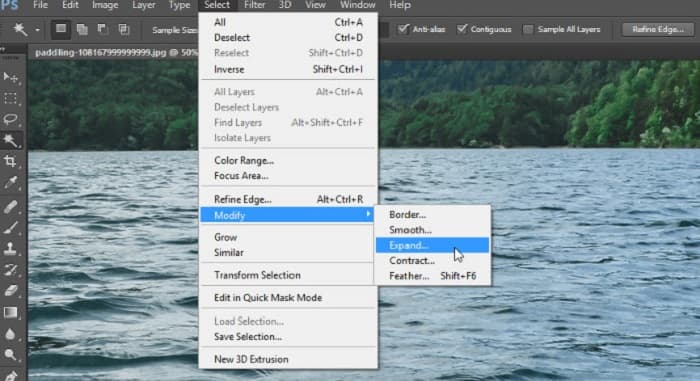
Langkah 3. Buka menu Select > Modify > Expand untuk memasukkan piksel latar belakang.
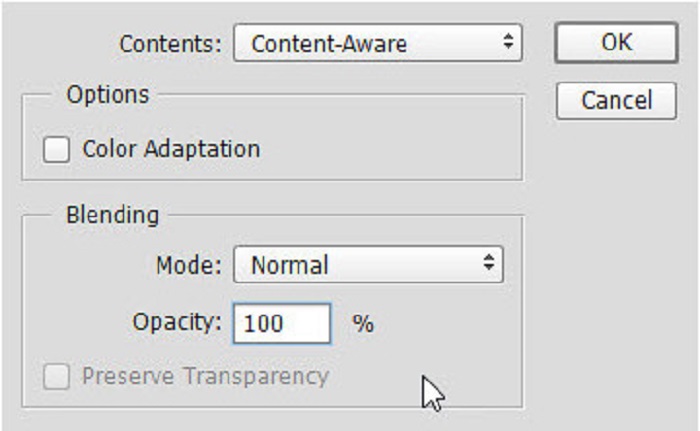
Langkah 4. Buka menu Edit > Fill, lalu pilih Content-Aware pada bagian Contents.
Langkah 5. Selanjutnya, tekan CTRL+D. Anda akan melihat watermark sudah terisi dengan latar belakang. Lalu, untuk menghapus garis tepi watermark, gunakan Clone Stamp Tool.
Langkah 6. Tahan tombol Alt dan telusuri garis tepi watermark. Setelah Anda selesai menghapus seluruh jejaknya, Anda akan melihat bahwa watermark telah hilang.
Bagian 4. FAQ tentang Menghapus Tanda Air Dari Gambar Wisuda
Apakah menghapus tanda air dari gambar kelulusan merusak kualitas?
Menghapus tanda air dari gambar kelulusan tidak serta merta merusak kualitasnya. Namun, saat Anda menghapus tanda air, beberapa alat masih meninggalkan bekas.
Bisakah Anda menghapus tanda air di Canva?
Ya. Canva memiliki fitur di mana Anda dapat menghapus tanda air secara gratis. Cukup klik tombol Hapus Tanda Air untuk melakukannya.
Bisakah Anda menghapus tanda air pada PDF?
Dengan menggunakan alat-alat di atas, Anda dapat menghapus watermark apa pun dari file PDF Anda.
Kesimpulan
Setelah Anda mempelajari cara menghapus watermark dari foto wisuda, sekarang Anda dapat melakukannya sendiri dan mencoba alat-alat yang telah dipresentasikan di atas. Menghapus watermark menjadi mudah berkat penghapus watermark. Namun, banyak orang merekomendasikan penggunaan FVC Free Watermark Remover karena alat ini praktis dan mudah digunakan.
-
 Cara Menghapus Tanda Air Lumion di Windows & Mac dengan Mudah
 Perlu menghapus tanda air Lumion untuk menampilkannya secara profesional? Nah, ada alat yang bisa Anda gunakan untuk membantu Anda menghilangkan tanda air yang ditinggalkannya.
-
 Cara Menghapus Tanda Air Weibo di Video & Gambar dengan Mudah
 Mengalami kesulitan menghapus Weibo Watermark pada video dan gambar yang diekspor? Dalam hal ini, Anda harus menghilangkan tanda air yang kami cantumkan di bawah ini yang dapat membantu Anda.
-
 Pelajari Cara Menghapus Tanda Air Movavi Gratis $91;Harus Dimiliki!$93;
 Mengekspor video atau gambar di Movavi akan meninggalkan tanda air, tetapi apakah mungkin untuk menghapusnya? Untuk mengajari cara menghapus tanda air secara gratis, baca ini.
