


 Video Converter Ultimate
 Perekam Layar
 Perbaikan Video
 Unduhan Aman
Prosedur Mudah untuk Menghapus Tanda Air Dari Video MP4
Apakah Anda mengalami masalah seperti tidak tahu cara menghapus watermark dari video MP4 menggunakan perangkat Anda seperti Mac dan Windows? Maka, artikel ini memiliki solusi terbaik untuk Anda. Jika Anda termasuk orang yang suka menonton film, klip, dan lain-lain, mungkin Anda juga bisa merasa betapa mengganggu dan menjengkelkannya menonton video favorit dengan watermark atau objek-objek yang tidak diperlukan yang muncul pada video MP4 Anda. Selain itu, Anda bahkan tidak bisa melihat seluruh bagian layar karena watermark tersebut menutupinya. Dan bagian yang paling membuat frustrasi adalah beberapa video memiliki watermark yang sangat besar sehingga Anda tidak bisa menikmati menonton video favorit Anda.
Untungnya, sudah ada aplikasi perangkat lunak yang luar biasa dan luar biasa dengan penghapus tanda air video yang dapat Anda gunakan untuk menghilangkan objek yang tidak perlu di video Anda, seperti tanda air, logo, teks, gambar, dan banyak lagi. Anda dapat dengan cepat menghapus atau menghapus objek ini dan menikmati menonton atau memutar video Anda dengan aplikasi ini. Dengan aplikasi ini, Anda tidak akan pernah frustrasi atau kesal lagi. Kemudian, jika Anda terpikat dengan topik ini, Anda harus membaca artikel ini untuk memberi Anda informasi yang cukup, terutama untuk menghilangkan tanda air pada video MP4 Anda dengan mudah.

Bagian 1: Cara Terbaik untuk Menghapus Tanda Air dari Video MP4
Jika Anda sedang mencari aplikasi paling unggul dan luar biasa untuk menghapus watermark dari video MP4, Video Converter Ultimate adalah alat terbaik. Aplikasi ini mampu menghilangkan objek-objek yang mengganggu di video Anda, seperti watermark, logo, teks, atau gambar. Selain itu, Anda tidak perlu menunggu lama saat proses penyimpanan karena Anda bisa menyimpan video dengan cepat setelah menghapus watermark.
Selain itu, Video Converter Ultimate memiliki banyak alat pengeditan yang dapat Anda manfaatkan, seperti penambah video, menghapus tanda air, menambahkan tanda air, pengontrol kecepatan video, pembuat GIF, pembuat kolase, perekam video dan audio, kompresor video/audio, konversi berbagai file format, seperti MP4, FLV, MOV, TRP, MTS, M2TS, MKV, AAC, MP3, dan banyak lagi. Selain itu, bagian terbaiknya adalah Anda tidak perlu membeli atau membeli aplikasi ini lagi. Anda dapat mengoperasikan ini secara gratis. Selain itu, aplikasi ini sangat sederhana dan mudah digunakan. Jika Anda ingin menghapus tanda air pada video MP4 Anda, Video Converter Ultimate dapat menawarkan dua cara. Baca terus untuk mempelajari dua cara menghilangkan tanda air ini di video Anda.
1. Menggunakan Penghapus Tanda Air Video
Langkah 1: Kunjungi situs web Video Converter Ultimate. Unduh aplikasinya secara gratis. Lalu, lanjutkan ke proses instalasi.
Unduh GratisUntuk Windows 7 atau yang lebih baruUnduhan Aman
Unduh GratisUntuk MacOS 10.7 atau yang lebih baruUnduhan Aman
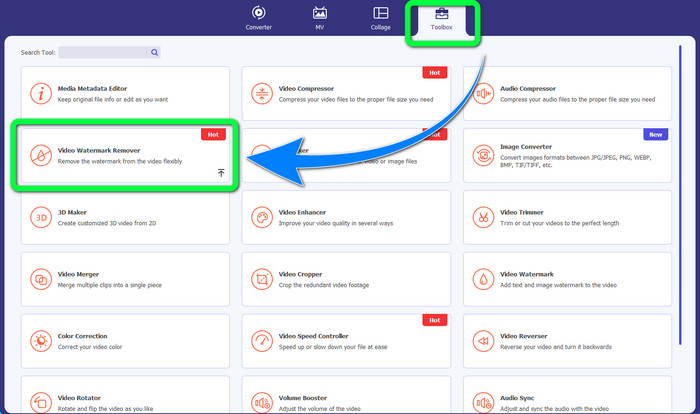
Langkah 2: Luncurkan aplikasi. Pilih Toolbox > Video Watermark Remover.
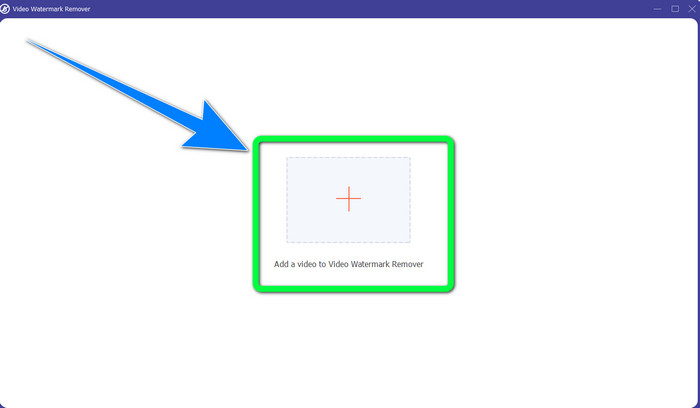
Langkah 3: Antarmuka lain akan muncul. Pilih tombol tanda Plus dan tambahkan video MP4 Anda yang memiliki watermark.
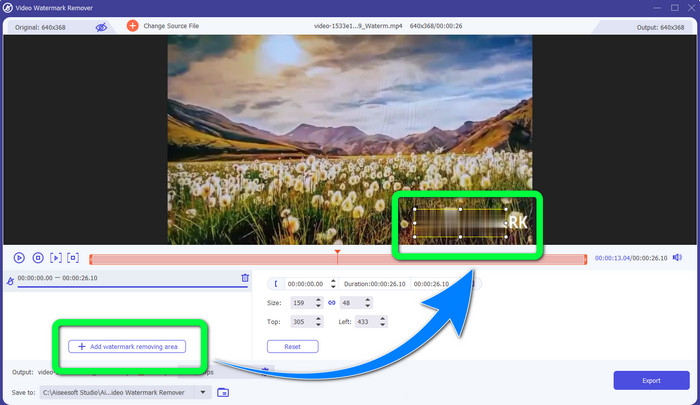
Langkah 4: Klik tombol Add Watermark Removing Area. Lalu akan muncul sebuah kotak kecil di video Anda, seret kotak ini dan gunakan untuk menutupi watermark di video Anda.
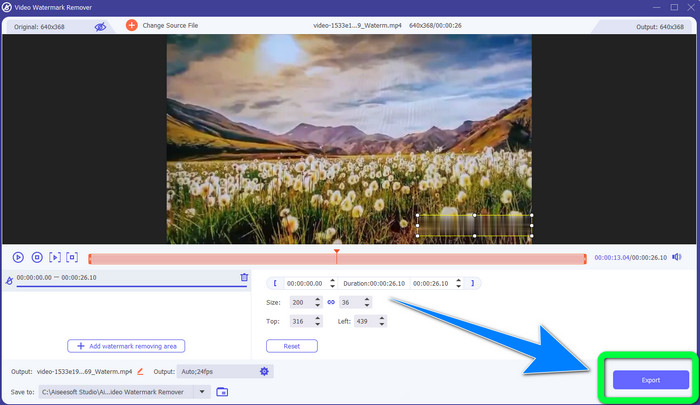
Langkah 5: Setelah selesai menghapus watermark, klik tombol Export untuk menyimpan video Anda. Sekarang Anda dapat menikmati momen menonton film favorit tanpa watermark.
2. Menggunakan Pemotong Video
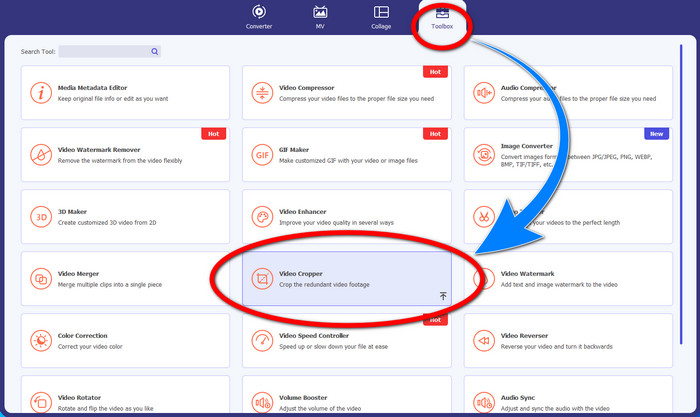
Langkah 1: Luncurkan Video Converter Ultimate. Lalu, klik Toolbox > Video Cropper.
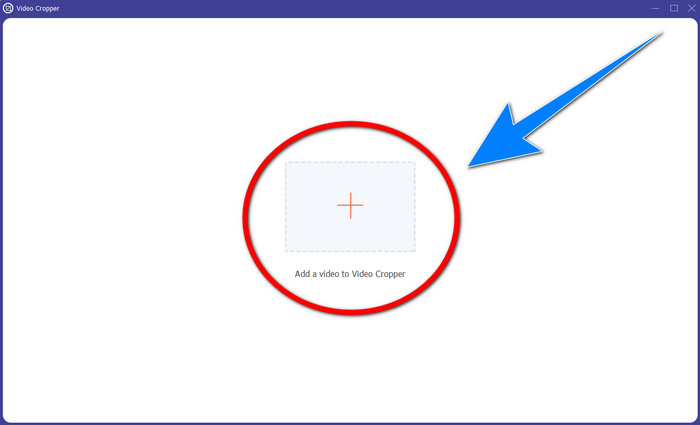
Langkah 2: Antarmuka lain akan muncul setelah mengklik Video Cropper. Klik simbol Plus untuk menambahkan video MP4 Anda yang memiliki watermark.
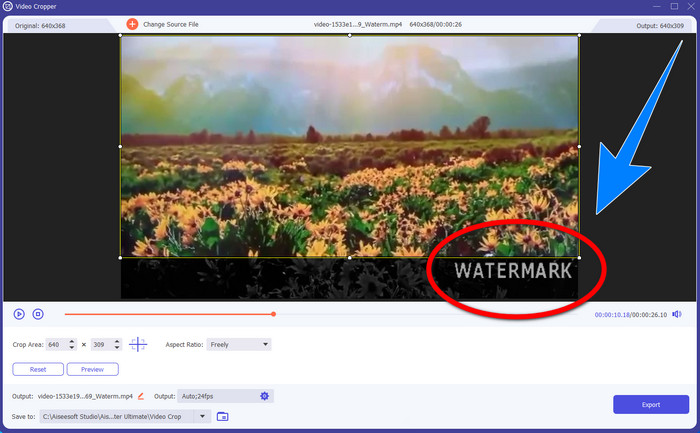
Langkah 3: Setelah video Anda terpasang, Anda dapat memotong (crop) video MP4 Anda dan menghilangkan watermark.
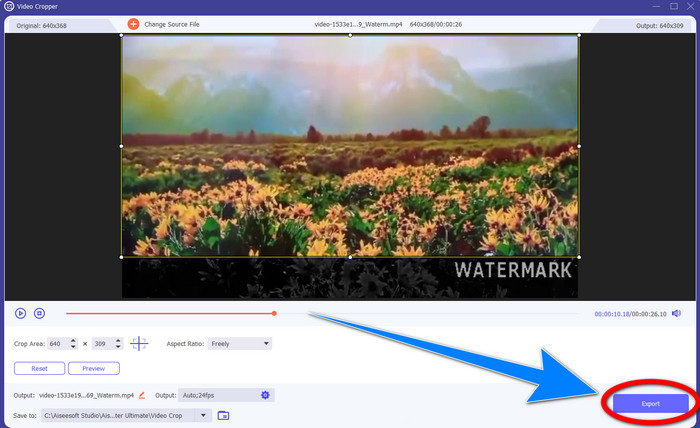
Langkah 4: Jika Anda sudah selesai melakukan crop video untuk menghapus watermark, klik tombol Export untuk menyimpan video Anda. Dengan cara ini, Anda dapat menonton video tanpa watermark.
Bagian 2: Hapus Watermark dari MP4 Video Online
Apakah Anda mencari aplikasi hebat yang bisa Anda gunakan untuk menghapus watermark dari video MP4 Anda secara online dan gratis? Maka, HitPaw Online Watermark Remover adalah aplikasi yang bisa Anda andalkan. Selain itu, Anda dapat menggunakan aplikasi ini tanpa harus membeli apa pun karena benar-benar gratis. Ditambah lagi, Anda bisa menghapus watermark, logo, dan tanda tangan tanpa batasan, dan tidak ada iklan. Aplikasi ini juga mudah dan sederhana digunakan. Anda bisa menghapus watermark pada video hanya dalam tiga langkah, sangat cocok untuk pemula.
HitPaw Online Watermark Remover dapat diakses oleh perangkat apa pun, seperti Windows, Mac, iPhone, dan Android. Aplikasi ini juga aman, dan memastikan bahwa Anda adalah satu-satunya yang dapat melihat dan mengedit video Anda. Namun, jika Anda menghapus tanda air pada video Anda, area tersebut terkadang menjadi buram dan mengganggu. Selain itu, proses penyimpanannya juga lambat. Jika Anda ingin menghapus tanda air pada video MP4 Anda secara online, ikuti langkah-langkah mudah di bawah ini.
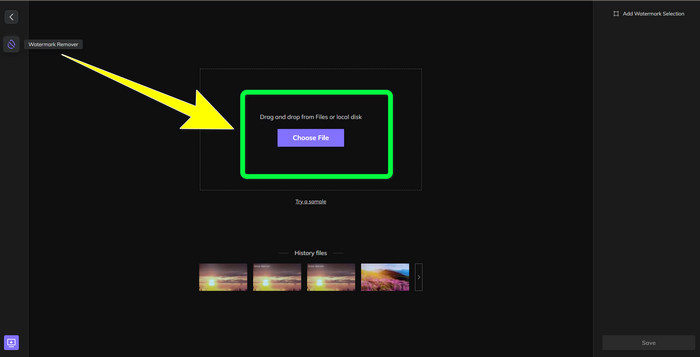
Langkah 1: Buka situs web HitPaw Online Watermark Remover. Klik Remove Watermark Now, lalu pilih Choose File untuk menambahkan video MP4 Anda yang memiliki watermark.
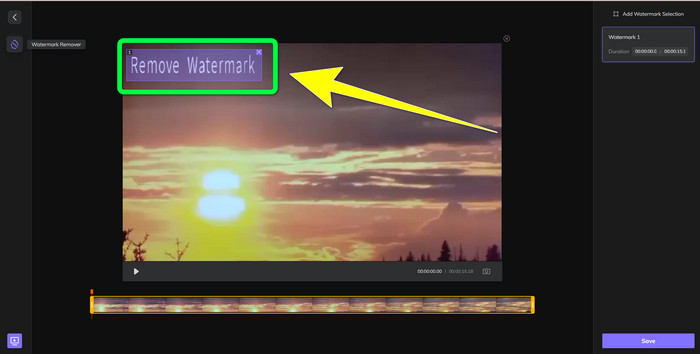
Langkah 2: Setelah menambahkan video Anda, akan muncul sebuah bentuk persegi panjang di video. Seret bentuk tersebut untuk menutupi dan menghapus watermark Anda.
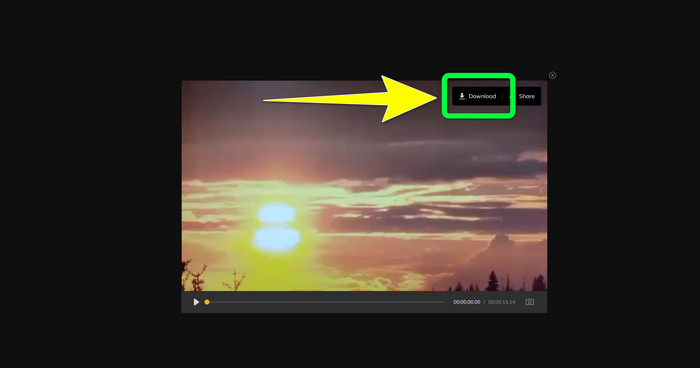
Langkah 3: Setelah menghapus watermark pada video Anda, klik tombol Save. Tunggu proses penyimpanan, lalu klik tombol Download untuk menyimpannya ke perangkat Anda.
Bagian 3: FAQ tentang Menghapus Tanda Air dari MP4
Apakah mungkin juga menghilangkan tanda tangan di video saya?
Ya, itu memungkinkan. Video Converter Ultimate juga mampu menghapus tanda tangan pada video Anda. Setiap objek yang tidak diperlukan dan mengganggu video Anda dapat dengan mudah dihapus menggunakan aplikasi ini.
Apakah memakan waktu untuk menghapus tanda air dari video MP4?
Itu tergantung pada aplikasi yang Anda gunakan. Jika Anda ingin menghapus tanda air pada video MP4 Anda, gunakan Video Converter Ultimate. Itu dapat menghapus tanda air secara instan.
Apa penghapus tanda air video terbaik yang bisa saya gunakan?
Jika Anda mencari aplikasi andal yang dapat menghapus watermark pada video Anda, Video Converter Ultimate adalah perangkat lunak yang sangat baik untuk Anda gunakan. Anda dapat menghapus watermark dan menyimpan video tanpa kehilangan kualitasnya.
Bisakah saya menggunakan alat potong di HitPaw Online Watermark Remover untuk menghilangkan tanda air?
Pastinya ya! Anda juga dapat menggunakan alat potong dari aplikasi ini jika Anda ingin menghapus tanda air pada video Anda, terutama jika tanda air itu berada di sudut atau tepi video Anda.
Selain menghapus tanda air, apakah mungkin menambahkan tanda air menggunakan Video Converter Ultimate di video saya?
Pasti ya! Video Converter Ultimate tidak hanya sebatas menghilangkan watermark pada video Anda. Aplikasi ini juga dapat menambahkan watermark ke video Anda, terutama jika Anda ingin meletakkan beberapa teks, logo, tanda tangan, dll.
Kesimpulan
Seperti yang tertulis di atas, Anda dapat dengan mudah menghapus watermark dari video MP4 menggunakan Video Converter Ultimate. Selain itu, artikel ini juga menunjukkan beberapa perangkat lunak yang dapat Anda gunakan untuk menghapus objek yang tidak diperlukan dari video MP4 secara online.
-
 Cara Menghapus Tanda Air Filmora di Video atau Proyek Anda Secara Gratis
 Bagaimana cara menghilangkan tanda air Filmora? Pertanyaan ini tersebar di seluruh web, dan di sini kami mencantumkan berbagai pendekatan yang dapat Anda gunakan!
-
 Trik Tercepat untuk Menghapus Tanda Air Adobe Stock Dari Video [Tutorial]
 Apakah Anda mengalami masalah dengan tanda air Adobe Stock? Baca ini dan pelajari cara menghapus tanda air Adobe Stock dari video.
-
 5 Cara Menghapus Tanda Air dari Video Secara Profesional
 Perlu menghapus tanda air dari video agar terlihat profesional? Nah, baca artikel ini saat kami menambahkan tutorial tentang cara melakukannya!
