


 Video Converter Ultimate
 Perekam Layar
 Perbaikan Video
 Unduhan Aman
Cara termudah untuk Mengonversi MPG ke DivX di Desktop Anda
Apakah Anda ingin mengonversi file MPG Anda ke DivX dengan cepat? Dalam hal ini, ada berbagai aplikasi yang bisa Anda gunakan untuk mengonversi beragam format file. Saat ini, seperti yang kita lihat, video memiliki berbagai macam format file. Namun, ada beberapa kasus ketika suatu format tidak kompatibel dengan perangkat lain. Karena itu, yang perlu Anda lakukan adalah mencari konverter yang mampu mengonversi satu jenis file ke format file lainnya. Dengan cara ini, Anda dapat memastikan bahwa video Anda bisa diputar di perangkat Anda karena sudah kompatibel dan sesuai. Untuk mengonversi file MPG Anda ke file DivX, Anda harus terus membaca artikel ini untuk mengetahui aplikasi atau konverter apa yang perlu Anda gunakan.

Bagian 1: Konversi MPG ke DivX Tanpa Kehilangan Kualitas
Jika Anda sedang mencari aplikasi yang bagus dan andal untuk mengonversi MPG ke DivX, maka Video Converter Ultimate adalah aplikasi yang bisa Anda gunakan. Aplikasi ini memungkinkan Anda mengonversi file MPG ke format file DivX. Namun bukan hanya itu. Aplikasi ini tidak terbatas pada dua format tersebut saja. Aplikasi ini juga bisa mengonversi berbagai format file lain, seperti FLV, MP4, MKV, MOV, VOB, DIVX, OGV, XVID, dan masih banyak lagi. Selain itu, Video Converter Ultimate tersedia untuk Mac dan Windows. Anda juga tidak perlu khawatir tentang kualitas video karena Anda dapat mengonversi file tanpa kehilangan kualitas dengan menggunakan aplikasi ini. Lebih lanjut, aplikasi ini sederhana dan mudah digunakan, sehingga sangat cocok untuk pemula yang ingin mengonversi file. Dari segi proses konversi, aplikasi ini dapat mengonversi file Anda dengan sangat cepat, sehingga Anda tidak perlu menunggu terlalu lama. Anda juga dapat menggunakan perangkat lunak ini untuk mengonversi banyak file sekaligus (batch). Selain andal untuk mengonversi berbagai file, aplikasi ini juga memiliki banyak alat pengeditan, seperti penguat volume, pembalik video, pemotong video, koreksi warna, penggabung video, penghapus watermark, pembuat GIF, dan lainnya. Jika Anda ingin mengonversi MPG ke DivX di Windows dan Mac, ikuti langkah‑langkah sederhana di bawah ini.
Langkah 1: Buka situs web Video Converter Ultimate dan unduh aplikasinya. Lalu lanjutkan ke proses instalasi dan jalankan aplikasi.
Unduh GratisUntuk Windows 7 atau yang lebih baruUnduhan Aman
Unduh GratisUntuk MacOS 10.7 atau yang lebih baruUnduhan Aman
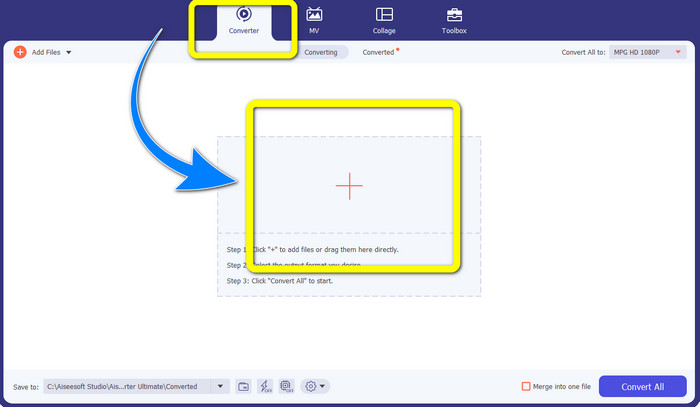
Langkah 2: Setelah Anda membuka Video Converter Ultimate, pergi ke bagian Converter. Lalu pilih tombol bergambar tanda Plus dan lampirkan file MPG yang ingin Anda konversi ke file DivX.
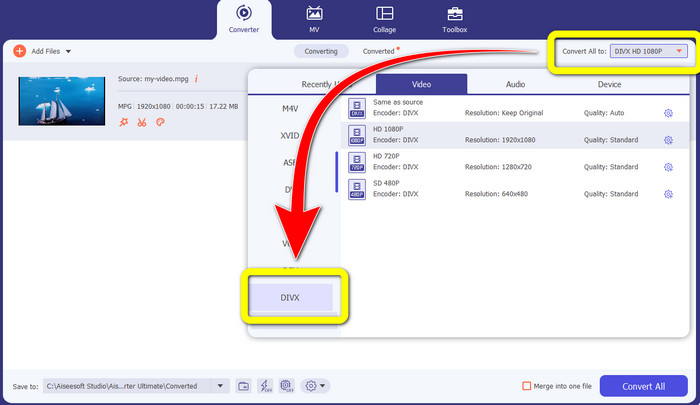
Langkah 3: Setelah Anda memasukkan file MPG, lanjutkan ke tombol Convert All to dan pilih file DIVX pada opsi format. Anda juga bisa memilih kualitas yang Anda inginkan.
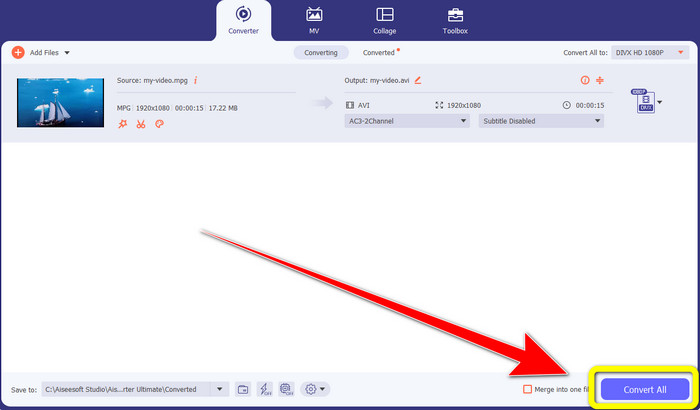
Langkah 4: Jika Anda sudah selesai memilih format file DIVX, klik tombol Convert All dan simpan video Anda sebagai file DIVX. Ini adalah cara termudah untuk mengonversi file MPG Anda ke file DIVX di Mac dan Windows.
Bagian 2: Mengkonversi MPG ke DivX Online Gratis
Menggunakan Media.io
Jika Anda tertarik mencari konverter MPG ke DIVX online secara gratis, salah satu alat daring yang dapat Anda gunakan adalah Media.io. Perangkat lunak ini dapat mengonversi berbagai jenis file, seperti video, audio, gambar, dan lain‑lain. Media.io mendukung beragam format file video, seperti MP4, AVI, MKV, WMV, MPEG2, FLV, XVID, M4V, dan sebagainya. Jadi, Anda juga bisa menggunakannya sebagai konverter MPEG ke DivX. Selain itu, Media.io tidak hanya mampu mengonversi berbagai format file; ia juga memiliki banyak alat untuk mengedit video Anda, seperti penghapus watermark, pemotong video, crop, penggabung video, pengubah kecepatan, pembuat slideshow, dan lainnya. Sayangnya, versi gratisnya memiliki keterbatasan. Saat mengonversi berbagai file, Anda hanya dapat mengunggah file hingga ukuran maksimum 100 Mb, yang kurang ideal jika Anda ingin mengonversi banyak file. Jika Anda ingin mengonversi lebih banyak dan merasakan fitur‑fitur yang lebih lengkap dari aplikasi ini, Anda harus membeli paket berlangganan. Selain itu, proses konversinya cukup lambat dan memerlukan beberapa menit untuk mengonversi file, yang kurang praktis bagi pengguna yang ingin mengonversi banyak file. Jika Anda ingin mengonversi MPG ke DIVX secara online dan gratis, ikuti langkah‑langkah mudah di bawah ini.
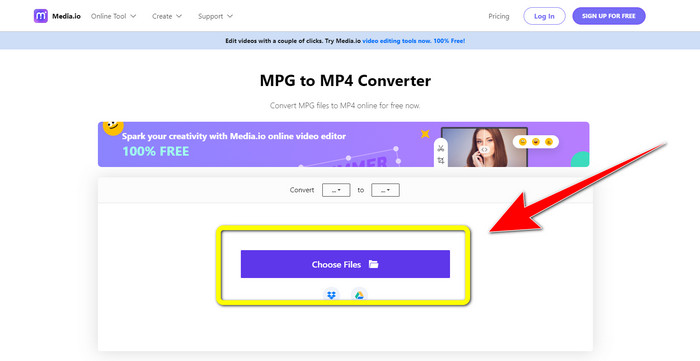
Langkah 1: Kunjungi situs web Media.io. Lalu klik tombol Choose Files untuk memasukkan video Anda berformat MPG.
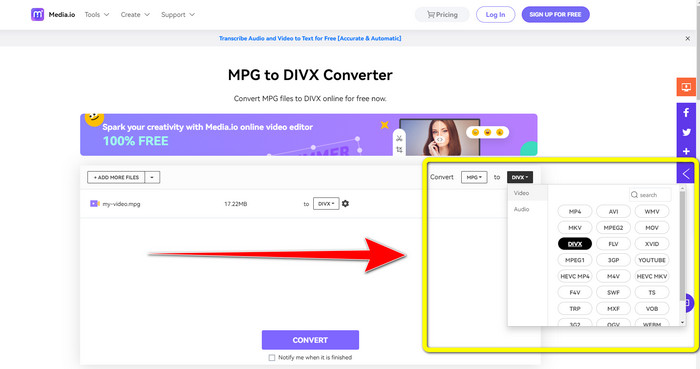
Langkah 2: Setelah Anda melampirkan file MPG, pergi ke Convert dan cari file DIVX pada opsi format lalu pilih.
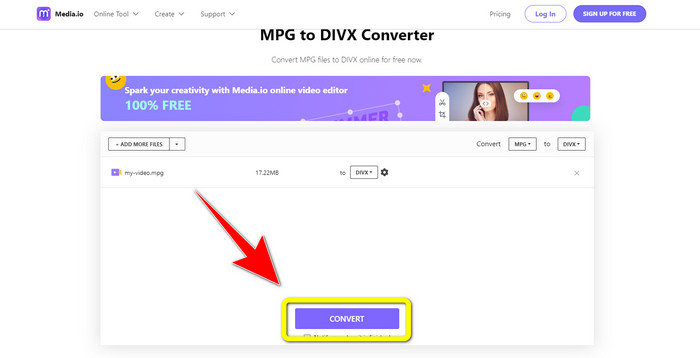
Langkah 3: Jika Anda sudah memilih file DIVX untuk video Anda, klik tombol Convert dan simpan hasil akhirnya.
Menggunakan FileProInfo
Aplikasi lain yang dapat Anda gunakan untuk mengonversi MPG ke DIVX secara online adalah FileProInfo. Aplikasi daring ini dapat membantu Anda mengonversi video berformat MPG ke file DIVX. Aplikasi ini juga mendukung berbagai format file, seperti 3GP, AAC, M4A, M4R, M4V, AVI, AMR, MP4, VOC, VOB, dan beragam format video lainnya. Jadi Anda bisa menggunakannya untuk mengonversi 3GP ke DivX. Selain itu, Anda dapat mengonversi file secara gratis. Cara penggunaannya sederhana dan mudah untuk proses konversi. FileProInfo adalah alat yang bisa Anda gunakan secara online, dan Anda juga dapat mengunduh aplikasinya ke komputer. Lebih jauh lagi, Anda dapat melakukan lebih banyak hal di aplikasi ini, seperti pemeriksa plagiarisme, penampil file, penggabung, pemisah, editor, dan lain‑lain. FileProInfo cocok untuk pemula, terutama untuk mengonversi berbagai format file. Namun, alat daring ini terlalu rumit dalam hal pengeditan video. Ada beberapa fitur yang cukup canggih dan sulit diikuti, sehingga kurang cocok bagi pemula. Selain itu, proses mengonversi MPG ke DIVX memakan waktu cukup lama. Jika Anda ingin mengonversi video berformat MPG ke file DIVX secara online, ikuti langkah‑langkah sederhana di bawah ini.
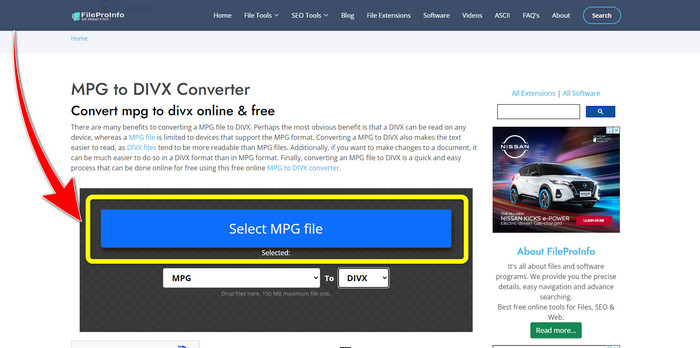
Langkah 1: Kunjungi situs web FileProInfo. Lalu klik tombol Select MPG File untuk melampirkan video Anda berformat MPG.
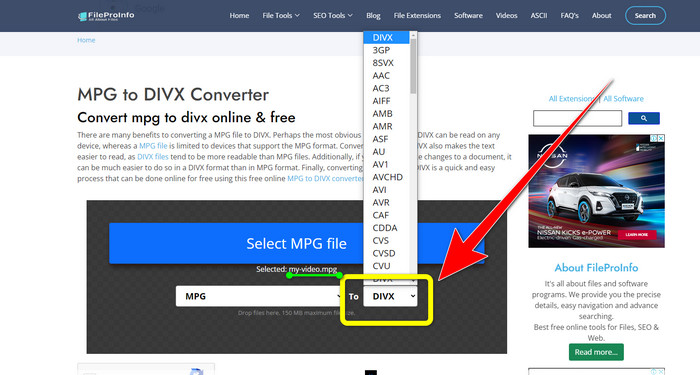
Langkah 2: Setelah menambahkan video MPG, cari format options dan klik file DIVX.
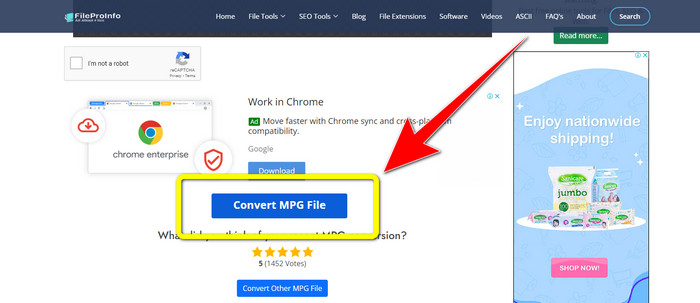
Langkah 3: Setelah Anda mengklik file DIVX, gulir sedikit ke bawah dan klik tombol Convert MPG File.
Bagian 3: Pengetahuan Lebih Lanjut tentang MPG dan DivX
Apa itu MPG?
File MPG adalah format yang menggunakan format file digital. Juga, itu distandarisasi oleh Moving Pictures Expert Group. Terakhir, format file ini banyak digunakan dalam film dan didistribusikan di internet.
Apa itu DIVX?
DIVX adalah codec video berkualitas tinggi dan kompresi tinggi yang dapat Anda gunakan untuk codec digital. Juga, itu diklasifikasikan sebagai file video. Ini juga tidak cocok untuk program Windows. Selain itu, ini memampatkan video ke sebagian kecil dari ukuran aslinya dengan sedikit penurunan kualitas.
Bagian 4: FAQ tentang Konversi MPG ke DivX
Apa keuntungan mengonversi file MPG ke file DIVX?
Salah satu keuntungan mengonversi file MPG ke file DIVX adalah format DIVX lebih diterima secara luas pada program daripada file MPG.
Browser apa yang dapat saya gunakan untuk mengonversi MPG ke DIVX?
Anda tidak perlu repot sendiri karena kini Anda bisa menggunakan hampir semua browser untuk convert file MPG ke DIVX di Google Chrome, Firefox, Safari, Opera, dan lainnya.
Apakah ada konverter yang memiliki proses konversi kecepatan?
Ya ada! Jika Anda mencari aplikasi atau konverter dengan proses konversi yang cepat, Anda dapat menggunakan Video Converter Ultimate. Anda dapat mengonversi file hanya dalam beberapa detik, tidak seperti aplikasi lain yang membutuhkan waktu terlalu lama untuk mengonversi.
Kesimpulan
Seperti yang ditunjukkan di atas, Anda dapat dengan mudah mengonversi MPG ke DivX menggunakan aplikasi yang diunduh atau secara online. Mengonversi file ke format lain itu penting, terutama jika file tersebut tidak cocok dengan program atau perangkat yang Anda gunakan. Jika Anda ingin mengonversi berbagai jenis file, Anda dapat menggunakan Video Converter Ultimate.
-
 Cara Mengonversi GIF ke DivX dengan Cara Sederhana dan Termudah
 Apakah Anda ingin mengonversi format file GIF ke Divx? Kami akan menunjukkan konverter luar biasa yang dapat Anda gunakan untuk mengonversi GIF ke DivX.
-
 Metode yang mudah dipelajari tentang Cara Mengonversi Xvid ke DivX
 Apakah Anda mencari solusi terbaik untuk mengonversi Xvid ke DivX secara gratis? Artikel ini akan membantu Anda mengatasi masalah Anda. Jadi, baca terus postingannya.
-
 Cara Mengonversi M4V ke DivX Gratis di Mac [Alat Terbaik&93;
 Mencari cara untuk mengonversi M4V ke DivX secara gratis? Kami mencantumkan konverter terbaik bagi Anda untuk mengonversi file M4V Anda ke DivX di Mac.
