


 Video Converter Ultimate
 Perekam Layar
 Perbaikan Video
 Unduhan Aman
4 Metode termudah untuk Menghapus Tanda Air iFunny
iFunny adalah salah satu aplikasi paling populer jika Anda ingin membaca pesan lucu dengan gambar (meme). Namun, beberapa gambar tersebut memiliki watermark iFunny yang mengganggu. Jika Anda ingin menemukan metode terbaik untuk menghapus watermark ini, Anda berada di halaman yang tepat. Kami akan memperkenalkan berbagai aplikasi yang dapat Anda gunakan untuk menghilangkan elemen mengganggu dari foto Anda. Alat-alat ini sudah diuji dan terbukti, jadi Anda tidak perlu ragu akan keabsahannya. Siap mempelajari cara terbaik untuk menghapus watermark iFunny? Bacalah artikel ini dari awal hingga akhir.

Bagian 1: Menghapus Tanda Air iFunny Menggunakan Alat Pemotong
Salah satu cara terbaik untuk menghapus tanda air iFunny adalah dengan menggunakan alat pemotong. Cara ini berlaku jika watermark ditempatkan di tepi atau sudut gambar Anda. Anda dapat memotong gambar dari sisi ke sisi dan dari atas ke bawah. Jika Anda ingin memotong tanda air iFunny dari gambar Anda, ikuti langkah-langkah sederhana di bawah ini.
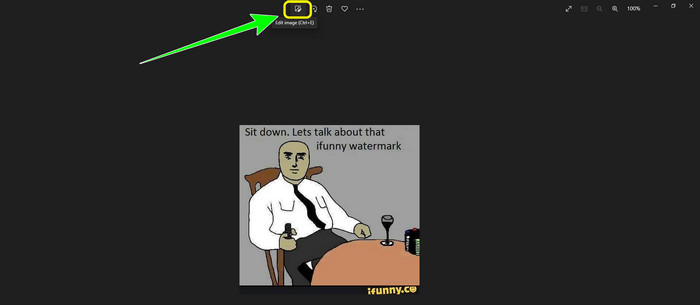
Langkah 1: Buka foto Anda yang memiliki watermark iFunny. Pilih opsi Edit Image untuk menggunakan alat Pemangkasan (Cropping). Anda juga bisa menekan ctrl+E.
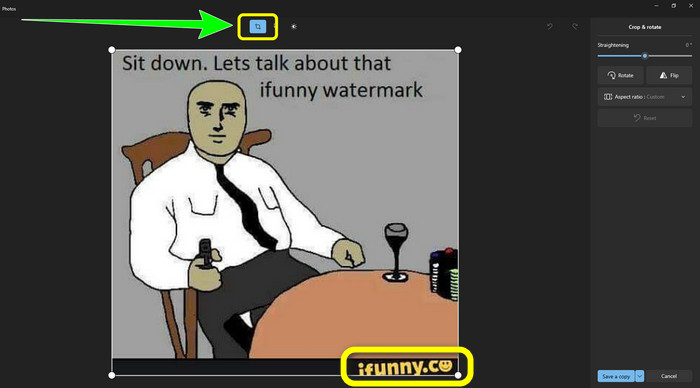
Langkah 2: Setelah itu, klik alat Cropping. Lalu, Anda sudah bisa memotong foto untuk menghapus watermark iFunny dari gambar Anda.
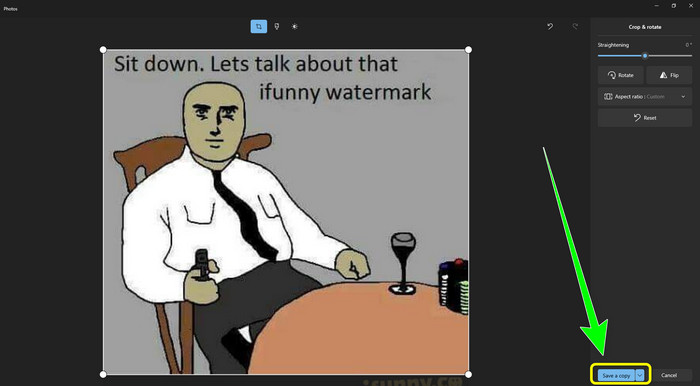
Langkah 3: Jika sudah selesai memotong foto, klik tombol Save a copy. Tunggu proses penyimpanan dan simpan foto final Anda ke lokasi yang diinginkan.
Ini adalah metode termudah untuk menghapus tanda air iFunny menggunakan alat Pemotongan.
Bagian 2: Cara Terbaik untuk Menghapus Tanda Air iFunny Tanpa Memotong
Menggunakan Penghilang Tanda Air Gratis FVC
Jika Anda sedang mencari penghapus watermark iFunny, Anda bisa menggunakan FVC Free Watermark Remover. Anda dapat menghapus watermark apa pun dari gambar dengan mudah dan instan menggunakan aplikasi ini. Selain itu, Anda dapat mengandalkan penghapus watermark ini jika terdapat banyak watermark pada foto Anda. Ditambah lagi, hampir semua format file gambar didukung oleh alat online ini, termasuk JPG, PNG, BMP, TIFF, dan lainnya. Untuk menghapus objek yang tidak diperlukan dan watermark dari gambar, penghapus watermark ini menyediakan tiga alat berbeda: Lasso, Brush, dan Polygonal. Dengan bantuan alat-alat ini, Anda dapat dengan mudah menghapus apa pun yang tidak Anda inginkan dari gambar Anda. Selain itu, FVC Free Watermark Remover memiliki antarmuka yang mudah dipahami dan dapat diakses oleh semua pengguna, baik pemula maupun profesional. Lebih jauh lagi, file Anda aman di sini karena penghapus watermark ini menjamin privasi Anda, yang berarti hanya Anda yang dapat mengedit foto Anda. Terakhir, ini adalah perangkat lunak gratis, sehingga Anda dapat menggunakannya kapan saja dan mengunggah file tanpa batas yang ingin Anda sempurnakan.
Langkah 1: Buka FVC Free Watermark Remover di peramban Anda. Lalu, klik tombol Upload Image untuk melampirkan foto Anda yang memiliki watermark iFunny.

Langkah 2: Setelah foto terlampir, sorot watermark iFunny menggunakan alat penghapus watermark.
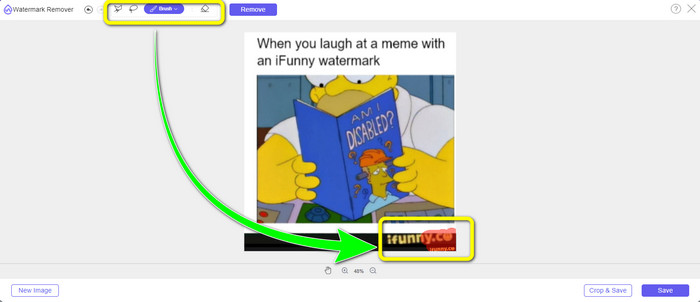
Langkah 3: Selanjutnya, klik tombol Remove untuk menghapus watermark iFunny dari foto Anda.
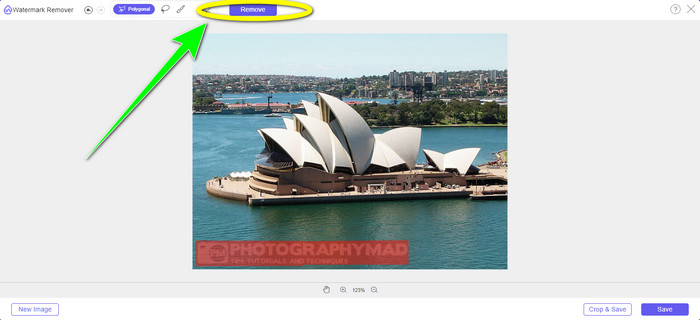
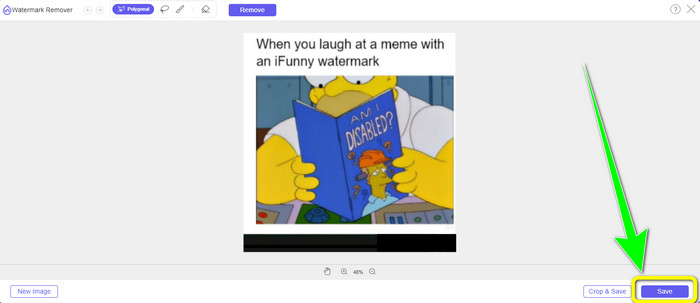
Langkah 4: Setelah proses penghapusan selesai, langkah terakhir Anda adalah mengklik tombol Save untuk mengunduh foto tanpa watermark iFunny ke perangkat Anda.
Menggunakan WatermarkRemover.io
Gunakan WatermarkRemover.io jika Anda ingin memakai aplikasi web lain untuk menghilangkan watermark iFunny dari foto Anda. Alat gratis ini dapat menghapus berbagai elemen berlebih dari gambar Anda, termasuk logo, keterangan, stempel, dan lainnya. Selain itu, Anda dapat menghapus beberapa watermark sekaligus dari gambar Anda. Aplikasi ini juga menawarkan antarmuka yang mudah digunakan, sangat cocok bagi pemula. Berbagai format gambar, termasuk PNG, JPG, WEBP, dan JPEG didukung oleh alat web ini. Namun, saat menggunakan versi gratis, ada beberapa batasan. Hanya 50 foto yang dapat diunggah sekaligus, dan ruang penyimpanannya hanya 25 GB. Jika Anda ingin mengunggah lebih banyak foto dan mendapatkan ruang lebih besar, Anda harus membayar biaya langganan yang tergolong cukup mahal. Ikuti langkah-langkah di bawah ini untuk menggunakan penghapus watermark iFunny yang hebat ini.
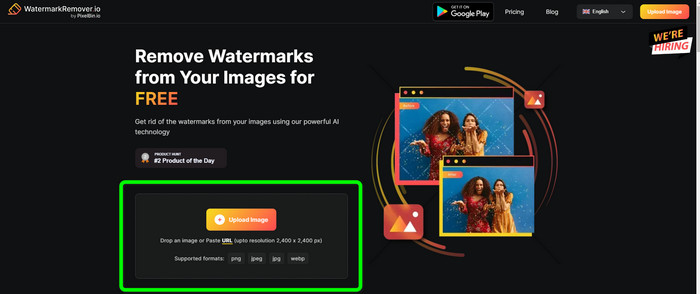
Langkah 1: Buka peramban Anda dan kunjungi WatermarkRemover.io. Klik tombol Upload Image untuk mengunggah foto Anda yang memiliki watermark iFunny. Anda juga dapat menyeret file ke dalam kotak yang tersedia.
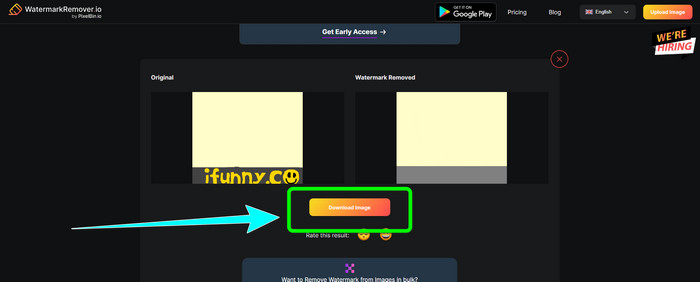
Langkah 2: Setelah foto diunggah, watermark iFunny akan dihapus secara otomatis. Ketika foto sudah tampil tanpa watermark, klik tombol Download.
Menggunakan Penghilang Tanda Air Apowersoft Online
Untuk segera menghapus watermark iFunny dari foto Anda, Apowersoft Watermark Remover Online juga merupakan aplikasi online yang bagus untuk Anda. Aplikasi ini dapat menghapus elemen yang tidak diinginkan dari foto, termasuk tanda tangan, teks, logo, dan lainnya. Selain itu, aplikasi ini mendukung berbagai format file gambar, seperti JPEG, JPG, PNG, TIFF, dan lainnya. Pemula dapat menggunakan alat ini meskipun belum memiliki banyak keterampilan karena Apowersoft Watermark Remover Online memiliki metode yang sederhana dan antarmuka yang mudah dipahami. Selain itu, file akan dihapus secara otomatis setelah Anda menghapus watermark dan mengunduh foto, sehingga tidak ada orang lain yang dapat melihat hasil kerja Anda. Selain menghapus watermark dari foto, alat ini juga dapat menghilangkan watermark dari video, yang sangat praktis bagi pengguna. Aplikasi ini mendukung berbagai format video, seperti MOV, WMV, MP4, 3GP, AVI, dan sebagainya. Namun, penghapus watermark online ini memiliki proses penghapusan yang lambat, yang kurang menyenangkan bagi pengguna. Selain itu, aplikasi ini tidak dapat digunakan tanpa koneksi internet. Jika Anda ingin memanfaatkan alat ini, ikuti langkah-langkah dasar di bawah ini.
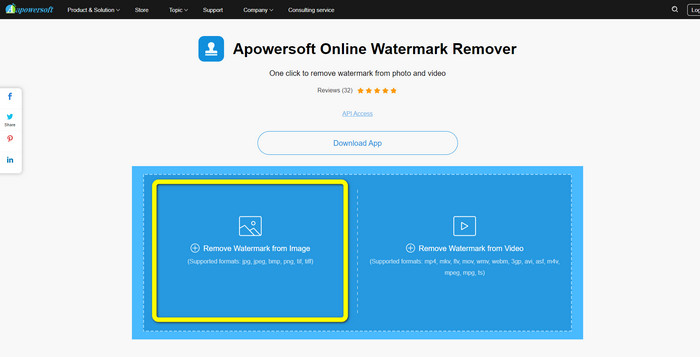
Langkah 1: Cari Apowersoft Online Watermark Remover. Lalu, klik tombol Remove Watermark from Image untuk melampirkan foto Anda yang memiliki watermark iFunny.
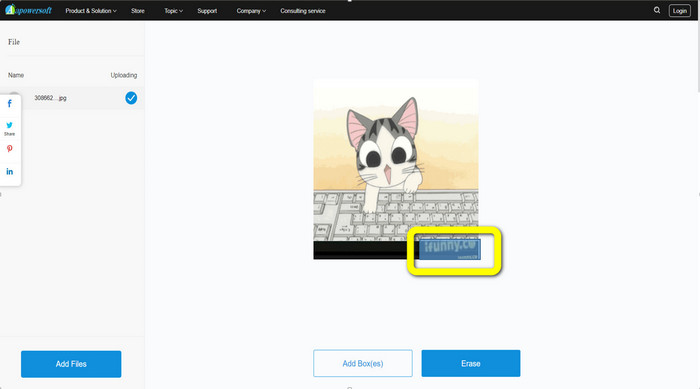
Langkah 2: Setelah file terlampir, Anda dapat menggunakan kotak biru untuk menutupi watermark iFunny pada foto Anda.
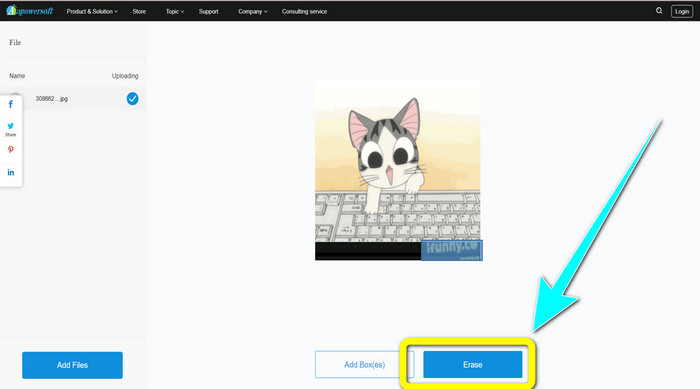
Langkah 3: Kemudian klik tombol Erase. Tunggu proses penghapusan dan unduh file final Anda.
Terkait dengan:
Ulasan Jujur tentang Inpaint Watermark Remover dan Alternatifnya
Cara Sederhana Menghapus Watermark dari JPG Secara Online
Bagian 3: FAQ tentang Menghapus Tanda Air iFunny
Apa aplikasi terbaik untuk menghapus tanda air iFunny?
Aplikasi terbaik yang dapat Anda gunakan adalah FVC Free Watermark Remover. Alat ini dapat dengan mudah menghilangkan watermark iFunny dari gambar Anda. Selain itu, proses penghapusannya cepat dan menawarkan metode paling mudah, sehingga menjadikannya penghapus watermark terbaik.
Dapatkah saya juga menghapus watermark dari video saya?
Tentu saja, bisa. Anda dapat menggunakan banyak aplikasi online maupun offline untuk menghapus watermark dari video Anda. Berikut adalah beberapa alat terbaik yang bisa Anda coba.
1. Video Converter Ultimate.
2. Media.io
3. HitPaw
4. Online Video Cutter
5. Apowersoft Online Watermark Remover.
Apakah ada alat pemangkasan yang dapat saya gunakan di FVC Free Watermark Remover?
Ya. FVC Free Watermark Remover memiliki dua cara untuk menghilangkan watermark dari sebuah foto. Yang pertama adalah menggunakan alat penghapus watermark yang berbeda, seperti Lasso, Brush, dan Polygonal. Yang kedua adalah menggunakan alat Pemotongan.
Kesimpulan
Seperti yang telah dijelaskan di atas, Anda dapat menggunakan banyak cara sederhana untuk menghapus watermark iFunny, seperti menggunakan berbagai alat dan fitur pemangkasan. Namun, jika Anda ingin menghapus elemen yang mengganggu dari gambar dengan cara yang mudah, gunakan FVC Free Watermark Remover sekarang.
-
 Cara Luar Biasa tentang Cara Menghapus Stiker dari Foto dan Video
 Apakah Anda ingin menghapus stiker dari video dan foto dengan mudah? Berikut cara-cara efektif, termasuk cara paling andal dan termudah yang bisa Anda coba.
-
 Cara Mudah Menghapus Tanda Air Reddit dari Gambar
 Jika Anda di sini, Anda mungkin mencari penghapus tanda air Reddit yang sangat baik. Dalam hal ini, kami akan menunjukkan kepada Anda metode termudah untuk menghapus tanda air Reddit.
-
 Cara Menghilangkan Watermark di Lightroom Mobile [Terselesaikan]
 Apakah Anda ingin mempelajari cara menghapus tanda air dari foto di lightroom? Berikut adalah metode termudah yang dapat Anda coba menggunakan ponsel dan komputer Anda.
