


 Video Converter Ultimate
 Perekam Layar
 Perbaikan Video
 Unduhan Aman
3 Metode Teratas yang Dapat Anda Coba untuk Mengonversi WebM ke 3GP
WebM didukung oleh hampir semua browser seperti Google Chrome, Microsoft Edge, Mozilla Firefox, Opera, dan lainnya. Namun, ada kalanya Anda tidak dapat memutar file WebM di beberapa perangkat seperti ponsel. Untuk memutar video Anda di perangkat lain, Anda harus mengunduh converter online atau offline untuk mengonversi file WebM ke format lain. Untungnya, artikel ini akan memperkenalkan beberapa cara paling mudah untuk mengonversi WebM ke 3GP menggunakan beberapa perangkat lunak yang sudah diuji.

Bagian 1: Metode Efektif untuk Mengonversi WebM ke 3GP di Windows dan Mac
Artikel ini ditujukan bagi Anda yang ingin menggunakan converter WebM ke 3GP di Windows dan Mac. Video Converter Ultimate adalah perangkat lunak terbaik yang bisa Anda gunakan. Aplikasi ini memungkinkan Anda mengonversi banyak file, seperti FLV, MKV, DIVX, XVID, MT2S, MTS, M4V, AVI, MP4, dan lebih dari 1000 format lainnya. Selain itu, Anda tidak perlu khawatir tentang proses konversi karena Anda dapat mengonversi file 30x lebih cepat dibandingkan converter lainnya. Anda juga dapat mengunduh aplikasi hebat ini secara gratis.
Selain itu, metode konversi file aplikasi ini tidak rumit karena memiliki antarmuka yang ramah dan cara sederhana, yang sangat cocok untuk semua pengguna. Selain mengonversi, ada lebih banyak alat yang dapat Anda nikmati, seperti menyempurnakan video, membuat video musik, membuat kolase, mengubah ukuran file, dan banyak lagi.
Fitur
◆ Sempurna untuk membuat kolase.
◆ Personalisasi dan sesuaikan GIF.
◆ Ubah kecepatan video.
◆ Mampu mengubah ukuran file video
◆ Ini dapat memampatkan file audio.
Pro
- Sempurna untuk Pengguna Windows dan Mac.
- Ini memiliki proses konversi yang cepat.
- Ini mendukung 1000+ format, seperti MP4, M4V, DIVX, FLV, MKV, 3GP, SWF, dll.
- Memiliki antarmuka pengguna yang ramah, yang cocok untuk pemula.
- Dapat dengan mudah menambah dan menghapus elemen yang tidak perlu seperti tanda air, logo, tanda tangan, dll.
Kontra
- Bayar versi pro untuk menggunakan semua fitur hebat.
Langkah 1: Unduh Video Converter Ultimate di Windows atau Mac Anda dengan mengklik tombol Download di bawah ini. Instal di perangkat Anda lalu jalankan perangkat lunaknya.
Unduh GratisUntuk Windows 7 atau yang lebih baruUnduhan Aman
Unduh GratisUntuk MacOS 10.7 atau yang lebih baruUnduhan Aman
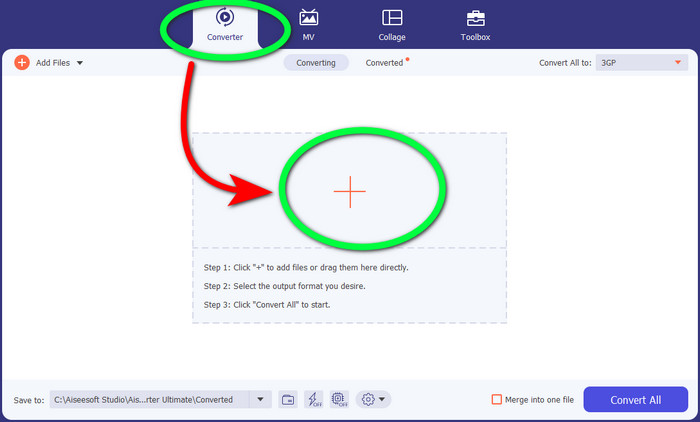
Langkah 2: Saat Anda melihat empat opsi di bagian atas antarmuka, pilih panel Converter dan klik tanda + untuk mengunggah file video WebM.
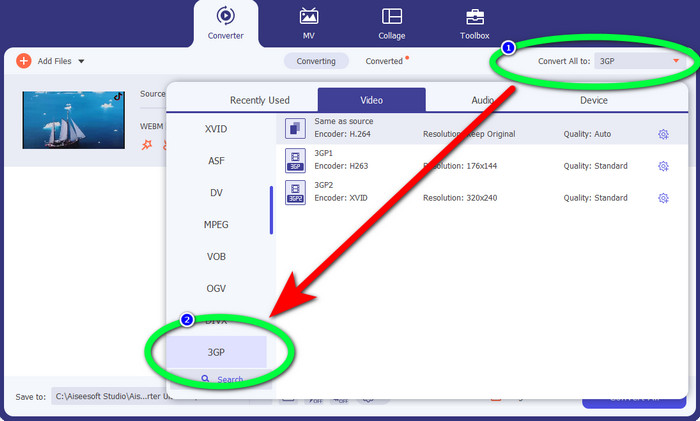
Langkah 3: Setelah mengunggah file video WebM, klik opsi Convert all to dan pilih file 3GP.
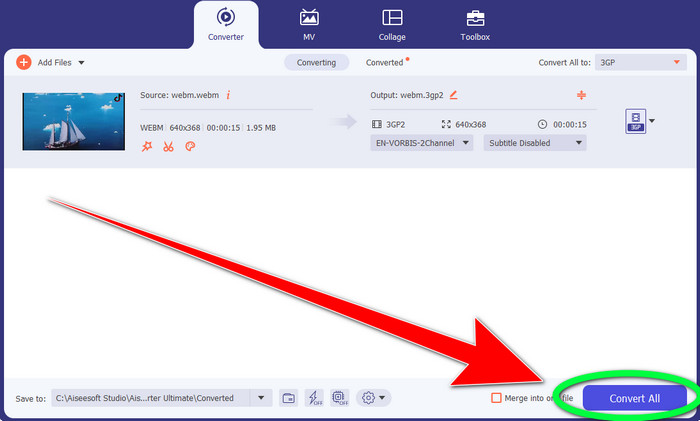
Langkah 4: Setelah selesai mengubah format file dari WebM ke 3GP, klik tombol Convert.
Bagian 2: Cara Mudah Mengonversi WebM ke 3GP Online
Menggunakan Pengonversi Video Daring Gratis FVC
Ingin memakai converter video online gratis? Maka, alat online yang bisa Anda gunakan secara gratis adalah FVC Free Video Converter Online. Aplikasi online ini memungkinkan Anda mengonversi WebM ke 3GP dengan mudah. Hanya ada tiga (3) langkah dasar, sehingga Anda tidak akan bingung saat mengonversi berbagai file. Selain itu, converter gratis ini dapat diakses di Windows dan Mac. Alat ini juga mengonversi berbagai file, seperti MP4, AVI, M4V, MKV, WMA, MP3, dan lainnya. Selain itu, Anda dapat mengonversi file dengan cepat karena memiliki kecepatan konversi yang tinggi, sehingga Anda tidak perlu menunggu lama untuk mengonversi file lain. Jika Anda tertarik mengonversi WebM ke 3GP menggunakan FVC Free Video Converter Online, gunakan langkah-langkah sederhana di bawah ini.
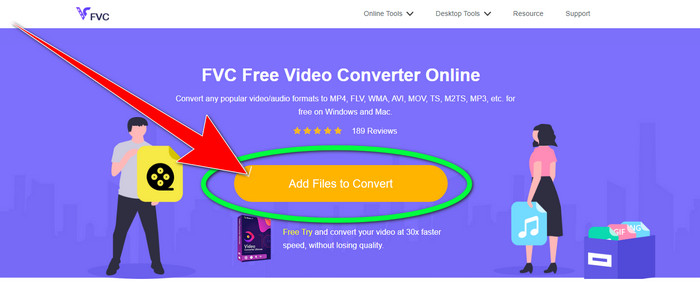
Langkah 1: Kunjungi FVC Free Video Converter Online. Klik tombol berwarna oranye di tengah untuk menambahkan file video WebM Anda.
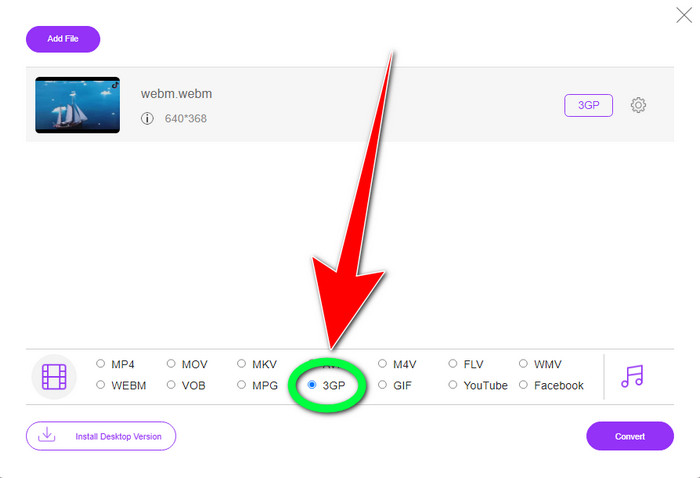
Langkah 2: Berikutnya, pilih file 3GP sebagai format yang Anda inginkan. Anda akan melihat opsi format di bagian bawah antarmuka.
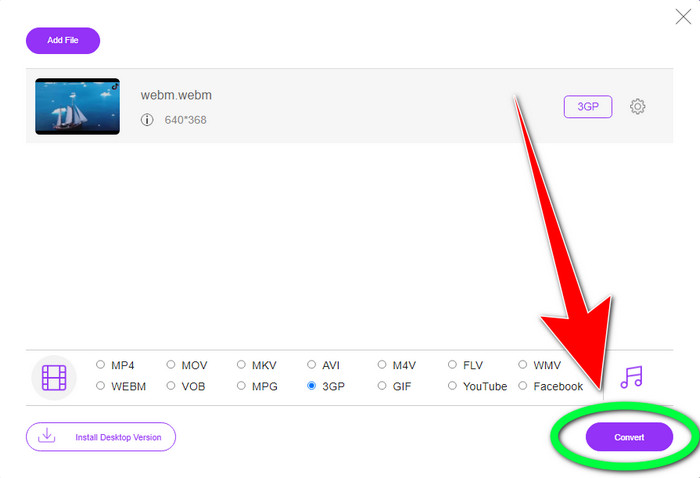
Langkah 3: Setelah Anda memilih format file 3GP, Anda dapat langsung mengklik tombol Convert untuk menyimpan video Anda. Alat ini juga memungkinkan Anda mengonversi WebM ke DIVX.
Menggunakan Convertio
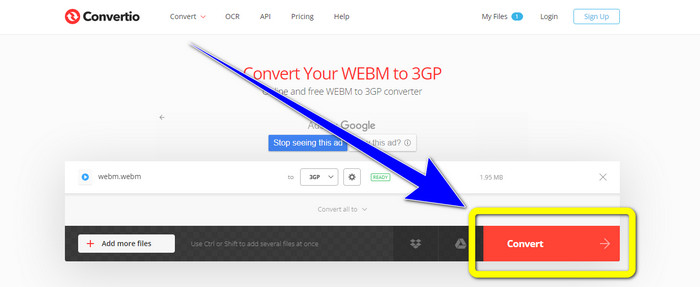
Jika Anda masih mencari pengonversi WebM ke 3GP lain secara online, maka Convertio adalah alat yang Anda cari. Ini juga memiliki langkah-langkah sederhana untuk mengonversi file Anda. Selain itu, Anda dapat mengonversi file Anda ke 37 format file video yang berbeda, termasuk HEVC, MPG, M4V, MKV, WMV, MP4, MOV, AVI, dll. Convertio tidak hanya terbatas pada konversi format video. Anda juga dapat mengonversi berbagai format audio, gambar, dan dokumen.
Namun, 100Mb adalah ukuran file maksimum aplikasi online ini untuk menggunakan versi gratisnya. Anda harus mendapatkan versi berbayar untuk memiliki ukuran file tidak terbatas dan menikmati lebih banyak fitur. Tapi, membeli langganan itu mahal. Jika Anda ingin mengonversi file WebM ke 3GP menggunakan Convertio, ikuti langkah-langkah di bawah ini.
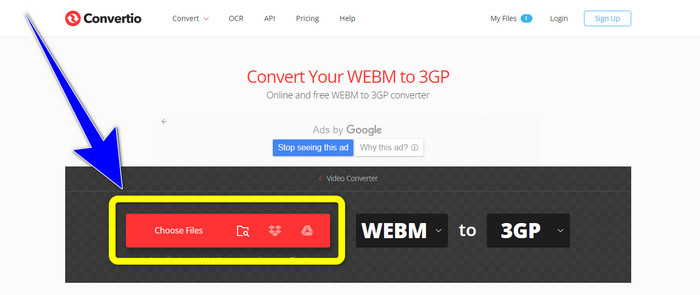
Langkah 1: Buka situs web Convertio dan tekan tombol Choose files untuk menambahkan file video WebM Anda.
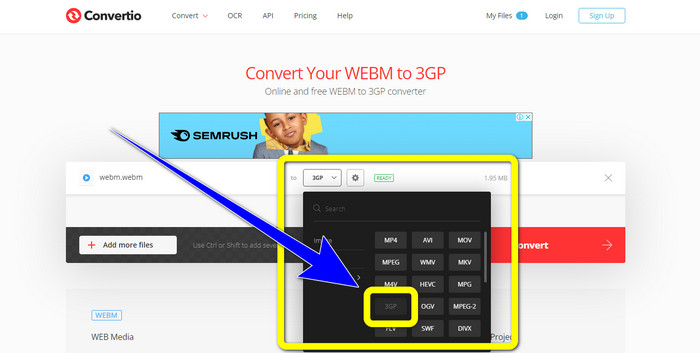
Langkah 2: Setelah Anda menambahkan file video WebM di Convertio, pilih opsi format dan pilih format file 3GP.
Langkah 3: Untuk langkah terakhir, Anda dapat mengklik tombol Convert untuk mengonversi file Anda. Lalu, simpan file akhir di komputer Anda setelah proses konversi selesai. Klik di sini untuk mempelajari cara mengonversi MPG ke 3GP.
Bagian 3: Informasi tentang WebM dan 3GP
WEBM
Dengan kompresi video VP8 dan audio Vorbis, WebM adalah sebuah wadah media (media container) terbuka. Format WebM biasanya digunakan untuk menambahkan media ke halaman web dan didukung oleh semua browser web, termasuk Opera, Mozilla Firefox, dan Google Chrome. Format ini menawarkan kualitas pemutaran video yang baik dan karakteristik kompresi data yang efisien. Penyematan video WebM di halaman situs web berlangsung tanpa gangguan atau kesalahan. Format WebM dimaksudkan untuk bersaing dengan standar H.264. Google adalah pemilik hak cipta ekstensi ini.
3GP
Untuk ponsel berbasis GSM (Global System for Mobile Communications), Third Generation Partnership Project membuat wadah multimedia 3GP pada tahun 1998. Wadah ini sangat cocok untuk ponsel karena menggunakan lebih sedikit data, bandwidth, dan ruang penyimpanan. Ini adalah wadah yang umum digunakan untuk file MMS (Multimedia Messaging Service).
Bagian 4: FAQ tentang Mengonversi WebM ke 3GP
Apa konverter offline dan online terbaik yang dapat saya gunakan untuk mengonversi WebM ke 3GP?
Berikut adalah aplikasi-aplikasi yang telah diuji dan andal untuk mengonversi WebM ke 3GP dan berbagai file lainnya.
1. FVC Free Video Converter Online
2. Video Converter Ultimate
3. Convertio
4. HitPaw Video Converter
5. Online Convert Free
6. AnyMP4 Video Converter Ultimate
7. OnlineConvert
Apakah 3GP adalah format video yang bagus?
Untuk ponsel jaringan 3G, format 3GP sangat bagus karena dibuat khusus untuk perangkat tersebut. Namun, dalam hal streaming di pemutar media portabel atau desktop, ada format yang lebih bagus seperti MP4 karena dapat mendukung video beresolusi lebih tinggi daripada 3GP.
Berapa resolusi 3GP?
Video 3GP memiliki dua resolusi: Yang pertama adalah 176x144 untuk semua ponsel yang mendukung format 3G. Resolusi lainnya adalah 320x240 untuk ponsel dengan layar lebar, PSP, pemutar MP4, dan iPad sentuh.
Kesimpulan
Dalam artikel ini, dapat kita simpulkan bahwa ada banyak cara untuk mengonversi WebM ke 3GP. Jika Anda menginginkan cara terbaik untuk mengonversi file video secara online, gunakan FVC Free Video Converter Online. Lalu, jika Anda mencari perangkat lunak yang dapat diunduh, gunakan Video Converter Ultimate. Keduanya sama-sama andal untuk mengonversi berbagai format video.
-
 Konverter WebM ke FLV Pilihan Teratas Gratis di Web & Desktop
 Apakah Anda memiliki masalah yang sama saat memutar file WebM di ponsel pintar Anda? Kemudian luangkan waktu 5 menit untuk membaca artikel ini untuk mengetahui cara mengonversi WebM ke FLV.
-
 3 Konverter WebM ke WMV Terbaik yang Tidak Boleh Anda Lewatkan
 Mencari cara untuk mengonversi file WebM ke file WMV? Kami mencoba beberapa konverter terkenal di pasaran saat ini dan memilih yang terbaik dan termudah untuk digunakan di antara mereka.
-
 Pengonversi WebM ke MKV Terbaik yang Harus Anda Gunakan untuk Mengonversi dengan Cepat
 Apakah Anda mencari cara untuk mengonversi file WebM ke MKV? Artikel ini menyajikan konverter WebM ke MKV terbaik untuk Anda coba.
