


 Video Converter Ultimate
 Perekam Layar
 Perbaikan Video
 Unduhan Aman
Konversi Caf ke MP3 yang mulus untuk Menjaga Kualitas dan Aksesibilitas Audio
Mengonversi Caf ke MP3 sangat penting untuk meningkatkan kompatibilitas dan aksesibilitas. Mengonversi file Caf Anda ke MP3 memastikan pemutaran yang mulus di berbagai platform, menghilangkan masalah kompatibilitas. Selain itu, file MP3 berukuran lebih kecil, membuatnya lebih mudah untuk disimpan, ditransfer, dan dibagikan. Apakah Anda ingin menikmati koleksi audio Anda di smartphone, komputer, atau sistem dalam mobil, mengonversi Caf ke MP3 memberi Anda fleksibilitas dan kemudahan yang lebih besar dalam mengakses musik, podcast, atau rekaman favorit Anda.
Dengan menggunakan konverter Caf ke MP3, Anda dapat dengan mudah mengubah file Caf Anda ke format MP3 yang populer, yang memastikan jangkauan kompatibilitas yang lebih luas, ukuran file yang lebih kecil, dan kemudahan berbagi koleksi audio Anda. Karena itu, cari tahu alat yang dapat Anda gunakan untuk membantu mengubah file Anda dari Caf ke MP3.

Bagian 1. Apa itu CAF, dan Mengapa Mengkonversi CAF ke MP3
Caf atau Core Audio Format adalah format file audio yang diperkenalkan oleh Apple Inc. Biasanya digunakan pada platform macOS dan iOS. File Caf sering dibuat dan digunakan dalam aplikasi audio profesional, seperti pengeditan suara, pencampuran, dan perekaman. Mengkonversi Caf ke MP3 menawarkan beberapa alasan dan keuntungan yang menarik. Berikut adalah beberapa dari beberapa alasan utama mengapa Anda mungkin mempertimbangkan untuk mengonversi file Caf Anda ke format MP3:
Kompatibilitas yang Ditingkatkan: MP3 adalah salah satu format audio yang paling luas didukung di berbagai perangkat, pemutar media, dan sistem operasi. Dengan mengonversi file Caf Anda ke MP3, Anda menjamin kompatibilitas dan menghilangkan masalah atau keterbatasan pemutaran apa pun yang mungkin Anda temui dengan file Caf.
Aksesibilitas: Mengonversi Caf ke MP3 memungkinkan aksesibilitas yang lebih besar terhadap konten audio Anda. File MP3 dapat diputar di banyak perangkat, termasuk ponsel pintar, tablet, laptop, komputer desktop, pemutar musik portabel, dan bahkan sistem audio mobil. Fleksibilitas ini memungkinkan Anda menikmati musik, podcast, atau rekaman favorit kapan saja dan di mana saja.
Ukuran File Lebih Kecil: File MP3 umumnya dikompresi, sehingga menghasilkan ukuran file yang secara signifikan lebih kecil dibandingkan file Caf. Kompresi ini membantu menghemat ruang penyimpanan pada perangkat Anda tanpa secara nyata menurunkan kualitas audio. Hal ini juga memudahkan Anda untuk mentransfer atau membagikan file audio kepada orang lain melalui email, aplikasi pesan, atau platform online.
Bagian 2. Konversi CAF ke MP3 Offline
Video Converter Ultimate adalah perangkat lunak yang sangat efisien yang memungkinkan konversi berbagai format file ke beragam format audio seperti Caf dan MP3. Perangkat lunak ini menyediakan fungsi konversi batch yang memungkinkan pengguna mengonversi banyak file audio secara bersamaan.
Selain itu, pengguna memiliki kemampuan untuk mengoptimalkan kualitas lagu apa pun yang diinginkan melalui fitur program yang memungkinkan penyesuaian teknis keluaran, termasuk kecepatan sampel dan kecepatan bit. Untuk individu yang ingin melakukan konversi batch file audio dari Caf ke MP3 atau sebaliknya, kami telah menyediakan panduan singkat di bawah ini untuk Anda teliti. Anda dapat merujuk ke petunjuk di bawah ini untuk mempelajari cara mengubah Caf ke MP3.
Langkah 1. Pilih ikon Unduh Gratis yang sesuai di bawah untuk meluncurkan program di perangkat Anda. Pastikan untuk mengikuti petunjuk di layar untuk mengaktifkan program pada langkah berikutnya. Setelah terpasang, antarmukanya mudah dikuasai. Alat ini berfungsi sebagai konverter Caf ke MP3 untuk Mac dan Windows.
Free DownloadUntuk Windows 7 atau yang lebih baruUnduhan Aman
Free DownloadUntuk MacOS 10.7 atau yang lebih baruUnduhan Aman
Langkah 2. Klik tombol Tambah pada antarmuka utama untuk mengimpor file audio yang ingin Anda edit. Anda kemudian akan diarahkan ke tampilan thumbnail dari file yang diimpor. Anda dapat mengirim satu folder untuk mengonversi banyak file sekaligus. Pilih lokasi dalam direktori Anda yang berisi semua file audio yang diperlukan.
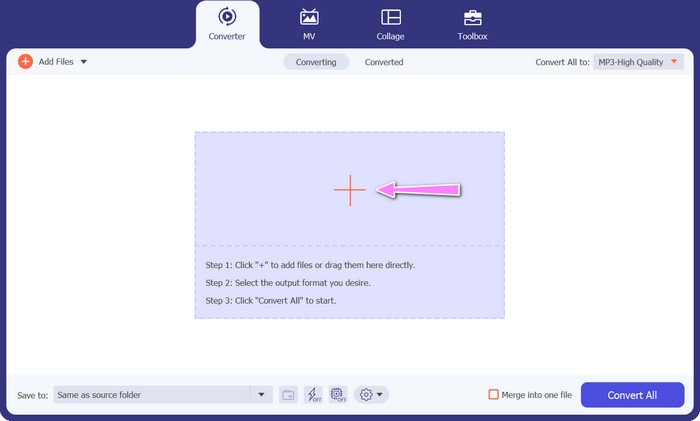
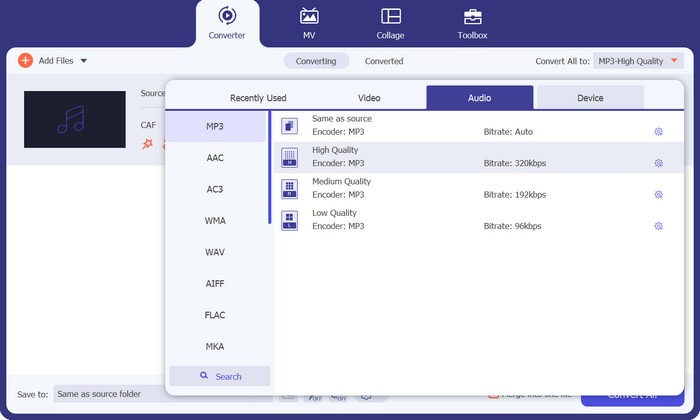
Langkah 3. Sekarang Anda dapat mengubah format keluaran dengan mengklik tombol Konversi Semua ke yang terletak di bagian atas jendela program. Pilih MP3 dari panel berlabel Audio. Pada saat yang sama, Anda dapat mengubah sample rate dan bitrate file keluaran untuk mendapatkan kualitas yang diinginkan.
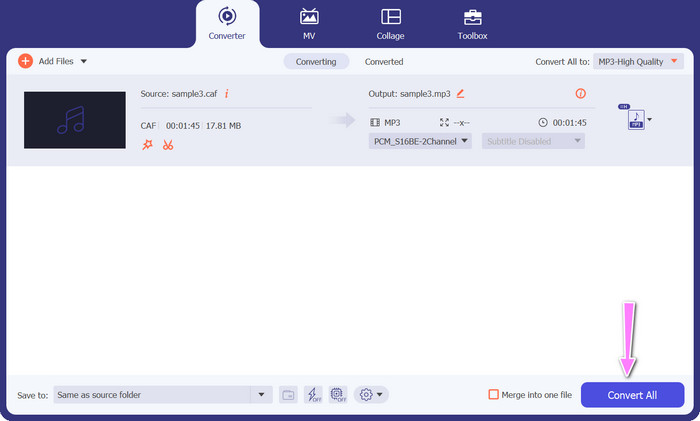
Langkah 4. Klik tombol Konversi Semua di bawah untuk memulai proses konversi sebagai langkah terakhir. Program kemudian akan secara otomatis membuka folder keluaran agar Anda dapat memeriksa format file yang baru.
Pro
- Itu dapat mengonversi format file audio Caf ke MP3 secara batch.
- Program ini bekerja dengan baik dengan Windows dan Mac OS.
Kontra
- Itu membutuhkan biaya berlangganan berbayar setelah uji coba gratis.
Bagian 3. Konversi CAF ke MP3 Online
Anda juga dapat menggunakan Free MP3 Audio Converter Online, yang merupakan opsi lainnya. Ini adalah aplikasi berbasis web yang bekerja dengan bantuan internet, seperti yang disiratkan oleh namanya. Dengan demikian, Anda tidak perlu memasang aplikasi yang mengonversi Caf ke MP3. Semuanya dapat diakses, dan Anda hanya memerlukan browser untuk menyelesaikan pekerjaan. Dari segi fitur, konverter Caf ke MP3 gratis ini tidak kalah sama sekali. Selain itu, Anda dapat mengunggah banyak file, mengonversinya secara massal, atau menyesuaikan profil video atau klip audio. Dengan mengikuti teknik yang dijelaskan di sini, Anda akan mengetahui konverter Caf ke MP3 online terbaik.
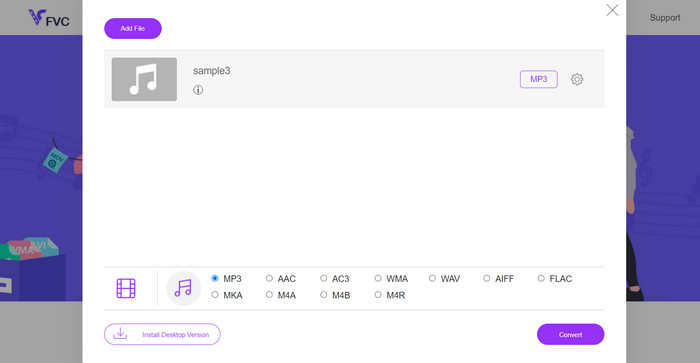
Langkah 1. Langsung saja ke situs utama Free MP3 Audio Converter Online dengan mengeklik tautan yang tertera di atas. Anda dapat mengirim file audio dengan masuk ke layar utama dan memilih opsi Tambahkan File untuk Dikonversi.
Langkah 2. Cuplikan file asli yang Anda pilih akan muncul di layar. Anda dapat memilih format keluaran yang diinginkan dengan pergi ke bagian bawah panel tempat Anda berada sebelumnya.
Langkah 3. Untuk mengubah format file dari Caf ke MP3, klik tombol Konversi. Anda perlu melakukan prosedur yang sama dari awal jika ingin mengonversi file lainnya.
Pro
- Pengguna dapat menikmati konversi tak terbatas per hari.
- Konverter Caf ke MP3 online ini berfungsi di hampir semua browser web.
Kontra
- Kecepatan konversi sebanding dengan bandwidth internet yang tersedia.
Bacaan Lanjutan:
Konversi MP3 ke AAC: Cara Meningkatkan Kualitas Audio Anda
Unduh Pemutar MP3 – 10 Pemutar Musik MP3 Gratis Terbaik 2023
Bagian 4. FAQ tentang Konversi CAF ke MP3
Bisakah saya mempertahankan metadata file Caf saya setelah mengonversinya menjadi MP3?
Pelestarian metadata selama konversi Caf ke MP3 tergantung pada konverter atau perangkat lunak tertentu yang Anda gunakan. Beberapa alat konversi memiliki kemampuan untuk mempertahankan metadata seperti nama artis, judul album, nomor trek, dan lainnya. Namun, perlu diperhatikan bahwa tidak semua pengonversi mendukung retensi metadata.
Apakah ada format audio lain yang dapat saya gunakan untuk mengonversi file Caf?
Ya, selain MP3, ada beberapa format audio lain yang bisa Anda konversi file Caf, tergantung kebutuhan spesifik Anda. Format alternatif umum termasuk WAV, FLAC (Free Lossless Audio Codec), AAC, dan OGG (Ogg Vorbis).
Apakah saya harus membayar konverter Caf ke MP3?
Tersedia opsi konversi Caf ke MP3 gratis dan berbayar. Banyak konverter online menawarkan layanan gratis, memungkinkan Anda mengonversi file Caf ke MP3 tanpa biaya apa pun. Namun, beberapa perangkat lunak tingkat lanjut atau layanan online premium mungkin memerlukan pembelian atau langganan untuk mendapatkan fitur tambahan atau kecepatan konversi yang lebih tinggi.
Kesimpulan
Dengan konversi Caf ke MP3, Anda dapat membuka potensi penuh koleksi audio Anda dan menikmati pemutaran yang lancar kapan saja dan di mana saja. Ini memungkinkan Anda menikmati musik, podcast, atau rekaman favorit di berbagai perangkat dan platform.
-
 4 Cara Terbaik untuk Mengonversi AIFF ke MP3 di Mac & PC
 Mengalami kesulitan karena file AIFF terlalu besar untuk disimpan? Jadi, Anda harus melanjutkan membaca saat kami menjelaskan cara memperbaikinya dengan mengonversi AIFF ke format MP3.
-
 Cari tahu Cara Mengonversi AMR ke MP3 [Online & Offline]
 Mengalami kesulitan karena file .amr tidak dapat diputar di desktop Anda? Kemudian baca artikel ini untuk mempelajari cara mengubah format AMR ke MP3.
-
 Panduan Cara Menambahkan Seni Album ke MP3 Dengan Mudah di Breze
 Apakah Anda ingin tahu cara menambahkan sampul album ke MP3? Jika demikian, baca detail lengkap dan tutorial tentang cara mengedit sampul album di file Anda.
