


 Video Converter Ultimate
 Perekam Layar
 Perbaikan Video
 Unduhan Aman
Cara Menyimpan GIF sebagai Video di iPhone dengan 5 Cara Luar Biasa
Siapa lagi yang akan menyangka bahwa orang bisa berinteraksi secara ekspresif secara online melalui Graphics Interchange Format atau GIF? Berkas-berkas ini dibuat dengan resolusi kecil dan berupa klip video animasi. Baik Anda ingin menambahkan sentuhan lucu pada pesan atau mengirim pelukan kepada orang-orang tercinta, GIF akan menjadi teman terbaik Anda. Pada artikel ini, kami mengkurasi beberapa situs media sosial tempat Anda dapat mengakses ribuan GIF dan mengajari Anda cara menyimpan GIF animasi di iPhone.

Bagian 1: Cara Menyimpan GIF di iPhone [iOS16/17]
1.Safari
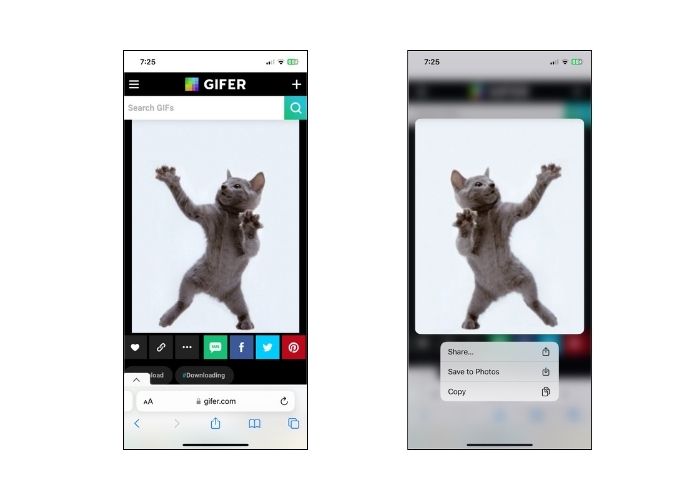
Jangan beralih ke cara lain dan mulai dulu dengan browser asli model iPhone apa pun, Safari. Ikuti langkah-langkah tentang cara menyimpan GIF di iPhone dari Safari.
Langkah 1. Buka aplikasi Safari di ponsel Anda dan cari GIF yang diinginkan.
Langkah 2. Ketuk dan tahan GIF yang Anda inginkan dari situs berbagi GIF pilihan Anda.
Langkah 3. Selanjutnya, ketuk Simpan ke Foto dari menu dan GIF akan tersimpan di aplikasi Foto Anda.
2. Twitter
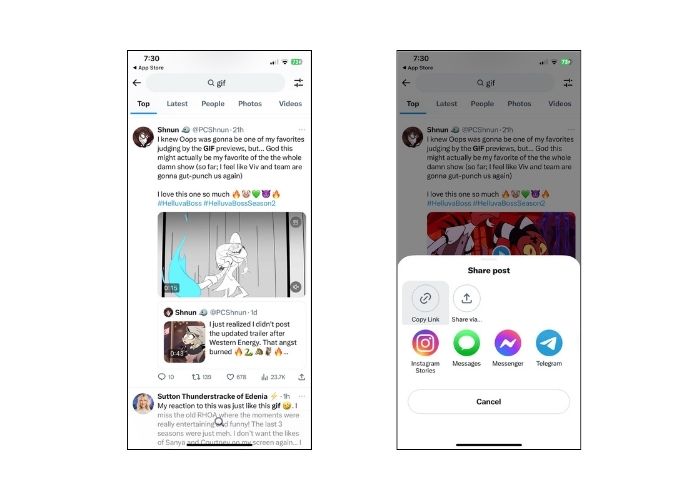
Jika Anda ingin menemukan GIF yang unik dan ekspresif, mencoba beberapa situs jejaring sosial online seperti Twitter, yang sekarang dikenal sebagai X, adalah pilihan yang bagus. Dari tweet orang, Anda memang memiliki pilihan lengkap mana yang akan dipilih. Bagaimana cara menyimpan GIF di iPhone dari Twitter? Ikuti panduan di bawah ini.
Langkah 1. Buka aplikasi Twitter di iPhone Anda dan cari GIF yang ingin Anda simpan.
Langkah 2. Setelah memilih tweet yang berisi GIF tujuan Anda, ketuk Menu dan salin tautannya.
Langkah 3. Terakhir, tempel tautan tersebut ke pengunduh GIF dan tekan Simpan ke Library.
3. Google
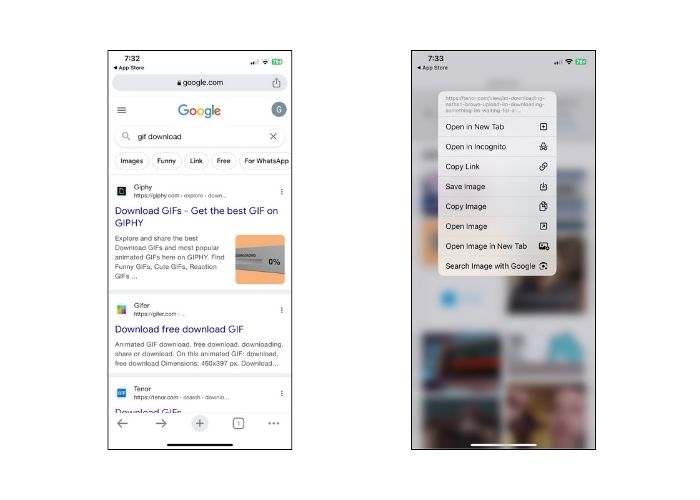
Mengenai mesin pencari, Google mungkin dipuji sebagai salah satu yang paling populer di seluruh dunia. Selain itu, mesin pencari ini memungkinkan Anda melihat jutaan GIF di seluruh web dan memberikan GIF yang Anda perlukan. Berikut cara menyimpan GIF di iPhone dari Google.
Langkah 1. Masuk ke Google Chrome di perangkat iPhone Anda. Pada bilah pencarian, ketik GIF yang ingin Anda simpan.
Langkah 2. Setelah menemukan GIF, ketuk Menu dan tekan Simpan Gambar.
Langkah 3. Lalu, akan muncul notifikasi yang menanyakan apakah Anda mengizinkan penambahan GIF ke aplikasi Foto atau tidak. Tekan OK untuk melanjutkan.
4. GIPHY
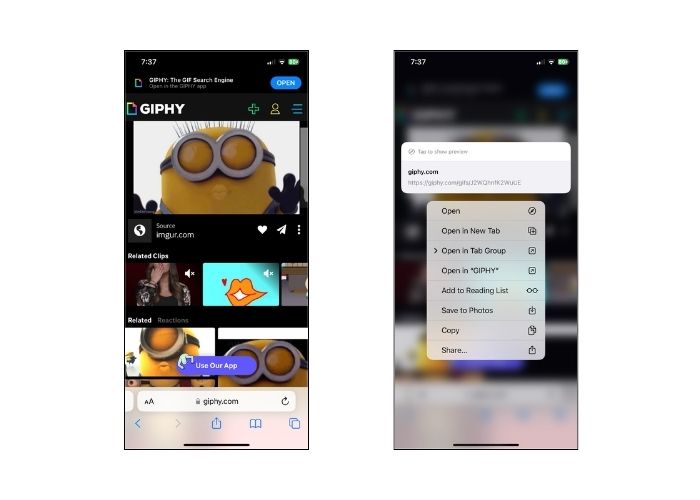
GIPHY adalah situs web online yang memungkinkan orang mengakses kumpulan GIF untuk setiap kesempatan. Jika Anda ingin mengetahui cara menyimpan GIF dari GIPHY di iPhone, ikuti panduan di bawah ini.
Langkah 1. Buka peramban web Anda dan masuk ke situs resmi GIPHY. Setelah itu, cari GIF yang Anda inginkan dengan kata kunci atau klik kategori tertentu pada daftar.
Langkah 2. Setelah memilih GIF, ketuk dan tahan GIF tersebut hingga pilihan muncul.
Langkah 3. Terakhir, pilih Simpan ke Foto dan GIF akan ditambahkan ke penyimpanan berkas lokal Anda.
5. Ada apa
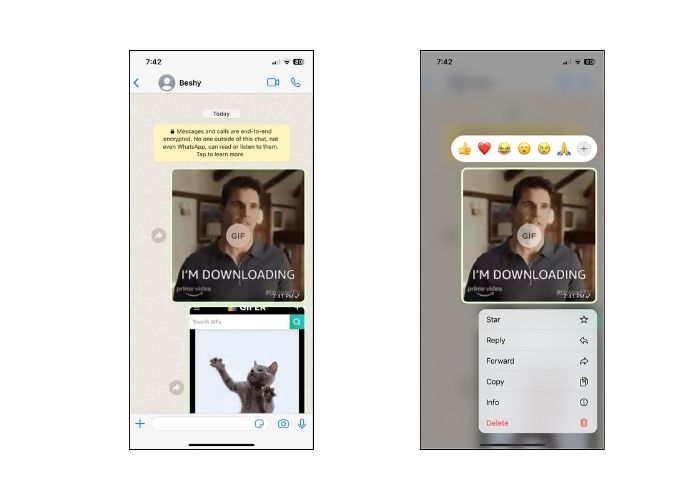
Platform komunikasi online lain yang terkenal saat ini adalah WhatsApp. Seperti alat komunikasi digital lainnya, WhatsApp juga merupakan pilihan terbaik untuk menerima GIF dari teman dan orang terkasih. Kami juga mendapatkan liputan Anda tentang cara menyimpan GIF dari WhatsApp di iPhone.
Langkah 1. Buka kotak obrolan atau grup yang berisi GIF tersebut.
Langkah 2. Setelah menggulir Media Tersimpan atau Chat, ketuk GIF lalu tekan selama 3 detik hingga Menu muncul.
Langkah 3. Pilih Simpan untuk menambahkan GIF ke berkas Anda.
Bagian 2: Mengapa saya tidak bisa menyimpan GIF di iPhone?
Beberapa faktor harus dipertimbangkan ketika ada upaya yang gagal untuk menyimpan GIF ke iPhone. Lihat alasan berikut di bawah ini dan coba tentukan mana penyebabnya.
1. Jika Anda tidak bisa menyimpan GIF di iPhone, sambungan internet Anda mungkin penyebabnya. Dalam hal ini, coba cek apakah internet tersedia dengan mengetuk Pengaturan > Wi-Fi.
2. Jika Anda tidak dapat mengunduh atau bahkan mengambil tangkapan layar, coba mulai ulang iPhone Anda. Dalam hal ini, telepon Anda akan diatur ulang.
3. Menutup paksa aplikasi mungkin juga membantu. Ada kalanya kesalahan akan teratasi setelah keluar dari aplikasi.
4. Terakhir, periksa penyimpanan Anda. Jika Anda penuh dengan file, Anda mungkin perlu mengosongkan sebagian ruang dengan menghapus foto, video, dan bahkan mencopot pemasangan beberapa aplikasi yang tidak digunakan.
Bagian 3. Cara Menyimpan GIF di iPhone sebagai Video
1. Video Converter Ultimate
Terkadang, kita perlu mengubah GIF menjadi video, namun tidak semua pembuat GIF bisa melakukannya. Karena itu, berikut adalah platform hebat yang dapat membantu. Video Converter Ultimate adalah alat yang dipercepat GPU yang mengonversi GIF menjadi berkas video dengan mulus dan cepat. Anda juga dapat mengonversi video ke ekstensi berkas lain seperti MOV, FLV, MP4, ASV, dan lainnya. Di samping itu, alat ini sangat baik dalam mempertahankan kualitas rekaman Anda dengan rasio 1:1.
Langkah 1. Instal Transkoder GIF ke Video Terbaik
Pertama, buka tombol Unduh di bawah yang sesuai dengan sistem operasi Anda. Setelah itu, jalankan berkasnya untuk meluncurkan program di komputer Anda.
Free DownloadUntuk Windows 7 atau yang lebih baruUnduhan Aman
Unduh GratisUntuk MacOS 10.7 atau yang lebih baruUnduhan Aman
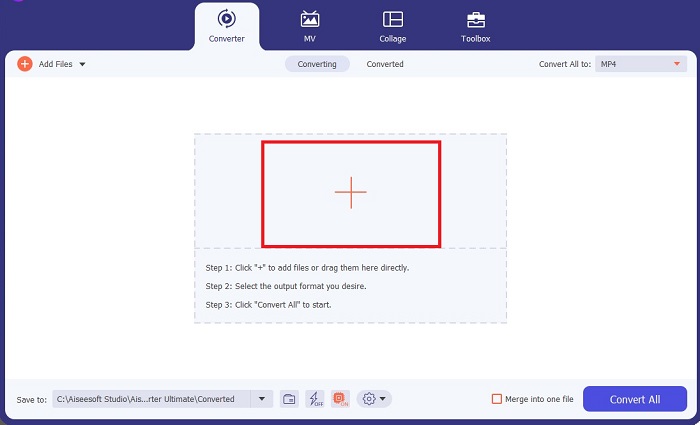
Langkah 2. Impor berkas GIF
Untuk mengunggah berkas GIF Anda, klik tombol Plus di tengah layar. Anda juga dapat mengonversi banyak berkas GIF sekaligus dengan mengunggah satu folder.
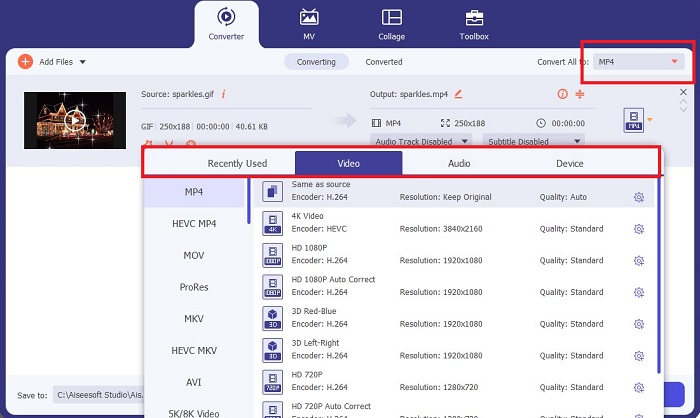
Langkah 3. Pilih Format Video
Setelah GIF Anda muncul di layar, buka tab Keluaran untuk mengakses daftar format video. Untuk menjaga kompatibilitas berkas Anda, pilih MP4.
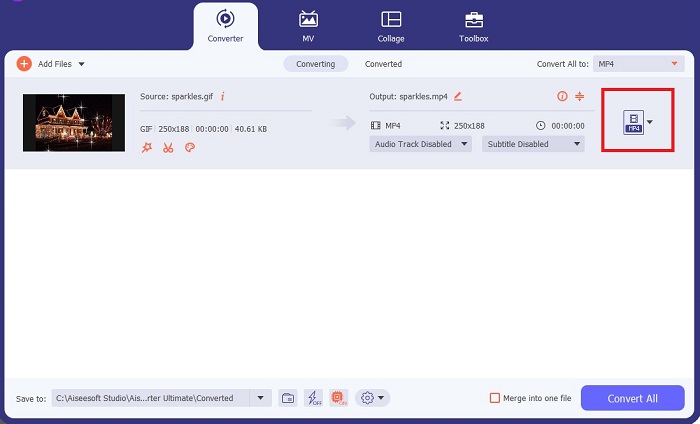
Langkah 4. Simpan Proyek
Terakhir, centang tombol Konversi di bagian bawah layar untuk memulai proses konversi. Anda juga dapat memeriksa berkas Anda dengan mengklik ikon Folder untuk membuka direktori lokal tempat GIF hasil konversi disimpan.
Bacaan Lanjutan:
Cara Tak Terkalahkan untuk Menambahkan Teks pada GIF (Semua Platform)
Penghapusan Latar Belakang GIF dengan Alat yang Efektif dan Bermanfaat
Bagian 4. FAQ Tentang Cara iPhone Menyimpan GIF
Bisakah Anda menyimpan GIF di iPhone dari email?
Sangat! Anda dapat menyimpan GIF apa pun dari email ke Rol Kamera Anda. Cukup ketuk ikon Bagikan di email Anda dan klik Simpan file.
Bisakah saya memposting GIF di Twitter di iPhone saya?
GIF dapat dibagikan di situs media sosial, termasuk Tweeter. Anda dapat melakukan ini dengan cara Anda memposting gambar.
Di mana menemukan GIF yang disimpan di iPhone
Setelah Anda menyimpan GIF, Anda dapat membuka File Explorer di iPhone atau menyegarkan aplikasi Foto.
Bisakah saya menyimpan GIF ke rol kamera saya di iPhone
Sangat! Jika Anda ingin menyimpan file GIF di rol kamera Anda, Anda dapat menyimpannya seperti yang Anda lakukan pada gambar biasa. Tekan gambar selama 3 detik atau tap Menu. Setelah itu, klik Simpan Gambar.
Bagaimana cara menyimpan gif Reddit di iPhone?
Anda dapat menyimpan GIF dari Reddit menggunakan langkah yang sama yang disebutkan di atas. Setelah menyimpan GIF Anda di kamera, membuka direktori File Anda adalah cara terbaik untuk menemukan GIF yang disimpan di iPhone. Ini adalah hal yang paling nyaman untuk dilakukan karena ada kalanya foto atau GIF yang Anda unduh tidak muncul di aplikasi Foto.
Kesimpulan
Mengetahui cara memanipulasi GIF, termasuk mengonversinya menjadi video, sangat diperlukan jika Anda ingin unggul di era digital. Itulah cara menyimpan GIF di iPhone melalui berbagai situs dan aplikasi media sosial.
-
 Cara Mengubah Video ke GIF untuk Membuat GIF yang Menarik
 Temukan cara mengonversi video Anda dengan mudah menjadi GIF menarik dengan pengonversi video ke GIF pilihan kami dan proses video-ke-GIF yang mudah diikuti.
-
 Tinjauan Komprehensif Ezgif tentang Fitur dan Alternatif
 Jika Anda telah menggunakan Ezgif dan masih belum mengetahui apa yang terjadi. Ulasan Ezgif ini akan membantu Anda mengatasi kekhawatiran tersebut. Baca terus untuk mengetahui lebih lanjut.
-
 10 Kompresor GIF Terbaik untuk Pengguna Desktop dan Online
 Dalam posting ini, Anda akan belajar tentang kompresor GIF terbaik untuk membantu Anda memperbaiki masalah Anda dengan file GIF besar. Periksalah dan dapatkan wawasan terbaik.
