


 Video Converter Ultimate
 Perekam Layar
 Perbaikan Video
 Unduhan Aman
Review Kompresor Veed.io: Cara Kerja Alat Ini
Pada abad ke-21, orang-orang menjadi terpesona oleh media digital. Sebagian besar layanan streaming kita saat ini memungkinkan Anda menonton dan memutar video tanpa batas. Di komputer dan ponsel pintar kita, menonton video juga telah menjadi bagian tak terpisahkan dari kehidupan kita. Saat membeli perangkat, kita memprioritaskan tampilan layar dan kemampuan perangkat untuk memutar video. Seiring kita mengembangkan pembuatan video dengan kualitas keluaran yang lebih baik, ukuran berkas yang digunakan di perangkat kita menjadi lebih besar. Karena itu, berbagai teknologi kompresi video telah dikembangkan. Salah satu kompresor video online yang populer saat ini adalah Veed.io compressor. Artikel ini secara menyeluruh mengulas kelebihan, kekurangan, dan cara penggunaan aplikasi online ini.

Bagian 1. Apa itu Kompresor Video Veed
Veed.io adalah alat kompresi video yang memungkinkan pengguna mengompresi file video berukuran besar tanpa mengurangi kualitas. Alat berbasis web ini mudah digunakan dan menawarkan antarmuka drag-and-drop yang sederhana. Juga bebas iklan sehingga pengguna dapat mengompres berbagai video dengan cepat dan aman. Salah satu fitur penting Veed.io adalah kemampuannya untuk mengompres video tanpa mengurangi kualitas. Itu dapat mempertahankan resolusi file video sambil mengompresinya dengan algoritma canggihnya. Selain itu, alat online ini kompatibel dan didukung dengan berbagai wadah video, termasuk MP4, AVI, MOV, MKV, WMV, dan banyak lagi. Veed.io mengompresi video dan menawarkan fitur pengeditan seperti memotong, memotong, menambahkan teks, dan banyak lagi. Ini memiliki panel pengeditan garis waktu di mana pengguna dapat mengedit dan menyempurnakan video keluaran mereka. Anda tidak hanya dapat memperkecil ukuran file video, tetapi Anda juga dapat mempercantik dan mengubah tampilan keluaran video.
Bagian 2. Pro dan Kontra Kompresor Video Veed
Veed.io adalah alat hebat yang hadir dengan banyak fitur. Namun, tidak ada yang sempurna dalam hal penggunaan digital. Selalu ada ruang untuk memperbaiki prosesnya. Itulah sebabnya kami telah melakukan tinjauan menyeluruh mengenai kelebihan dan kekurangannya.
Pro
- Ini dapat memberi pengguna banyak fitur pengeditan untuk meningkatkan keluaran video.
- Itu juga dapat mengubah ukuran rasio aspek video yang sesuai untuk platform media sosial.
- Anda dapat mengubah warna latar belakang file video yang ingin Anda kompres.
- Ini memiliki penghilang kebisingan latar belakang.
- Alat online ini hadir dengan opsi untuk meningkatkan FPS.
- Muncul dengan opsi Ekspor Lebih Cepat.
Kontra
- Meskipun aplikasi ini merupakan layanan freemium, fitur-fitur tertentu tidak tersedia sebagai uji coba gratis.
- Untuk penggunaan gratis, ia memiliki tanda air saat mengekspor video.
- Alat ini secara otomatis memperkecil dan mengompresi file. Hal ini bisa menjadi kelemahan bagi pengguna yang ingin memiliki opsi atau pilihan untuk memperkecil filenya secara manual.
- Ini terutama bergantung pada kecepatan internet, jadi durasi kompresi dengan alat ini mungkin berbeda-beda.
Bagian 3. Panduan Kompresor Video Veed
Veed.io dapat diakses dari perangkat apa pun dengan koneksi internet dan kompatibel dengan semua browser utama. Ini adalah alat intuitif untuk mengedit klip kecil dan mengompresnya menjadi ukuran file video yang lebih kecil. Anda dapat memeriksa solusi di bawah ini jika Anda perlu mempelajari proses detail alat tersebut.
Langkah 1: Akses Veed.io Secara Online
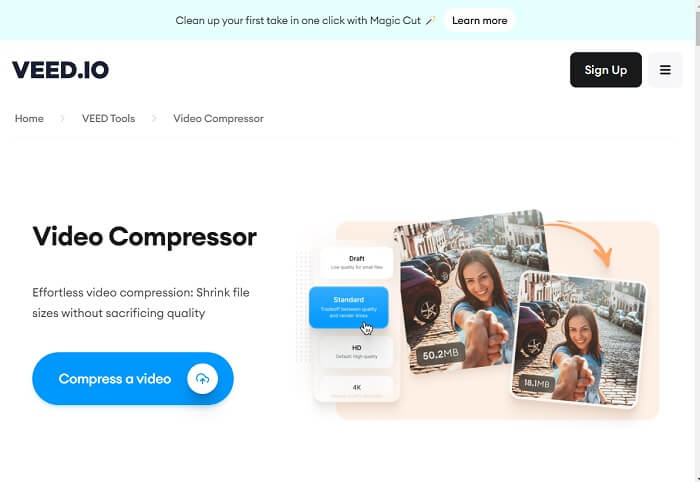
Akses kompresor video Veed di peramban web Anda pada halaman produk utamanya. Anda juga dapat menekan tautan yang disematkan dalam panduan ini untuk menuju halaman webnya dengan cepat. Lalu, Anda bisa mendaftar akun atau menekan opsi Compress a Video untuk langsung mengakses fitur pengeditannya.
Langkah 2: Impor dan Edit Video
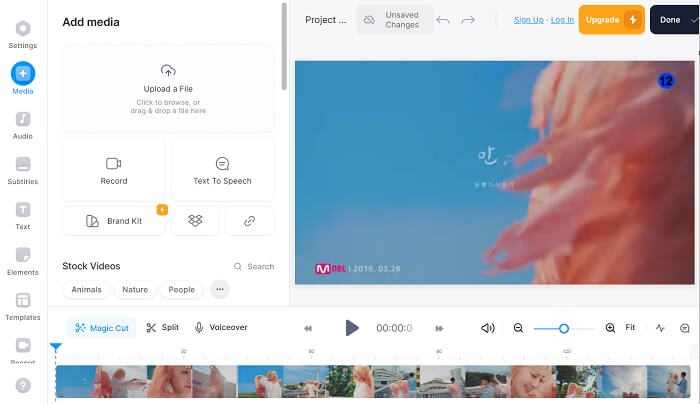
Setelah itu, buka tab Media dengan mengklik opsinya di bagian sebelah kiri alat online. Anda akan melihat opsi untuk mengimpor video Anda. Anda dapat menyeret dan melepas berkas video atau menekan Upload a File untuk menambahkan video ke antarmuka alat. Selanjutnya, seret video ke panel pengeditan timeline dan sesuaikan video menggunakan fitur pengeditannya.
Langkah 3: Ekspor dan Perkecil Ukuran Berkas Video
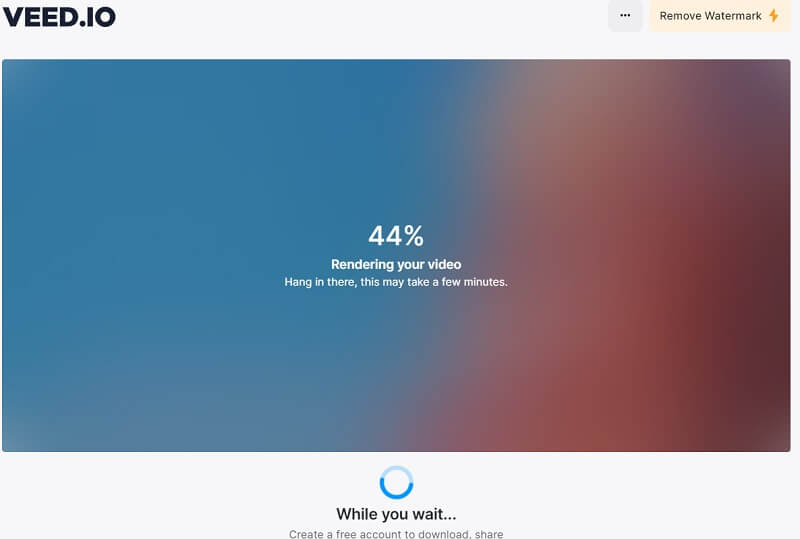
Terakhir, setelah berkas video selesai diedit sesuai keluaran yang Anda inginkan, siapkan untuk diekspor. Tekan atau klik opsi Done di bagian kanan atas alat online. Pilih Export Video untuk mengompres berkas secara otomatis menggunakan algoritma alat tersebut. Tunggu prosesnya, dan video dapat langsung disimpan ke folder komputer Anda atau diekspor ke platform media sosial.
Bagian 4. Alternatif untuk Kompresor Video Veed
Misalkan Anda merasa Veed.io berbeda dari getaran Anda dan harus menggunakan metode lain untuk mengompresi video Anda. Bagian ini akan menganalisis berbagai solusi untuk mengompres file video tanpa memerlukan kompresor video Veed.io.
1. Video Converter Ultimate
Video Converter Ultimate adalah aplikasi konverter video yang diperbarui untuk komputer Anda yang dapat memperkecil dan mengubah ukuran berkas video tanpa mengorbankan kualitas. Yang membuat alat ini menjadi pilihan yang lebih baik dibandingkan Veed.io adalah kemampuannya mengompres berkas video berkualitas tinggi. Pengguna atau klien dapat memperkecil ukuran berkas video yang berisi 8K, 4K, 2K, 1080p, dan lainnya. Kita semua tahu bahwa jenis kualitas video ini akan memakan banyak ukuran berkas. Dengan aplikasi ini, perangkat Anda akan “lebih lega” karena dapat menyimpan banyak video berkualitas tersebut dalam ukuran berkas yang relatif kecil. Selain itu, aplikasi ini mendukung lebih dari 1000 format untuk mengedit, meningkatkan, dan mengompres. Kontainer berkas ini mencakup MP4, AVI, WMV, MKV, MOV, format yang didukung VLC, dan lainnya. Anda dapat melihat panduan terperinci di bawah ini tentang cara mengompres video menggunakan Video Converter Ultimate.
Langkah 1: Dapatkan Free Converter Ultimate di PC Anda
Untuk mengompres berkas video dengan Free Converter Ultimate, Anda harus mendapatkan penginstal berkasnya dan menyimpannya di PC Anda. Kami memiliki solusi yang lebih baik jika Anda membutuhkan alat ini dengan cepat. Tekan ikon Free Download yang disajikan di bawah ini untuk mendapatkan penginstal alat tersebut.
Free DownloadUntuk Windows 7 atau yang lebih baruUnduhan Aman
Unduh GratisUntuk MacOS 10.7 atau yang lebih baruUnduhan Aman
Langkah 2: Impor dan Perkecil Ukuran Berkas Video Anda
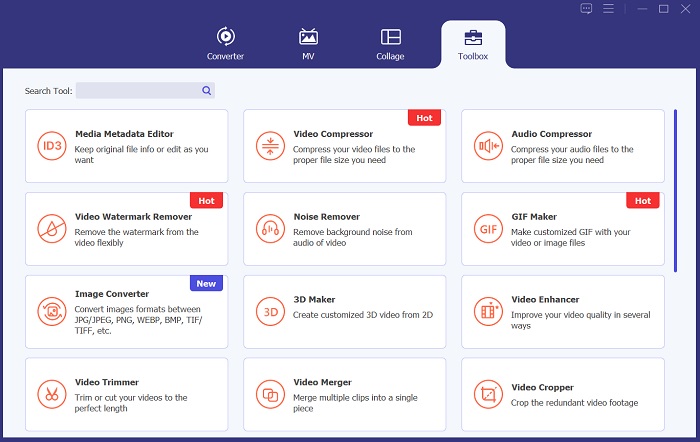
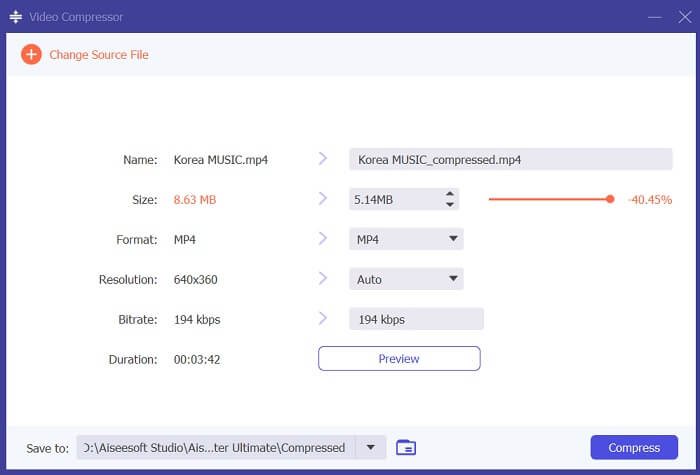
Selanjutnya, untuk mengompres video, buka menu Toolbox dan temukan Video Compressor. Tekan ikon + pada antarmuka aplikasi Anda dan cari video yang perlu Anda perkecil ukuran berkasnya. Tekan tombol OK untuk menambahkan video ke sistem alat.
Langkah 3: Ekspor Video
Terakhir, ketika Anda telah mengatur ukuran berkas video yang perlu dikurangi, tekan opsi Compress untuk menganalisis video dan memulai proses kompresi. Berkas keluaran akan otomatis disimpan di folder PC Anda di bawah folder output milik Video Converter Ultimate.
2. Kompresor Video FVC Daring
Opsi lain yang dapat digunakan pengguna untuk mengompres video adalah FVC Video Compressor Online. Alat berbasis web ini merupakan opsi khusus untuk memperkecil ukuran berkas video Anda. Alat ini mendukung berbagai kontainer dan format video, termasuk MP4, MOV, AVI, FLV, TS, WebM, M4V, dan lainnya. Alat ini juga mendukung beragam kualitas video yang kompatibel dengannya. Pengguna dapat mengompres video yang berisi 4K, video HD, SD, 3D, dan lainnya. Dengan algoritmanya, alat ini menjamin proses kompresi 30 kali lebih cepat dibandingkan kompresor video online biasa. Fitur ini menjadikan alat ini alternatif yang lebih baik daripada Veed.io. Selain itu, FVC Video Compressor Online memiliki fitur kompresi batch yang dapat memperkecil ukuran berkas secara massal. Fungsi ini adalah hal yang saat ini tidak dimiliki Veed.io. Untuk mempelajari cara memperkecil berkas video dengan platform ini, ikuti panduan terperinci di bawah ini.
Langkah 1: Akses FVC Video Compressor Online
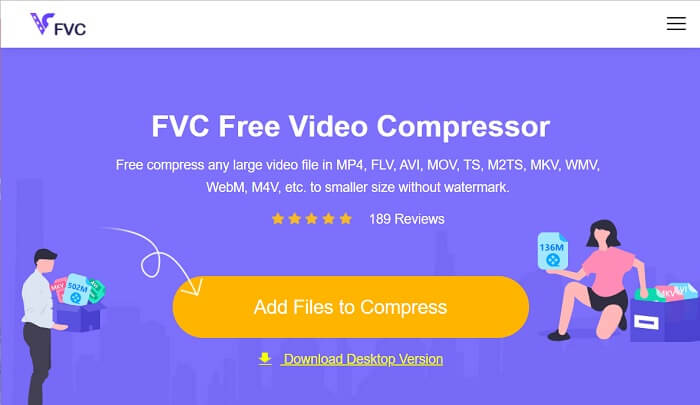
Mulailah memproses file video Anda dengan mengakses FVC Video Compressor Online di browser web Anda. Alat ini kompatibel dengan Chrome, Firefox, Safari, Microsoft Edge, dan lainnya. Buka halaman produk utamanya dan temukan antarmukanya.
Langkah 2: Kompres Berkas Video
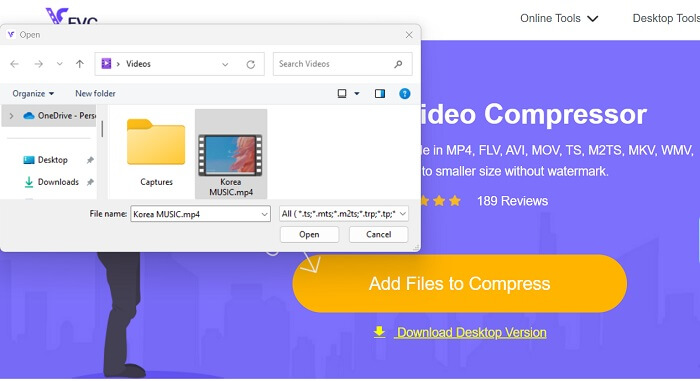
Tekan ikon Add Files to Compress untuk mengakses folder di PC atau perangkat Anda. Jelajahi perangkat Anda dan temukan video yang perlu Anda kompres. Klik Open untuk mengimpor berkas. Untuk pengguna pertama kali, Anda mungkin perlu mengunduh penginstal atau peluncur di peramban web Anda untuk mengoperasikan platform ini.
Langkah 3: Ekspor Video
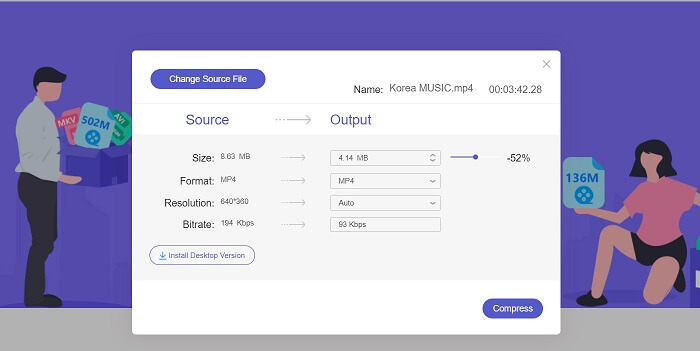
Terakhir, kompres berkas video dengan menyesuaikan berbagai parameter video. Gunakan indikator untuk memilih persentase ukuran berkas yang akan dikurangi dari video asli. Anda dapat menekan opsi Compress untuk memulai proses dan mengekspor video yang sudah diperkecil.
Bacaan Lanjutan:
10 Kompresor GIF Terbaik untuk Pengguna Desktop dan Online
Cara Mengompres Video untuk Vimeo Sebelum Mengunggah (Gratis & Online)
Bagian 5. FAQ Tentang Kompresor Video Veed
Apakah kompresor video Veed gratis?
Veed Video Compressor adalah alat perangkat lunak yang memungkinkan atau memungkinkan pengguna untuk mengurangi ukuran file video mereka tanpa kehilangan kualitas. Ia menggunakan algoritme kompresi tingkat lanjut untuk mengompresi video dengan tetap mempertahankan resolusi dan kecepatan bingkai aslinya. Ini tersedia di browser web apa pun, termasuk Chrome, Safari, dan Firefox. Ini gratis untuk digunakan bagi pengguna yang perlu mengurangi ukuran file videonya
Apakah aman menggunakan Veed io?
Ya, Kompresor Video Veed aman digunakan. Ia menggunakan enkripsi SSL, seperti HTTP, untuk memastikan keamanan, perlindungan, dan privasi data kliennya. Selain itu, pengguna tidak perlu mengunduh atau mendapatkan perangkat lunak file apa pun di perangkat mereka, menjadikannya pilihan yang aman dan nyaman untuk mengompresi file video.
Apakah VEED gratis memiliki tanda air?
Ya, ada tanda air saat mengekspor file video. Veed Video Compressor memungkinkan pengguna untuk menyesuaikan pengaturan kompresi sesuai dengan kebutuhan mereka. Pengguna dapat menyesuaikan parameter seperti bitrate, resolusi, dan frame rate untuk mencapai tingkat kompresi yang diinginkan. Fitur-fitur canggih ini tersedia. Namun, video keluaran akan memiliki tanda air di dalamnya.
Kesimpulan
Veed Video Compressor adalah alat yang ideal bagi para pembuat konten yang ingin mengunggah video berkualitas tinggi tanpa waktu unggah yang lama. Ini adalah platform yang sangat baik bagi siapa saja yang ingin mengompres berkas video besar dengan cepat dan efisien. Antarmuka yang ramah pengguna dan algoritma kompresi canggih membuatnya menonjol di pasar kompresi video yang padat. Namun, alat ini masih perlu ditingkatkan, seperti yang telah kita bahas kelemahannya di atas. Ketika Veed compress mengecewakan Anda, Anda dapat mengandalkan alternatif dan padanannya yang direkomendasikan dalam artikel ini. Meskipun demikian, Veed.io adalah platform yang hebat, mudah diakses, mudah digunakan, dan andal dalam memperkecil ukuran berkas.
-
 Cara Mengompres Video GoPro dari 4K ke 1080p (Gratis & Online)
 Saat Anda menggunakan kamera GoPro untuk merekam video, biasanya ukuran file video yang diambil sangat besar, yang akan sulit untuk dibagikan dengan orang lain. Jadi, posting ini akan menunjukkan kepada Anda cara mengompres video GoPro.
-
 Cara Mengompres Video Gratis untuk Facebook dari GB ke MB
 Jika Anda dilarang mengunggah video besar di Facebook, jangan khawatir. Cukup kompres ukuran video besar dari GB ke MB dengan kompresor video gratis.
-
 Cara Mengompres Video untuk Web Secara Efisien Tanpa Kehilangan Kualitas
 Ketika video situs web Anda mendapat banyak keluhan dari klien yang selalu banyak buffer, Anda dapat mencoba mengompres video untuk web dengan 2 cara yang efisien, yang akan membantu Anda mengurangi waktu buffer situs web untuk mempertahankan klien.
