


 Video Converter Ultimate
 Perekam Layar
 Perbaikan Video
Bebaskan Kreativitas Anda: Ulasan Luminar Neo Komprehensif
Apakah Anda sedang mencari solusi serba ada untuk peningkatan gambar dan penghapusan latar belakang? Tidak perlu mencari lagi, Luminar Neo mungkin menjadi alat yang tepat untuk Anda. Dengan antarmuka yang mudah dinavigasi dan fitur-fitur canggih berbasis AI, alat ini menonjol sebagai perangkat pengeditan foto serbaguna untuk berbagai jenis pengguna. Baik Anda ingin meningkatkan kejernihan dan kecerahan warna, mengganti latar belakang secara mulus, atau sekadar memperhalus detail pada bidikan Anda, alat ini menawarkan beragam fitur dan alat yang efisien untuk memenuhi kebutuhan kreatif Anda. Dalam ulasan Luminar Neo ini, kami akan membahas bagaimana alat yang kuat ini dapat dengan mudah meningkatkan kualitas fotografi Anda, sekaligus memberikan informasi untuk membuka potensi penuh gambar Anda. Ikuti kami menelusuri fitur dan fungsionalitas yang menjadikan Luminar Neo pilihan menonjol di dunia peningkatan gambar.

Bagian 1. Ulasan Luminar Neo
Luminar Neo, perangkat lunak pengeditan foto inovatif yang dikembangkan oleh Skylum, merupakan game-changer bagi fotografer dan seniman visual yang mencari seperangkat alat lengkap untuk meningkatkan kualitas gambar mereka. Pada intinya, alat ini memanfaatkan teknologi AI canggih untuk menyederhanakan proses pengeditan yang rumit, sehingga mudah diakses oleh pengguna dengan berbagai tingkat keahlian. Selain menawarkan beragam alat pengeditan kreatif dan preset, yang membedakan Luminar Neo adalah fitur peningkatan resolusi gambar dan penghapusan latar belakang yang luar biasa. Fitur pengubah skala gambar (image upscaler) memastikan foto Anda tetap tajam dan detail bahkan saat diperbesar, sementara penghapus latar belakang menyediakan solusi mulus untuk mengubah dan menyempurnakan latar belakang dengan mudah.
Fitur utama
◆ Memanfaatkan AI tingkat lanjut untuk peningkatan yang tepat, termasuk alat khusus untuk langit dan kulit.
◆ Beragam alat dan preset untuk menambahkan sentuhan unik pada foto Anda.
◆ Integrasi dengan perangkat lunak pengeditan populer seperti Photoshop untuk alur kerja yang lancar.
◆ Pemrosesan cepat untuk menangani file besar dan pengeditan rumit dengan mudah.
◆ Pertahankan gambar asli Anda saat bereksperimen dengan pengeditan.
◆ Antarmuka yang ramah pengguna.
◆ Penghapus latar belakang.
Pro
- Alur kerja yang dapat disesuaikan.
- Kemampuan AI yang kuat.
- Harga terjangkau.
- Mudah untuk pemula.
- Diskon untuk pengguna Skylum.
- dukungan pelanggan 24/7.
Kontra
- Beberapa fungsi perlu ditingkatkan.
- Tidak ada aplikasi seluler untuk mengedit foto.
Bagian 2. Luminar Neo vs. Luminar AI
Berikut tabel perbandingan Luminar Neo dan Luminar AI.
| Fitur | Luminar Neo | AI termasyhur |
| Pengeditan yang Didukung AI | Iya | Iya |
| Antarmuka | Tingkat lanjut dan dapat disesuaikan | Mudah digunakan dan disederhanakan |
| Alat Pengeditan | Berbagai macam alat dan preset | Templat dan alat pintar yang digerakkan oleh AI |
| Integrasi | Integrasi yang mulus dengan perangkat lunak pengeditan lainnya | Performa efisien, dioptimalkan untuk pemrosesan AI |
| Target Pemirsa | Fotografer profesional dan pengguna tingkat lanjut | Fotografer pemula dan kasual |
Penting untuk diingat bahwa pilihan antara Luminar Neo vs. Luminar AI bergantung pada preferensi individu dan persyaratan pengeditan. Baik Anda menyukai fitur Luminar Neo yang canggih dan dapat disesuaikan atau lebih menyukai kesederhanaan Luminar AI yang ramah pengguna, kedua alat tersebut merupakan solusi ampuh dalam bidang pengeditan foto.
Bagian 3. Bagaimana Cara Menggunakan Luminar Neo?
Berikut cara menggunakan Luminar Neo untuk meningkatkan gambar:
Langkah 1. Buka Luminar Neo sebagai program mandiri.
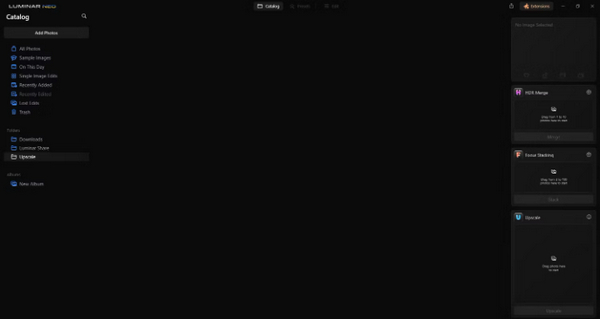
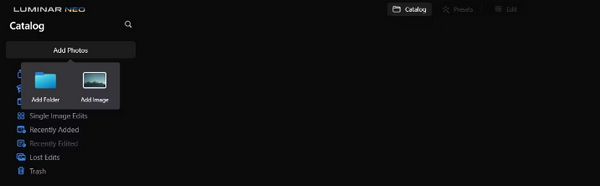
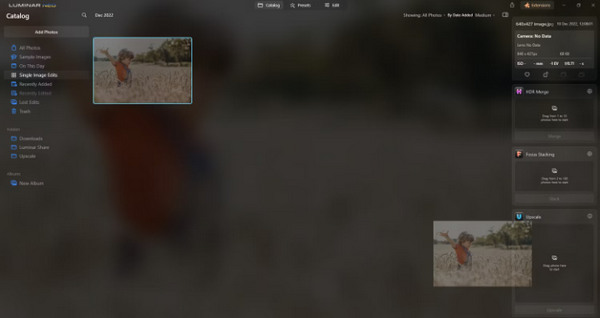
Langkah 2. Klik Add Photos lalu pilih Add Image.
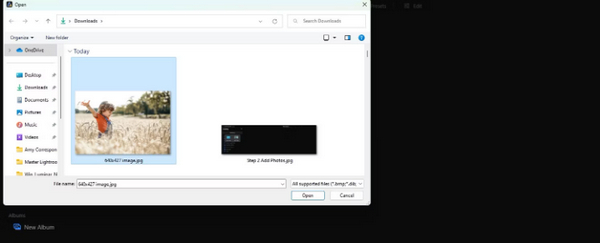
Langkah 3. Pilih file yang Anda inginkan dan klik Open.
Langkah 4. Sekarang, klik Catalog di bagian atas menu.
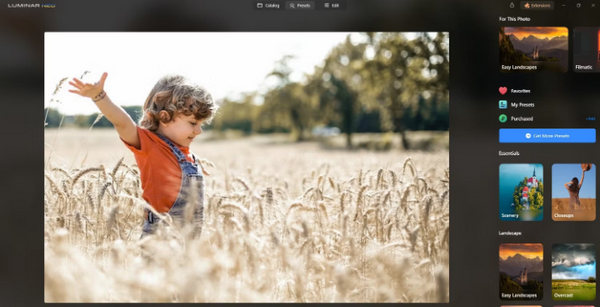
Langkah 5. Seret gambar ke bawah ke kotak Upscale AI yang terletak di bagian bawah, bertanda Drag photo here to start.
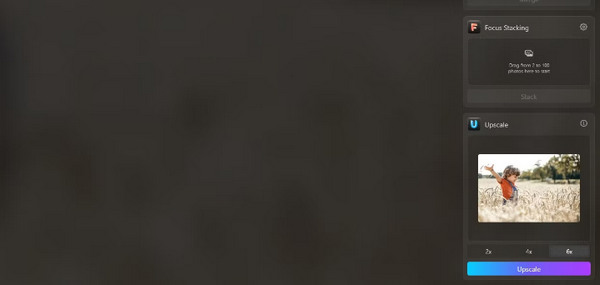
Langkah 6. Selesaikan proses dengan memilih tingkat pembesaran yang Anda inginkan; misalnya, dalam demonstrasi ini, kami memilih peningkatan 6x.
Langkah 7. Terakhir, klik Upscale untuk menerapkan tingkat pembesaran yang dipilih pada gambar Anda.
Transfer gambar Anda yang baru ditingkatkan dari komputer ke ponsel Anda dengan mudah menggunakan Luminar Share.
Berikut cara menggunakan Luminar Neo untuk menghapus latar belakang gambar:
Langkah 1. Mulailah dengan mengimpor foto yang ingin Anda edit. Cari dan klik tombol Add Photos di kiri atas layar. Setelah memilih gambar Anda, klik Open.
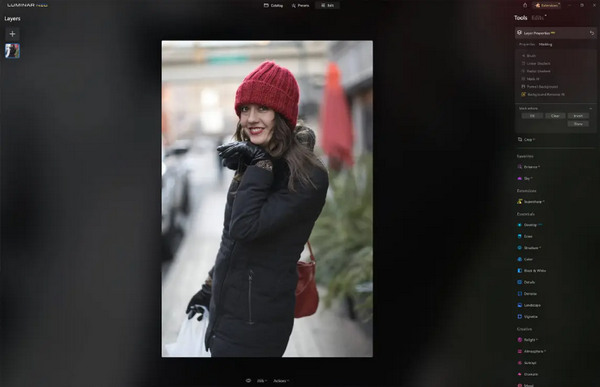
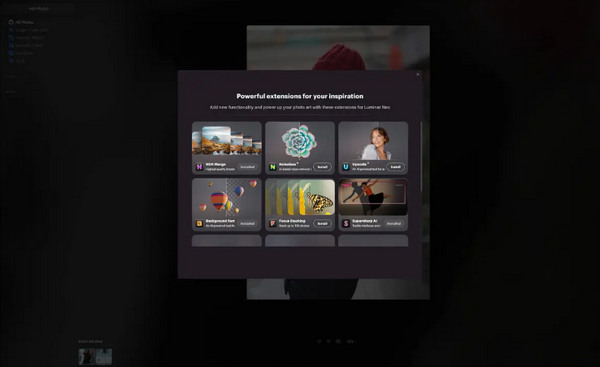
Langkah 2. Ini sangat penting bagi pengguna pertama kali. Anda perlu mengunduh Ekstensi Background Removal AI dari tab extensions di kanan atas layar Anda. Setelah mengunduh, klik dua kali foto Anda, klik Edit, dan mulai mengedit.
Langkah 3. Di dalam bilah edit di sisi kanan layar Anda, buka Layer Properties, lalu Masking, dan pilih Background Removal AI. Ini memungkinkan Anda memilih subjek Anda. Setelah disorot dengan warna merah, tekan Remove untuk menghapus latar belakang secara ajaib. Gunakan kuas refinements untuk melakukan penyesuaian pada area yang mungkin terlewat oleh AI.
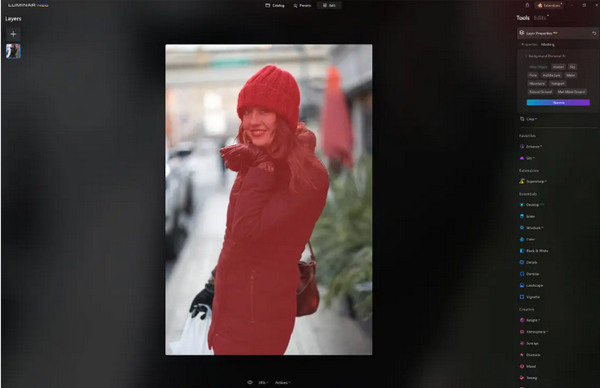
Satu-satunya hal tentang Luminar Neo adalah versi gratisnya tidak menyertakan fitur ini. Namun demikian, jika anggaran Anda terbatas dan ingin menyempurnakan foto Anda ke level berikutnya, alat ini cocok untuk Anda.
Bagian 4. 2 Alternatif Gratis Terbaik untuk Luminar Neo
Luminar Neo mungkin mahal bagi sebagian orang dan terlalu rumit untuk dinavigasi dengan mudah, jadi, jika Anda mencari alat alternatif untuk Luminar Neo, berikut adalah alat terbaik yang dapat Anda periksa.
Peningkatan Gambar Online FVC
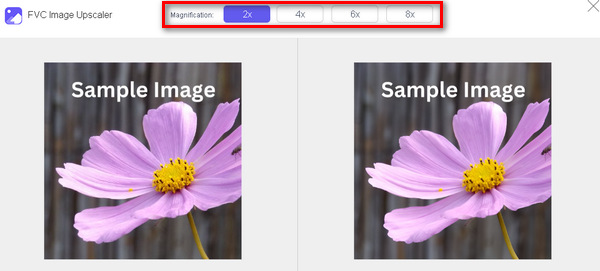
FVC Online Image Upscaler adalah pengubah skala gambar online gratis. Ya, benar, ini gratis, tetapi jangan meremehkan kemampuannya. Alat ini terintegrasi dengan teknologi AI untuk mengotomatiskan proses peningkatan gambar secara mulus. Selain itu, Anda dapat memperbesar gambar hingga 8x tanpa mengorbankan kualitasnya.
Inilah cara Anda dapat menggunakan alat ini
Langkah 1. Kunjungi situs resmi mereka.
Langkah 2. Klik Upload Photo dan pilih gambar yang ingin Anda perbesar.

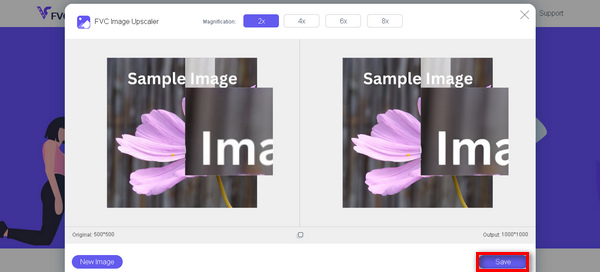
Langkah 3. Setelah itu, alat ini akan menampilkan pratinjau gambar Anda. Anda dapat memanfaatkan opsi Magnifier untuk memeriksa kualitas gambar.
Langkah 4. Klik Save untuk mengunduh gambar Anda.
FVC Free Image Upscaler adalah alternatif terbaik untuk Luminar Neo dalam hal meningkatkan gambar. Selain itu, dengan alat ini, pengguna dapat dengan mudah menyempurnakan gambarnya. Tidak ada antarmuka yang rumit, Anda hanya perlu beberapa klik untuk menyempurnakan gambar Anda dengan sempurna.
Penghapus Latar Belakang Online FVC
Sementara itu, Anda dapat menggunakan FVC Online Background Remover sebagai alternatif untuk menghapus latar belakang gambar. Alat ini serbaguna dan dibuat untuk mengotomatiskan proses penghapusan latar belakang gambar. Alat ini mendukung berbagai format gambar populer seperti PNG, JPG, dan JPEG. Selain itu, Anda dapat menyesuaikan hasil gambar Anda: Anda bisa mengganti latar belakang dengan warna solid, membalik subjek, memindahkannya, dan memotongnya.
Berikut langkah-langkah bagaimana Anda dapat menggunakan alat ini dengan mudah:
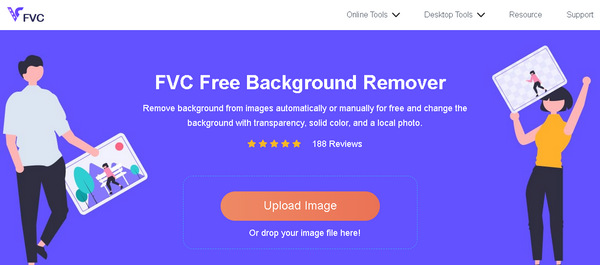
Langkah 1. Pertama, buka situs resmi mereka dan klik Upload Image.
Langkah 2. Setelah hasilnya muncul, Anda dapat mengedit gambar dengan memperhalus tepi dan memindahkan subjek.
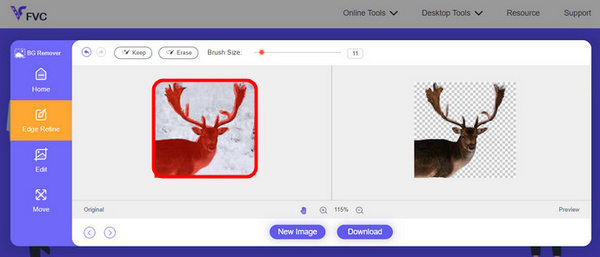
Langkah 3. Untuk menyimpan hasilnya, klik tombol Download.
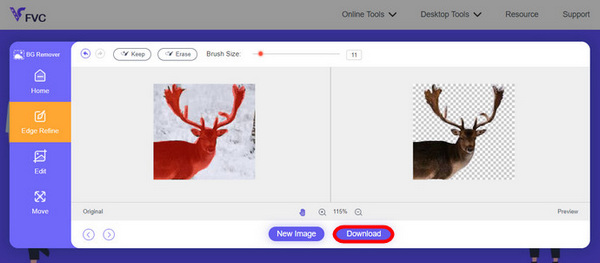
Penghilang Latar Belakang Gambar FVC benar-benar alat yang berguna untuk memotong gambar dan alternatif terbaik untuk Luminar Neo. Selain gratis, alat ini mudah dinavigasi. Tidak ada kerumitan, hanya hasil berkualitas.
Bagian 5. FAQ tentang Ulasan Luminar Neo
Apakah Luminar Neo lebih baik dari Lightroom?
Perbandingan antara Luminar Neo dan Lightroom seringkali bergantung pada preferensi individu dan kebutuhan spesifik. Lightroom terkenal karena integrasinya yang mulus dengan Creative Cloud Adobe, menjadikannya favorit di kalangan fotografer profesional. Di sisi lain, Luminar Neo menawarkan fitur AI canggih dan alur kerja yang fleksibel. Pilihan di antara keduanya pada akhirnya bergantung pada gaya pengeditan pengguna dan persyaratan alur kerja.
Apakah Luminar Neo sebagus Photoshop?
Luminar Neo dan Photoshop memiliki tujuan berbeda dalam bidang pengeditan foto. Photoshop adalah standar industri, menawarkan seperangkat alat canggih yang komprehensif untuk pengeditan rumit dan desain grafis. Luminar Neo, meskipun kuat, lebih melayani fotografer dengan fitur-fitur berbasis AI. Kesesuaian satu sama lain bergantung pada kebutuhan spesifik pengguna.
Apakah Luminar Neo bagus untuk pemula?
Ya, Luminar Neo dirancang agar mudah digunakan, menjadikannya pilihan yang sangat baik untuk pemula. Antarmukanya yang intuitif, ditambah dengan kemampuan AI yang canggih, memungkinkan pengguna mencapai hasil yang mengesankan tanpa kesulitan belajar. Berbagai macam preset dan alat kreatif perangkat lunak ini juga memberdayakan pemula untuk menjelajahi dan menyempurnakan foto mereka dengan mudah.
Apakah Luminar Neo merupakan model pembelian satu kali atau model berlangganan?
Luminar Neo mengikuti model pembelian satu kali. Pengguna dapat membeli perangkat lunak dan mengakses fitur-fiturnya tanpa perlu berlangganan berulang. Struktur harga ini memberikan pendekatan yang mudah dan hemat biaya bagi pengguna yang lebih memilih pembayaran satu kali untuk kebutuhan pengeditan foto mereka.
Kesimpulan
Singkatnya, ulasan Luminar Neo ini telah memberikan Anda wawasan berharga tentang alat pengeditan foto yang kuat namun mudah digunakan ini. Dengan fitur-fitur canggih seperti pembesaran gambar berbasis AI dan penghapusan latar belakang, alat ini cocok untuk profesional maupun pemula. Meskipun masih ada ruang untuk perbaikan, fleksibilitas, AI yang kuat, dan harga yang terjangkau menjadikannya pilihan menarik untuk meningkatkan kemampuan fotografi Anda. Baik Anda mencari kustomisasi maupun kesederhanaan, Luminar Neo menawarkan solusi lengkap untuk mentransformasi gambar Anda.
-
 Tambahkan Latar Belakang ke Foto di iPhone, Android, Komputer, Online
 Bisakah saya menambahkan latar belakang putih pada foto? Bagaimana cara melakukannya? Pelajari 3 cara menambahkan latar belakang ke foto secara online, di komputer, iPhone, atau Android.
-
 Peningkat Gambar Canva: Peningkat Kualitas Gambar Baru? [Tinjauan]
 Temukan bagaimana Canve Image Enhancer dapat membawa foto Anda ke level berikutnya. Periksa ulasan terperinci kami yang mencakup semua fitur, pro, dan kontra alat ini.
-
 Vance AI Image Enhancer: Tinjauan Mendalam [2024]
 Mencari alat penambah gambar yang kuat dan efisien? Baca ulasan mendalam kami tentang Vance AI Image Enhancer dan lihat bagaimana Vance AI dapat mengubah foto Anda.
