


 Video Converter Ultimate
 Perekam Layar
 Perbaikan Video
 Unduhan Aman
Cara Menggabungkan File Video MPEG Menjadi Satu – 2 Metode Utama yang Harus Anda Ketahui
Cara menggabungkan file MPEG? Anda baru saja mengunduh serial TV lama dalam format MPEG, misalnya 8 episode pendek dan masing-masing memiliki bagian pembuka dan penutup yang berulang. Bagaimana cara menggabungkan file-file MPEG ini menjadi satu seperti film? Baik Anda hanya perlu menggabungkan video menjadi satu, maupun ingin menggabungkan file MPEG dengan fitur lanjutan, berikut 2 metode efisien yang tidak boleh Anda lewatkan.

Bagian 1: Cara Menggabungkan File MPEG Online Gratis
FVC Free Online Video Merger adalah penggabung MPEG online gratis yang memungkinkan Anda menggabungkan file video MPEG, MP4, AVI, dan lainnya tanpa batasan ukuran. Alat ini memungkinkan Anda menggabungkan beberapa file MPEG menjadi video yang menarik tanpa watermark. Selain itu, file yang diunggah akan dihapus dalam waktu 24 jam untuk melindungi privasi Anda.
Langkah 1: Buka FVC Free Online Video Merger dengan browser apa pun. Klik tombol Upload Videos to Merge di tengah halaman web untuk mendapatkan installer. Setelah itu, Anda dapat mengklik tombol tersebut lagi untuk mengunggah file MPEG yang ingin Anda gabungkan ke dalam program online.

Langkah 2: Saat Anda masuk ke antarmuka Merging videos, Anda dapat mengatur urutan video MPEG yang ingin digabungkan. Anda bisa mengatur posisi video, menghapus file, atau menambahkan lebih banyak file MPEG dengan mengklik tombol insert new di posisi yang diinginkan.
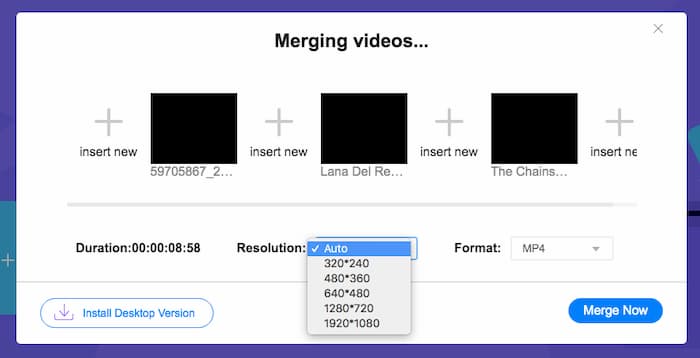
Langkah 3: Setelah itu, Anda dapat menentukan resolusi dan format video keluaran. Anda bisa menggabungkan file MPEG menjadi satu file MP4 sebelum mengklik tombol Merge now untuk memulai proses. Dengan begitu, Anda dapat memperoleh video yang diinginkan dalam waktu singkat.

Penggabung video online mudah digunakan. Namun, jika Anda ingin memotong pembukaan dan akhir episode yang berlebihan, itu tidak dapat membantu Anda lebih jauh. Anda perlu menggunakan penggabungan MPEG yang lebih kuat.
Bacaan Lebih Lanjut:
Bagian 2: Metode Serbaguna untuk Menggabungkan Video MPEG
Aiseesoft Video Converter Ultimate adalah penggabung MPEG profesional yang memungkinkan Anda menggabungkan bagian-bagian yang diinginkan dari file MPEG menjadi satu film. Alat ini memungkinkan Anda memotong bagian yang diinginkan dari file MPEG, menyesuaikan kualitas video, menyesuaikan watermark, atau bahkan membuat film dengan berbagai tema.
- 1. Gabungkan file MPEG ke dalam MPEG, MP4, dan lebih dari 300 format video.
- 2. Tweak resolusi video, atau bahkan tingkatkan kualitas video untuk penggabungan file.
- 3. Pangkas bagian file MPEG yang diinginkan dan gabungkan menjadi satu video.
- 4. Tambahkan efek dan filter dan sesuaikan tanda air ke dalam video MPEG.
Unduh GratisUntuk Windows 7 atau yang lebih baruUnduhan Aman
Unduh GratisUntuk MacOS 10.7 atau yang lebih baruUnduhan Aman
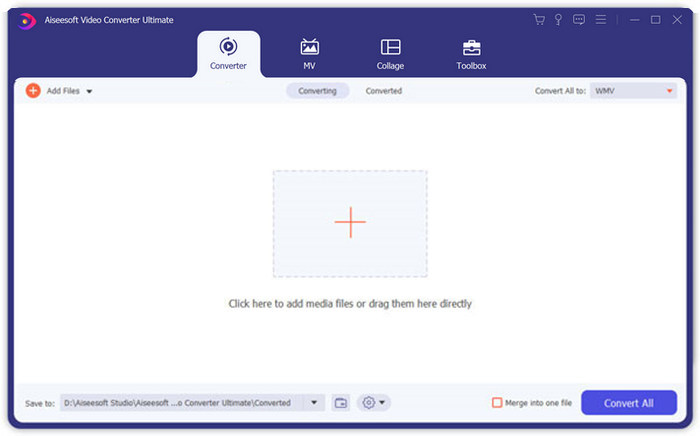
Langkah 1: Jalankan Aiseesoft Video Converter Ultimate di komputer Anda. Buka menu Converter dan klik tombol besar “+” di tengah antarmuka utama untuk menambahkan file MPEG yang ingin Anda gabungkan. Klik tombol Add Files untuk mengimpor semua file yang ingin Anda gabungkan.
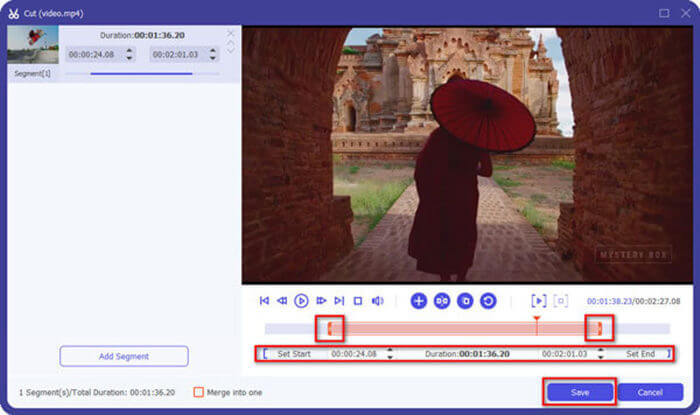
Langkah 2: Untuk klip MPEG yang perlu dipangkas, klik tombol Cut di sebelah video. Anda dapat mengatur titik awal dan akhir untuk menghapus bagian pembuka dan penutup pada video MPEG Anda. Setelah itu, klik tombol Save di bagian bawah untuk menyimpan file.
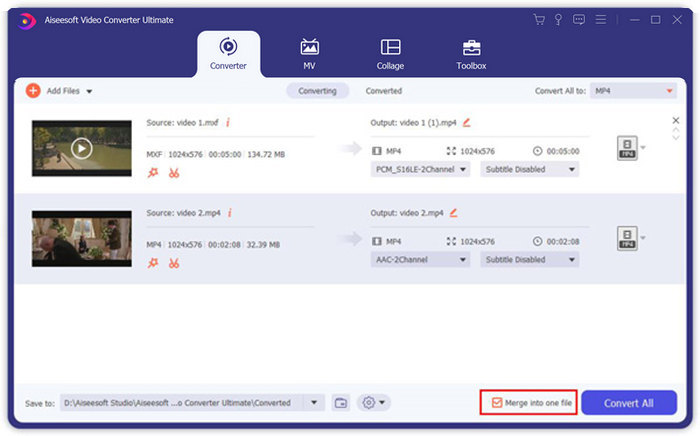
Langkah 3: Setelah itu, Anda dapat menyeret video yang sudah dipangkas ke dalam program. Sesuaikan urutan video MPEG. Saat semuanya sudah siap, Anda perlu mencentang kotak Merge into one file di samping Convert All. Klik tombol Convert All untuk mulai menggabungkan file MPEG.
Bagian 3: FAQ tentang Bergabung dengan File MPEG
Bagaimana cara menggabungkan file MPEG dengan kualitas terbaik?
Bila Anda ingin menggabungkan file MPEG dengan kualitas yang sama, Anda dapat memilih parameter sebagai video asli. Tetapi jika file MPEG berbeda dalam kualitas video, Anda harus meningkatkan beberapa file MPEG dengan kualitas rendah terlebih dahulu dengan penggabung video profesional.
Bisakah saya menggabungkan file MPEG dengan iPhone atau ponsel Android?
Iya. Sebelum mengunduh aplikasi penggabung video untuk menggabungkan file MPEG, Anda harus memastikan bahwa aplikasi tersebut kompatibel dengan MPEG atau video lain yang ingin Anda gabungkan. Adobe Premiere Clip, Viva Video, dan Splice Video adalah rekomendasi yang dapat Anda pertimbangkan.
Apa format file MPEG?
MPEG adalah format file video yang menggunakan kompresi file MPEG-1 atau MPEG-2. Ini adalah format populer untuk film yang didistribusikan di Internet yang membuat streaming dan pengunduhan lebih cepat daripada format video populer lainnya.
Kesimpulan
Artikel ini memperkenalkan 2 cara efisien untuk menggabungkan file video MPEG, terutama saat Anda perlu memangkas bagian tambahan. Penggabungan Video Online Gratis FVC adalah metode mudah untuk menggabungkan file MPEG secara online, tetapi Anda tidak dapat mengedit klip video. Jadi, jika Anda ingin memotong dan mengedit video MPEG, Aiseesoft Video Converter Ultimate harus menjadi solusi terbaik.
-
 6 Penggabung Video MP4 Terbaik untuk Menggabungkan Video MP4 secara Gratis
 Ada banyak penggabung MP4 yang tersedia untuk menghubungkan berbagai klip MP4. Pada artikel ini, kami telah memilih beberapa penggabung MP4 gratis untuk Windows 10/8/7 dan Mac.
-
 Bagaimana Menggabungkan File M4V? Berikut adalah 2 Solusi Tercepat
 Jika Anda mencari solusi untuk menggabungkan file video M4V menjadi satu, jangan lewatkan bagian ini. Di sini kita akan berbicara tentang dua metode terbaik untuk menggabungkan file video M4V.
-
 Cara Menggabungkan Video 3GP dari Ponsel Menjadi Satu File
 Bila Anda ingin menggabungkan beberapa video 3GP dari BlackBerry Anda menjadi satu video, Anda dapat mempelajari lebih lanjut tentang 2 metode efisien untuk menggabungkan file 3GP dari artikel.
