


 Video Converter Ultimate
 Perekam Layar
 Perbaikan Video
 Unduhan Aman
Cara Mengkonversi M2TS ke MP4 tanpa Mengurangi Kualitas
“Saat saya meletakkan video dari kamera Sony saya ke komputer, itu adalah file M2TS, yang tidak dapat dibagikan di Facebook atau YouTube. Di mana saya dapat menemukan konverter video untuk mengonversi file menjadi MP4, dan menontonnya di komputer saya? ”
Terkadang Anda ingin memutar file M2TS di beberapa perangkat portabel, atau mengunggahnya ke YouTube atau Facebook. Akan lebih bijak jika mengonversinya ke format video umum seperti MP4. Dalam posting ini, kami akan membagikan 5 cara gratis untuk mengonversi M2TS ke MP4 di Windows dan Mac.

Bagian 1. Cara Terbaik untuk Mengkonversi M2TS ke MP4 secara Gratis
Tidak semua pemutar media mendukung file M2TS. Untuk menikmati video M2TS dari kamera HD dengan lebih baik, sebaiknya Anda mengubah M2TS ke MP4 yang umum digunakan untuk pemutaran. FVC Free M2TS Converter adalah konverter dan editor M2TS serba guna. Anda tidak hanya dapat mengonversi file M2TS ke MP4, MKV, AVI, MOV, dan lain-lain, tetapi juga mengedit file M2TS seperti mengompres, menggabungkan, menambahkan tema, dan lainnya.
Unduh GratisUntuk Windows 7 atau lebih baruUnduhan Aman
Unduh GratisUntuk MacOS 10.7 atau lebih baruUnduhan Aman
Langkah 1. Dengan mengklik tombol Free Download, Anda dapat dengan cepat mengunduh Free M2TS Converter. Kemudian instal dan jalankan di komputer Windows Anda. Klik tombol Add File(s) untuk memasukkan file M2TS ke dalam program.
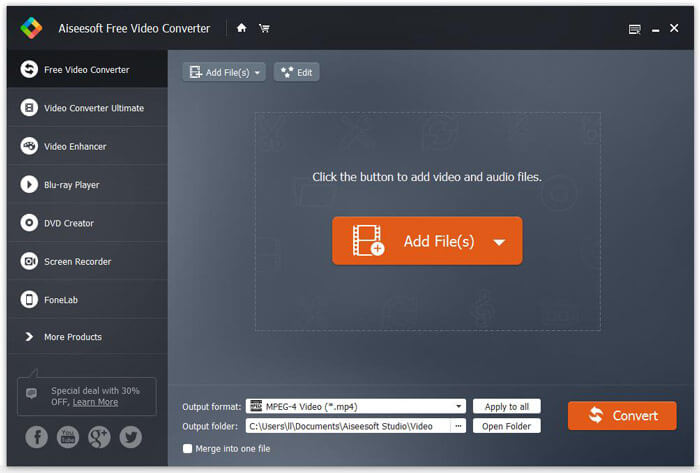
Langkah 2. Klik tombol drop down Output format, dan pilih MPEG-4 Video (*.mp4) sebagai format keluaran. Anda juga dapat mengatur folder keluaran untuk menyimpan file yang telah dikonversi.

Langkah 3. Jika Anda ingin menambahkan tema tertentu untuk video, Anda dapat mengklik tombol Edit di menu atas untuk memilih tema yang sesuai. Setelah semua pengaturan selesai, Anda dapat mengklik tombol Convert untuk mulai mengubah file M2TS ke MP4.

Bagian 2. Bagaimana Mengubah M2TS ke MP4 Online
Jika Anda ingin mengonversi M2TS ke MP4 secara online dan gratis, FVC Free Online Video Converter akan menjadi pilihan yang bagus. Sebagai konverter multimedia online gratis, alat ini mendukung konversi hampir semua video dan audio populer ke MP4, FLV, MKV, MOV, M4V, MTS, TS, M2TS, WMV, ASF, VOB, MP3, AAC, dan lain-lain. Selain itu, cara pemakaiannya juga cukup mudah.
Langkah 1. Buka situs web FVC Free Online Video Converter. Klik Add Files to Convert di bagian atas. Lalu unduh dan instal FVC launcher.

Langkah 2. Pilih video yang ingin Anda konversi. Jika Anda menginginkan video MP4, cukup klik MP4. Lalu klik Convert.

Langkah 3. Anda bisa langsung menyimpan video MP4 ke desktop. Setelah itu, proses konversi akan dimulai secara otomatis.
Bagian 3. Bagaimana Mengkonversi M2TS ke MP4 dengan ConvertFiles
ConvertFiles adalah konverter M2TS ke MP4 berbasis web yang mendukung 200+ format video, audio, gambar, dokumen, presentasi, dan arsip. Ikuti langkah-langkah sederhana di bawah ini untuk mulai mengubah file M2TS menjadi MP4 online.
Langkah 1. Buka halaman resmi ConvertFiles. Klik tombol Browse untuk mengunggah file M2TS dari komputer Anda.
Langkah 2. Klik kotak Input format dan pilih HDV Video File(.m2ts), lalu klik kotak Output format untuk memilih MPEG-4 Video File(.mp4) sebagai format keluaran.
Langkah 3. Klik tombol Convert untuk mulai mengonversi M2TS ke MP4 secara gratis. Proses konversi bisa memakan waktu beberapa menit. Setelah itu, Anda dapat mengklik tautan unduhan untuk mengunduh file MP4 yang telah dikonversi.
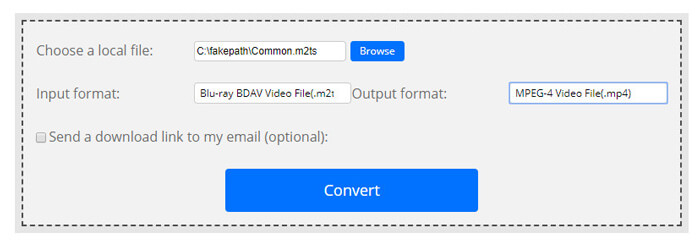
Terkadang konversi mungkin gagal karena format input yang tidak valid. Untuk mencapai tingkat keberhasilan yang tinggi, Anda dapat mencoba M2TS Converter Gratis.
Bagian 4. Bagaimana Mengubah M2TS ke MP4 dengan VLC
VLC Media Player adalah pemutar multimedia open source untuk Windows, Mac, Linux, iOS dan Android. Ini juga berfungsi sebagai konverter M2TS ke MP4 yang bagus untuk mengonversi file M2TS ke MP4, MOV, AVI, dan banyak lagi. Terlebih lagi, Anda dapat mengedit file M2TS seperti memotong, memotong, memutar, menambahkan efek gambar, dan lainnya.
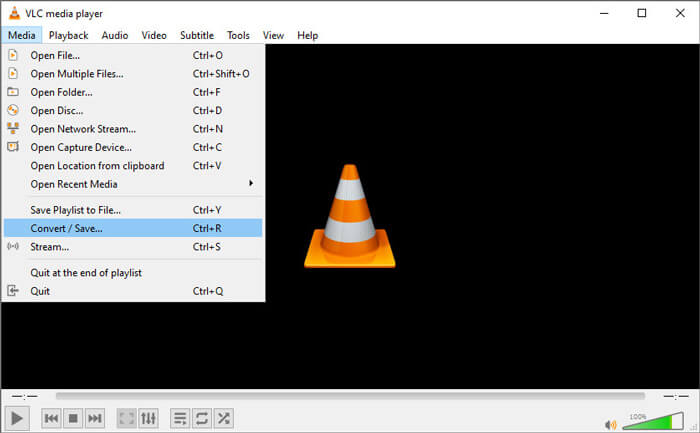
Langkah 1. Unduh dan jalankan VLC Media Player di komputer Anda. Klik Media > Convert / Save... untuk melanjutkan. Lalu klik tombol Add... untuk menambahkan file M2TS Anda.
Langkah 2. Klik tombol Convert / Save untuk masuk ke jendela Convert. Klik tombol drop down Profile untuk memilih Video - H.264 + MP3 (MP4) sebagai format keluaran.
Langkah 3. Klik tombol Browse untuk memilih folder tujuan. Lalu klik tombol Start untuk mulai mengonversi M2TS ke MP4.
Bagian 5. Bagaimana cara mengekspor MP4 dari M2TS dengan Handbrake
HandBrake adalah transcoder video gratis dan sumber terbuka lainnya yang dapat mengonversi video dari hampir semua format. Anda dapat mencoba Handbrake untuk mengonversi file M2TS menjadi MP4 dengan langkah-langkah berikut.
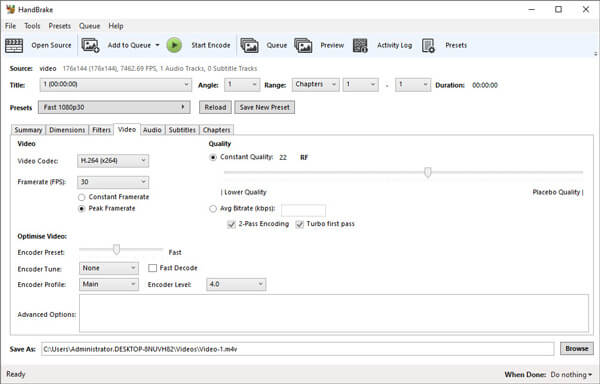
Langkah 1. Unduh gratis, instal, dan jalankan HandBrake di Windows/Mac Anda. Klik Open Source di pojok kiri untuk memasukkan file M2TS dari folder lokal Anda.
Langkah 2. Anda dapat menyesuaikan pengaturan untuk file M2TS. Pilih MP4 dari tombol drop down Format di tab Summary. Di tab Video, Anda bisa mengatur codec video, kualitas video, framerate, dan mengoptimalkan video.
Langkah 3. Klik tombol Browse untuk mengatur folder tujuan. Lalu klik tombol Start Encode untuk mulai mengonversi M2TS ke MP4 secara gratis.
Bagian 6. Tanya Jawab tentang Mengubah M2TS ke MP4
Apa perbedaan antara M2TS dan MP4?
M2TS adalah singkatan dari MPEG-2 Transport System. Ini adalah format file wadah Blu-ray Disc Audio Video, dan digunakan untuk multiplexing video, audio dan streaming lainnya. Umumnya file M2TS lebih besar dari file MP4 dengan kualitas yang sama. File MP4 didukung di hampir semua pemutar media, tetapi file M2TS hanya dapat diputar di beberapa pemutar.
Bagaimana cara memutar file M2TS di PC saya?
Anda dapat langsung membuka file M2TS di beberapa aplikasi pemutar media populer, termasuk Windows Media Player, VLC Media Player, 5K Player, SMPlayer, Splash, dll. Anda juga dapat memutar file M2TS dengan Software Sony Picture Motion Browser.
Bisakah VLC memutar file M2TS?
Iya. Anda dapat memutar file M2TS dengan VLC Media Player di Windows dan Mac. Jalankan saja pemutar media VLC, dan klik Media untuk Membuka File untuk memutar file M2TS di VLC. Jika itu tidak berhasil untuk masalah codec, Anda harus mengonversi M2TS ke format video yang didukung VLC terlebih dahulu.
Kesimpulan
Dengan 5 metode gratis di atas, Anda dapat mengkonversi file M2TS ke MP4 dengan mudah. Setelah perbandingan, FVC Free M2TS Converter harus menjadi konverter M2TS ke MP4 terbaik. Dengan teknologi akselerasi perangkat keras, ia mengekspor file MP4 dalam kualitas tinggi dalam hitungan menit. Anda dapat mencoba pengonversi gratis ini sekaligus.
-
 Panduan Lengkap tentang Cara Mengonversi TS ke MP4
 Apa itu file TS dan ingin mengonversi TS ke MP4? Dalam posting ini, kami akan membagikan kepada Anda metode gratis dan online untuk mengonversi TS ke MP4.
-
 Cara Mengonversi File MTS ke MP4
 Tidak tahu cara mengonversi file MTS ke MP4? Dalam panduan ini, Anda akan menemukan 6 cara gratis dan mudah untuk mengubah format MTS ke MP4 di Windows atau Mac tanpa kehilangan kualitas.
-
 2 Cara Sederhana untuk Mengonversi MTS ke MP3 secara Gratis
 Punya kebutuhan untuk mengekstrak audio MP3 dari file MTS tetapi tidak tahu caranya? Posting ini membagikan 2 cara mudah untuk membantu Anda mengonversi MTS / M2TS ke MP3 dengan kualitas audio tinggi.
