


 Video Converter Ultimate
 Perekam Layar
 Perbaikan Video
 Unduhan Aman
Cara Mengonversi M2TS ke WMV di Windows / Mac / Online (Sepenuhnya Gratis Digunakan)
Beberapa kamera Canon dan Sony menggunakan M2TS sebagai format keluaran default. Video M2TS berukuran besar dalam ukuran file. Kompatibilitas format M2TS juga kurang bagus. Jika Anda ingin mengimpor file M2TS ke Windows Movie Maker untuk pengeditan lebih lanjut, Anda perlu mengonversi video M2TS ke WMV terlebih dahulu.
Artikel ini akan menunjukkan kepada Anda cara online dan offline untuk mengonversi video dari format M2TS ke WMV langkah demi langkah. Dengan demikian, Anda dapat mengubah format video M2TS ke WMV di ponsel atau komputer Anda dengan mudah.

Bagian 1: Bagaimana mengkonversi M2TS ke WMV pada Windows dan Mac
Jika Anda hanya ingin mengubah format video, converter video M2TS ke WMV gratis sudah cukup. Anda tidak perlu membayar untuk fitur tambahan yang tidak Anda perlukan. Berikut ini adalah 2 perangkat lunak konverter M2TS ke WMV yang dapat Anda pilih.
Konversi M2TS ke WMV di Windows secara Gratis
Untuk mengonversi file M2TS ke WMV di komputer Windows Anda, Anda dapat menggunakan FVC Free M2TS Converter. Ini adalah konverter M2TS batch yang dapat mengonversi file M2TS ke WMV, MOV, MP4, dan format video serta audio lainnya secara massal. Alat pengeditan video bawaan juga dapat digunakan secara gratis. Anda dapat mengedit dan menyesuaikan video M2TS sebelum mengonversinya. Berikut fitur utama perangkat lunak konverter M2TS ke WMV gratis ini.

Konverter M2TS Gratis
112.356+ Unduhan- Ubah M2TS ke WMV di Windows 10/8/7 / Vista / XP secara gratis.
- Mendukung konversi batch M2TS ke WMV.
- 50x kecepatan konversi lebih cepat.
- Kompres, gabungkan, dan terapkan efek video lainnya ke file M2TS.
- Tambahkan tema khusus ke file M2TS Anda, seperti keluarga, ulang tahun, liburan, dll.
Unduh GratisUntuk Windows 7 atau lebih baruUnduhan Aman
Unduh GratisUntuk MacOS 10.7 atau lebih baruUnduhan Aman
Langkah 1: Unduh gratis, instal dan jalankan FVC Free M2TS Converter. Klik Add File(s) untuk mengimpor lebih dari satu file video M2TS.

Langkah 2: Di daftar output format, telusuri dan atur WMV sebagai format video keluaran.

Langkah 3: Jika Anda ingin mengedit video M2TS, cukup klik Edit di bagian atas. Lalu Anda dapat mengedit judul, penulis, dan waktu video M2TS di bagian pembuka dan penutup dalam FVC Free M2TS Converter.

Langkah 4: Klik Convert untuk mengonversi M2TS ke WMV secara gratis di Windows.
Konversi M2TS ke WMV di Mac secara Gratis
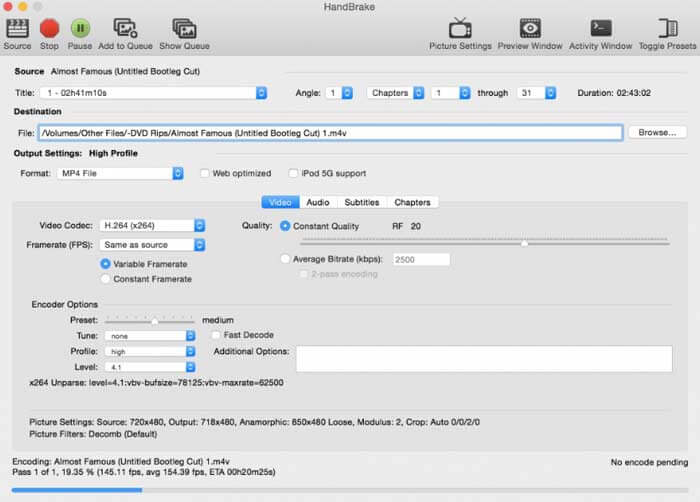
Untuk pengguna Mac, Anda dapat menggunakan HandBrake sebagai konverter gratis M2TS ke WMV. Berikut adalah langkah-langkah rinci untuk mengonversi M2TS ke WMV secara gratis di Mac menggunakan HandBrake.
Langkah 1: Jalankan HandBrake. Di jendela pop-up Source, pilih file M2TS Anda lalu klik Open.
Langkah 2: Bentangkan daftar Format. Pilih format video sebagai WMV.
Langkah 3: Klik Browse untuk mengubah folder tujuan.
Langkah 4: Klik Start untuk menyelesaikan konversi video M2TS ke WMV di Mac.
Bagian 2: Bagaimana Mengkonversi M2TS ke WMV Online
Jika Anda tidak ingin menginstal apa pun di komputer, Anda juga dapat menggunakan konverter video online. Bagian ini akan mengambil FVC Free Online Video Converter sebagai contoh.
Langkah 1: Kunjungi FVC Free Online Video Converter di browser Anda.

Langkah 2: Jika Anda belum mengunduh FVC launcher, klik Add Files to Convert untuk mengunduh terlebih dahulu. Lalu instal launcher dan lakukan pembaruan.

Langkah 3: Buka dan tambahkan file M2TS. Lalu pilih format WMV sebelum mulai Convert.

Langkah 4: Setelah memastikan folder penyimpanan, tunggu dengan sabar hingga file WMV Anda selesai.
Bagian 3: Tanya Jawab tentang Mengubah M2TS ke WMV
Bisakah Android memainkan file M2TS?
Tidak. Anda dapat menggunakan VLC Media Player sebagai aplikasi pemutar M2TS Anda. Atau Anda dapat mengonversi M2TS ke format WMV untuk pemutaran yang mudah di Android dan iPhone.
Apakah ada perbedaan antara MTS dan M2TS?
Sebenarnya, jawabannya adalah tidak. Tidak ada perbedaan fungsional antara MTS dan M2TS. Keduanya adalah file video definisi tinggi yang terkait dengan AVCHD.
Apakah M2TS lebih baik dari WMV?
M2TS dirancang khusus untuk camcorder. Jadi file M2TS dalam definisi tinggi dan ukuran file besar. Anda dapat membuat video lebih kecil dengan mengubah M2TS ke WMV. Dibandingkan dengan M2TS, WMV adalah format video yang umum dan didukung secara luas. Jika Anda ingin mengompres M2TS dan mengubah ke format video populer, ini adalah cara yang baik untuk mengonversi format M2TS ke WMV.
Itulah semua cara untuk mengonversi video dari M2TS ke WMV. Anda dapat mengubah format video dan menerapkan efek video dasar secara gratis di Windows, Mac, dan online. Sepenuhnya gratis dan aman digunakan. Tidak ada risiko potensial atau pembelian dalam aplikasi. Jadi Anda dapat dengan bebas mengonversi file M2TS ke format WMV.
-
 Bagaimana mengkonversi M2TS ke MOV pada Windows / Mac
 Perlu mengonversi M2TS ke MOV untuk memutar file video di sejumlah pemain dan platform? Artikel ini akan membantu Anda menemukan metode Online / Offline terbaik untuk mengonversi M2TS ke MOV di Windows / Mac.
-
 Cara Mengonversi File M2TS ke MP3 secara Gratis
 Bisakah file M2TS dikonversi ke MP3? Dalam posting ini, kami telah membuat daftar 6 cara gratis dan online teratas untuk membantu Anda mengonversi M2TS ke MP3, AAC, AIFF, dan lebih banyak format audio.
-
 5 Cara Mudah untuk Mengonversi TS ke AVI / MKV / MOV / WMV di Windows / Mac
 Ingin mengonversi file TS ke AVI / MKV / MOV / WMV dengan cepat? Artikel ini menunjukkan konverter video online dan offline dengan panduan lengkap. Mungkin Anda bisa mendapatkan konverter TS gratis terbaik di sini.
