


 Video Converter Ultimate
 Perekam Layar
 Perbaikan Video
 Unduhan Aman
5 Metode untuk Mengonversi WMA ke MP3: Desktop & Online
WMA adalah format audio yang dikembangkan oleh Microsoft. Jelas, format ini kompatibel dengan perangkat Windows, tetapi di luar itu, kecocokannya tergolong biasa saja. Beberapa model lama perangkat seluler dan pemutar musik tidak mendukung format ini. Jika kita ingin memastikan bahwa konten file audio ini dapat diputar di perangkat atau platform apa pun, cobalah mengonversi WMA ke MP3. File MP3 berukuran lebih kecil dan karena itu juga menghemat banyak ruang penyimpanan di hard disk. Dan hampir semua platform dapat mengedit dan memutar musik asalkan mendukung MP3.
Mengonversi WMA ke MP3 merupakan opsi yang sangat hemat biaya, dan banyak program serta platform yang dapat melakukannya untuk kita. Setelah melakukan penelitian dan penggunaan aktual, artikel ini memilih 5 yang terbaik. Anda akan menemukan detail tentang cara menggunakannya dan melihat kelebihan serta kekurangan masing-masing konverter di sini.

Bagian 1. Cara Mengonversi WMA ke MP3 di Win/Mac [Tanpa Kehilangan Kualitas]
FVC Video Converter Ultimate
Jika Anda menyukai performa perangkat lunak yang stabil di sisi desktop, Anda sebaiknya menjadi yang pertama mencoba FVC Video Converter Ultimate. Perangkat lunak ini ramah bagi pengguna Windows maupun Mac dan mendukung lebih dari 1.000 format, sehingga kita hampir tidak pernah mengalami masalah kompatibilitas saat menggunakannya. Fitur konversi batch dan teknologi akselerasi hardware-nya memastikan bahwa perangkat lunak ini dapat menangani banyak tugas konversi WMA ke MP3 dengan efisiensi 30X lebih cepat kapan saja. FVC Video Converter Ultimate bukan sekadar konverter format; di dalam toolbox-nya terdapat seperangkat lengkap alat pengeditan video, audio, dan gambar, seperti pemotongan, peningkatan, kompresi, penghilangan noise, dan lain-lain. Dengan mengunduh perangkat lunak ini, kita tidak lagi perlu bolak-balik ke banyak platform, tetapi dapat menyelesaikan semua kebutuhan sekaligus.
Free DownloadUntuk Windows 7 atau yang lebih baruUnduhan Aman
Free DownloadUntuk MacOS 10.7 atau yang lebih baruUnduhan Aman
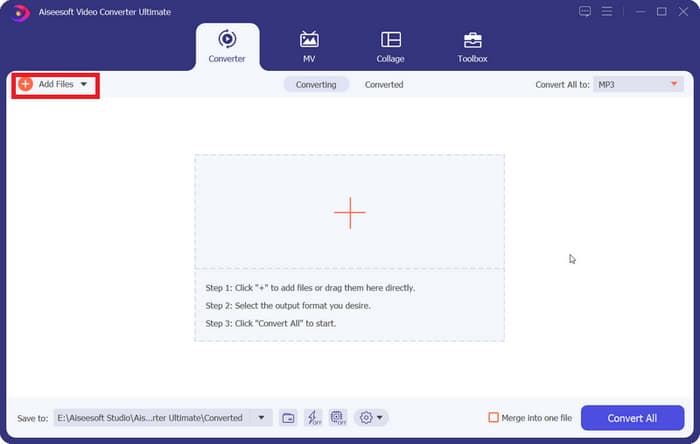
Langkah 1. Unduh dan instal FVC Video Converter Ultimate di komputer Anda. Di sini kita menggunakan perangkat Windows sebagai contoh. Tekan Converter > Add Files untuk mengunggah audio WMA Anda.
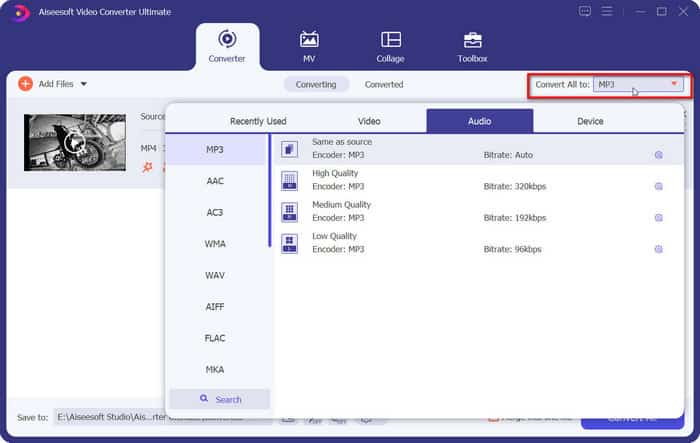
Langkah 2. Buka Convert All to, perluas daftar di bawah tab ini, lalu pilih Audio > MP3. Ada banyak pilihan kualitas audio yang berbeda. Pilih yang menjadi target Anda.
Jika Anda ingin memangkas file audio yang ditambahkan, klik Cut di bawah nama file.
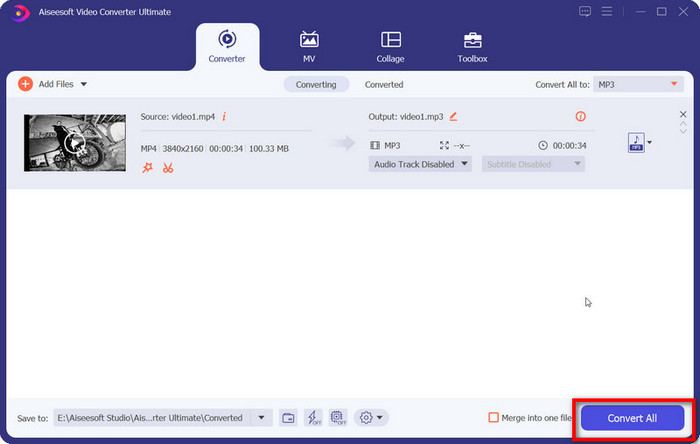
Langkah 3. Setelah menyelesaikan semua pengaturan ini, klik Convert All untuk mengekspor audio MP3 Anda.
Bagian 2. Cara Mengonversi WMA ke MP3 secara Gratis
Cara Mengonversi WMA ke MP3 dengan VLC Media Player
Selain FVC Video Converter Ultimate, ada program desktop lain yang dapat Anda gunakan: VLC Media Player. Meskipun penggunaan aplikasi ini yang paling umum adalah untuk membuka dan memutar berkas multimedia, aplikasi ini juga mendukung penyelesaian beberapa operasi penyuntingan sederhana, seperti konversi format. Selain kompatibilitasnya yang sangat baik, VLC Media Player memiliki kelebihan karena sepenuhnya gratis dan mudah digunakan.
Berikut cara mengubah file WMA ke MP3 dengan VLC Media Player.
Langkah 1. Siapkan komputer Anda dengan VLC Media Player. Di pojok kiri atas, pilih Media > Convert/Save.
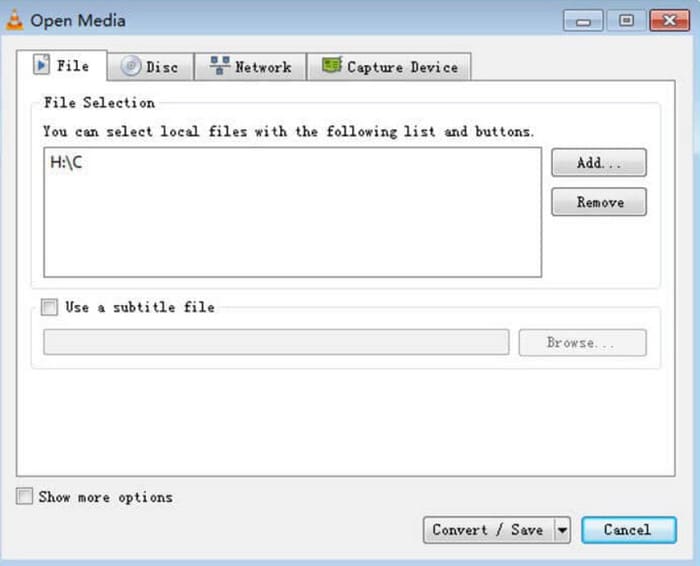
Langkah 2. Jendela Open Media kemudian akan muncul. Pilih File dan klik + Add untuk memilih audio WMA yang telah Anda siapkan. Selanjutnya, klik Convert/Save.
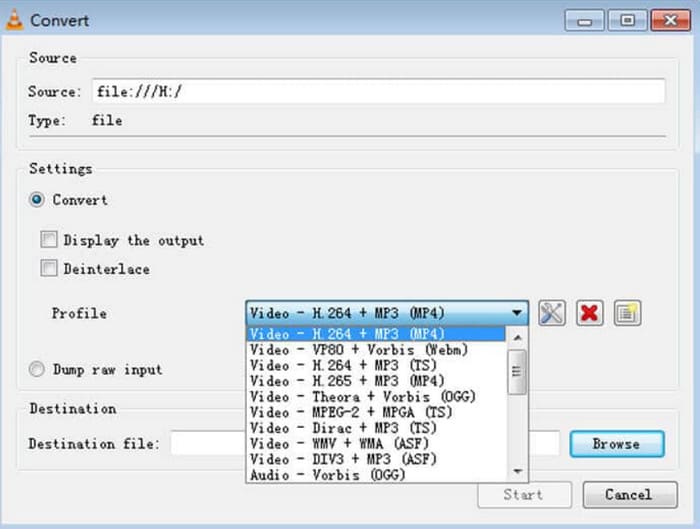
Langkah 3. Silakan menuju ke opsi Profile dan perluas daftar di sebelahnya. Pilih format target Anda dan klik Browse untuk menentukan lokasi penyimpanan.
Langkah 4. Setelah Anda menyelesaikan semua pengaturan di atas, klik Start untuk memulai proses konversi format WMA ke MP3.
VLC Media Player tidak mendukung banyak pilihan format output, dan kita hanya dapat menemukan alat penyesuaian parameter audio yang sangat mendasar di dalamnya. Alat ini bagus untuk sekadar mentransfer WMA ke MP3, tetapi untuk pengeditan yang lebih khusus, kami merekomendasikan FVC Video Converter Ultimate.
dengan VLC Media Player
iTunes, pemutar multimedia yang dikembangkan oleh Apple, dapat melakukan lebih dari sekadar memutar dan menyimpan berkas audio. Kita juga dapat membiarkannya melakukan beberapa tugas konversi format dasar. Meskipun dikenal sebagai yang paling kompatibel dengan perangkat Mac, iTunes juga menawarkan versi yang dapat diunduh oleh pengguna Windows.
Beberapa layanan dasar iTunes gratis. Berikut ini, kami akan menunjukkan cara mengonversi WMA ke MP3 menggunakan iTunes.
Langkah 1. Luncurkan iTunes di komputer Anda. Pilih Edit > Preference.
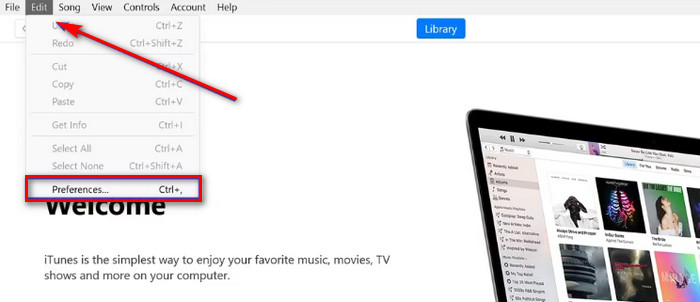
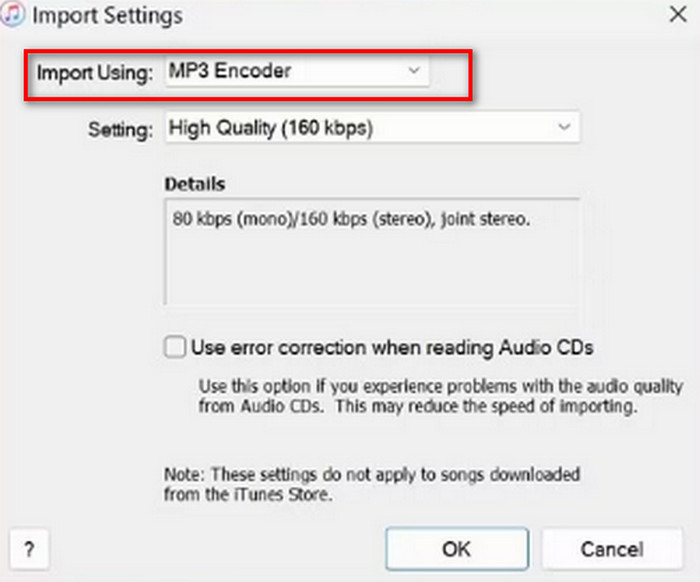
Langkah 2. Setelah membuka jendela General Preference, pilih General dan buka Import Settings. Pilih MP3 Encoder lalu klik OK untuk menyimpan perubahan.
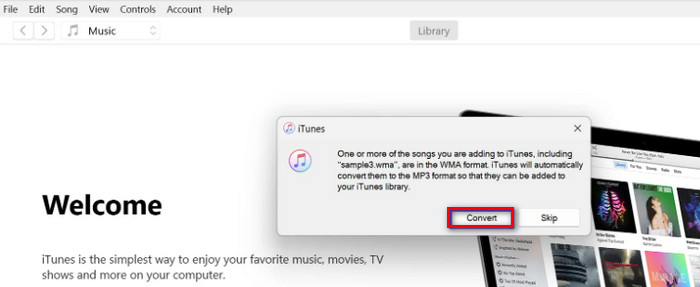
Langkah 3. Kembali ke File lagi dan ketuk Add File to Library. Sebuah jendela pop-out akan muncul. Anda harus mengklik Convert.
Penting untuk dicatat bahwa iTunes juga menawarkan beberapa alat penyuntingan audio profesional, dan aplikasi tersebut dihentikan untuk perangkat Apple setelah rilis versi macOS Catalina. Pastikan model perangkat Anda cocok sebelum mengunduhnya.
Bagian 3. Cara Mengubah WMA ke MP3 Online
Konverter Audio Gratis FVC
Inilah rekomendasi yang diberikan bagi pengguna yang lebih menyukai aplikasi desktop. Jika Anda merasa terlalu merepotkan untuk mengunduh dan menginstal perangkat lunak dan ingin memiliki sebuah platform yang bisa langsung mulai mengonversi begitu Anda membuka antarmukanya, cobalah FVC Free Audio Converter.. Alat ini dapat dibuka di browser Anda, dan desain antarmukanya sangat sederhana. Konverter gratis dan efisien ini adalah asisten paling setia ketika kita memiliki kebutuhan mendesak untuk menyesuaikan format audio.
Berikut cara mengubah WMA ke MP3 online dengan FVC Free Audio Converter.
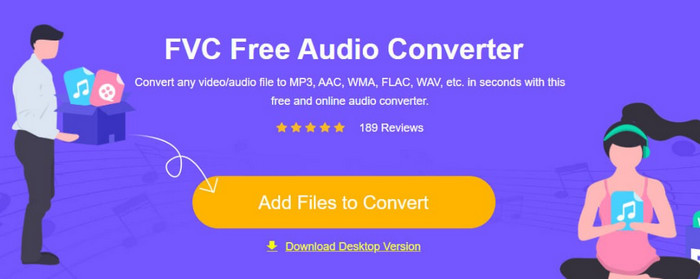
Langkah 1. Luncurkan FVC Free Audio Converter melalui browser Anda. Klik Add Files to Start dan unggah file audio WMA Anda.
Langkah 2. Pilih MP3 sebagai format keluarannya. Lalu klik Convert untuk memulai proses. Jika Anda ingin menyesuaikan beberapa parameter audio, pilih ikon Settings di sisi kanan file audio.
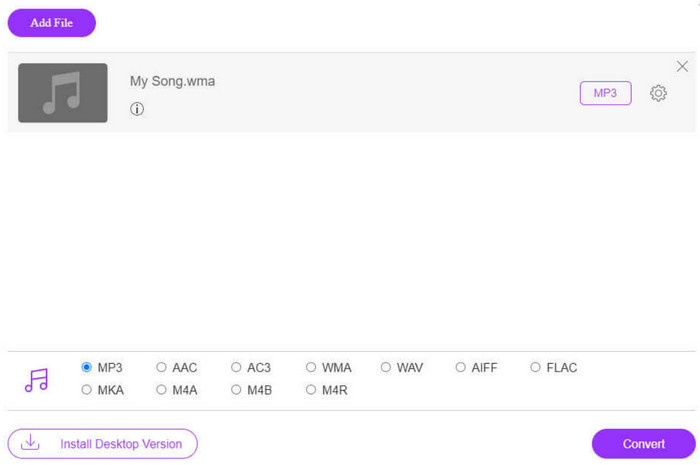
Kecepatan konversi FVC Free Audio Converter sangat cepat, tetapi fiturnya masih lebih sedikit daripada FVC Video Converter Ultimate. Jika Anda menginginkan output audio yang lebih tinggi, kami sarankan untuk mengunduh versi desktop.
FreeConvert
Konverter format daring lain yang juga ringan adalah FreeConverter. Alat ini mendukung lebih dari 1500 konversi format file dan menangani file eBook selain video, audio, dan gambar. Platform ini mengklaim dapat menghapus file sumber secara otomatis dalam beberapa jam setelah pengguna selesai mengedit untuk memastikan privasi tidak terganggu.
Baca panduan di bawah ini untuk mempelajari cara mengubah WMA menjadi MP3 menggunakan FreeConverter.
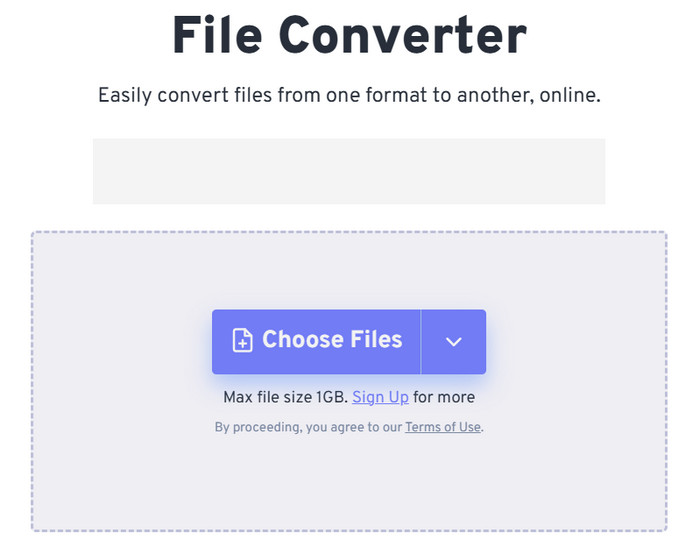
Langkah 1. Kunjungi situs resmi FreeConvert. Klik Choose Files untuk menambahkan audio WMA Anda ke platform ini.
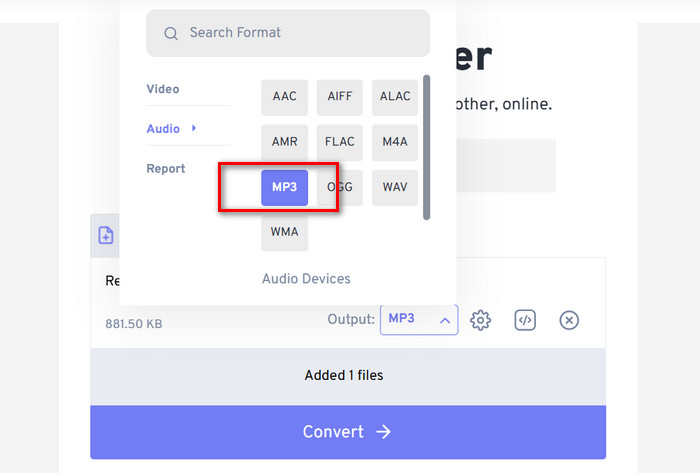
Langkah 2. Perluas menu Output. Pilih Audio > MP3.
Jika Anda ingin meningkatkan kualitas audio, klik ikon Advanced settings.
Langkah 3. Klik Convert untuk memulai proses konversi.
Meskipun FreeConvert mengklaim bahwa konversi format audio sepenuhnya gratis, jangan lupa bahwa layanan ini memiliki batas ukuran file. Platform ini tidak dapat memproses audio di atas 1 GB, jadi jika file kita melebihi batas ini, kita perlu membayar untuk dapat terus mengonversi dengan konverter WMA ke MP3 ini secara penuh.
Bagian 4. FAQ tentang Konversi WMA ke MP3
File WMA VS MP3, mana yang lebih baik?
Bergantung pada cara kita membandingkan, MP3 jelas lebih unggul daripada WMA dalam hal kompatibilitas. Ukuran berkas MP3 lebih kecil daripada WMA, suatu fitur yang membuatnya lebih cocok untuk menyimpan dan mentransfer audio. Namun, WMA lebih baik dalam hal kualitas suara.
Bagaimana cara memutar berkas WMA lama?
Ketika berbicara tentang memilih sebuah pemutar audio WMA, pilihan terbaik adalah Windows Media Player yang sudah terpasang bersama Windows. Tentu saja, beberapa pemutar pihak ketiga seperti VLC Media Player dan MPlayer juga layak untuk dicoba.
Bisakah musik YouTube memutar berkas WMA?
Ya, WMA saat ini termasuk dalam rentang format audio yang didukung secara resmi oleh YouTube.
Bagian 4. Kesimpulan
Ini adalah panduan yang mengajarkan Anda cara mengonversi WMA ke MP3. Meskipun kualitas suara audio dalam format WMA sedikit lebih baik, ukuran filenya juga lebih besar. Terlebih lagi, saat ini tidak banyak platform dan pemutar musik yang mendukung format ini. Untuk memastikan Anda tidak terhambat saat memutar audio, mengonversi WMA ke MP3 adalah hal yang perlu dilakukan. Di sini, Anda akan menemukan lima alat, termasuk tiga perangkat lunak desktop dan dua platform online. Jika membandingkan kelima alat tersebut, FVC Video Converter Ultimate adalah pilihan yang paling serbaguna.
-
 Pemutar Musik WMA – Ulasan 10 Pemutar Musik WMA Terbaik 2025
 Bisakah Google Musik Memutar WMA? Apa pemutar musik WMA terbaik? Pemutar musik Android apa yang dapat memutar file WMA? Postingan ini membuat daftar 10 pemutar musik WMA terbaik untuk Anda memutar musik WMA di Mac, PC Windows, Android dan iPhone.
-
 2 Metode untuk Mengonversi Audio FLV ke WMA [Gratis & Online]
 Ingin mengekstrak audio WMA dari video FLV? Berikut adalah 2 ekstraktor audio WMA gratis untuk mengonversi FLV (Flash Video) ke WMA (Windows Media Audio) dengan kecepatan konversi cepat di Mac OS X dan Windows 10/8/7.
-
 Top 3 Perekam WMA yang Mudah Digunakan Cocok untuk Bakat Suara
 Apakah Anda seorang bakat suara? Artikel ini berbicara tentang perekam WMA yang menghasilkan kualitas tinggi seperti WMA untuk pembuat konten suara.

