


 Video Converter Ultimate
 Perekam Layar
 Perbaikan Video
 Unduhan Aman
Cara Mengonversi M2TS ke Format yang Kompatibel dengan iPad di Windows / Mac / Online
Bisakah Anda memutar M2TS di iPad secara langsung? Sayangnya, jawabannya Tidak. M2TS tidak kompatibel dengan iPad. Jika Anda ingin memutar M2TS di iPad, Anda perlu memasang aplikasi pemutar M2TS di iPad, atau Anda bisa mengonversi M2TS ke format iPad. Jelas, artikel ini memilih solusi yang kedua. Silakan baca dan pelajari cara mengubah format video di iPad dari M2TS.

Bagian 1: Bagaimana Mengkonversi M2TS ke iPad di Windows dan Mac
Format apa yang didukung iPad? Sebenarnya, iPad menerima format video umum H.264, MP4, M4V, MOV, MPEG-4 dan M-JPEG. Untuk meletakkan M2TS di iPad, Anda perlu mengonversi format video M2TS ke iPad terlebih dahulu.
Cara Mengonversi M2TS ke iPad di Windows secara Gratis
FVC Free M2TS Converter adalah konverter batch M2TS ke iPad yang sepenuhnya gratis digunakan. Anda dapat mengonversi banyak file M2TS ke iPad dengan kecepatan 50x lebih cepat daripada konverter M2TS biasa. Jadi, tidak masalah jika Anda perlu mengonversi file video M2TS berukuran besar ke iPad dalam jumlah banyak. Konverter M2TS ke iPad gratis ini dapat menanganinya dengan sempurna.
Selain itu, Anda dapat menggabungkan file M2TS dan menambahkan tema sebelum konversi M2TS ke iPad. Jendela pratinjau waktu nyata dapat menampilkan efek video secara instan. Singkatnya, Anda dapat mengedit dan mengonversi AVCHD M2TS ke iPad di Windows secara gratis dalam satu tempat.

Konverter M2TS Gratis
113.456+ Unduhan- Konversi M2TS ke iPad H.264, MP4, MOV, MPEG-4 dan format lain yang kompatibel.
- Kecepatan 50x lebih cepat dengan dukungan konversi batch.
- Pertahankan kualitas tingkat tinggi saat mengonversi ke iPad dari semua camcorder HD.
- Konverter M2TS ke iPad berfungsi dengan komputer Windows 10/8/7.
Unduh GratisUntuk Windows 7 atau lebih baruUnduhan Aman
Unduh GratisUntuk MacOS 10.7 atau lebih baruUnduhan Aman
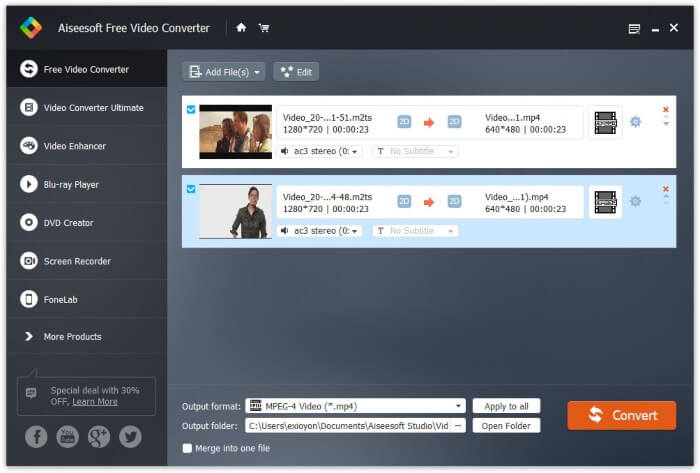
Langkah 1: Unduh gratis, instal, dan jalankan FVC Free M2TS Converter. Seret dan jatuhkan file M2TS ke antarmuka utama.

Langkah 2: Bentangkan daftar Output format di dekat bagian bawah. Untuk mengonversi M2TS ke iPad di Windows, Anda dapat mengatur format keluar dari kategori Apple iPad secara langsung.

Langkah 3: Klik ikon roda gigi Settings untuk menyesuaikan encoder video, frame rate, dan lain-lain. Terakhir, klik Convert untuk mengonversi video dari M2TS ke format iPad.
Cara Mengonversi M2TS ke iPad di Mac secara Gratis
Jika Anda ingin mengonversi video M2TS ke iPad di Mac secara gratis, VLC Media Player bisa menjadi pilihan yang tepat. Ini adalah pemutar dan konverter M2TS sumber terbuka dan gratis untuk multiplatform.
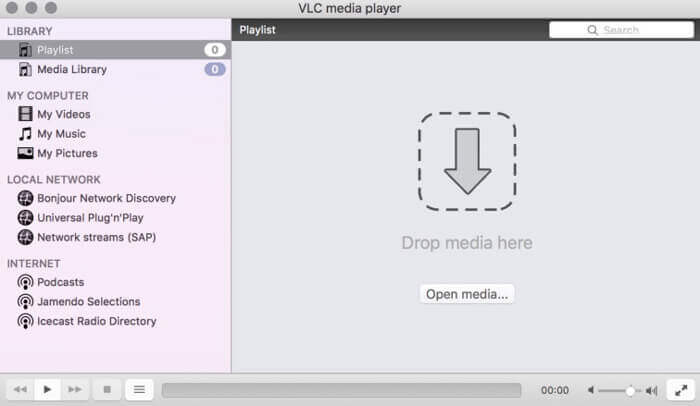
Langkah 1: Buka VLC Media Player di Mac. Pilih Convert/Save dari daftar turun bawah Media.
Langkah 2: Klik Add untuk mengimpor file M2TS. Lalu pilih file tersebut dan klik Open di bawah untuk melanjutkan proses.
Langkah 3: Klik Convert/Save di bagian bawah untuk beralih ke jendela berikutnya.
Langkah 4: Pilih format iPad dari daftar turun bawah Profile. Anda dapat mengklik ikon Tools di sampingnya untuk menyesuaikan pengaturan video.
Langkah 5: Klik Start untuk mulai mengonversi file M2TS ke iPad di Mac melalui VLC.
Bagian 2: Bagaimana Mengkonversi M2TS ke iPad Online
Untuk pengguna seluler, menggunakan konverter M2TS ke iPad online juga merupakan pilihan yang bagus. Anda dapat mengonversi file M2TS ke iPad secara gratis tanpa perlu mengunduh, menginstal, atau mendaftar.
Langkah 1: Buka konverter M2TS ke iPad online, seperti FVC Free Online Video Converter.

Langkah 2: Unduh FVC launcher dengan mengklik Add Files to Convert dan lakukan instalasi.

Langkah 3: Cari file M2TS di komputer Anda yang akan dikonversi. Dan jangan lupa untuk memilih formatnya.

Langkah 4: Klik Start Converting untuk mengonversi M2TS ke iPad secara gratis secara online.
Bagian 3: Tanya Jawab tentang Mengubah M2TS ke iPad
Apa yang terjadi jika tiba-tiba tidak ada audio di file M2TS di iMovie?
M2TS tidak secara asli didukung oleh perangkat Apple. Anda perlu mengonversi M2TS ke format Mac untuk menyelesaikan masalah.
Bagaimana cara membuka file M2TS di iPhone dan iPad?
AVCHD M2TS tidak kompatibel dengan perangkat iOS. Jika Anda bersikeras untuk memutar video M2TS di iPad, Anda dapat menggunakan aplikasi VLC Media Player untuk memutar video.
Ada aplikasi pemutar video yang bagus untuk iPad?
Anda bisa mendapatkan tampilan layar yang lebih besar di iPad daripada iPhone. Jadi pengalaman menonton video juga akan lebih baik. Pemutar video yang direkomendasikan termasuk PlayerXtreme Media Player, KMPlayer, VLC, AirPlayer dan banyak lagi. Anda dapat memilih salah satu untuk mendapatkan kontrol video secara fleksibel.
Itulah semua cara untuk mengonversi M2TS ke iPad dengan alat online dan offline. Konverter video M2TS tersebut gratis dan aman digunakan. Berapa pun jumlah file M2TS yang ingin Anda konversi ke format yang kompatibel dengan iPad, Anda dapat memperoleh kecepatan tercepat di sini.
-
 Cara Mengkonversi M2TS ke MP4 tanpa Mengurangi Kualitas
 Ingin mengonversi video dari camcorder HD ke MP4 umum? Berikut adalah 4 cara sederhana dan gratis untuk mengubah file M2TS menjadi MP4 di Windows dan Mac.
-
 Cara Mengkonversi M2TS ke MKV tanpa Kehilangan Kualitas
 Ingin mengonversi M2TS ke MKV dengan tetap menjaga kualitas aslinya? Posting ini menunjukkan kepada Anda metode gratis dan online untuk mengubah M2TS menjadi MKV tanpa kerugian.
-
 Apa Perbedaan Antara MTS dan M2TS
 Apa itu file MTS atau M2TS? Apa perbedaan antara M2TS dan MTS? Bagaimana saya bisa menonton file MTS atau M2TS yang direkam dengan camcorder? Temukan semua jawabannya di posting ini.
