


 Video Converter Ultimate
 Perekam Layar
 Perbaikan Video
 Unduhan Aman
4 Metode Efektif Teratas untuk Mengonversi TS ke 3GP
Artikel ini berfokus pada cara mengonversi TS ke 3GP. Saat ini, ponsel sangat populer dan menjadi salah satu cara untuk menonton video favorit Anda. Namun sayangnya, ada kalanya file TS tidak didukung oleh ponsel. Format populer yang bisa Anda gunakan untuk menonton video di ponsel adalah format file 3GP. Jadi, satu‑satunya solusi yang dapat Anda lakukan adalah mengonversi file TS ke format 3GP. Jika demikian, artikel ini bisa memenuhi kebutuhan Anda. Baca artikel ini untuk mempelajari cara mengonversi TS ke 3GP.

Bagian 1: Aplikasi yang Dapat Diunduh Gratis untuk Mengonversi TS ke 3GP
Video Converter Ultimate
Jika Anda menginginkan aplikasi unduhan gratis yang bisa digunakan di Windows dan Mac untuk mengonversi TS ke 3GP dengan mudah, Video Converter Ultimate adalah pilihan yang tepat. Perangkat lunak ini memungkinkan Anda mengonversi TS ke 3GP dengan mudah dan cepat. Selain itu, aplikasi ini memungkinkan Anda mengonversi banyak file hanya dengan satu klik. Di samping itu, Anda dapat mengonversi file dengan cepat karena Video Converter Ultimate memiliki proses konversi yang sangat cepat, yaitu 30x lebih cepat dibandingkan konverter lainnya. Semua pengguna juga bisa menggunakan aplikasi ini karena antarmukanya ramah dan metodenya sederhana. Lebih jauh lagi, konverter ini memiliki lebih banyak fitur daripada yang Anda bayangkan. Aplikasi ini juga dapat mengonversi format file gambar seperti JPG, PNG, BMP, TIFF, dan lainnya. Selain itu, jika Anda ingin memutar (rotate) video, Anda tetap bisa mengandalkan aplikasi ini. Anda dapat membalik (flip) video secara horizontal maupun vertikal. Lihat detail di bawah ini untuk menemukan lebih banyak fitur.
Fitur
◆ Konversi format video, seperti MP4, M4V, 3GP, FLV, AVI, MOV, MKV, dan lainnya.
◆ Andal dalam membuat kolase yang indah.
◆ Menawarkan proses konversi batch.
◆ Pembuat Video Musik tersedia.
◆ Dapat menyesuaikan kecepatan video dari 0,125x hingga 8x lebih cepat.
◆ Menawarkan alat pengeditan, seperti penambah video, kompresor, penggabungan, pemangkas, dll.
Pro
- Juga bagus dalam mengonversi file gambar.
- Tidak perlu koneksi internet.
- Sempurna untuk pemula dan memiliki antarmuka yang sederhana.
- Ini memiliki kemampuan untuk menyesuaikan video 3D dari 2D.
Kontra
- Beli versi pro untuk merasakan fitur hebat.
Untuk mengonversi TS ke format file 3GP, mari gunakan Video Converter Ultimate dengan panduan terperinci berikut.
Langkah 1: Klik tombol unduh di bawah ini untuk mengunduh Video Converter Ultimate secara gratis di Windows atau Mac Anda. Lalu, instal dan jalankan konverternya.
Unduh GratisUntuk Windows 7 atau yang lebih baruUnduhan Aman
Unduh GratisUntuk MacOS 10.7 atau yang lebih baruUnduhan Aman
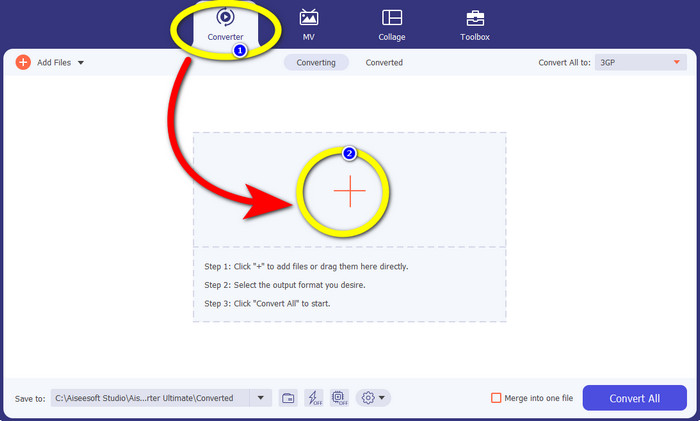
Langkah 2: Pilih panel Converter dan klik tanda + untuk memasukkan file TS yang ingin Anda konversi ke format 3GP.
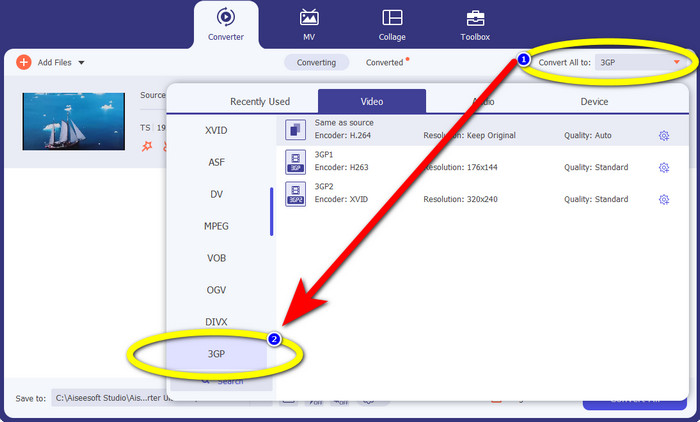
Langkah 3: Setelah Anda memasukkan file TS, klik tombol Convert all to. Opsi format akan muncul, lalu klik format file 3GP.
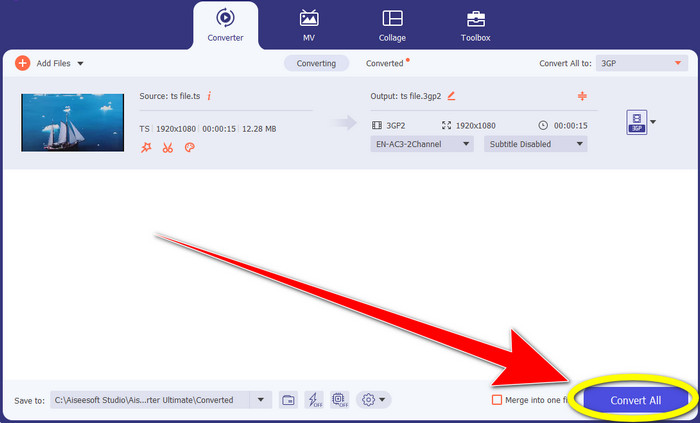
Langkah 4: Untuk langkah terakhir, klik tombol Convert All. Proses konversi hanya memakan waktu beberapa detik, dan Anda sudah bisa menyimpan video akhir di Windows atau Mac Anda.
Pengonversi Video HitPaw
Alat unduhan gratis lainnya untuk mengonversi TS ke 3GP adalah HitPaw Video Converter. Konverter ini juga sangat bagus untuk mengonversi berbagai file seperti MKV, M4V, VOB, WEBM, FLV, XVID, M2TS, TS, 3GP, dan lainnya. Selain itu, Anda bisa mengonversi format audio dengan mudah menggunakan alat ini. Ditambah lagi, terdapat banyak alat pengeditan seperti potong, gabung, crop & rotate, watermark, kecepatan, filter, dan lain‑lain. Selain itu, HitPaw Video Converter memungkinkan Anda mengunduh video dari lebih dari 1000 situs seperti YouTube, Bili Bili, Facebook, dan sebagainya. Namun, meskipun bisa diunduh secara gratis, fiturnya terbatas, sehingga Anda tetap perlu membeli versi penuhnya. Proses mengunduh dan memasangnya di Windows dan Mac juga cukup rumit karena ada banyak langkah yang harus dilakukan. Ikuti langkah‑langkah di bawah ini jika Anda ingin menggunakan HitPaw Video Converter untuk mengonversi TS ke 3GP.
Langkah 1: Unduh HitPaw Video Converter di Windows atau Mac Anda. Ikuti proses instalasinya dan buka aplikasinya.
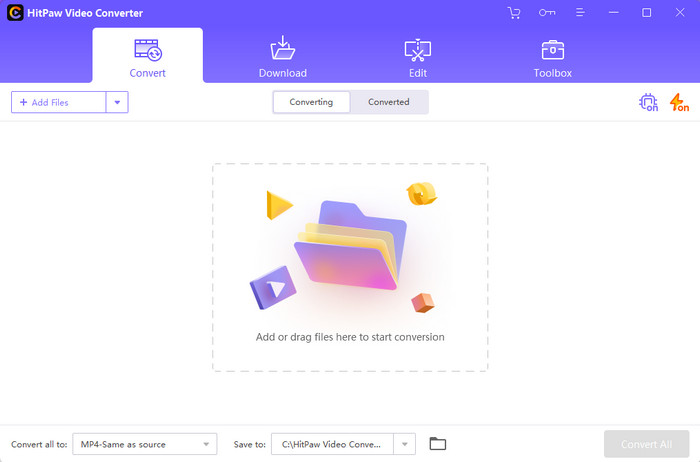
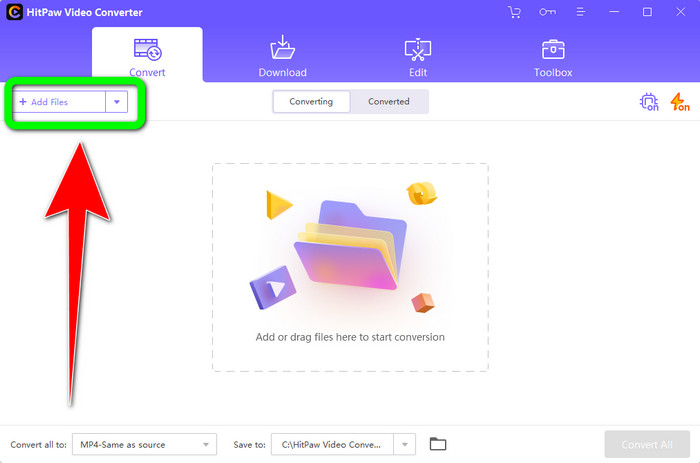
Langkah 2: Klik tombol Add Files untuk mengunggah file TS.
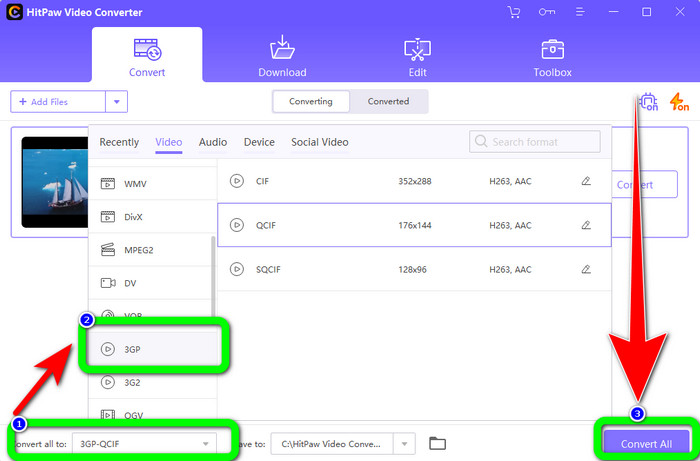
Langkah 3: Klik tombol Convert All to. Lalu, opsi format akan muncul di layar. Pilih format file 3GP dan klik tombol Convert All untuk akhirnya mengonversi dan menyimpan video akhir Anda.
Bagian 2: Pengonversi TS ke 3GP Online yang Menakjubkan
Pengonversi Video Gratis FVC Online
Untuk konverter online, ada FVC Free Video Converter Online. Aplikasi ini dapat mengonversi TS ke 3GP dengan mudah dan lancar. Aplikasi ini juga dapat membantu Anda mengonversi lebih banyak file seperti MP4, AVI, WMA, TS, M2TS, XVID, FLV, dan lainnya. Selain itu, konverter ini mudah digunakan dan cocok untuk semua pengguna. Lebih jauh, Anda dapat menggunakan perangkat lunak online gratis ini baik di Windows maupun Mac. Aplikasi ini juga tersedia di hampir semua browser seperti Google, Mozilla Firefox, Microsoft Edge, dan lainnya. Ikuti langkah‑langkah sederhana berikut untuk mengonversi TS ke format file 3GP menggunakan FVC Free Video Converter Online.
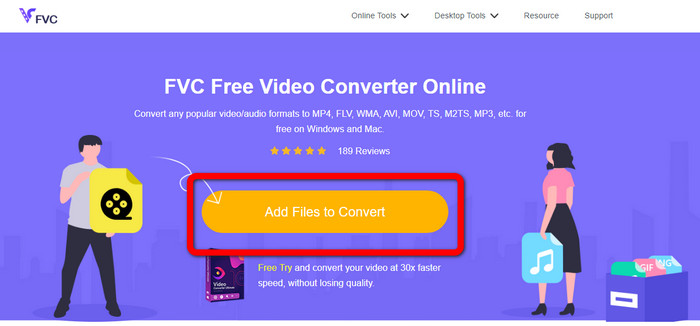
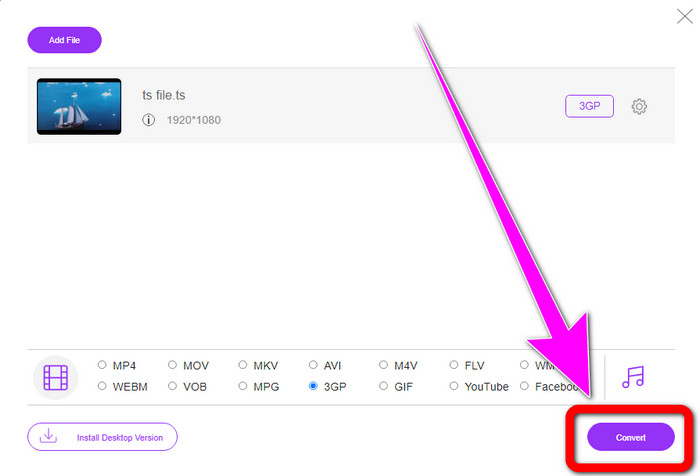
Langkah 1: Buka situs web FVC Free Video Converter Online. Klik kotak oranye di tengah untuk mengunggah file TS.
Langkah 2: Setelah Anda mengunggah file TS, Anda akan melihat banyak opsi format di bagian bawah antarmuka. Lalu, pilih format file yang Anda inginkan, yaitu format 3GP.
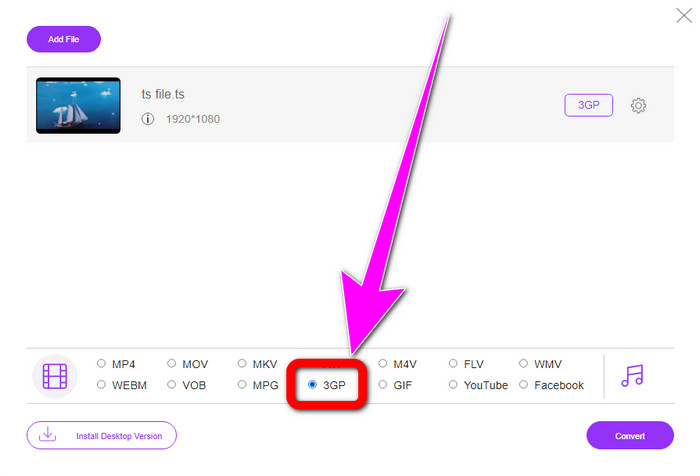
Langkah 3: Jika Anda sudah selesai memilih format 3GP, klik tombol Convert. Lalu, unduh dan simpan hasil akhir video Anda.
Convertio
Convertio adalah alat online lainnya untuk mengonversi TS ke 3GP. Seperti aplikasi‑aplikasi di atas, konverter ini mudah digunakan karena hanya membutuhkan tiga kali klik untuk mengonversi berbagai file seperti MOV, AVI, FLV, MKV, MPG, MP4, dan lainnya. Selain mengonversi video, Convertio juga merupakan konverter audio, dokumen, dan presentasi. Namun, ada kekurangan, terutama saat menggunakan versi gratis. Batas ukuran file maksimal hanya 100Mb, sehingga Anda tidak bisa mengonversi file tanpa batas. Anda harus menggunakan versi berbayar untuk merasakan performa aplikasi yang maksimal. Lanjutkan ke langkah‑langkah di bawah ini untuk mengonversi TS ke format 3GP.
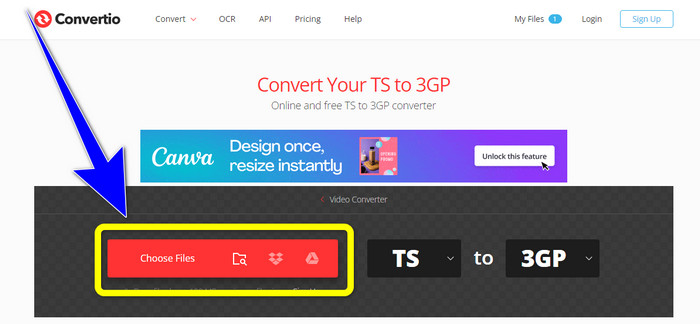
Langkah 1: Kunjungi situs web Convertio. Lalu, klik tombol Choose Files untuk memasukkan file TS Anda.
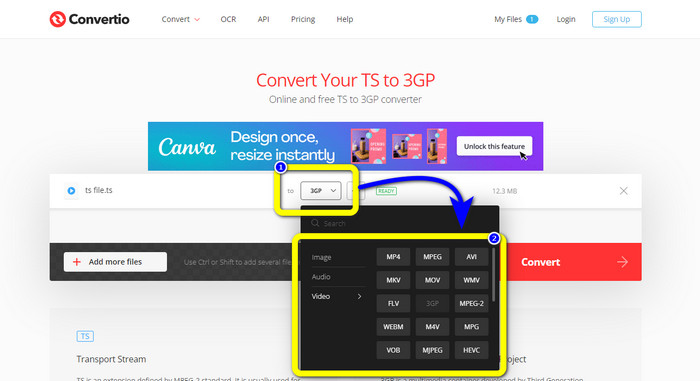
Langkah 2: Klik opsi format dan pilih format file 3GP.
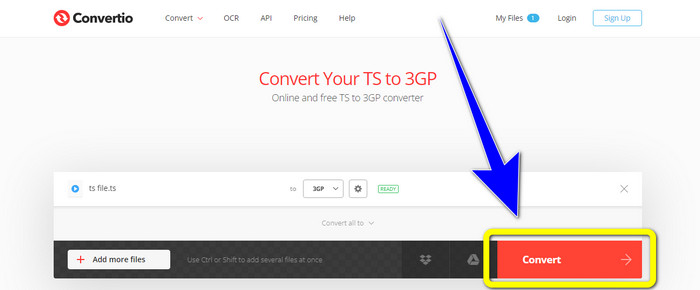
Langkah 3: Untuk langkah terakhir, tekan tombol convert. Tunggu prosesnya, lalu simpan hasilnya. Anda juga dapat menggunakan alat ini untuk mengonversi TS ke FLV.
Bagian 3: TS vs. 3GP
| Mengajukan | TS | 3GP |
| Ekstensi File | .ts | .3gp |
| Keterangan | Spesifikasi MPEG-2 mendefinisikan TS sebagai ekstensi. Biasanya digunakan untuk penyiaran, streaming media internet, dan menyimpan musik dan video di DVD. Saat terjadi kesalahan transmisi data, aliran dasar penampung media ini disimpan dalam bentuk yang memungkinkan pemutaran cepat dan sinkronisasi audio/video. | Untuk telepon berbasis GSM (Sistem Global untuk Komunikasi Seluler), Proyek Kemitraan Generasi Ketiga menciptakan wadah multimedia 3GP pada tahun 1998. Wadah tersebut sangat cocok untuk ponsel karena menggunakan lebih sedikit data, bandwidth, dan penyimpanan. Ini adalah wadah umum untuk file MMS (Layanan Pesan Multimedia). |
| Dikembangkan oleh | Kelompok Pakar Gambar Bergerak | Proyek Kemitraan Generasi Ketiga |
| Program Terkait | QuickTime Player, Film Windows dan TV VLC Media Player | Pemutar Media Windows, Pemutar Media VLC |
Bagian 4: FAQ tentang Konversi TS ke 3GP
Apakah TS lebih baik dari MP4?
File MP4 dan TS memiliki kualitas video yang sama. Perbedaan utama antara file TS dan MP4 adalah file TS datar, tetapi file MP4 dimulai dengan indeks. Di sisi lain, bit video di dalam file identik. Oleh karena itu, file TS, M2TS, dan MP4 semuanya memiliki kualitas video yang sama.
Bisakah saya mengunggah file TS ke YouTube?
Sayangnya, Tidak. Anda dapat mengunggah file TS ke Facebook tetapi tidak ke YouTube. Program terbaik untuk membuka file TS adalah VLC Media Player.
Apa itu MPEG TS dan PS?
TS adalah Transport Stream yang berfungsi untuk keperluan komunikasi dan aplikasi penyiaran. PS adalah Program Stream yang dapat digunakan untuk aplikasi penyimpanan seperti DVD.
Kesimpulan
Inilah empat metode paling efektif untuk mengonversi TS ke 3GP. Namun, beberapa aplikasi hanya dapat digunakan sepenuhnya jika Anda menggunakan versi berbayar. Jika Anda menginginkan konverter gratis tanpa batasan, gunakan FVC Free Video Converter Online.
-
 TS ke GIF: Cara Mengubah File TS menjadi GIF Animasi
 Pelajari cara mengubah file TS menjadi format GIF dengan bantuan penulisan ini. Daftar di bawah ini menunjukkan ide yang berbeda tentang TS dan GIF dan cara mengonversi TS ke GIF.
-
 Cara Mengonversi DIVX ke 3GP di Windows, Mac, dan Online
 Bagaimana cara mengubah DIVX ke 3GP? Jika Anda mencari jawaban, baca artikel ini. Kami akan menunjukkan kepada Anda prosedur hebat dengan bantuan konverter yang berbeda.
-
 4 Cara Terbaik untuk Mengonversi SWF ke 3GP di Windows, Mac & Online
 Berikut adalah metode paling berguna untuk mengonversi SWF ke 3GP secara instan. Juga, posting ini akan menunjukkan kepada Anda beberapa alat Windows dan Online yang efektif yang dapat Anda gunakan.
