


 Video Converter Ultimate
 Perekam Layar
 Perbaikan Video
Cari Tahu Apa 3 Pengonversi FLV ke MKV Terbaik untuk Mengonversi File FLV Anda ke MKV
Apakah Anda lelah berselancar di internet untuk mencari cara terbaik mengonversi FLV ke MKV secara gratis? Mungkin ini sebuah kebetulan, tetapi hari ini kami menemukan konverter FLV terbaik yang bisa Anda gunakan; tentu saja, kami hanya memilih yang terbaik. Agar pencarian Anda jadi jauh lebih mudah, teruskan dengan membaca artikel di bawah ini karena Anda akan banyak belajar tentang FLV, MKV, dan konverter yang bisa Anda gunakan.

Bagian 1. 2 Cara Mengkonversi FLV ke MKV Gratis
Cara ke-1. Gunakan Konverter Online untuk Mengonversi FLV ke MKV
Konverter online ini jelas merupakan salah satu transcoder besar untuk mengonversi FLV ke MKV secara online. FVC Free Video Converter Online adalah konverter yang sederhana dan mudah dipahami yang bisa Anda gunakan secara online. Namun, alat ini bergantung pada internet, yang berarti jika Anda tidak memiliki koneksi internet, ini bukan pilihan untuk mengonversi. Meskipun alat ini berbasis internet, tampilannya tetap bebas iklan yang mengganggu, dan bebas malware. Jadi sekarang, jika Anda ingin merasakan sendiri menggunakan alat ini, ikuti langkah-langkah di bawah ini.
Langkah 1. Klik tautan ini untuk membuka FVC Free Video Converter Online pada tab baru.
Langkah 2. Klik tombol Add Files to Convert untuk membuka folder di komputer yang Anda gunakan. Pilih file FLV yang ingin Anda konversi dan tekan Open untuk mengunggah file.
Unduh Versi Desktop untuk mengonversi file secara batch.
Langkah 3. Pilih format MKV pada daftar format yang ditampilkan di bawah.
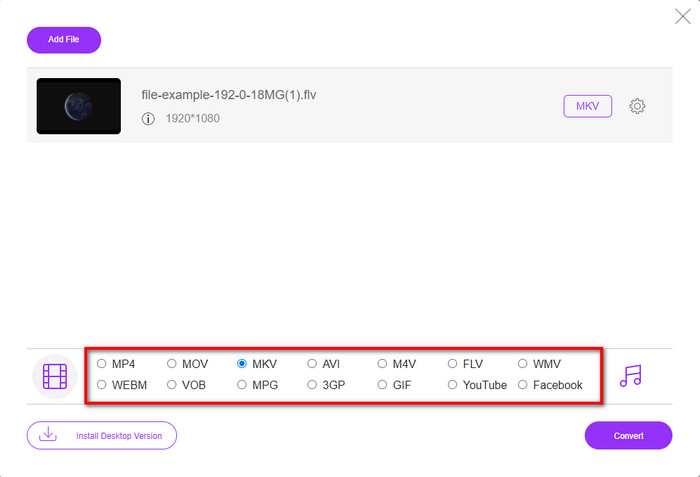
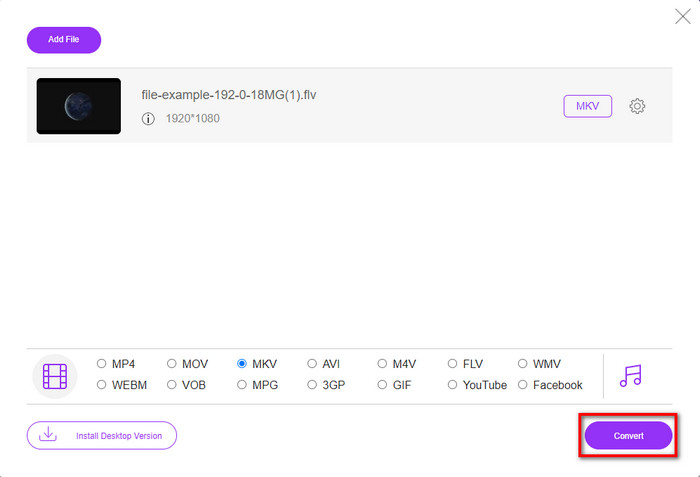
Langkah 4. Mulai proses konversi dengan mengklik tombol Convert, dan file yang sudah dikonversi akan otomatis tersimpan di drive komputer Anda setelahnya.
Cara ke-2. Gunakan Konverter Gratis yang Tersedia untuk Diunduh di Windows dan Mac
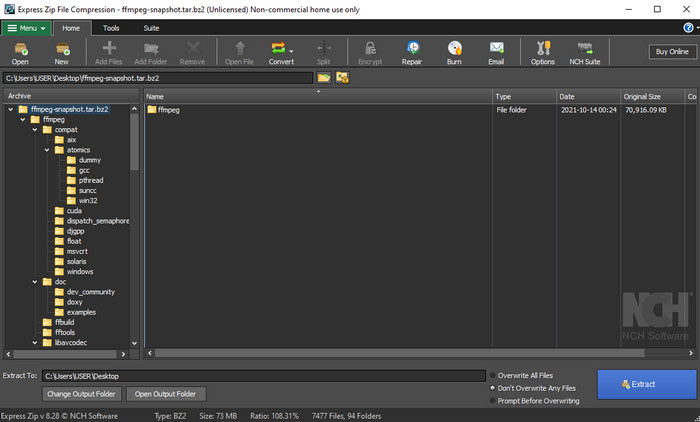
FFmpeg bukan konverter klasik yang biasa Anda gunakan. Meskipun bukan konverter pada umumnya, alat ini tetap bisa mengonversi file FLV Anda. Yang membuat alat ini berbeda adalah antarmukanya berbasis CLI, yang berarti sebelum melakukan konversi, Anda harus memberinya perintah dengan melakukan pengodean atau sederhananya mengetik. Jika Anda merasa konverter ini menarik, baca detail di bawah ini untuk menggunakan FFmpeg FLV ke MKV dengan mengikuti langkah-langkahnya.
Langkah 1. Unduh dan buka FFmpeg.exe.
Langkah 2. Buka command prompt di komputer Anda.
Langkah 3. Jelajahi file FLV menggunakan CMD. Lalu salin kode ini dan tempelkan ke command prompt ffmpeg -i input.flv -vn -ar 44100 -ac 2 -b:a 192k output.mkv setelah itu, tekan Enter pada keyboard Anda untuk memulai proses.
Bagian 2. Konversi FLV ke MKV dengan Konverter FLV ke MKV Terbaik Tanpa Rugi
cara ke-3. Gunakan Konverter Profesional untuk Mengonversi FLV ke WMV
Masih belum puas dengan dua konverter pertama yang dijelaskan di atas? Kalau begitu, Anda harus mencoba FVC Video Converter Ultimate. Mengapa? Karena alat ini memberikan hasil yang profesional meskipun Anda tidak perlu mengeluarkan terlalu banyak usaha saat mengonversi. Selain itu, alat ini mendukung lebih banyak format untuk mengonversi file FLV Anda ke MKV, AVI, MOV, AVI, MP4, dan lebih dari 200 format lainnya. Masih belum terkesan? Mungkin Anda ingin menambahkan sentuhan “ajaib” pada video Anda? Dalam hal ini, Anda beruntung menggunakan konverter ini karena ia menyediakan fitur pengeditan video lanjutan yang bisa Anda gunakan. Ragu karena menurut Anda alat ini mungkin terlalu rumit untuk digunakan? Jika demikian, ikuti langkah-langkah di bawah ini untuk merasakan dan mempelajari cara menggunakan konverter FLV ke MKV ini.
Langkah 1. Sebelum menggunakan konverter ini, Anda harus mengunduhnya terlebih dahulu dengan mengklik tombol unduh di bawah. Ikuti petunjuk instalasi setelah selesai mengunduh, lalu jalankan programnya.
Unduh GratisUntuk Windows 7 atau yang lebih baruUnduhan Aman
Unduh GratisUntuk MacOS 10.7 atau yang lebih baruUnduhan Aman
Langkah 2. Untuk menambahkan file FLV yang ingin Anda konversi, tekan tombol +. Jelajahi file FLV di folder yang akan muncul pada antarmuka Anda, lalu tekan Open untuk lanjut ke langkah berikutnya.
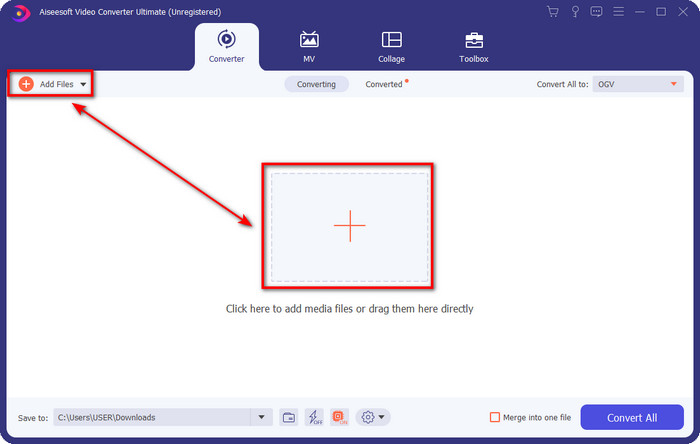
Langkah 3. Setelah itu, ubah format menjadi MKV dengan mengklik tombol drop-down di sisi kanan atas antarmuka pengguna.
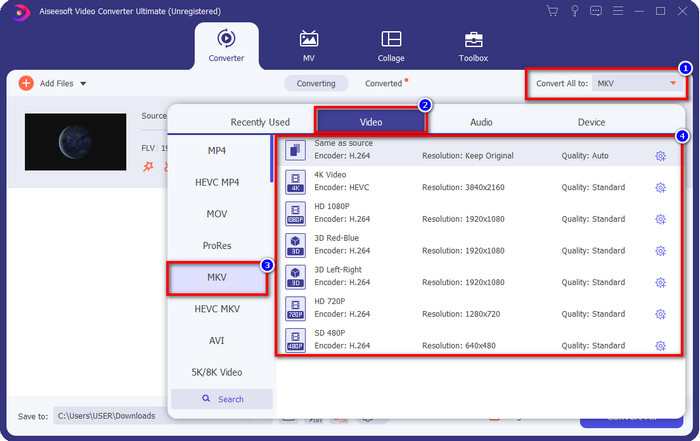
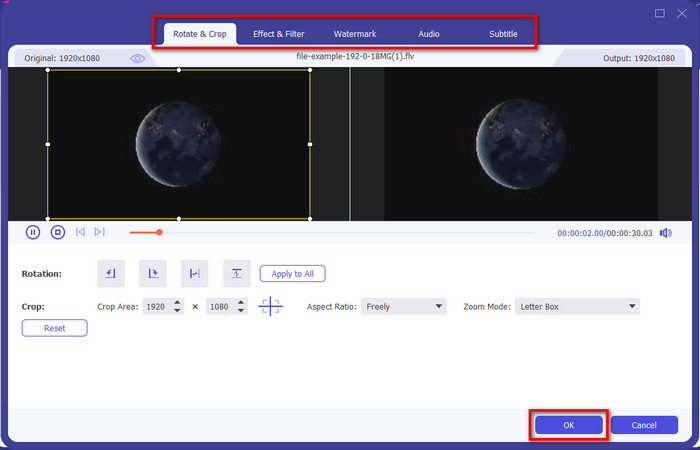
Opsional. Jika Anda perlu mengedit video, Anda bisa mengklik tombol wand jika diinginkan. Sebuah antarmuka baru akan muncul; Anda dapat melakukan Rotate, Crop, Effects, Filter, Watermark, mengatur Audio, dan Subtitle pada antarmuka ini. Jangan membatasi imajinasi Anda, lakukan apa pun yang Anda mau, dan untuk menerapkan semua sentuhan “ajaib” yang sudah Anda buat, klik OK.
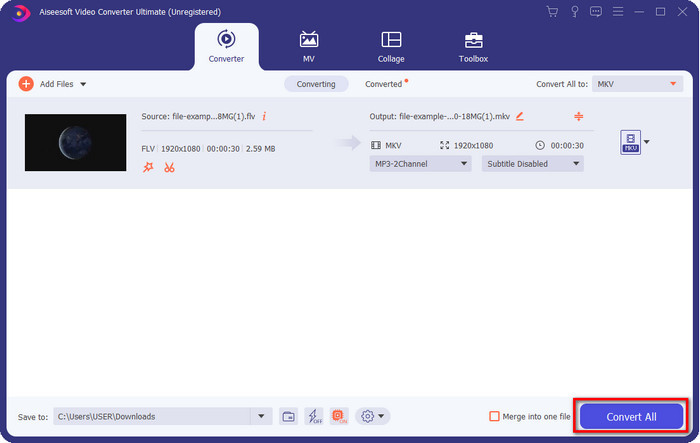
Langkah 4. Setelah semuanya selesai, klik Convert All untuk mengonversi FLV ke format MKV. Prosesnya hanya memakan waktu kurang dari satu menit, jadi Anda tidak perlu menunggu terlalu lama. Sebuah folder akan muncul di layar Anda berisi FLV yang sudah dikonversi.
Terkait:
Bagian 3. Apa Perbedaan Antara FLV dan MKV
FLV dan MKV dikenal sebagai salah satu wadah terbaik yang diketahui semua orang. Namun sebelum hal lain, mari kita bandingkan dan lihat informasi lebih detail tentang kedua format tersebut.
FLV dikenal di semua situs web karena populer di halaman web, terutama karena Adobe yang membuatnya. Selain itu, .flv memutar aliran video online karena lebih mudah dimuat daripada format lainnya. Selain itu, format ini memerlukan plug-in-play sebelum Anda dapat melihat atau menonton video dalam format ini, atau Anda dapat mengunduh Flash Player dengan mudah. Meskipun formatnya sangat bagus, plug-in-play yang digunakannya telah dihapus, yang berarti formatnya bukan pilihan terbaik. Namun, banyak pemutar media yang masih mendukung format ini dan pengguna yang masih menggunakannya.
MKV dikenal sebagai format yang paling mirip dengan masa depan. Format ini tidak akan seperti format lain dalam banyak hal jika kita akan membandingkannya. Misalnya, struktur yang dibangun dalam format ini tidak sama dengan MP4 atau AVI, tetapi berbeda. Desain dan penyimpanan file media yang unik membuatnya lebih mengesankan. Saat ini, sulit untuk memilih format mana yang sudah ketinggalan zaman, dan salah satunya adalah MKV.
Jika kita menggali lebih dalam, kita akan menemukan banyak alasan mengapa Anda perlu mengubah FLV menjadi MKV. Meskipun kedua format berisi konten media, MKV lebih kuat daripada FLV. Jadi, jika Anda ingin memiliki kekuatan unik MKV, Anda harus mengonversi file Anda ke dalam format ini.
FLV vs. MKV
Adobe Flash Player menggunakan FLV untuk mengirimkan konten video seperti film dan acara TV. Saat ini, Adobe tidak lagi mengembangkan pemutar dan merekomendasikan pengguna untuk menghapusnya karena alasan keamanan. Namun, Anda masih dapat menggunakan format FLV di banyak program non-Adobe/Macromedia.
Format wadah multimedia Matroska, dirilis pada tahun 2002, adalah format sumber terbuka yang dapat mencakup sejumlah trek video, audio, gambar, dan subjudul. Jadi, Anda dapat menggunakannya untuk menyimpan klip video pendek, acara TV, dan film dengan mudah. Ini cukup populer untuk anime fan-subbbing.
Bagian 4. FAQ tentang Konversi FLV ke MKV
Apakah aman untuk mengonversi FLV ke MKV secara online?
Nah, mengonversi format harus aman jika Anda menggunakan alat web. Namun, tidak semua konverter online aman untuk mengonversi format file Anda. Karena ada beberapa kecenderungan, akan ada banyak kesalahan tak terduga ketika Anda menggunakan konverter yang salah. Misalnya, penurunan kualitas adalah masalah yang tersebar luas, virus setelah mengunduh file setelah mengonversi, beberapa iklan pop-up, malware menular, dan banyak lagi. Jadi, jika Anda ingin memiliki proses konversi online yang aman, Anda harus menggunakan FVC Free Video Converter Online.
Apakah mengkonversi FLV akan memakan waktu?
Proses konversi akan tergantung pada banyak faktor, dan salah satunya adalah alat yang Anda gunakan dan ukuran file. Jika Anda memiliki file FLV besar, Anda harus menggunakan FVC Video Converter Ultimate, terutama saat terburu-buru. Karena alat ini menyediakan proses secepat kilat, Anda tidak akan memerlukan koneksi internet untuk menggunakannya. Dan sekarang, jika Anda mencari konverter yang dapat memproses format Anda lebih cepat, maka alat utama adalah pilihannya.
Mengapa saya tidak bisa membuka file FLV saya?
Ada beberapa alasan mengapa Anda tidak dapat membuka file FLV. Perhatikan; detail berikut ini adalah salah satu alasan keseratus Anda tidak dapat membuka file FLV. Pertama-tama, Anda tidak dapat membuka FLV jika file tersebut retak atau ada virus di dalamnya. Kedua, masalah paling umum file video tidak didukung pada aplikasi yang Anda gunakan. Ketiga, jika Anda mengunduh file FLV di internet, akan ada kasus file tersebut kehilangan beberapa informasi penting untuk memutarnya. Meskipun ini merupakan masalah, kami masih dapat membantu dengan mengonversi FLV Anda ke format lain. Tapi ingat, Anda tidak bisa mengembalikan FLV dengan mengubah format jika rusak atau tidak lengkap.
Kesimpulan
Kita telah mempelajari hal-hal yang perlu kita ketahui untuk mengonversi FLV ke MKV dengan beberapa cara. Alat-alat di atas sangat bagus digunakan jika kita ingin mengonversi format ke versi yang baru. Sekarang, semuanya ada di tangan Anda untuk memilih format dan cara mana yang menurut Anda paling cocok untuk mengubah format Anda. Salah satu dari tiga alat di atas akan menjamin keberhasilan Anda, tetapi jika Anda menginginkan hasil yang profesional dan ingin memaksimalkan kualitas file video Anda, Anda harus memilih FVC Video Converter Ultimate. Tak perlu banyak penjelasan, karena alat ini akan mengisi semua kekosongan kebutuhan Anda.
-
 3 Solusi Cara Mengkonversi FLV ke PSP Tanpa Rugi
 Bagaimana cara mengubah FLV ke PSP? Di sini Anda akan mendapatkan panduan langkah demi langkah untuk mengonversi video Flash ke format yang didukung PSP (WMV, MP4, AVI, FLV, dll.) di Windows dan Mac.
-
 2 Metode untuk Mengonversi Audio FLV ke WMA [Gratis & Daring]
 Ingin mengekstrak audio WMA dari video FLV? Berikut adalah 2 ekstraktor audio WMA gratis untuk mengonversi FLV (Flash Video) ke WMA (Windows Media Audio) dengan kecepatan konversi cepat di Mac OS X dan Windows 10/8/7.
-
 [Terpecahkan] Cara Mengonversi Video FLV ke File GIF Animasi Gratis
 Jika Anda ingin membuat GIF dari segmen video FLV untuk pengiriman yang lebih baik, Anda dapat mempelajari lebih lanjut tentang cara mengonversi video FLV ke file GIF dengan mudah dari artikel ini.

