


 Video Converter Ultimate
 Perekam Layar
 Perbaikan Video
Konverter TS ke GIF Terbaik untuk Mengubah TS menjadi GIF Online & Offline
File TS dikenal sebagai MPEG transport stream atau singkatnya transport stream. Jenis file ini paling sering terlihat pada DVD karena berfungsi untuk menyinkronkan beberapa pemutaran sekaligus. Meskipun file TS merupakan media penyimpanan digital standar untuk MPEG, TS tetap lebih terbatas dibanding format lainnya. Sebagian besar klip di DVD disimpan dalam format .ts agar mudah ditransfer secara global. Namun, beberapa pemutar media tidak dapat memutar file .ts karena adanya penggabungan (multiplex) video, audio, dan aliran pemutaran lainnya, serta ukuran file yang sering kali sangat besar. Jadi, untuk mengatasi masalah ini dan juga menghemat ruang penyimpanan agar bisa disimpan di drive Anda, solusinya adalah mengonversinya. Mari pelajari cara mengonversi TS ke GIF agar dapat diputar dengan bantuan alat ini dan pahami perbedaan di antara keduanya.

Bagian 1. TS vs GIF
TS dan GIF keduanya wadah file media tetapi mereka memiliki perbedaan besar terutama apa yang berisi format file.
Misalnya, file TS sering tersedia di DVD, Blu-ray, dan penyiaran serta streaming online lainnya. Tetapi data aliran transportasi memiliki elemen berbeda yang telah disatukan menjadi salah satu format yang efisien pada pemutaran.
Elemen-elemen ini adalah
● VIDEO_TS.VOB – wadah data untuk audio dan video.
● VIDEO_TS.BUP – wadah data untuk membuat cadangan informasi.
● VIDEO_TS.ISO – data seperti menu, teks, subtitle, dan lainnya ada di sini.
● AUDIO_TS – biasanya data kosong.
Tetapi GIF tidak memiliki elemen seperti yang dimiliki file TS. Tetapi GIF lebih mudah diakses daripada file ini dan ukurannya jauh lebih kecil dibandingkan dengan format lain juga. Tetapi kelemahan file GIF adalah Anda tidak dapat memuat file audio di sini. Karena GIF tidak berisi file audio dan lebih sedikit pada palet warna dengan fps lebih rendah.
Bagian 2. Cara Mengonversi TS ke GIF di PC dan Mac [Program dan Alat Berbasis Web]
1. Video Gratis FVC ke Pembuat GIF
Buat dan konversi GIF di FVC Free Video ke GIF Maker. Alat ini jauh lebih baik daripada konverter online mana pun yang pernah Anda temui di web. Meskipun alat ini mendukung format terbatas, alat ini tetap merupakan salah satu konverter terbaik yang tercantum di sini, di samping konverter utama. Proses konversi yang dibawa ke Anda oleh alat ini jauh lebih cepat dan lebih aman daripada CloudConvert dan Convertio tetapi jika Anda ingin lebih cepat maka lanjutkan ke alat berikutnya di bawah ini. Karena 30x lebih cepat dari alat ini dan 100x dari alat berbasis web atau program mana pun. Jadi, untuk menguji konversi konverter TS ke GIF ini, Anda harus mengikuti langkah-langkah di bawah ini.
Langkah 1. Unduh alat ini ke drive Anda dan instal.
Unduh GratisUntuk Windows 7 atau versi lebih baruUnduhan Aman
Unduh GratisUntuk MacOS 10.7 atau versi lebih baruUnduhan Aman
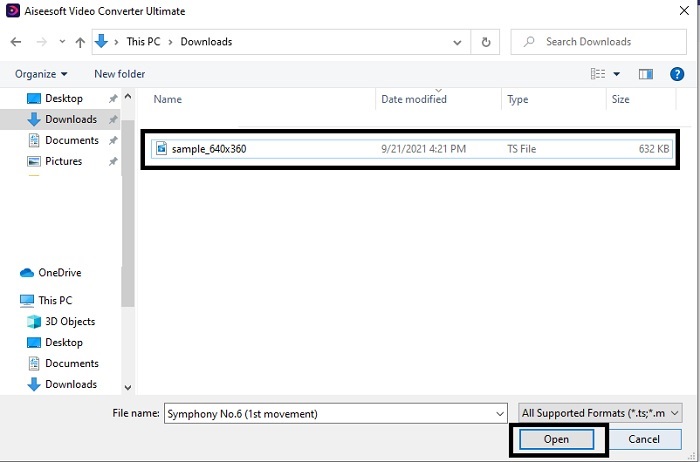
Langkah 2. Setelah mengubah pengaturan instalasi dan meluncurkannya, klik tombol Add File di sisi kiri atas antarmuka dan klik open untuk memasukkan file GIF.
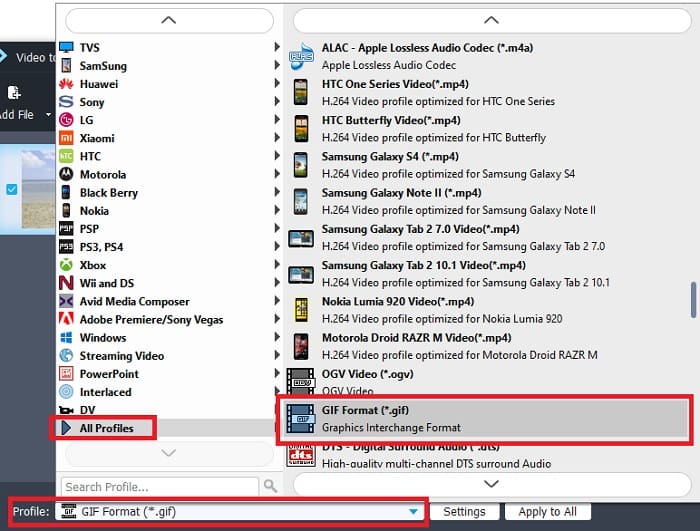
Langkah 3. Di antarmuka utama, Anda akan melihat di bagian bawah ada Profile, lalu klik. Sekarang Anda dapat mengubah file .ts ke format yang Anda inginkan.
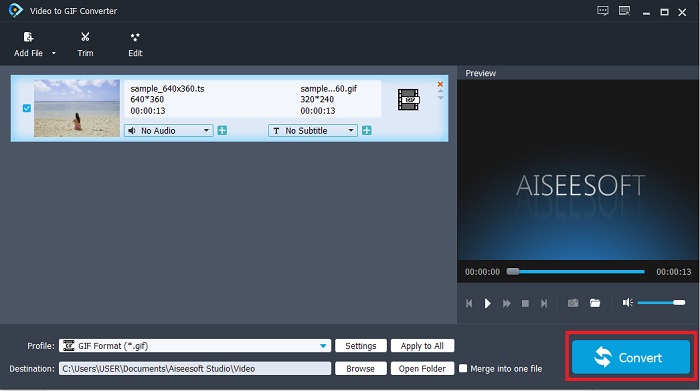
Langkah 4. Untuk mulai mengubah file .ts, klik tombol Convert dan lanjutkan.
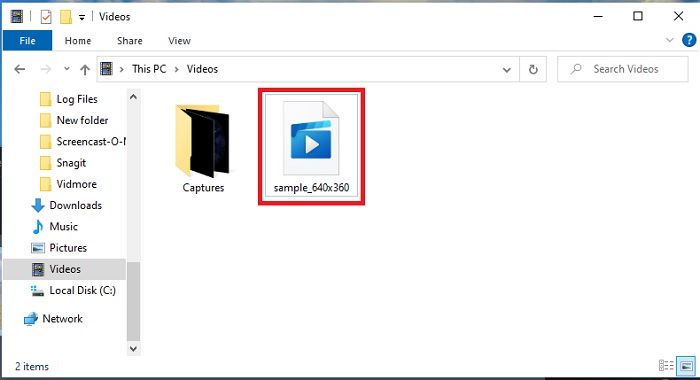
Langkah 5. Tunggu beberapa menit dan biarkan proses konversi selesai. Setelah itu, cari file .gif di file explorer dan nikmati hasilnya.
2. FVC Video Converter Ultimate
Jika konversi adalah masalahnya, maka FVC Video Converter Ultimate adalah solusi terbaik. Alat ini selalu bisa menyelesaikan berbagai masalah konversi yang mungkin Anda temui. Karena alat ini dapat mengubah format yang tidak dapat diputar menjadi dapat diputar dan kemudian meningkatkannya. Ultimate converter ini telah digunakan oleh lebih dari satu juta pengguna online dan mereka menyukainya. Namun, setiap alat yang bekerja seperti ini biasanya berbayar, tetapi jika Anda tidak menyukai hal-hal yang terlalu mahal maka inilah jawabannya. Selain harganya yang ekonomis, alat ini juga dapat membuat video menjadi GIF dengan kualitas terbaik yang pernah Anda lihat. Jadi, tanpa berpanjang kata, mari lanjut ke langkah-langkah rinci cara mengubah format TS ke GIF dengan mengikuti langkah-langkah yang disediakan khusus untuk Anda.
Langkah 1. Langkah pertama untuk memiliki ultimate converter ini adalah mengunduhnya ke drive PC atau Mac Anda. Instal, ubah pengaturan jika diinginkan, lalu klik finish untuk menyimpan perubahan.
Unduh GratisUntuk Windows 7 atau yang lebih baruUnduhan Aman
Unduh GratisUntuk MacOS 10.7 atau yang lebih baruUnduhan Aman
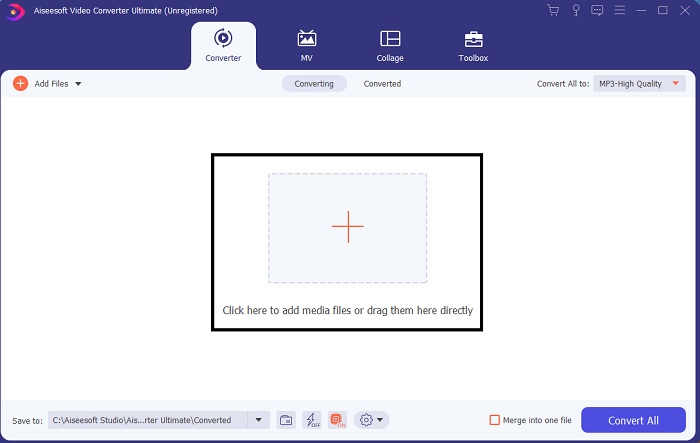
Langkah 2. Klik tanda plus di tengah antarmuka. Cari file .ts yang ingin Anda ubah menjadi GIF dan klik open untuk memasukkannya ke antarmuka alat. Informasi tambahan, Anda dapat menambahkan banyak file .ts atau file lain sekaligus. Anda juga dapat mengonversi semuanya ke format yang sama atau mengubahnya satu per satu.
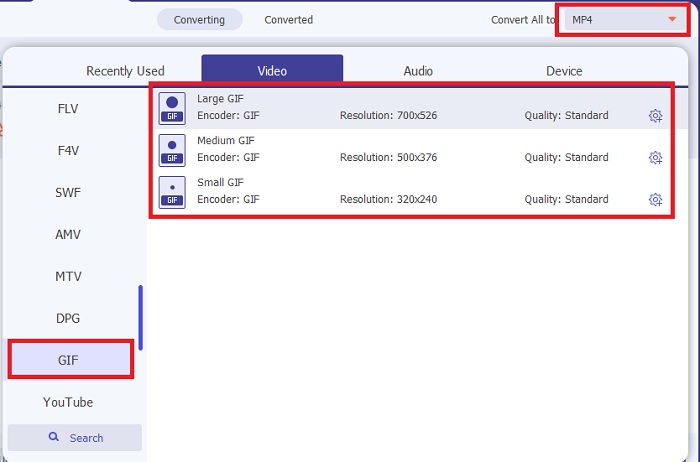
Langkah 3. Pada antarmuka utama, klik tombol drop-down di sisi kiri. Pilih format GIF atau format lain yang Anda inginkan.
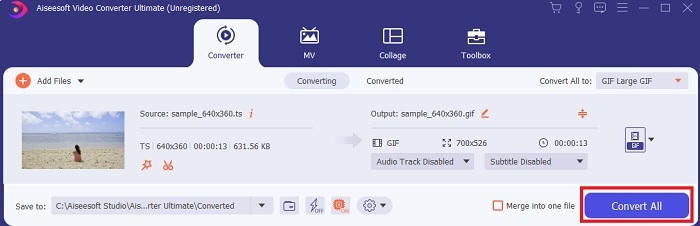
Langkah 4. Setelah memilih format GIF, klik tombol Convert All untuk memulai konversi file TS.
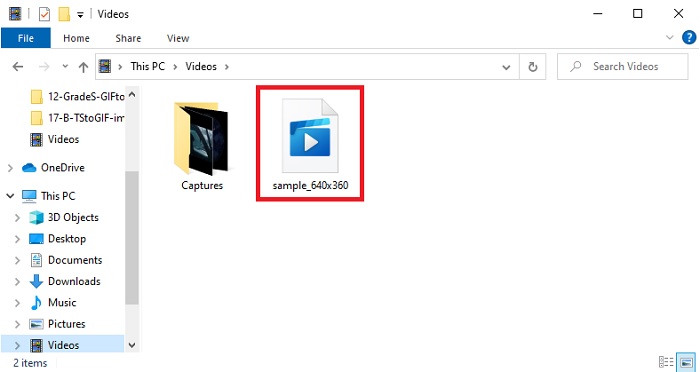
Langkah 5. Setelah konversi selesai, sebuah folder akan muncul di layar Anda. Klik file yang baru saja Anda konversi dan tonton sekarang.
3. CloudConvert
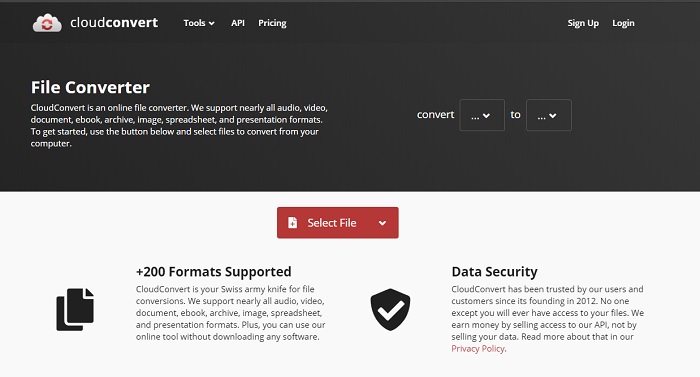
Jika Anda tidak ingin mengunduh software di atas, Anda dapat menggunakan CloudConvert ini. Berbeda dengan dua converter pertama, alat web ini bergantung pada internet. Jadi, jika Anda mengonversi di sini, Anda harus memiliki koneksi internet yang stabil untuk menghindari gangguan atau kehilangan data seperti alat berikutnya. Namun CloudConvert mendukung konversi dan format dasar juga. Alat ini tidak memiliki fitur pengeditan seperti dua alat di atas. Tetapi keuntungannya, Anda tidak perlu mengunduhnya ke penyimpanan Anda.
4. Convertio
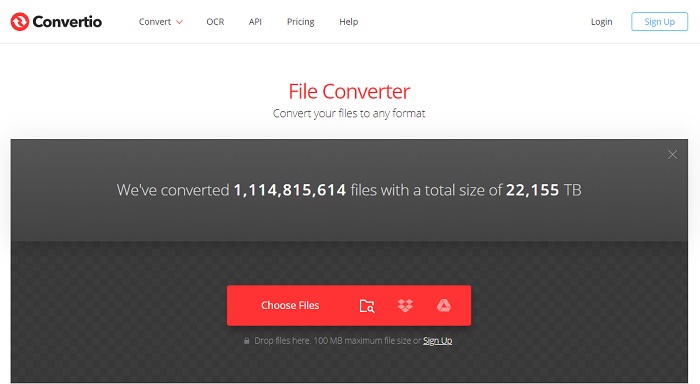
Dengan alat ini Anda dapat melakukan banyak konversi TS ke GIF sekaligus jika mau, tetapi Anda harus mendaftar terlebih dahulu. Karena batasan yang diberikan Convertio untuk dikonversi dalam satu waktu hanya dua file. Namun ingat, jika Anda mendaftar ke alat ini, berarti Anda sudah membagikan data pribadi Anda. Walaupun belum ada kabar tentang kebocoran data di alat ini, tetap saja lebih baik waspada. Selain itu, web tool ini memberikan kompresi dan konversi yang baik tetapi mendukung format yang lebih sedikit dibanding ultimate tool.
Bagian 3. FAQ tentang TS ke GIF
Apakah file TS dikompresi?
Ya, itu adalah data video terkompresi karena menggunakan kompresi .mpeg untuk melindungi dan memiliki transfer yang aman jika Anda ingin mentransfernya nanti.
Di mana saya dapat memutar file .ts?
Sering kali Anda tidak dapat memutar file .ts di pemutar media bawaan dan bahkan di beberapa alat pihak ketiga. Namun ada pemutar media yang dapat Anda gunakan untuk memutar file .ts layaknya menonton film di bioskop. Blu-ray Player adalah salah satu pemutar media yang telah berevolusi dan mendukung semua format untuk ditonton pemutarannya. Unduh alat ini dengan mengklik tautan di bawah dan tonton file .ts Anda. Unduh Blu-ray Player untuk PC Unduh Blu-ray Player untuk Mac
Format mana yang terbaik untuk dikonversi ke file TS?
Berdasarkan riset kami, file TS menyinkronkan pemutaran audio dan video seperti halnya MP4. Walaupun MP4 tidak menyimpan file yang disinkronkan, ini tetap format terbaik yang dapat Anda gunakan untuk mengonversi file .ts. Setelah mengubah file TS ke MP4, file tersebut dapat diputar di semua platform dan pemutar media.
Kesimpulan
Sebagai penutup pembahasan, hasil yang diharapkan adalah bahwa FVC Video Converter Ultimate menjadi pemenang dalam pertarungan konversi ini. Meskipun semua alat yang tercantum di sini bisa mengonversi TS ke GIF, ultimate converter tetap menjadi converter fenomenal di antara semua converter. Jadi, jika Anda ingin mendapatkan hasil konversi yang sempurna, unduh alat ini dan nikmati proses konversinya.
-
 [Panduan] Cara Mengonversi Video M4V ke GIF Animasi di Windows/Mac
 Jika Anda ingin membuat file GIF animasi dari video M4V favorit Anda, Anda dapat mempelajari tentang 2 cara mudah dan efisien untuk mengonversi video M4V ke GIF dengan pengaturan yang disesuaikan.
-
 WebM ke GIF – 3 Konverter WebM ke GIF Gratis untuk Membuat GIF Anda Sendiri
 Apakah WebM adalah GIF? Bagaimana cara mengubah video menjadi GIF? Apakah ada konverter WebM ke GIF gratis? Posting ini membagikan 3 cara gratis untuk membantu Anda mengonversi WebM ke GIF.
-
 Cara Mengonversi Video MKV ke GIF Animasi tanpa Photoshop/FFmpeg
 Setelah mengunduh dan menonton film MKV di komputer, Anda mungkin ingin berbagi momen indah dengan teman atau di Internet sebagai GIF. Pada artikel ini, Anda dapat mempelajari tentang 2 cara termudah untuk mengonversi MKV ke GIF.
