


 Video Converter Ultimate
 Perekam Layar
 Perbaikan Video
 Unduhan Aman
Cara Efektif Konversi TIFF ke JPG dan PNG
TIFF adalah format file gambar yang umum digunakan oleh fotografer dan desainer grafis. Format ini memiliki kualitas tinggi, fleksibilitas, dan kompatibilitas yang hampir universal. Namun, ukurannya lebih besar sehingga sulit dibagikan kepada orang lain atau di web. Dalam kasus seperti ini, salah satu solusi terbaik adalah mengonversi file ini ke format lain. Format file JPG dan PNG memiliki ukuran file yang lebih kecil dibandingkan TIFF. Dengan demikian, mengonversi TIFF ke JPG dan PNG menjadi pilihan yang lebih baik. Artikel ini dapat menawarkan kepada Anda metode terbaik untuk mengonversi TIFF ke format JPG/PNG. Selain itu, Anda akan mempelajari semua informasi yang Anda perlukan tentang format file gambar ini. Jadi, tanpa berlama-lama, mari baca tulisan ini saat kami memberikan solusi yang Anda cari.

Bagian 1. TIFF vs. JPG vs. PNG
| Format File | TIF/TIFF | JPG | PNG |
| Ekstensi Nama File | .tif / .tiff | .jpg | .png |
| Dikembangkan oleh | Aldus (diakuisisi oleh Adobe) | Kelompok Pakar Fotografi Bersama | Grup Pengembangan PNG |
| Keterangan | Pada tahun 1992, Format File Gambar Tag (BERTENGKAR) Dikembangkan. Pengembang dapat mengembangkan jenis file fleksibel ini untuk mengakomodasi banyak kebutuhan. File TIF dan TIFF adalah format file gambar yang digunakan untuk menyimpan gambar. Namun, ada beberapa perbedaan antara format ini. File gambar TIFF mampu menyimpan lebih dari satu gambar dalam satu file. Di sisi lain, file TIF hanya dapat menyimpan satu gambar. Juga, file TIFF dapat menyimpan metadata terkait gambar, tetapi file TIF tidak bisa. | JPG dan JPEG adalah ekstensi yang sama yang mengacu pada format gambar digital yang sama. Tidak ada perbedaan antara format JPEG dan JPG. Satu-satunya perbedaan adalah jumlah karakter yang digunakan. File JPG disimpan dengan ekstensi file .jpg, dan file JPEG disimpan dengan ekstensi .jpeg. JPEG adalah singkatan dari Joint Photographics Experts Group. | Singkatan dari PNG adalah singkatan dari Portable Network Graphic. Anda dapat menyimpan foto berkualitas tinggi dan membagikannya menggunakan format PNG. PNG dapat menangani 16 juta warna yang mengejutkan. Ini juga mendukung latar belakang transparan dan semi-transparan. File gambar PNG adalah format terbuka, artinya Anda dapat menyimpan dan membuka file PNG dari perangkat lunak pengedit gambar apa pun. |
Bagian 2. Metode Luar Biasa untuk Mengonversi TIF/TIFF ke JPG/PNG Online
FVC Free Image Converter adalah konverter terbaik yang dapat Anda gunakan untuk mengubah TIFF menjadi JPG/PNG secara online. Prosedur konversinya juga sangat mudah. Gambar dapat dikonversi hanya dalam tiga langkah sederhana. Prosedur konversi batch juga disediakan. Beberapa foto dapat dikonversi sekaligus. Artinya, Anda dapat mengonversi gambar Anda dalam waktu yang lebih singkat. Alat ini mudah dipahami dan menawarkan antarmuka yang intuitif dengan pengaturan yang jelas. Selain itu, FVC Free Image Converter mendukung berbagai format input. Alat ini mendukung berbagai format, termasuk JPG, PNG, BMP, TIFF, WEBP, dan GIF. Lebih jauh lagi, konverter ini sepenuhnya gratis. Selain itu, alat ini melindungi privasi pengguna. Data Anda akan langsung dihapus setelah foto Anda dikonversi dan disimpan. Fakta bahwa Anda dapat menggunakan aplikasi online ini di semua jenis browser meningkatkan aksesibilitas bagi pengguna. Untuk menggunakan konverter TIFF ke JPG ini, ikuti petunjuk sederhana yang tercantum di bawah ini.
Konversi TIF/TIFF ke JPG
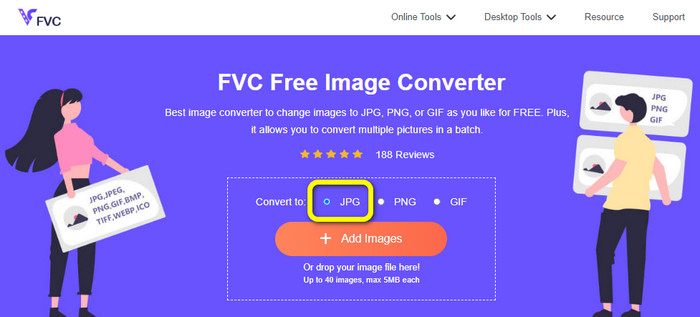
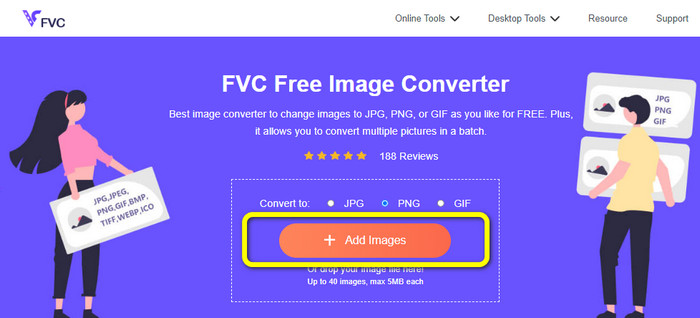
Langkah 1: Kunjungi situs web FVC Free Image Converter dari browser Anda. Lalu pilih format file JPG dari opsi Convert to.
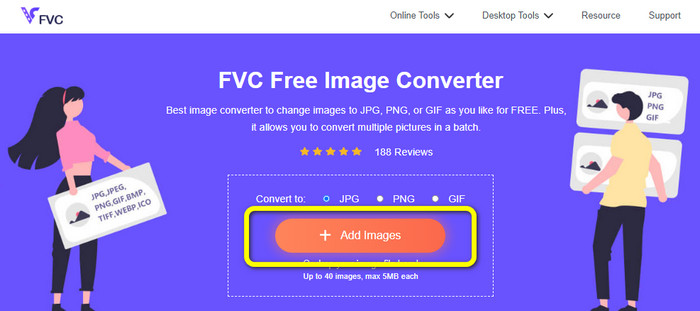
Langkah 2: Langkah berikutnya adalah mengklik tombol Add Images. Setelah mengklik, folder file akan muncul di layar komputer Anda. Pilih file gambar dan klik Open.
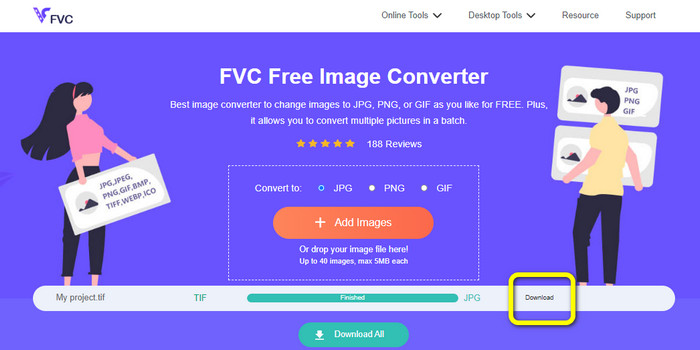
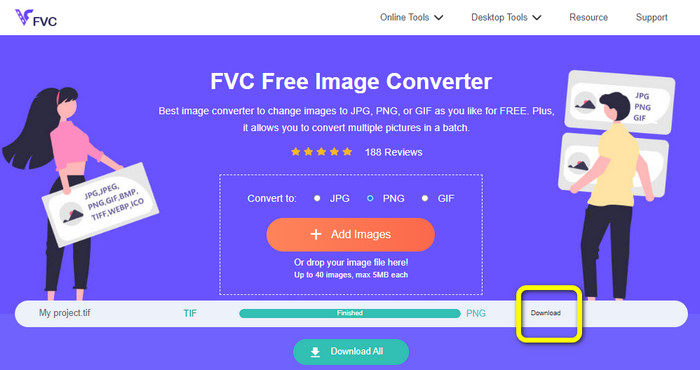
Langkah 3: Image converter akan mengonversi gambar Anda secara otomatis setelah diunggah. Klik tombol Download untuk menyimpan dan mengunduh gambar yang telah dikonversi ke komputer Anda.
Mengkonversi TIFF/TIF ke PNG
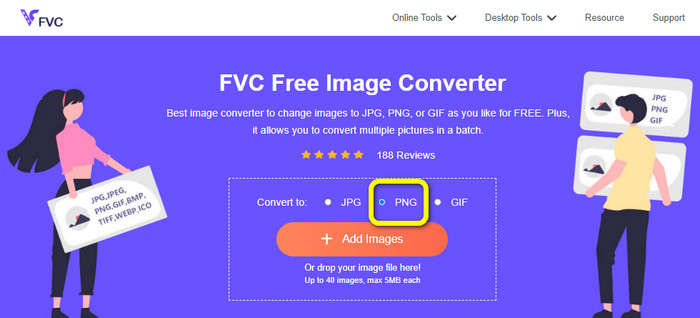
Langkah 1: Dari halaman web, pilih format file PNG dari opsi format.
Langkah 2: Klik tombol Add Images. Lalu, ketika folder file muncul di layar, pilih file PNG yang ingin Anda konversi. Setelah itu, buka file tersebut.
Langkah 3: Setelah proses konversi selesai, klik tombol Download. Tunggu proses penyimpanan dan buka gambar Anda dari folder. Klik di sini untuk mempelajari cara mengonversi BMP ke JPG atau PNG.
Bagian 3. Cara Terbaik untuk Mengonversi TIF/TIFF ke JPG/PNG Offline
Video Converter Ultimate adalah salah satu cara offline terbaik untuk mengonversi file TIF ke JPG dan PNG. Anda dapat mengunduh program ini di sistem operasi Mac maupun Windows. Konverter gambar offline ini memungkinkan Anda mengonversi file TIF ke JPG dan PNG. Selain itu, alat ini mendukung format lain seperti WEBP, BMP, GIF, TIFF, JPG, PNG, dan lainnya. Konverter ini menawarkan antarmuka yang ramah pengguna, sehingga cocok untuk profesional maupun pemula. Selain itu, jika Anda ingin mengonversi beberapa file sekaligus, Anda bisa melakukannya. Salah satu fitur unggulannya adalah kemampuan melakukan proses konversi batch. Karena itu, alat ini menjadi praktis bagi semua pengguna yang sering mengonversi file gambar. Selain itu, saat mengonversi gambar, ada lebih banyak hal yang bisa Anda lakukan. Pada ikon pengaturan, Anda dapat memperbesar dan memperkecil gambar. Anda juga dapat mengubah kualitas gambar sesuai preferensi. Dengan cara ini, Anda bisa mendapatkan hasil yang Anda inginkan. Ikuti prosedur dasar di bawah ini untuk mengonversi TIF ke format JPG dan PNG.
Konversikan TIFF ke JPG
Langkah 1: Unduh Video Converter Ultimate di komputer Anda. Setelah itu, jalankan aplikasi setelah proses instalasi selesai. Lihat tombol Download di bawah ini dan klik untuk mengakses konverter dengan mudah.
Unduh GratisUntuk Windows 7 atau yang lebih baruUnduhan Aman
Unduh GratisUntuk MacOS 10.7 atau yang lebih baruUnduhan Aman
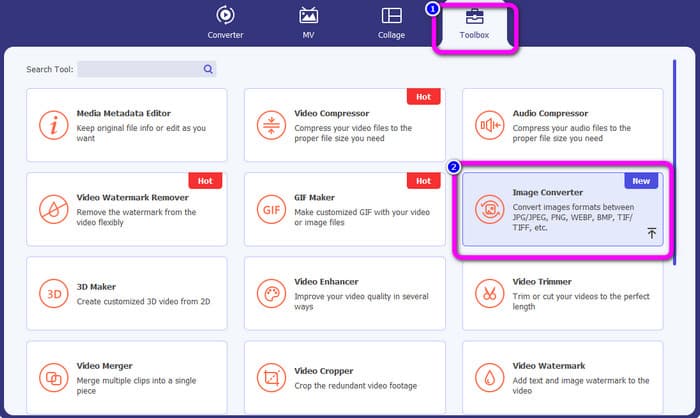
Langkah 2: Klik panel Toolbox di bagian atas antarmuka. Pilih fungsi Image Converter.
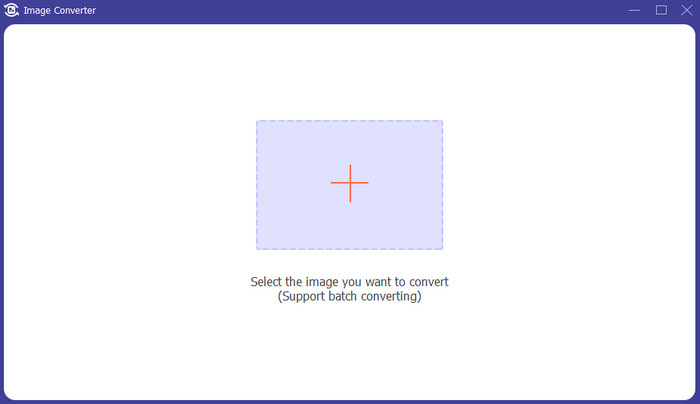
Langkah 3: Lalu klik tombol bergambar tanda Plus di bagian tengah antarmuka. Pilih file gambar TIFF dari folder file Anda, lalu buka.
Langkah 4: Jika Anda menginginkan lebih banyak gambar, klik tombol Add Source file. Lalu, masuk ke opsi Convert All to dan pilih format file JPG.
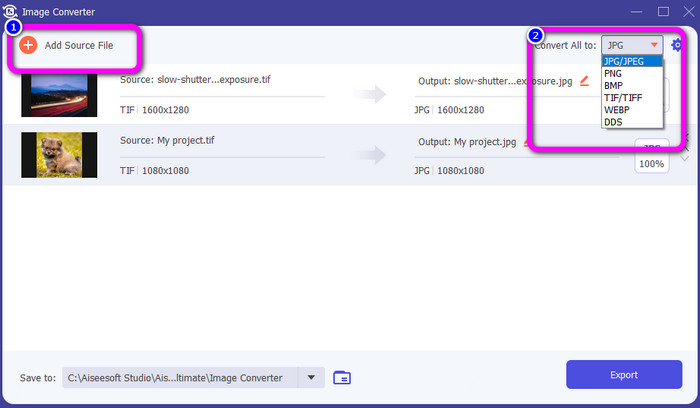
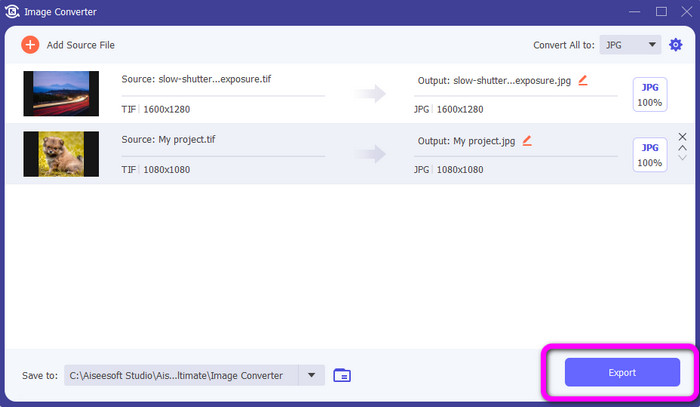
Langkah 5: Terakhir, klik tombol Export setelah memilih JPG sebagai format keluarannya. Setelah proses konversi selesai, Anda dapat membuka gambar yang telah dikonversi di folder file Anda.
Konversikan TIFF ke PNG
Langkah 1: Anda dapat mengikuti proses yang sama seperti di atas. Pergi ke panel Toolbox dan pilih fungsi Image Converter.
Langkah 2: Klik ikon Plus untuk memasukkan TIFF yang ingin Anda konversi.
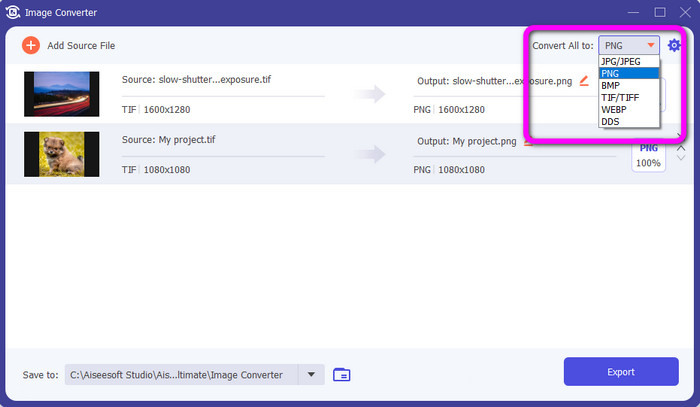
Langkah 3: Setelah menambahkan gambar TIFF Anda, buka opsi Convert All to. Pilih format file PNG sebagai format keluarannya.
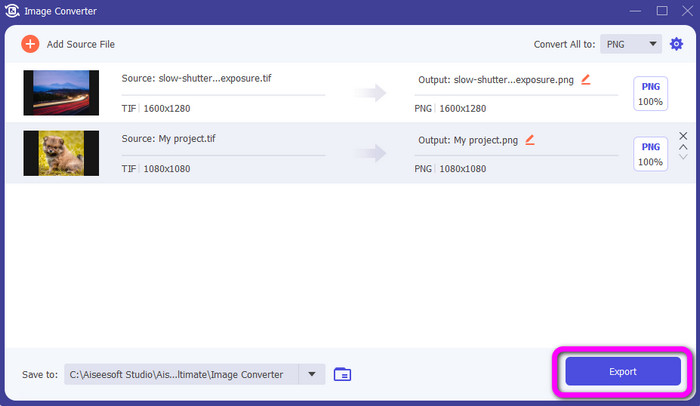
Langkah 4: Untuk langkah terakhir Anda, klik tombol Export di sudut kiri bawah antarmuka. Anda juga dapat menggunakan perangkat lunak ini untuk mengonversi JPG ke PNG.
Bagian 4. FAQ tentang Konversi TIF/TIFF ke JPG/PNG
1. Bagaimana cara mengonversi TIFF ke PNG di Mac?
Salah satu cara efektif untuk mengonversi TIFF ke PNG di Mac adalah dengan menggunakan FVC Free Image Converter. Buka Safari dari Mac Anda dan akses konverter gambar online ini. Dari halaman utama, pilih format PNG dari opsi format. Klik tombol Add Images untuk menambahkan file TIFF yang ingin Anda konversi. Saat diunggah, file akan dikonversi secara otomatis. Lalu, klik tombol download untuk menyimpan gambar yang telah dikonversi di Mac Anda.
2. Apa keuntungan mengonversi TIF ke PNG?
Jika Anda ingin membuat file Anda lebih kecil, Anda perlu mengubah file TIF Anda ke format lain. Mengonversi TIF ke file PNG adalah yang terbaik karena PNG memiliki ukuran file yang lebih kecil. Ini akan memberi Anda ukuran file yang dapat dikelola untuk browser web dan perangkat.
3. File mana yang lebih mudah dikirim, JPG atau TIFF?
Format file JPG memiliki ukuran file yang lebih kecil. Itu membuatnya lebih mudah untuk mengirim gambar secara online atau melalui email. TIFF memiliki ukuran file yang lebih besar, sehingga lambat untuk mengirim gambar.
Kesimpulan
Sekarang Anda tahu bahwa file gambar TIFF memiliki ukuran file yang lebih besar. Jadi, jika Anda ingin mengirim gambar secara online dengan lebih cepat, lebih baik mengonversinya ke format lain dengan ukuran file yang lebih kecil. Karena itu, artikel ini telah memberikan solusi terbaik untuk mengonversi TIFF ke JPG dan PNG. Jika Anda menginginkan cara yang lebih mudah untuk mengonversi file gambar, gunakan FVC Free Image Converter. Alat ini menawarkan antarmuka yang mudah dipahami dengan metode sederhana untuk mengonversi file gambar.
-
 Konversi JPEG ke JPG Secara Efisien [Lima Metode Terdaftar]
 Datang dan dapatkan tutorial paling mudah tentang mengubah format file gambar JPEG ke JPG. Klik panduan ini dan mulailah mempelajari metode pilihan Anda
-
 5 Tutorial Terkemuka untuk Mengonversi PNG ke JPG dengan Cepat
 Jika Anda perlu mengonversi file PNG ke format JPG, Anda dapat mempelajari cara terbaik di sini. Anda juga akan mempelajari perbedaan antara format file PNG dan JPG
-
 Detail Lengkap tentang Perbedaan JPEG vs JPG vs PNG
 Posting ini akan memberi Anda informasi yang cukup tentang perbedaan JPEG vs JPG vs PNG. Selain itu, Anda akan belajar cara mengonversi gambar ke file ini
