


 Video Converter Ultimate
 Perekam Layar
 Perbaikan Video
 Unduhan Aman
Perbaiki Kualitas Gambar dengan Luar Biasa Menggunakan Alat Paling Fantastis
Memiliki gambar berkualitas rendah cukup mengganggu. Jika Anda juga memiliki gambar berkualitas rendah, Anda perlu meningkatkan kualitas gambar tersebut. Tetapi bagaimana caranya? Ada banyak alat pengukur skala (image upscaler) yang bisa Anda gunakan di komputer untuk meningkatkan kualitas gambar. Dan jika Anda bertanya bagaimana cara memperbaiki kualitas gambar Anda, kami akan membantu Anda. Baca seluruh artikel ini untuk mempelajari dengan cepat cara memperbaiki kualitas gambar.

Bagian 1. Bagaimana Memperbaiki Kualitas Gambar Online Gratis
Ada banyak image upscaler yang dapat Anda unduh di PC Anda. Namun, Anda perlu membelinya sebelum Anda dapat meningkatkan kualitas gambar Anda. Dan jika Anda mencari penambah gambar gratis, maka kami memiliki alat yang tepat. Baca bagian ini secara menyeluruh untuk mempelajari cara meningkatkan kualitas gambar secara gratis menggunakan dua alat online paling fantastis.
Upscaler Gambar Gratis FVC
FVC Free Image Upscaler adalah aplikasi online gratis yang akan membantu Anda memperbaiki kualitas gambar. Alat online ini ramah untuk pemula karena memiliki antarmuka yang mudah digunakan. Selain itu, alat ini dapat memberikan empat hasil pembesaran, yaitu 2x, 4x, 6x, dan 8x, dengan hasil yang sangat baik. Anda juga tidak perlu cemas tentang keamanan data karena FVC Free Image Upscaler menjamin bahwa alat ini aman digunakan. Yang lebih mengagumkan dari alat ini adalah penggunaan Teknologi AI yang secara otomatis mengenali bagian gambar yang buram. Selain itu, alat ini sangat baik untuk memperbaiki piksel yang hilang, tekstur warna, dan detail lainnya. Jika Anda ingin menggunakan alat ini untuk meningkatkan kualitas gambar, baca petunjuk di bawah ini.
Cara memperbaiki kualitas foto online menggunakan FVC Free Image Upscaler:
Langkah 1. Di peramban yang Anda gunakan, cari FVC Free Image Upscaler di kolom pencarian. Klik tautan ini untuk langsung menuju halaman utamanya.
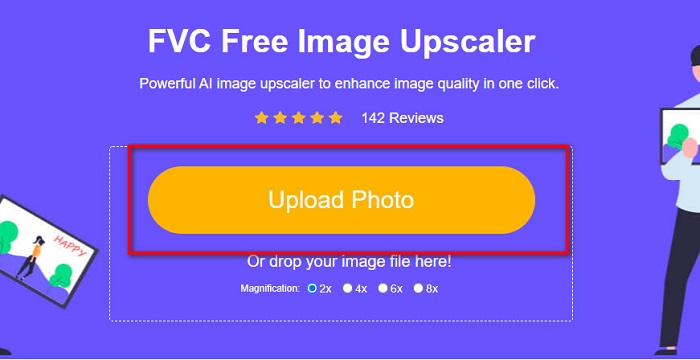
Langkah 2. Pada antarmuka utama, klik tombol Upload Photo untuk mengunggah gambar yang ingin Anda tingkatkan kualitasnya. Berkas-berkas di komputer Anda akan muncul dan Anda dapat memilih gambar berkualitas rendah lalu mengunggahnya.
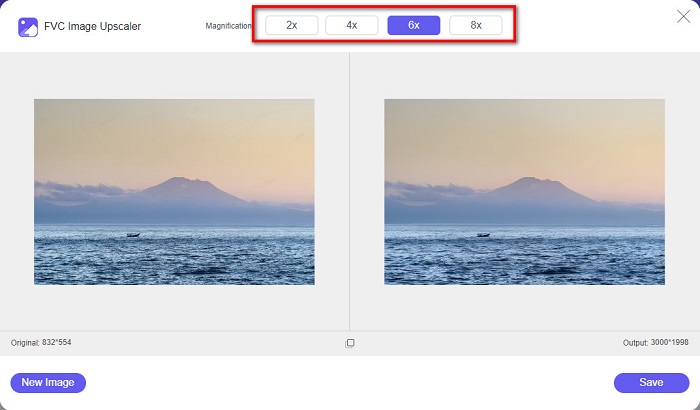
Langkah 3. Selanjutnya, pilih pembesaran yang Anda inginkan untuk gambar tersebut. Semakin besar pembesaran, semakin baik kualitasnya. Anda dapat memilih antara 2x, 4x, 6x, dan 8x.
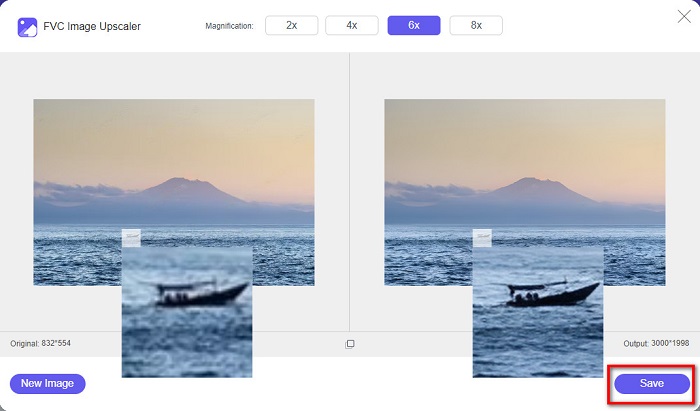
Langkah 4. Lalu, tekan tombol Save untuk menyimpan gambar yang sudah ditingkatkan ke folder di komputer Anda.
Mudah, bukan? Semudah A-B-C, Anda bisa memperbaiki kualitas gambar menggunakan FVC Free Image Upscaler.
Icons8.com
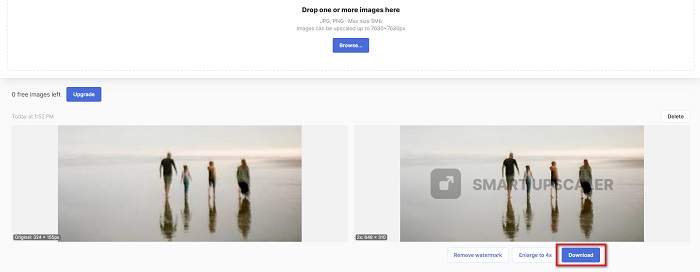
Icons8.com adalah pengukur skala gambar online lainnya yang dapat diakses di hampir semua peramban web, termasuk Google, Firefox, dan Safari. Aplikasi online ini mudah digunakan karena memiliki antarmuka yang sederhana. Selain itu, alat online ini menggunakan Teknologi AI yang secara otomatis mendeteksi bagian gambar yang buram. Lebih jauh lagi, gambar Anda bisa diperbesar hingga 7680 x 7680 piksel. Namun, alat ini memberikan watermark pada hasilnya. Meskipun demikian, alat ini tetap efektif untuk memperbesar (upscale) gambar Anda.
Cara memperbaiki gambar berkualitas rendah di Icons8.com:
Langkah 1. Buka peramban Anda, lalu cari Icons8.com. Kemudian pada antarmuka utama, klik tombol Browse.
Langkah 2. Karena Icons8.com juga menggunakan Teknologi AI, alat ini secara otomatis mendeteksi bagian gambar Anda yang buram.
Langkah 3. Terakhir, klik tombol Download untuk menyimpan gambar ke komputer Anda.
Bagian 2. Bagaimana Memperbaiki Gambar Kualitas Buruk di Photoshop
Tidak sulit untuk meningkatkan citra kualitas Anda. Tetapi menggunakan Photoshop untuk meningkatkan gambar Anda mungkin cukup menantang karena antarmuka dan fungsinya. Tapi jangan khawatir, karena kami akan mengajari Anda cara menggunakan Adobe Photoshop untuk meningkatkan kualitas gambar Anda.
Adobe Photoshop sangat unggul dalam pengeditan dan manipulasi foto. Perangkat lunak pengeditan ini digunakan banyak editor profesional di seluruh dunia. Selain itu, Photoshop memiliki banyak alat pengeditan canggih yang dapat Anda gunakan untuk mengedit gambar. Adobe Photoshop juga dapat diunduh di berbagai platform, termasuk Windows, Mac, dan Linux. Anda dapat mengedit banner, logo, brosur, dan banyak lagi menggunakan aplikasi ini. Dan yang tidak banyak diketahui pengguna adalah bahwa Photoshop juga dapat meningkatkan kualitas gambar Anda. Meskipun Anda harus membelinya sebelum mengunduh, Adobe Photoshop sepadan dengan harganya.
Cara memperbaiki gambar berkualitas rendah di Photoshop:
Dalam tutorial ini, kami akan meningkatkan kualitas gambar dengan memperbesarnya untuk melihat resolusinya.
Langkah 1. Unduh Adobe Photoshop di komputer Anda. Ikuti proses instalasi, lalu jalankan aplikasinya di komputer.
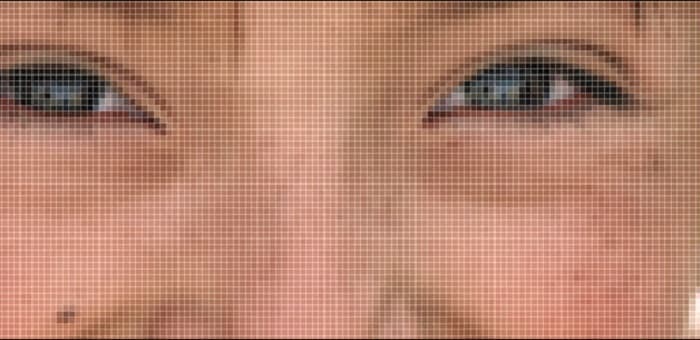
Langkah 2. Buka gambar beresolusi rendah di Adobe Photoshop. Berikut adalah contoh gambar yang diperbesar hingga 100%. Seperti yang Anda lihat, gambar tersebut beresolusi rendah.
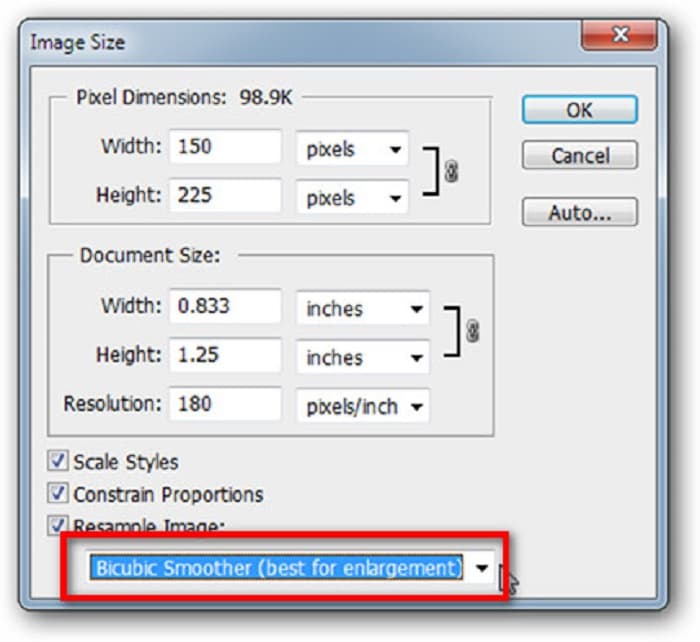
Langkah 3. Lalu, buka menu Image > Image Size. Kemudian ubah jenis anti-aliasing untuk memperbesar dan menghaluskan gambar Anda pada bagian Resample Image. Ubah ke Bicubic Smoother, yang paling baik untuk pembesaran.
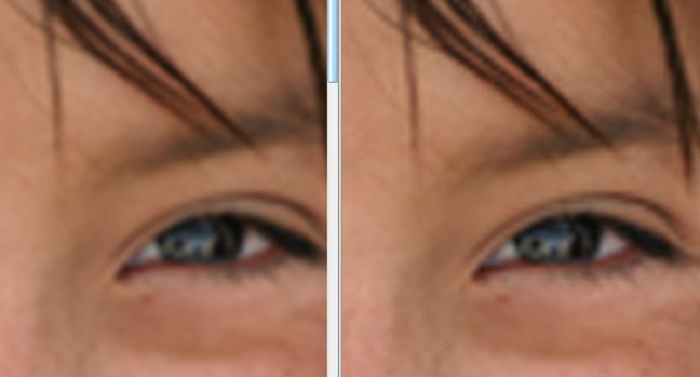
Langkah 4. Anda dapat melihat perbedaan antara dua gambar di bawah ini setelah mengubahnya ke versi Bicubic Smoother. Mengubah anti-aliasing memberikan perbedaan besar pada kehalusan gambar Anda.
Langkah 5. Sekarang, kita akan meningkatkan gambar yang telah diperbesar dengan mengubah detailnya. Kebanyakan pengguna Photoshop tidak melampaui RGB dan CMYK. Dan kali ini, kita akan menggunakan mode warna yang berbeda, yaitu Lab Color. Buka Image > Mode > Lab Color.
Langkah 6. Selanjutnya, pastikan Anda membuka panel dengan masuk ke Windows > Channels > Lightness. Anda juga dapat mengklik ikon sembunyikan layer di samping channel a dan b.
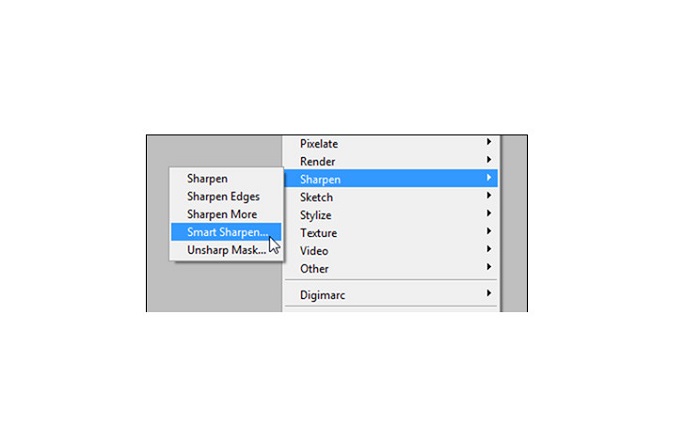
Langkah 7. Saat memilih channel Lightness, buka Filter > Smart Sharpen > Sharpen untuk menambahkan filter Smart Sharpen.
Langkah 8. Lalu, Anda dapat menyesuaikan pengaturan foto dan menemukan hasil yang Anda inginkan. Selalu ingat bahwa Anda harus mempertahankan pengaturan Remove pada Gaussian Blur.
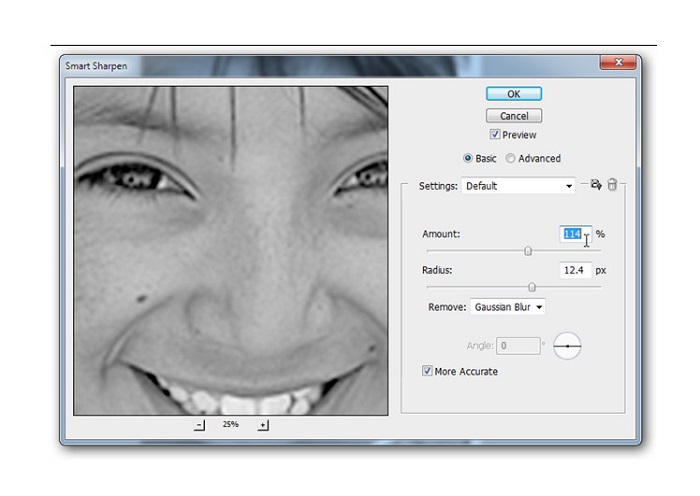
Langkah 9. Anda bisa memilih untuk mempertahankan gambar dalam mode Lab Color atau mengembalikannya ke RGB. Selesai! Berikut adalah hasilnya. Anda akan melihat bahwa kualitas gambar meningkat dan teksturnya menjadi lebih kaya.
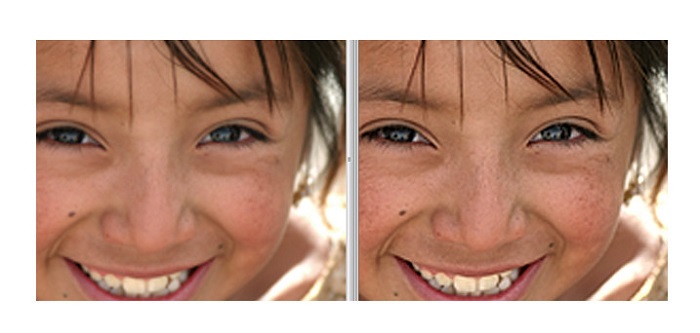
Dan voila! Dengan mengikuti panduan di atas tentang cara memperbaiki gambar berkualitas buruk di Photoshop, Anda dapat meningkatkan kualitas gambar Anda.
Bagian 3. FAQ tentang Bagaimana Memperbaiki Kualitas Gambar
Bisakah saya meningkatkan kualitas gambar buruk di iPhone?
Ya. Anda dapat mengunduh banyak aplikasi di iPhone yang akan membantu Anda meningkatkan kualitas gambar. Salah satu aplikasi penambah gambar terbaik adalah Remini, aplikasi yang mudah digunakan.
Dapatkah saya mengubah resolusi gambar JPEG?
Anda dapat mengubah resolusi format gambar apa pun yang ingin Anda tingkatkan. Anda dapat menggunakan alat yang disebutkan di atas untuk meningkatkan kualitas gambar JPEG Anda.
Bagaimana cara memperbaiki kualitas gambar di Instagram?
Untuk memperbaiki kualitas foto Anda di Instagram, ubah pengaturan Image Resolution pada plugin menjadi ukuran gambar yang lebih besar agar gambar ditampilkan pada resolusi yang tepat. Anda dapat melakukannya dengan masuk ke menu berikut: Instagram Feed > Customize > Posts > Photos > Image Resolution.
Kesimpulan
Kami berharap telah menjawab pertanyaan Anda tentang cara memperbaiki kualitas gambar. Anda dapat memilih salah satu alat yang dipaparkan di atas yang paling sesuai. Adobe Photoshop mungkin merupakan alat yang lebih profesional, tetapi tidak termasuk alat yang mudah digunakan. Jadi, jika Anda menginginkan pengukur skala gambar gratis yang mudah digunakan, gunakan FVC Free Image Upscaler.
-
 Cara Mengonversi Gambar Resolusi Rendah ke Resolusi Tinggi Online
 Jika Anda ingin mempelajari cara mengonversi gambar beresolusi rendah menjadi gambar beresolusi tinggi secara online, maka artikel ini cocok untuk Anda. Baca selengkapnya untuk mempelajari caranya.
-
 Hapus Tanda Air DaVinci Resolve pada Video yang Diekspor dengan Tutorial Lengkap
 Untuk menghapus tanda air Davinci Resolve, Anda perlu menggunakan alat atau membeli versi resminya, teruslah membaca ini untuk mengetahui lebih lanjut.
-
 Cara Menghilangkan Watermark Power Director Secara Gratis [Lengkap]
 Bagaimana cara menghilangkan tanda air Power Director secara gratis? Alat terbaik untuk menghilangkan tanda air ada di sini, jadi pelajari dengan membaca ini.
