


 Video Converter Ultimate
 Perekam Layar
 Perbaikan Video
 Unduhan Aman
Tutorial Menghilangkan Watermark di PNG Gratis/Online/Tanpa Registrasi
Saat ini, PNG, atau Portable Network Graphics, adalah salah satu format gambar paling umum yang kita miliki. Namun demikian, kita tidak bisa mengabaikan fakta bahwa apa pun format gambar yang Anda gunakan, watermark ada di mana-mana. Anda bisa menemukan watermark pada gambar PNG, gambar JPG, dan sebagainya. Jika itu yang terjadi, kami memiliki solusi terbaik untuk Anda. Artikel ini menawarkan berbagai metode untuk menghapus watermark dari gambar PNG Anda. Jadi hal terbaik yang bisa Anda lakukan kali ini adalah fokus membaca artikel ini, serap semua informasinya, lalu terapkan sendiri!

Bagian 1. Cara Menghapus Tanda Air dari PNG Online Gratis
Anda dapat menggunakan FVC Free Watermark Remover untuk menghapus watermark dari gambar PNG Anda karena alat ini mendukung format file PNG. Menghapus berbagai elemen yang mengganggu dari foto PNG sangatlah mudah. Alat ini dapat diakses hampir di semua browser, seperti Google Chrome, Microsoft Edge, Mozilla Firefox, dan lain-lain. Selain itu, penghapus watermark ini memiliki berbagai alat yang bisa Anda gunakan untuk menghapus watermark. Anda bisa memakai Brush, Lasso, dan Polygonal Tool untuk menandai watermark yang ingin dihapus. Juga, jika watermark berukuran kecil, Anda dapat memperbesar dan memperkecil gambar. Dengan begitu, Anda dapat melihat watermark dengan jelas. FVC Free Watermark Remover juga memiliki antarmuka yang sederhana sehingga Anda bisa menggunakan aplikasi ini dengan efisien. Namun bukan hanya itu. Alat daring ini menawarkan dua cara mudah untuk menghapus watermark dari gambar PNG Anda. Anda dapat menggunakan alat penghapus watermark jika area watermark berada di bagian tengah foto. Di sisi lain, jika area watermark berada di tepi atau sudut gambar, Anda bisa menggunakan alat pemotong (crop). Seperti yang Anda lihat, FVC Free Watermark Remover sangat praktis bagi semua pengguna.
Fitur
◆ Tawarkan alat penghapus tanda air untuk menghilangkan tanda air dan objek lain yang tidak diinginkan dari sebuah foto.
◆ Memiliki fungsi alat potong.
◆ Dapat mengekspor kualitas asli foto.
Pro
- Cocok untuk pengguna non-profesional.
- Perangkat lunak ini gratis 100%.
- Menawarkan dua cara untuk menghapus tanda air.
- Mendukung format file gambar populer, seperti PNG, JPG, BMP, dll.
- Tidak diperlukan instalasi dan akun.
- Mampu menghapus banyak tanda air.
Kontra
- Koneksi internet diperlukan untuk mengoperasikan perangkat lunak.
Jika Anda ingin menggunakan FVC Free Watermark Remover, ikuti langkah-langkah sederhana di bawah ini untuk menghapus watermark dari gambar PNG Anda.
Gunakan alat ini jika tanda air berada di bagian tengah foto Anda.
Langkah 1: Jika Anda ingin menambahkan gambar PNG dengan watermark, klik tombol Upload Image. Folder Anda akan muncul di layar. Pilih gambar PNG tersebut.
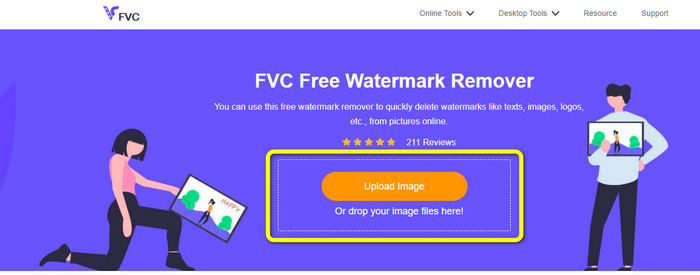
Langkah 2: Setelah menambahkan gambar PNG yang memiliki watermark, Anda bisa menggunakan salah satu dari tiga alat, yaitu Lasso, Polygonal, dan Brush. Dengan menggunakan Brush, Anda dapat menyesuaikan ukuran kuas. Selain itu, Anda dapat memakai tanda + dan - di bagian bawah antarmuka untuk memperbesar atau memperkecil foto.
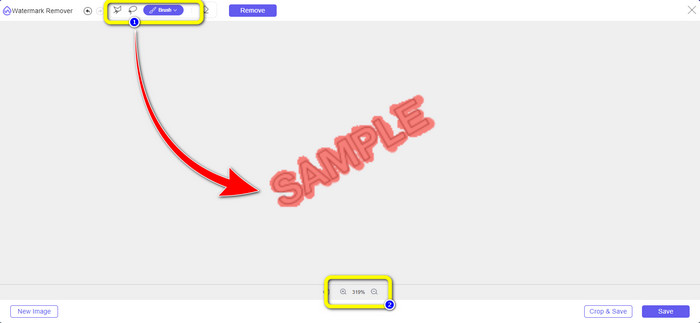
Langkah 3: Ketika Anda sudah selesai menandai watermark menggunakan Brush, klik tombol Remove untuk menghapus watermark. Setelah mengklik, tunggu beberapa saat untuk proses penghapusan lalu klik Save.
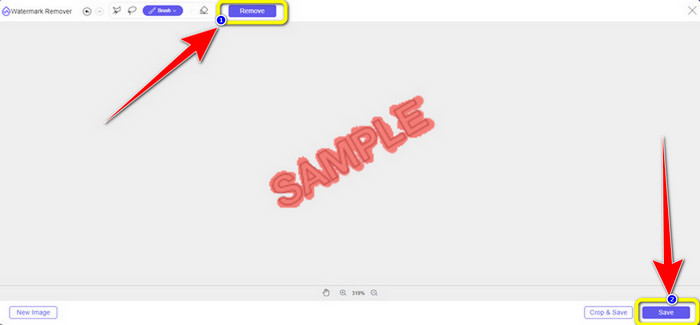
Langkah 4: Jika Anda ingin memotong foto untuk menghapus watermark, unggah gambar yang ingin Anda potong dengan mengeklik tombol Upload Image. Anda juga dapat menjatuhkan (drag and drop) file gambar ke dalam kotak kuning.
Langkah 5: Setelah selesai mengunggah gambar PNG Anda, klik tombol Crop. Lalu Anda sudah bisa memotong foto yang memiliki watermark.
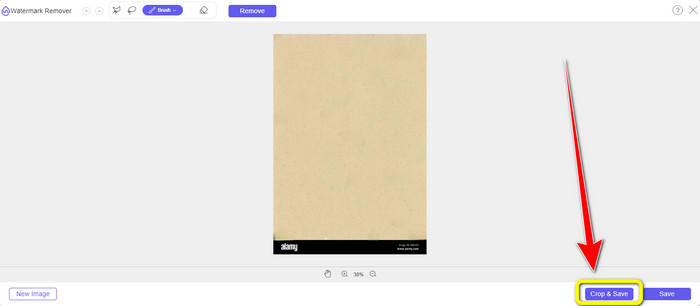
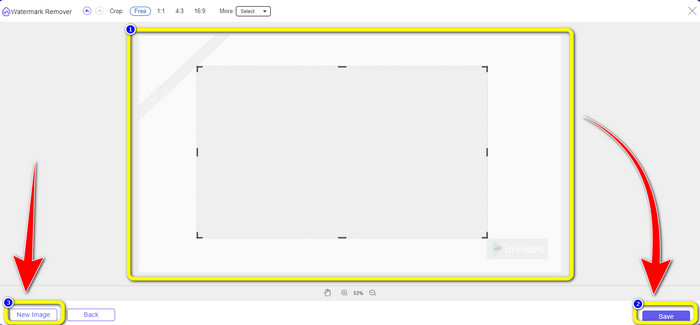
Langkah 6: Setelah memotong, Anda bisa memilih tombol Save untuk mengunduh foto ke komputer Anda. Selain itu, jika Anda ingin memotong gambar lain, klik tombol New image. Anda juga dapat menggunakan alat ini untuk menghapus watermark dari JPG.
Bagian 2. Hapus Tanda Air dari PNG Online dengan Watermarkremover.io
Watermark Remover.io adalah alat daring yang mampu menghapus watermark dari sebuah foto. Alat ini juga mendukung format file gambar PNG, sehingga Anda dapat menggunakannya untuk menghapus watermark dari gambar PNG hanya dalam beberapa detik. Selain itu, alat ini hanya membutuhkan dua langkah untuk menghapus watermark, jadi Anda tidak perlu kesulitan dengan prosesnya. Namun, Watermark Remover.io menawarkan fitur yang terbatas, terutama jika Anda menggunakan versi gratis. Dalam satu bulan, Anda hanya dapat mengunggah 50 gambar. Alat ini juga hanya menyediakan 10k transformasi dasar dan 25Gb penyimpanan, yang dirasa kurang memuaskan bagi pengguna. Anda harus membeli paket berlangganan untuk dapat mengunggah lebih dari 50 gambar dan mendapatkan lebih banyak transformasi dasar.
Fitur
◆ Hapus objek yang tidak diinginkan dari foto, seperti tanda air, logo, teks, stiker, dll.
Pro
- Memiliki langkah-langkah sederhana, yang sangat cocok untuk pemula.
- Ini mendukung berbagai format file gambar, seperti PNG, JPG, WEBP, dll.
Kontra
- Beli langganan untuk merasakan lebih banyak fitur hebat.
- Koneksi internet yang cepat sangat dianjurkan.
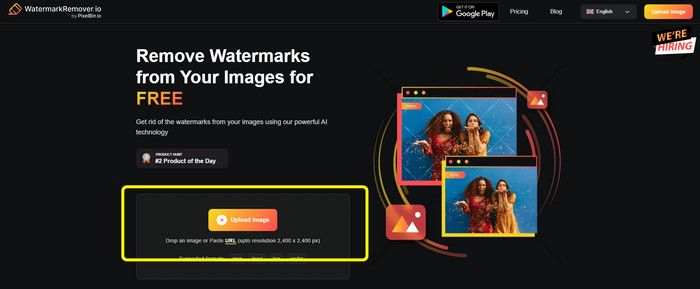
Langkah 1: Kunjungi website Watermark Remover.io. Lalu klik tombol Upload Image untuk menambahkan gambar PMG Anda yang memiliki watermark. Anda dapat menempelkan tautan foto dengan mengeklik tombol URL.
Langkah 2: Perangkat lunak akan secara otomatis menghapus watermark setelah Anda menambahkan file. Setelah proses selesai, Anda sudah bisa mengklik tombol Download Image untuk menyimpan file tanpa watermark.

Bagian 3. Hapus Watermark dari PNG Online dengan Mudah dengan Inpaint
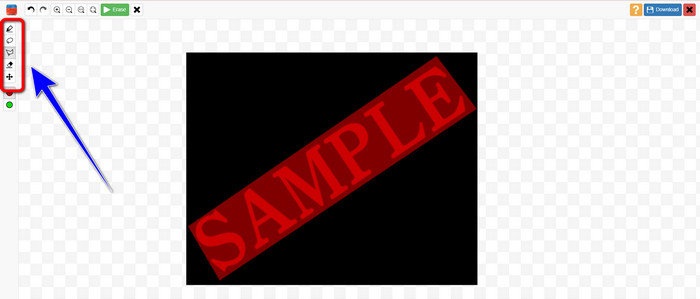
Alat online lain yang dapat Anda gunakan untuk menghapus tanda air dari gambar PNG adalah Inpaint. Dengan bantuan penghapus tanda air ini, Anda dapat dengan mudah membersihkan dan memperbaiki gambar Anda. Ini juga menawarkan tiga alat penghapus tanda air berguna yang dapat Anda gunakan. Tools tersebut adalah Marker, Lasso, dan Polygonal. Dengan menggunakan alat ini, Anda dapat menyorot tanda air yang mengganggu dan menghapusnya. Selain itu, Anda dapat memulihkan foto lama dan menjadikannya baru. Anda dapat melakukan banyak hal jika Anda mencoba menggunakan perangkat lunak online ini. Namun, menggunakan Inpaint online memiliki banyak keterbatasan. Anda hanya dapat mengunggah gambar dengan ukuran file maksimal 10 Mb. Ini juga memiliki resolusi maksimum 4,2 megapiksel. Jika Anda menginginkan resolusi yang lebih tinggi dan ukuran file yang tidak terbatas, Anda harus menggunakan versi unduhan Inpaint.
Fitur
◆ Hilangkan elemen yang tidak perlu dari foto, seperti tanda air, logo, teks, dll.
Pro
- Ini mendukung WEBP, PNG, dan JPG.
- Sempurna untuk pemula.
Kontra
- Versi gratis memiliki banyak keterbatasan.
- Unduh versi desktop Inpaint untuk merasakan lebih banyak fitur.
- Itu tidak akan beroperasi tanpa koneksi internet.
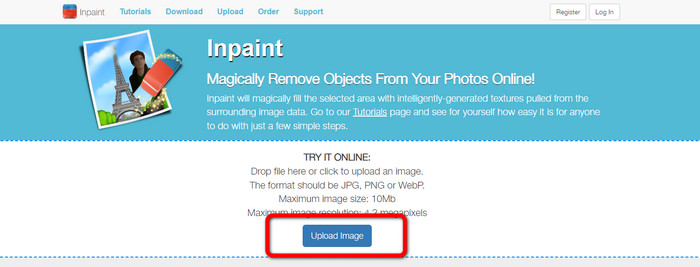
Langkah 1: Kunjungi website Inpaint. Lalu klik tombol Upload Image untuk mengimpor gambar PNG Anda yang memiliki watermark.
Langkah 2: Di sisi kiri antarmuka, Anda dapat mengklik salah satu alat penghapus watermark untuk menandai watermark, seperti Polygonal, Marker, dan Lasso.
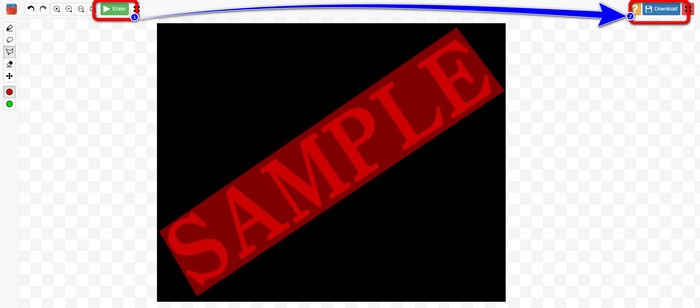
Langkah 3: Anda dapat mengklik tombol Erase di bagian kiri atas setelah menandai semua watermark. Tunggu proses penghapusan dan pilih tombol Download di bagian kanan atas layar.
Bagian 4. Cara Menghapus Tanda Air dari PNG di Photoshop
Setelah mempelajari metode di atas untuk menghapus tanda air secara daring, Anda juga harus mempertimbangkan untuk menggunakan Photoshop, yang mengkhususkan diri dalam penyuntingan gambar dan merupakan pilihan yang baik untuk menghapus tanda air. Alat ini mahal, tetapi Anda dapat menggunakan alat pena untuk menemukan tanda air yang ingin Anda hapus secara akurat.
Fitur
• Mendukung lapisan, masker, filter, mode campuran, dan pengeditan non-destruktif.
• Membuat logo, poster, grafik web, tiruan UI, dan banyak lagi.
• Alat seperti Healing Brush, Clone Stamp, dan Content-Aware Fill.
• Termasuk pemilihan objek otomatis, penggantian langit, dan filter saraf.
Pro
- Standar industri untuk pengeditan gambar profesional
- Sangat kuat dan serbaguna
- Pembaruan rutin dengan fitur baru
- Berbagai macam tutorial dan dukungan komunitas
- Integrasi yang mulus dengan aplikasi Adobe lainnya (seperti Illustrator, Lightroom, Premiere Pro)
Kontra
- Harga berlangganan yang mahal
- Kurva pembelajaran yang curam bagi pemula
- Bisa menghabiskan banyak sumber daya pada komputer lama
Berikut cara menggunakan Photoshop untuk menghilangkan tanda air:
Langkah 1: Pilih Remove Tool dari sebelah kiri.
Langkah 2: Sesuaikan ukuran kuas dan aplikasikan pada watermark yang ingin Anda hapus.
Langkah 3: Sekarang, Anda akan melihat bahwa watermark telah berhasil dihilangkan.
Bagian 5. FAQ tentang Menghapus Tanda Air dari PNG
Apa cara termudah untuk menghilangkan tanda air dari gambar PNG?
Cara terbaik adalah menggunakan FVC Free Watermark Remover. Alat ini tidak memiliki prosedur yang rumit, sehingga Anda dapat menghapus berbagai watermark dari gambar PNG Anda dengan mudah.
Apakah Menghapus Tanda Air PNG Ilegal?
Jika Anda menggunakannya untuk keperluan komersial atau keperluan umum lainnya, jawabannya adalah ya, jika Anda tidak memiliki gambar atau tidak memiliki izin, menghapus tanda air biasanya ilegal dan melanggar hak cipta. Anda hanya dapat menghapus tanda air dari gambar Anda sendiri atau jika lisensi mengizinkannya.
Apa cara terbaik untuk menghilangkan tanda air dari PNG tanpa mengaburkannya?
Cara terbaik untuk menghapus tanda air dari PNG tanpa blur adalah dengan menggunakan alat seperti Content-Aware Fill atau Clone Stamp milik Photoshop, yang memadukan area tanda air dengan piksel di sekitarnya secara halus. Alat daring berbasis AI seperti FVC Free Watermark Remover juga menawarkan hasil yang cepat dan bersih.
Kesimpulan
Menghapus watermark dari gambar PNG bisa menjadi tantangan, tetapi artikel ini menyediakan empat metode mudah untuk membantu Anda melakukannya. Baik Anda ingin menggunakan solusi profesional seperti Photoshop maupun alat gratis yang andal dan juga berkinerja baik seperti FVC Image Upscaler, semuanya dapat memberikan hasil yang memuaskan. Di antara berbagai pilihan tersebut, kami menyarankan untuk menggunakan FVC Free Watermark Remover karena lebih mudah diakses dan cocok untuk pemula.
-
 Panduan Lengkap untuk Menghapus Tanda Air iFunny dengan Mudah
 Temukan penghapus tanda air iFunny paling luar biasa untuk Anda. Juga, pelajari metode sederhana ini untuk menghapus tanda air iFunny dari foto Anda
-
 Metode Online dan Offline Cara Menghilangkan Watermark Alamy
 Jika Anda ingin menemukan penghapus tanda air Alamy yang bagus, Anda dapat membaca postingan ini untuk mempelajari tentang tiga metode efisien untuk menghapus tanda air Alamy.
-
 Ulasan Jujur Penghilang Tanda Air Inpaint dan Alternatif
 Apakah Anda ingin tahu cara menggunakan Inpaint untuk menghapus tanda air? Membaca artikel ini adalah pilihan yang tepat. Anda juga akan mempelajari alternatif terbaik yang dapat Anda gunakan.
