


 Video Converter Ultimate
 Perekam Layar
 Perbaikan Video
 Unduhan Aman
Ulasan Walk-through tentang Inpaint Watermark Remover
Apakah Anda bersedia mempelajari cara menggunakan Inpaint untuk menghapus watermark? Tenang, kami siap membantu Anda! Jika Anda sedang membaca panduan ini, kemungkinan Anda sedang mencari metode terbaik untuk menghilangkan watermark dari gambar Anda. Dengan begitu, Anda tidak perlu lagi repot. Artikel ini akan memberi Anda ulasan jujur tentang program yang perlu Anda gunakan, seperti Inpaint Watermark Remover. Anda akan mempelajari cukup banyak hal tentang setiap alat, termasuk fitur, kelebihan, kekurangan, dan biayanya. Selain itu, kami juga akan menawarkan alternatif terbaik pengganti Inpaint untuk menghapus watermark dari foto Anda. Dengan cara ini, Anda memiliki opsi lain mengenai penghapus watermark yang bisa Anda gunakan. Mari baca artikel ini untuk menemukan informasi bermanfaat lainnya.

Bagian 1: Tinjauan tentang Inpaint
Perangkat lunak hebat dan andal bernama Inpaint ini dibuat khusus untuk menghapus elemen yang tidak diinginkan dari gambar, seperti watermark, logo, teks, stempel, dan lain-lain. Ada banyak program pengeditan foto canggih yang tersedia, dan Inpaint bukan termasuk ke dalam jenis yang rumit tersebut. Anda akan menyukai kesederhanaan dan kecepatan Inpaint jika Anda adalah fotografer kasual, pemula, atau pengguna sibuk yang tidak selalu punya waktu menggunakan perangkat lunak pengeditan foto canggih seperti Photoshop. Selain itu, pengguna Windows dan Mac dapat menggunakan Inpaint. Anda bisa mengunduh aplikasinya, atau menggunakannya langsung secara online. Terakhir, alat penanda cerdas dari Inpaint membuat proses penghapusan objek yang tidak diinginkan menjadi sangat mudah. Inpaint juga dapat membantu Anda memulihkan foto-foto lama yang rusak dengan sangat baik. Namun, Anda harus membeli langganan jika ingin menyimpan gambar dengan resolusi tinggi. Versi gratisnya hanya dapat menawarkan kualitas rendah.
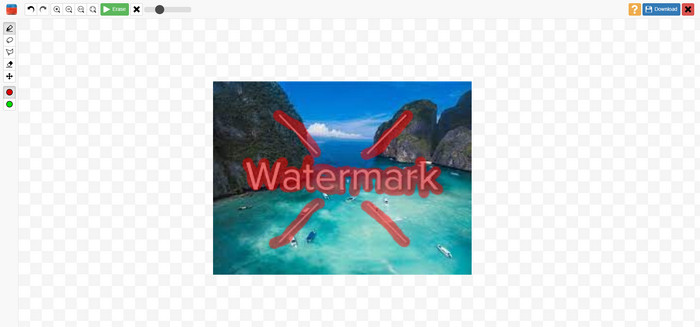
Fitur, Pro, dan Kontra Inpaints
Fitur
◆ Hapus elemen yang tidak diinginkan dari foto.
◆ Perbaiki foto lama.
◆ Mampu melakukan retouch wajah
Pro
- Menawarkan antarmuka yang intuitif, yang mudah digunakan.
- Itu dapat menghapus tanda air secara instan. Itu dapat menghapus tanda air secara instan.
Kontra
- Tidak bekerja dengan baik pada foto dengan latar belakang yang rumit.
- Beli langganan untuk merasakan fitur hebat.
Cara menggunakan Inpaint untuk menghilangkan watermark
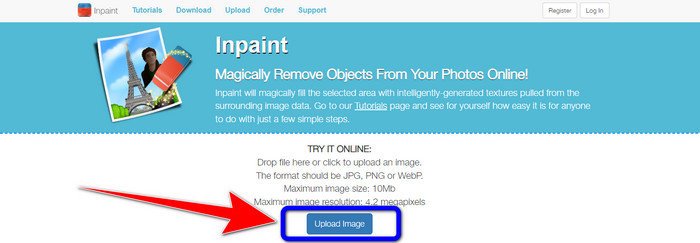
Langkah 1: Kunjungi situs web Inpaint. Lalu, klik tombol Upload Image untuk menambahkan foto Anda yang memiliki watermark yang ingin dihapus.
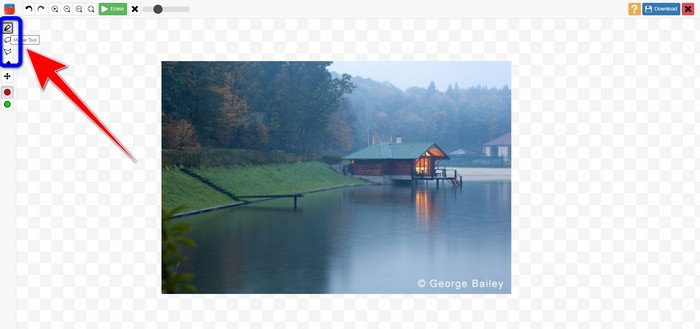
Langkah 2: Setelah menambahkan foto, Anda harus menyorot watermark menggunakan alat penghapus watermark. Alat-alat tersebut adalah Marker, Polygonal, dan Lasso.
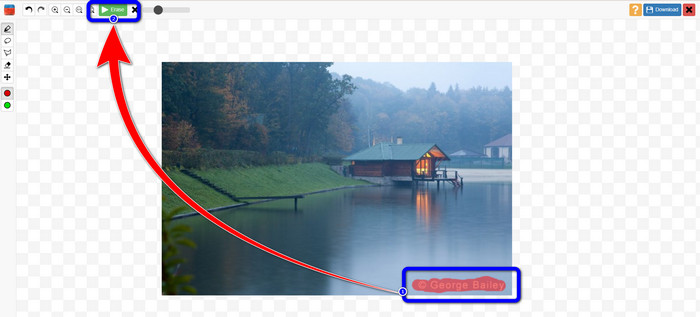
Langkah 3: Jika sudah selesai menyorot watermark pada foto Anda, klik tombol Erase di bagian kiri atas layar dan tunggu proses penghapusan.
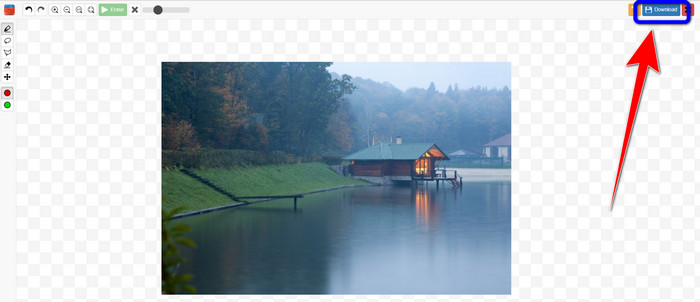
Langkah 4: Ketika watermark sudah hilang, klik tombol Download dan simpan hasilnya ke desktop Anda.
Bagian 2: Alternatif Terbaik untuk Inpaint untuk Menghilangkan Tanda Air dari Foto Online
Setelah mengetahui cara efektif menggunakan Inpaint untuk menghilangkan watermark, berikut alternatif terbaik yang bisa Anda gunakan untuk menghilangkan watermark pada foto Anda.
Penghilang Tanda Air FVC Gratis
Alat online terbaik yang bisa Anda gunakan selain Inpaint adalah FVC Free Watermark Remover. Perangkat lunak online ini memungkinkan Anda menghilangkan semua elemen yang tidak diperlukan dari gambar, seperti watermark, logo, teks, tanda tangan, dan lain-lain. Anda dapat menggunakan berbagai alat penghapus, seperti Brush, Polygonal, dan Lasso. Namun bukan hanya itu. Perangkat lunak online ini juga memiliki fitur Cropping, yang berarti Anda dapat menghapus watermark dengan cara memotong bagian foto. Proses penghapusannya cepat, sehingga Anda tidak perlu menghabiskan banyak waktu. Setelah menghapus watermark, Anda dapat menyimpan hasil akhir dalam format yang sama. Alat ini juga mendukung berbagai format gambar, seperti JPG, PNG, BMP, dan lainnya. Selain itu, penghapus watermark ini memiliki antarmuka yang mudah dipahami dengan langkah-langkah sederhana, sehingga cocok untuk pengguna non-profesional.
Fitur
◆ Mampu memotong gambar untuk menghilangkan tanda air.
◆ Ekspor gambar dengan kualitas asli.
◆ Hapus elemen menjengkelkan dari foto menggunakan alat Lasso, Kuas, dan Poligonal.
Pro
- Sempurna untuk pengguna non-profesional.
- Ini memiliki antarmuka pengguna yang dapat dipahami.
- Benar-Benar Gratis.
- Ini memiliki proses penghapusan yang cepat.
- Menjamin privasi setiap pengguna.
- Tidak perlu menginstal aplikasi.
Kontra
- Untuk mengoperasikan aplikasi, diperlukan koneksi internet.
Menggunakan Alat Watermark Remover
Karena area tanda air berada di tengah foto Anda, kami akan menggunakan alat penghapus tanda air, bukan alat potong. Ikuti langkah-langkah sederhana di bawah ini untuk menghapus watermark dari foto Anda menggunakan FVC Free Watermark Remover.
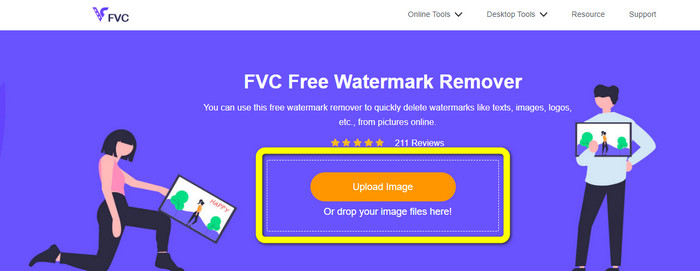
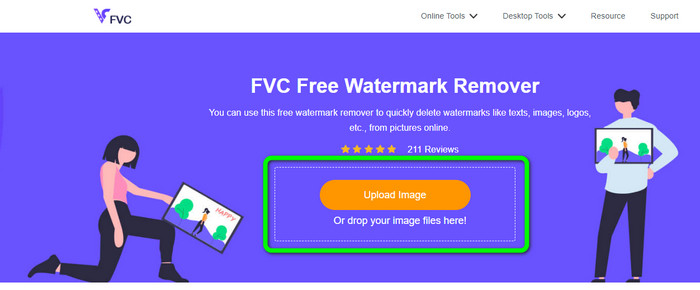
Langkah 1: Buka situs web FVC Free Watermark Remover. Klik tombol Upload Image untuk mengunggah gambar Anda yang memiliki watermark. Anda juga bisa langsung menyeret file Anda.
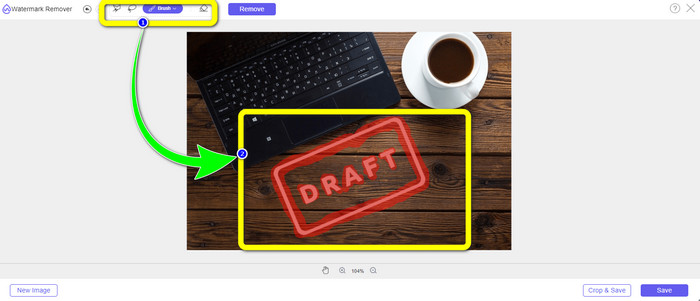
Langkah 2: Sorot watermark menggunakan alat penghapus yang dapat Anda lihat di bagian atas antarmuka.
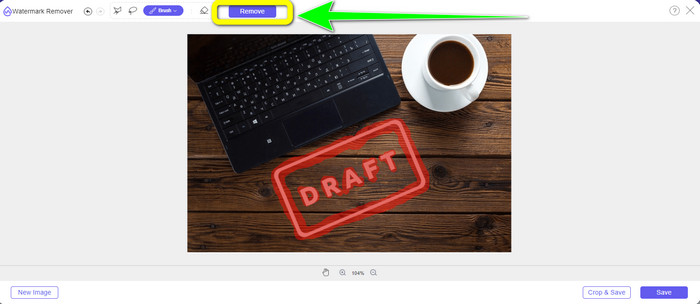
Langkah 3: Setelah selesai menyorot watermark pada gambar Anda, klik tombol Remove untuk menghapus watermark dan tunggu proses penghapusan yang cepat.
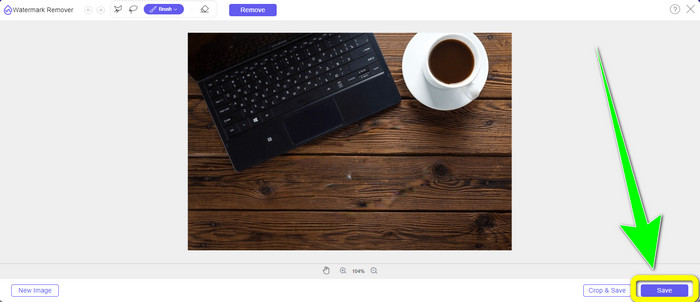
Langkah 4: Setelah berhasil menghapus watermark dari foto Anda, klik tombol Save untuk mengunduh foto tanpa watermark.
Menggunakan Alat Cropping
Dalam metode ini, Anda perlu mempertimbangkan area watermark dari foto Anda. Jika tanda air ada di sudut atau tepi gambar Anda, Anda dapat menggunakan alat potong. Ikuti langkah-langkah sederhana di bawah ini untuk mempelajari cara memangkas foto untuk menghilangkan tanda air.
Langkah 1: Klik tombol Upload Image untuk memasukkan foto Anda yang memiliki watermark.
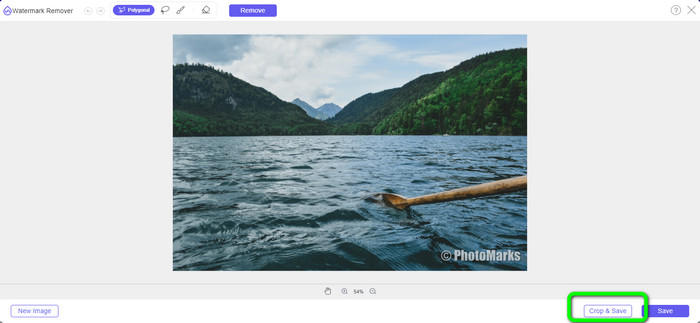
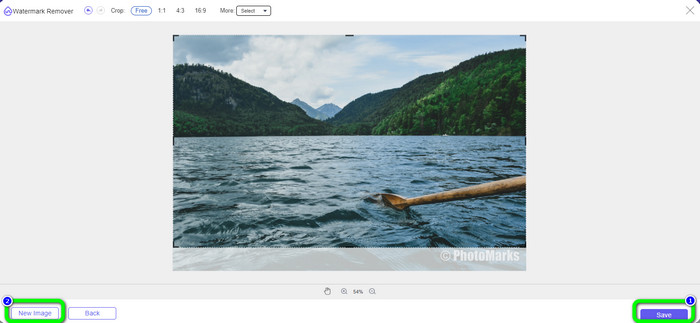
Langkah 2: Setelah memasukkan foto, klik tombol Crop & Save di bagian kanan bawah antarmuka.
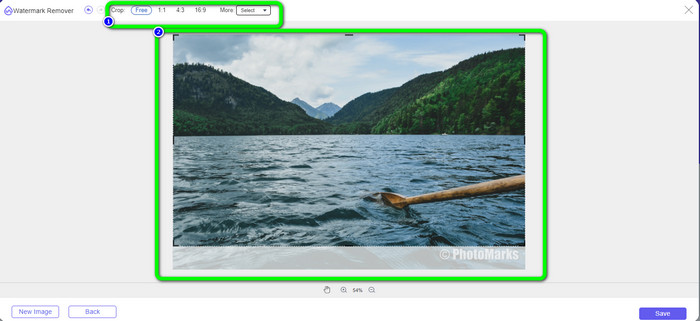
Langkah 3: Di bagian atas antarmuka, terdapat beberapa opsi pemotongan yang dapat Anda pilih. Opsi-opsi ini akan membantu Anda memotong foto. Namun jika Anda ingin memotong foto secara manual, klik opsi Free.
Langkah 4: Setelah menghapus watermark dengan memotong foto, tekan tombol Save di bagian kanan bawah antarmuka untuk mengunduh foto Anda tanpa watermark. Lalu, jika Anda masih ingin memotong foto lain, klik tombol New Image di bagian kiri bawah antarmuka.
Terkait dengan:
Cara Mudah Menghapus Watermark Reddit dari Gambar
Cara Menghapus Watermark di Lightroom Mobile [Tuntas]
Bagian 3: FAQ tentang Inpaint Watermark Remover
Kapan saya harus menggunakan Inpaint?
Anda dapat menggunakan Inpaint untuk menghilangkan elemen yang tidak diinginkan dari foto Anda, seperti orang, cap air, logo, stiker, dan lainnya. Dengan alat ini, Anda dapat membuat foto Anda lebih fantastis dan enak dipandang oleh pemirsa Anda.
Bisakah saya menggunakan Inpaint di komputer saya?
Ya kamu bisa! Anda dapat mengunduh Inpaint karena menawarkan versi desktop. Aplikasi yang dapat diunduh ini memiliki fitur yang lebih hebat daripada versi online. Anda dapat melampirkan gambar tanpa batasan, dan ini memberikan kualitas pemulihan yang lebih tinggi dengan algoritme pengecatan yang lebih baik.
Apakah Inpaint adalah penghapus tanda air yang lebih baik?
Inpaint dapat diandalkan untuk menghapus watermark dari foto. Namun, ada beberapa keterbatasan. Aplikasi ini memiliki batas ukuran file dan resolusi, yang kurang menguntungkan bagi pengguna. Anda bisa menggunakan FVC Free Watermark Remover jika menginginkan penghapus watermark yang lebih baik. Alat ini tidak memiliki batasan, dan Anda dapat menghapus watermark dari foto secara gratis.
Kesimpulan
Seperti yang dapat Anda lihat, artikel ini telah memberikan ulasan jujur tentang Inpaint Watermark Remover. Selain itu, artikel ini juga menawarkan alternatif terbaik yang bisa Anda gunakan untuk menghapus watermark dari foto Anda. Jika Anda menginginkan penghapus watermark gratis 100%, Anda dapat menggunakan FVC Free Watermark Remover.
-
 Cara Menghapus Tanda Air dari Video di After Effects dengan Mudah
 Artikel ini akan membantu menghilangkan tanda air dari video menggunakan After Effects. Selain itu, ini akan memberikan alternatif terbaik untuk menghilangkan objek yang mengganggu.
-
 Panduan Langkah demi Langkah tentang Cara Menghapus Emoji dari Video
 Merasa kesal dengan emoji di video Anda? Posting ini akan memberi Anda prosedur terbaik untuk menghapus emoji secara instan dari video Anda menggunakan alat yang hebat.
-
 Cara Luar Biasa tentang Cara Menghapus Stiker dari Foto dan Video
 Apakah Anda ingin menghapus stiker dari video dan foto dengan mudah? Berikut cara-cara efektif, termasuk cara paling andal dan termudah yang bisa Anda coba.
