


 Video Converter Ultimate
 Perekam Layar
 Perbaikan Video
 Unduhan Aman
Langkah Mudah Cara Mengubah Ukuran Foto untuk Facebook
Banyak milenial dan orang dewasa menggunakan Facebook sebagai platform media sosial yang paling populer. Facebook adalah aplikasi tempat Anda dapat mengunggah gambar lalu membagikannya atau mengirimkannya ke teman-teman Anda. Dan banyak orang ingin memiliki gambar dengan kualitas bagus untuk diunggah ke Facebook. Jika Anda juga ingin mengunggah foto beresolusi tinggi dan berkualitas tinggi, kami punya alat yang dapat membantu Anda. Untungnya, kami menemukan aplikasi di iPhone, Android, dan online yang dapat mengubah ukuran gambar dengan cepat dan efisien. Jadi, tetap duduk dengan nyaman karena dalam posting ini, Anda akan segera belajar cara mengubah ukuran foto untuk Facebook.

Bagian 1. Cara Mengubah Ukuran Foto di iPhone untuk Facebook
Jika Anda menggunakan perangkat iPhone, aplikasi dapat diunduh di AppStore untuk membantu Anda mengubah ukuran foto. Selain itu, ada aplikasi gratis yang dapat Anda gunakan di perangkat iPhone Anda. Namun, tidak semua aplikasi menghasilkan keluaran berkualitas tinggi. Itu sebabnya kami mencari aplikasi terbaik untuk mengubah ukuran gambar secara instan.
Remini adalah aplikasi pengubah ukuran foto paling populer yang dapat Anda unduh di iPhone. Aplikasi ini memiliki antarmuka yang ramah pengguna karena fungsinya yang intuitif. Selain itu, Remini dapat meningkatkan kualitas gambar Anda menggunakan penambah kualitas berbasis AI (Artificial Intelligence), yang secara otomatis mengubah ukuran gambar dan meningkatkannya ke kualitas terbaik. Dan bukan hanya itu, dengan aplikasi ini Anda juga dapat meningkatkan kualitas video menggunakan fitur penambah video. Lebih jauh lagi, aplikasi ini mendukung semua format gambar umum, seperti JPEG, JPG, dan PNG. Yang juga fantastis dari aplikasi ini adalah Anda bisa mengunduhnya secara gratis di App Store. Jadi, jika Anda ingin menggunakan aplikasi ini untuk mengubah ukuran foto menjadi sampul Facebook, ikuti langkah-langkah di bawah ini.
Cara mengubah ukuran gambar menggunakan aplikasi Remini:
Langkah 1. Buka App Store Anda, cari aplikasi Remini dan unduh ke perangkat Anda. Setelah aplikasi terpasang, buka aplikasi tersebut.
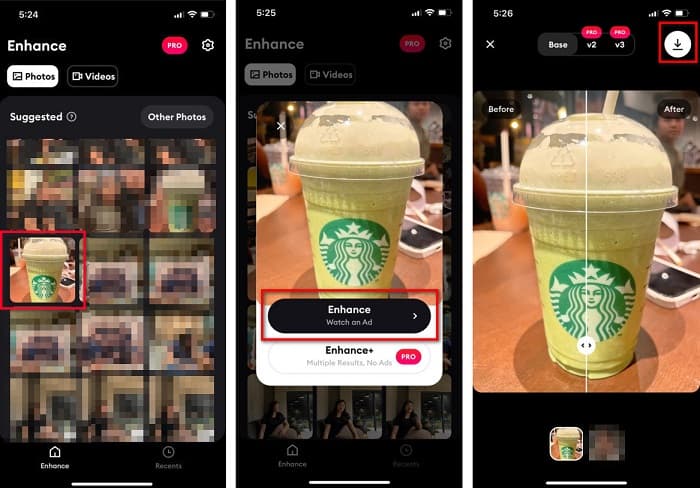
Langkah 2. Setelah membuka aplikasi, Anda akan melihat foto-foto Anda dan pilih gambar yang ingin Anda tingkatkan kualitasnya. Lalu ketuk tombol Enhance untuk masuk ke antarmuka berikutnya.
Langkah 3. Sebelum lanjut ke antarmuka berikutnya, Anda harus menonton iklan terlebih dahulu. Setelah itu, Anda akan melihat tampilan sebelum dan sesudah dari gambar Anda. Ketuk ikon Unduh di sisi kanan atas layar Anda.
Bagian 2. Cara Mengubah Ukuran Foto di Android untuk Facebook
Apakah Anda pengguna Android? Jangan khawatir; kami juga akan menyajikan aplikasi yang dapat Anda gunakan untuk mengubah ukuran gambar. Meskipun ada banyak aplikasi yang dapat Anda unduh dari PlayStore, kami memilih yang terbaik untuk disajikan kepada Anda. Baca di bawah untuk mempelajari cara mengubah ukuran gambar untuk Facebook di Android.
AI Photo Enhancer & PixelLeap adalah aplikasi hebat lainnya yang akan membantu Anda mengubah ukuran gambar untuk kualitas yang lebih baik. Pengubah ukuran foto ini bisa diunduh gratis di aplikasi Play Store dan aman digunakan. Selain itu, jika Anda ingin meningkatkan atau memulihkan foto lama, Anda bisa menggunakan AI Photo Enhancer & PixelLeap. Dengan teknologi AI-nya, Anda cukup mengunggah gambar yang ingin diubah ukurannya, lalu aplikasi akan secara otomatis meningkatkan kualitas gambar Anda. Selain itu, aplikasi ini memiliki antarmuka yang sederhana, sehingga sangat cocok jika Anda masih pemula. Aplikasi ini juga memiliki fitur pengeditan lain yang bisa Anda gunakan, seperti memperbaiki (rectify), mewarnai (colorize), membuat animasi (animate), memberi ekspresi (emote), dan mencerahkan (brighten) gambar Anda. Namun, masalahnya adalah aplikasi ini berisi banyak iklan yang memakan waktu untuk diselesaikan dan meninggalkan watermark pada hasil keluaran. Meskipun demikian, aplikasi ini adalah solusi jika Anda ingin mengubah ukuran foto untuk Facebook tanpa memotongnya.
Cara mengubah ukuran gambar menggunakan AI Photo Enhancer & PixelLeap:
Langkah 1. Pasang AI Photo Enhancer & PixelLeap pada perangkat Android Anda.
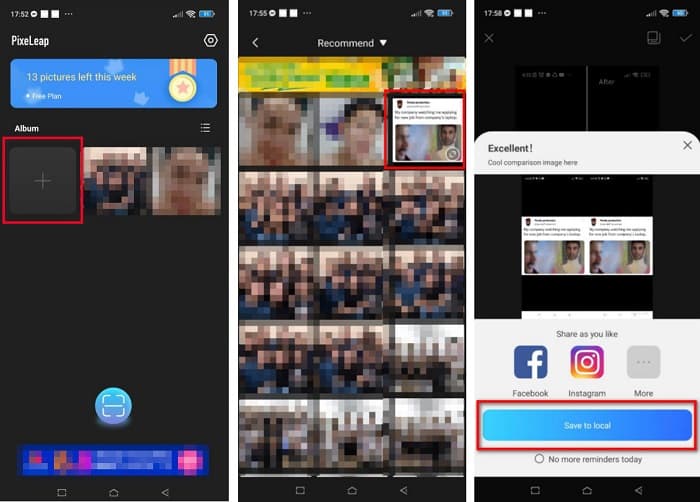
Langkah 2. Lalu, pada antarmuka utama aplikasi, ketuk kotak tanda + untuk mengunggah gambar yang ingin Anda ubah ukurannya. Setelah itu, aplikasi akan meminta Anda menonton iklan sebelum lanjut ke antarmuka berikutnya.
Langkah 3. Telusuri gambar yang ingin Anda ubah ukurannya, lalu ketuk gambar tersebut. Setelah memilih gambar, ketuk opsi Enhance. Kemudian aplikasi akan secara otomatis meningkatkan kualitas gambar Anda. Ketuk Save to local untuk mengunduh hasilnya.
Bagian 3. Cara Mengubah Ukuran Foto Online untuk Facebook
Keuntungan menggunakan aplikasi online adalah memungkinkan Anda menghemat ruang di perangkat Anda. Selain itu, ada banyak aplikasi web gratis yang dapat Anda gunakan di browser Anda. Jadi, jika Anda ingin menggunakan aplikasi online untuk mengubah ukuran gambar untuk diunggah di Facebook, kami akan menunjukkan cara mengubah ukuran foto untuk Facebook.
FVC Free Image Upscaler adalah pengubah ukuran foto online terbaik yang memungkinkan Anda memperbesar gambar hingga 2x, 4x, 6x, dan 8x. Dengan antarmuka yang sederhana, pemula pun dapat dengan mudah mengubah ukuran gambar. Selain itu, aplikasi ini mendukung semua format gambar, termasuk JPEG, JPG, PNG, dan BMP. Yang lebih mengesankan dari aplikasi ini adalah penggunaan teknologi AI yang secara otomatis mendeteksi bagian beresolusi rendah dari sebuah gambar lalu meningkatkannya. Selain itu, aplikasi ini dapat memperbaiki piksel yang hilang, tekstur warna, dan detail lainnya secara menyeluruh dan sempurna. Aplikasi ini juga dapat diakses di semua browser web, termasuk Google, Firefox, dan Safari. Oleh karena itu, jika Anda ingin menggunakan FVC Free Image Upscaler untuk mengubah ukuran atau meningkatkan gambar Anda, ikuti langkah-langkah mudah berikut.
Cara mengubah ukuran gambar untuk Facebook menggunakan FVC Free Image Upscaler:
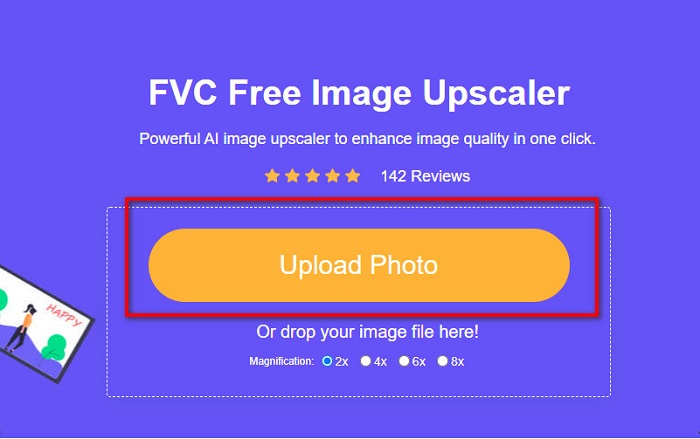
Langkah 1. Buka browser Anda dan ketik FVC Free Image Upscaler pada kotak pencarian. Anda juga bisa mengklik tautan yang disediakan untuk langsung menuju situs web. Klik Upload Photo untuk meluncurkan aplikasinya.
Langkah 2. Pada antarmuka utama perangkat lunak, klik Upload Photo untuk mengimpor gambar yang ingin Anda ubah ukurannya.
Langkah 3. Pada antarmuka berikutnya, pilih preset pembesaran yang Anda inginkan untuk hasil gambar Anda. Anda dapat memilih antara pembesaran 2x, 4x, 6x, dan 8x. Lalu lanjut ke langkah berikutnya.
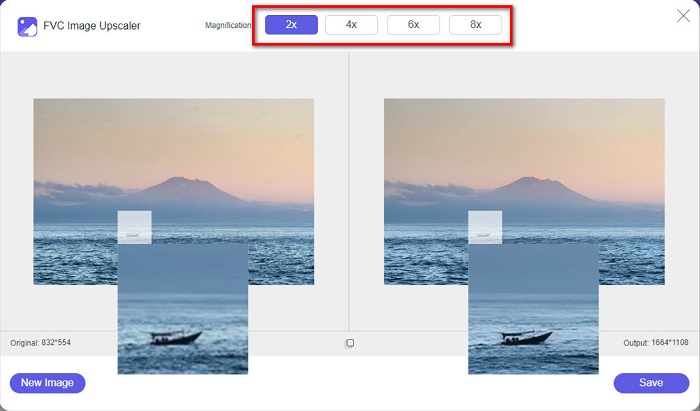
Langkah 4. Terakhir, centang tombol Save untuk menyimpan hasil Anda ke komputer. Anda akan melihat perbedaan antara file asli dan gambar yang telah diubah ukurannya. Dalam hitungan detik, gambar Anda akan tersimpan.
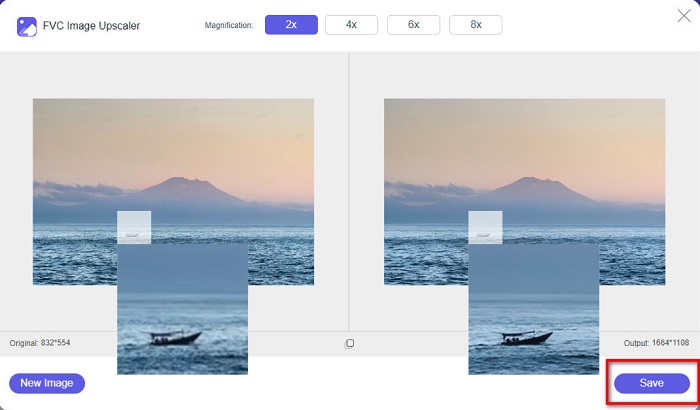
Dan itu saja! Semudah ABC, gambar Anda sekarang disempurnakan dan diubah ukurannya.
Terkait dengan:
Cara Menajamkan Gambar Secara Online dan Offline dengan 4 Cara Mudah
Cara Mengubah Ukuran Gambar – Adobe Resize Image [Online dan Offline]
Bagian 4. FAQ tentang Cara Mengubah Ukuran Foto untuk Facebook
Apa rasio foto terbaik untuk Facebook?
Mengenai rasio foto, sebaiknya gunakan gambar vertikal dengan rasio aspek 4:5 dan 1200 x 1500 px. Dan jika Anda menginginkan gambar persegi, resolusinya harus 1080 x 1080 px.
Berapa ukuran posting Facebook?
Ukuran gambar yang disarankan untuk postingan Facebook adalah 1200 x 630 piksel untuk menghindari pikselasi dan memiliki waktu pemuatan yang lebih cepat.
Apa format gambar terbaik untuk diunggah di Facebook?
Format gambar terbaik dan direkomendasikan untuk diunggah di Facebook adalah format JPG. Yang terbaik adalah mengunggah format JPG dengan warna RGB kurang dari 15 MB.
Kesimpulan
Kami telah memberikan solusi di atas jika Anda ingin mengubah ukuran foto untuk Facebook. Dengan membaca artikel ini secara menyeluruh, kami berharap Anda telah mempelajari semua hal penting yang perlu dilakukan. Anda pasti bisa mengubah ukuran gambar apa pun yang Anda inginkan menggunakan aplikasi di iPhone, Android, ataupun online. Namun untuk hasil yang lebih baik, gunakan FVC Free Image Upscaler, yang juga akan membantu Anda menghemat ruang pada perangkat Anda.
-
 Aplikasi Pengubah Ukuran Foto Terbaik Online, Offline, Android, dan iPhone
 Apa saja aplikasi pengubah ukuran foto terbaik? Klik halaman untuk mempelajari lima aplikasi pengubah ukuran foto paling kuat yang dapat Anda gunakan untuk meningkatkan atau mengubah ukuran file Anda.
-
 Cara Mengubah Ukuran Gambar - Adobe Mengubah Ukuran Gambar [Online dan Offline]
 Jika Anda mencari gambar ubah ukuran Adobe, maka kami memiliki solusi untuk Anda. Lihat posting ini secara menyeluruh untuk mempelajari cara mengubah ukuran gambar menggunakan Adobe di PC Anda.
-
 4 Pembesar GIF Offline dan Online Teratas yang Tidak Boleh Anda Lewatkan
 Posting ini untuk Anda jika Anda mencari pembesar GIF terbaik. Kami mencantumkan pembesar GIF online dan offline berkinerja terbaik untuk komputer Anda.
