


 Video Converter Ultimate
 Perekam Layar
 Perbaikan Video
 Unduhan Aman
Hapus Tanda Air Tahan Tembak secara Profesional dengan Alat Fantastis ini
Shootproof adalah galeri foto klien dan situs web portofolio. Jika Anda mencari gambar-gambar menakjubkan secara online, Shootproof bisa membantu Anda. Situs ini menawarkan banyak gambar indah yang dihasilkan para penjual. Shootproof dikenal sebagai bisnis berbagi galeri untuk fotografer. Selain itu, layanan ini memungkinkan fotografer membuat toko online untuk foto-foto mereka. Namun, banyak penjual menambahkan watermark pada gambar mereka agar orang lain tidak dengan mudah memiliki gambar tersebut. Jadi, jika Anda salah satu pengguna yang mencari cara untuk menghapus watermark Shootproof, lanjutkan membaca tulisan ini.

Bagian 1. 2 Metode Cara Menghapus Tanda Air Tahan Tembak dengan Mudah
Menghapus tanda air Shootproof tidak sulit jika Anda memiliki penghilang tanda air yang sesuai. Dan untuk membantu Anda memilih penghapus tanda air terbaik, kami mencari penghapus tanda air gratis yang paling sering digunakan secara online. Untuk mengetahui alat ini, baca bagian ini secara menyeluruh.
Penghilang Tanda Air FVC Gratis
FVC Free Watermark Remover adalah salah satu penghapus watermark online yang terkenal. Aplikasi online ini gratis dan aman digunakan. Selain itu, alat ini dapat diakses di semua peramban web, seperti Google, Firefox, dan Safari. Alat ini mendukung format gambar standar, termasuk PNG, JPEG, JPG, BMP, dan lainnya. Dalam fitur penghapus watermark-nya, Anda dapat memilih berbagai alat seleksi untuk menghapus watermark pada gambar Anda.
Apalagi banyak pemula yang bisa menggunakan watermark remover ini karena mudah digunakan. Juga, ketika Anda mengekspor gambar Anda, itu akan memiliki format file asli. Alat ini juga tidak mengharuskan Anda untuk masuk atau mendaftar.
Cara menghapus tanda air Shootproof menggunakan FVC Free Watermark Remover:
Langkah 1. Pertama, buka peramban Anda dan cari FVC Free Watermark Remover di kotak pencarian.
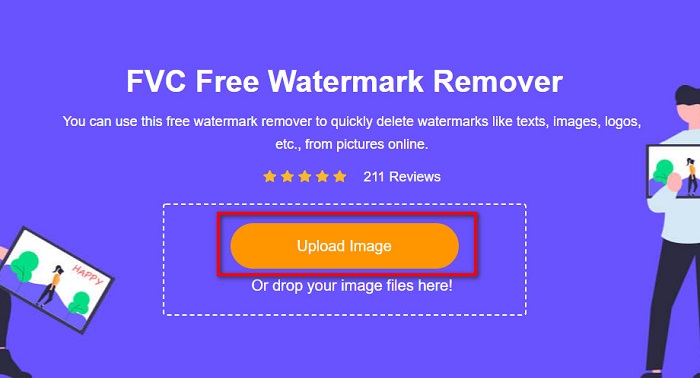
Langkah 2. Lalu, klik tombol Upload Image pada antarmuka utama untuk mengunggah gambar yang ingin Anda hilangkan watermark-nya.
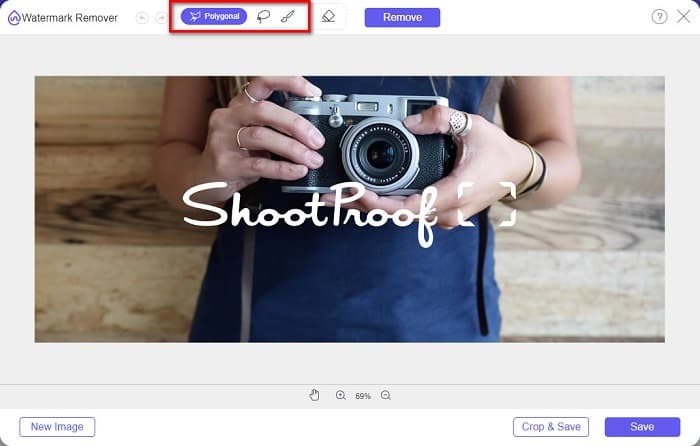
Langkah 3. Selanjutnya, pilih alat seleksi yang ingin Anda gunakan untuk menghapus watermark pada gambar Anda. Anda dapat memilih antara Polygonal, Lasso, dan Brush.
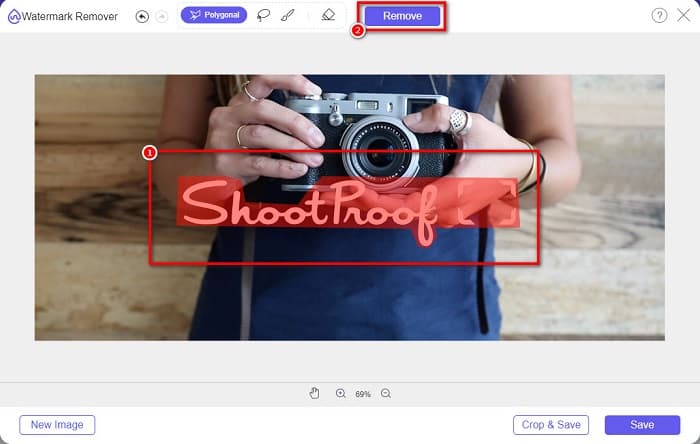
Langkah 4. Setelah itu, telusuri area watermark pada gambar Anda. Lalu, klik tombol Remove setelah area tersebut dipilih. Anda akan melihat watermark sudah hilang.
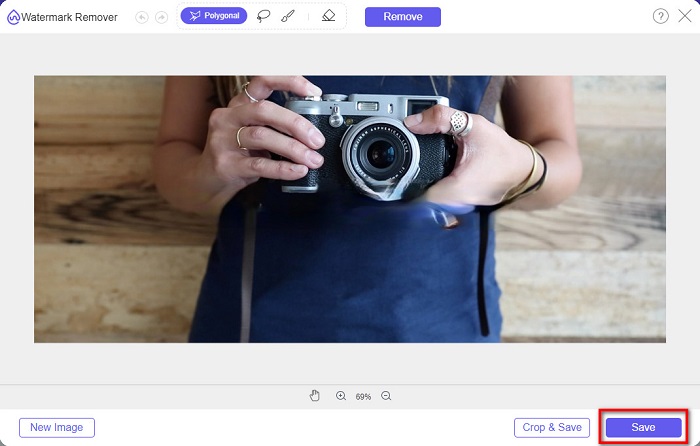
Langkah 5. Terakhir, klik tombol Save untuk menyimpan hasilnya ke perangkat Anda. Selesai! Dengan langkah-langkah sederhana ini, Anda dapat memiliki gambar Shootproof tanpa watermark.
Penghilang Tanda Air Apowersoft Online
Apowersoft Online Watermark Remover adalah aplikasi online yang dikenal untuk menghapus berbagai watermark pada gambar Anda. Ini adalah aplikasi online yang ramah pengguna karena memiliki antarmuka yang intuitif. Selain itu, alat ini mendukung format gambar standar, seperti PNG dan JPG. Anda juga tidak perlu khawatir tentang keamanan file, karena alat online ini aman digunakan. Alat ini juga memiliki fungsi untuk menghapus watermark pada video. Namun, jika koneksi internet Anda lambat, proses unggah dan ekspor mungkin menjadi lambat.
Cara menghapus tanda air Shootproof menggunakan Apowersoft Online Watermark Remover:
Langkah 1. Cari Apowersoft Online Watermark Remover di peramban Anda, lalu buka halaman utamanya. Pada antarmuka utama, klik opsi Remove Watermark From Image.
Langkah 2. Kemudian, pada antarmuka berikutnya, Anda akan melihat sebuah kotak penghapus watermark dan letakkan kotak tersebut di area watermark.
Langkah 3. Untuk menghapus watermark pada gambar Anda, klik tombol Erase.
Bagian 2. Kiat tentang Menggunakan Fitur Tanda Air Tahan Tembak
Dengan menggunakan fitur tanda air dari Shootproof, Anda dapat menambahkan dan menghapus tanda air pada gambar Anda. Jika Anda ingin mencegah pengguna lain memiliki foto Anda, Anda dapat menambahkan teks pada gambar Anda yang berfungsi sebagai tanda air.
Cara menambahkan tanda air di Shootproof:
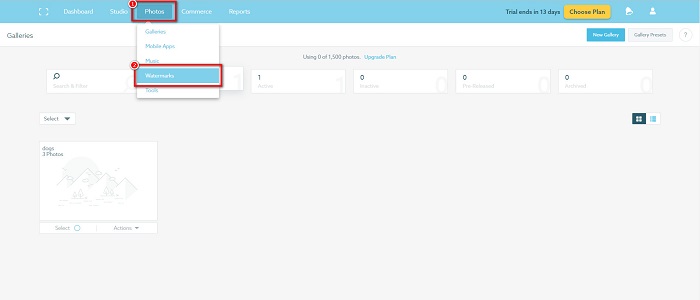
Langkah 1. Buka Photos, lalu klik opsi Watermarks.
Langkah 2. Kemudian, pilih antara watermark teks atau gambar.
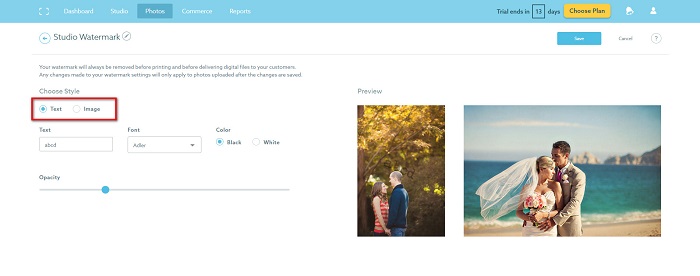
Jika Anda ingin menggunakan watermark gambar, Anda disarankan untuk mengunggah file PNG resolusi tinggi dengan latar belakang transparan. Anda juga dapat menggunakan file JPG.
Langkah 3. Selanjutnya, sesuaikan Watermark Settings. Di Watermark Settings, Anda dapat memilih posisi watermark pada foto Anda. Anda juga dapat menyesuaikan ukuran dan opasitas watermark.
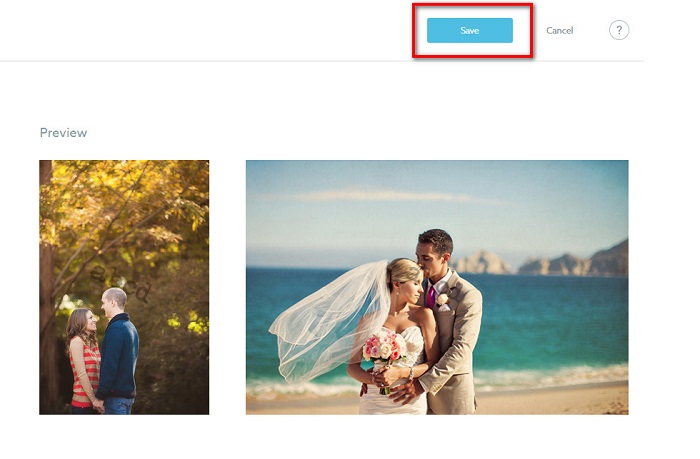
Langkah 4. Terakhir, klik tombol Save untuk menyimpan pengaturan yang telah Anda buat.
Terapkan tanda air pada gambar yang Anda unggah.
Pada halaman Tanda Air, Anda dapat memilih Tanda Air Default. Anda juga dapat mengaktifkan tanda air untuk semua unggahan berikutnya. Anda dapat mengubah ini sebelum mengunggah gambar baru.
Dan ketika Anda mengunggah foto baru ke galeri Anda melalui pengunggah berbasis web atau Pengunggah Desktop, Anda dapat memilih tanda air yang ingin Anda gunakan di layar pengunggahan.
Cara Menghapus tanda air di Shootproof
Selalu ingat bahwa mengedit atau menambahkan tanda air yang ada hanya akan memengaruhi unggahan Anda di masa mendatang. Perubahan yang Anda buat tidak akan memengaruhi gambar yang sudah ada di galeri Anda. Tetapi jika Anda ingin mengubah tanda air atau menghapus tanda air Shootproof, Anda dapat menyegarkan tanda air untuk memperbaruinya di galeri Anda. Berikut adalah bagaimana Anda dapat menghapus atau mengubah tanda air Shootproof.
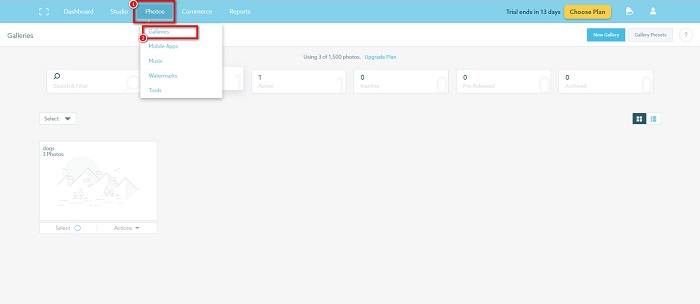
Langkah 1. Masuk ke Photos > Galleries, lalu klik galeri Anda.
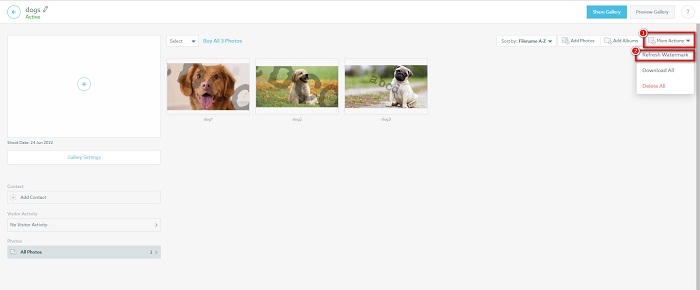
Langkah 2. Di dalam galeri, klik tombol More Actions di pojok kanan atas antarmuka.
Langkah 3. Lalu, pilih Refresh Watermark untuk menghapus watermark pada setiap gambar yang Anda unggah.
Langkah 4. Untuk menghapus watermark, geser bilah penggeser ke posisi nonaktif. Jika Anda hanya ingin mengganti watermark, pilih New Watermark.
Langkah 5. Terakhir, klik Apply Change untuk menyimpan perubahan yang telah Anda buat.
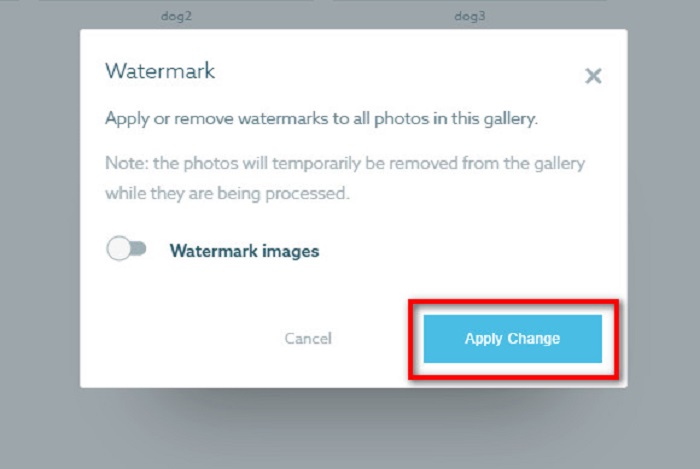
Anda akan melihat bahwa foto-foto akan secara otomatis ditampilkan sebagai pemrosesan. Ketika perubahan diterapkan, Anda akan melihat bahwa gambar akan kembali ke galeri Anda.
Terkait dengan:
Rekomendasi Penghapus Watermark Arnold Maya yang Luar Biasa dan Wajib Anda Coba
Penghapus Watermark 123rf – Ulasan Mendalam Alat-alat Terbaik
Bagian 3. FAQ tentang Shootproof Hapus Tanda Air
Bisakah Anda menghapus tanda air digital?
Menghapus tanda air digital yang tidak terlihat itu sulit. Misalnya, yang disematkan oleh plugin Digimarc Photoshop sulit untuk dihapus. Memotong, mengubah ukuran, menambahkan noise, dan keburaman sedang mungkin tidak berfungsi dengan tanda air digital.
Bisakah Anda menghapus tanda air logo dari video?
Ya. Dimungkinkan untuk menghapus tanda air logo pada video Anda. Banyak penghapus tanda air memungkinkan Anda menghapus logo di video Anda. Jika Anda ingin menghapus logo pada video Anda, gunakan Video Converter Ultimate.
Apakah Shootproof muncul jika Anda mengambil tangkapan layar?
Shootproof mengambil beberapa langkah untuk melindungi foto penjual. Namun, Shootproof tidak dapat mencegah orang mengambil tangkapan layar gambar Anda di galeri Anda.
Kesimpulan
Dan itu saja! Dengan mengikuti metode yang disebutkan di atas, sekarang Anda dapat menghapus watermark Shootproof dari gambar Anda. Meskipun menghapus watermark di Shootproof itu gratis, prosesnya mungkin agak sulit. Jadi, jika Anda ingin menghapus watermark Shootproof pada gambar Anda dengan mudah, gunakan FVC Free Watermark Remover.
-
 Penghilang Tanda Air Photobucket yang Luar Biasa Online dan Offline
 Pelajari cara menghapus tanda air Photobucket dari foto Anda menggunakan penghapus tanda air Photobucket yang menakjubkan ini. Baca artikel ini untuk mempelajari caranya.
-
 Hapus Tanda Air dari PDF dengan Mudah Dengan Langkah Sederhana
 Hapus Watermark dari PDF dengan mengikuti langkah-langkah sederhana ini. Pelajari cara mudah menghapus tanda air dari file PDF Anda menggunakan alat luar biasa ini.
-
 Cara Mudah Menghilangkan Tanda Air Dari Gambar Wisuda
 Ingin tahu cara terbaik untuk menghilangkan tanda air dari gambar kelulusan? Dengan membaca artikel ini, Anda akan dapat mengetahui cara menghapus tanda air pada foto lulusan dengan mudah.
