


 Video Converter Ultimate
 Perekam Layar
 Perbaikan Video
 Unduhan Aman
Cara Menghapus Gambar dengan Cepat dengan 3 Solusi Terbaik untuk Digunakan
Menghilangkan piksel pada gambar adalah solusi yang Anda perlukan untuk merapikan gambar yang ternyata berpiksel atau jika gambar Anda tampak berbentuk bitmap dengan kotak-kotak kecil. Banyak pengguna merasa repot untuk memodifikasi, mengatur, mengubah, dan meningkatkan kualitas gambar; jujur saja, dulu memang begitu, tapi itu sekarang sudah lewat. Dengan teknologi canggih yang dapat kita akses, tugas ini menjadi sangat mudah diselesaikan ketika Anda menggunakan alat yang tepat.
Tidak memiliki alat yang tepat untuk menghilangkan pikselasi pada foto Anda? Untungnya, artikel ini akan memberi Anda tiga perangkat lunak terbaik yang kami temukan yang dapat membantu Anda mengedit pikselasi foto dan tutorial masing-masing untuk menyelesaikan masalah.

Bagian 1. Cara Unpixelate Gambar Online dengan Editor Foto Pilihan Terbaik [Disarankan]
FVC Free Image Upscaler adalah alat daring otomatis sepenuhnya yang bisa Anda gunakan untuk menghilangkan piksel pada gambar secara online dan gratis. Anda bisa membukanya di browser web apa pun yang Anda miliki—tidak perlu mengunduh peluncur khusus, sehingga Anda bisa langsung menggunakan alat ini begitu mengaksesnya. Meskipun perangkat lunak ini berbasis web, kemampuan dan kinerjanya dalam menghilangkan piksel sebanding dengan editor gambar profesional yang bisa Anda gunakan, baik online maupun offline. Mungkin Anda mengira akan kesulitan menggunakan alat ini, namun sebenarnya tidak. Masih belum yakin? Kalau begitu, Anda bisa membaca atau mengikuti tutorial yang tertera di bawah ini untuk mendapatkan panduan cara menggunakannya dengan mudah.
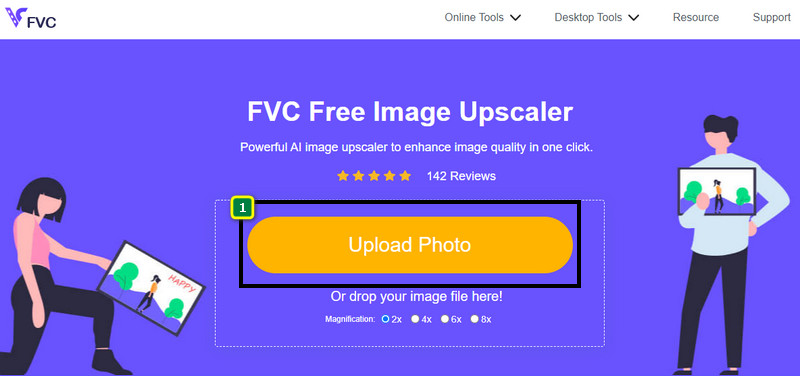
Langkah 1. Anda dapat mengakses alat web ini di browser apa pun di perangkat Anda dengan mencari namanya atau mengeklik tautan ini untuk membuka situs utamanya.
Langkah 2. Setelah berada di alat web tersebut, klik Add Image untuk mengunggah gambar yang berpiksel. Jendela folder file akan muncul di layar Anda; silakan cari gambar yang tersimpan di drive lokal Anda, lalu tekan Open untuk mengunggahnya.
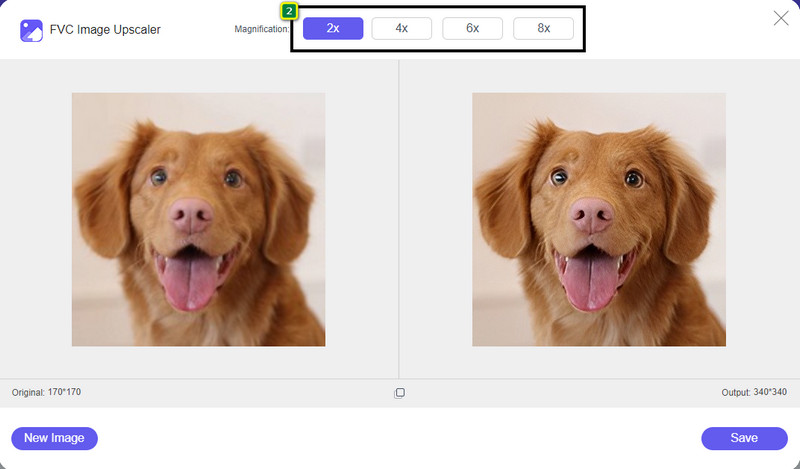
Langkah 3. Selanjutnya, pilih opsi pembesaran yang ingin Anda terapkan pada gambar untuk menghaluskan tampilannya sehingga tidak lagi tampak seperti bitmap dengan kotak-kotak kecil.
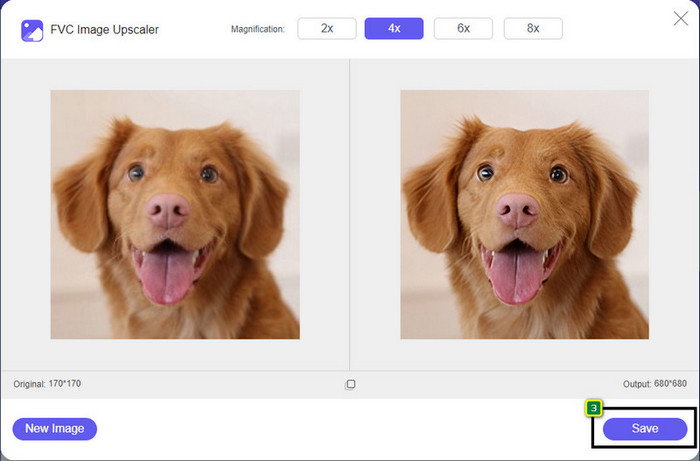
Langkah 4. Semudah itu, klik Save untuk mengunduh versi gambar yang sudah tidak berpiksel ke drive lokal Anda.
Bagian 2. Cara Unpixelate Gambar Offline Menggunakan 2 Cara di Windows & Mac [Mudah]
Pixbim - Unpixelate Foto di Windows
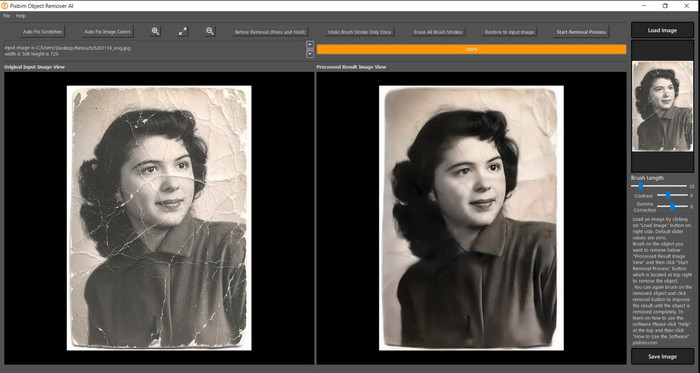
Pixbim adalah salah satu penghilang piksel gambar paling kuat berbasis AI yang dapat Anda unduh di Windows untuk mengatasi masalah ini. Editor ini patut disebutkan dalam artikel ini karena mampu memperbaiki gambar berpiksel dengan cepat dan efisien. Dengan bantuan AI, parameter akan disesuaikan untuk Anda sehingga Anda tidak akan mengalami kerumitan saat menggunakan perangkat lunak ini. Karena fitur dan fungsinya, Anda harus membeli kunci lisensi untuk terus menggunakannya setelah masa uji coba gratis berakhir. Ini mungkin terasa mahal bagi banyak pengguna yang menginginkannya di PC mereka.
Langkah 1. Setelah Anda mengunduh perangkat lunak tersebut, Anda perlu meluncurkannya agar kita bisa lanjut ke langkah berikutnya.
Langkah 2. Tekan Load Image untuk menambahkan gambar berpiksel yang ingin Anda tingkatkan kualitasnya di sini.
Langkah 3. Setelah itu, sesuaikan parameter dengan menggeser slider sesuai nilai yang ingin Anda capai.
Langkah 4. Setelah selesai menyesuaikan gambar, simpan hasilnya untuk mengekspornya.
Editor Foto Movavi [Windows & Mac]
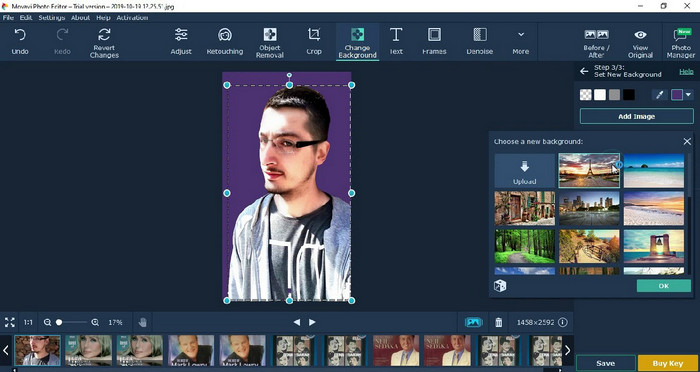
Banyak pengguna sudah mencoba menggunakan Movavi Photo Editor karena keunggulannya dalam mengedit gambar. Sama seperti Pixbim, editor ini dapat memulihkan piksel yang hilang pada gambar dengan dukungan jaringan saraf AI-nya. Dengan editor ini di tangan Anda, Anda bisa melakukan pengeditan dasar maupun lanjutan pada tampilan, seperti memotong, memutar, menambahkan filter, memperbaiki piksel, dan lainnya. Namun, Anda tidak bisa mendapatkan semua fitur tersebut jika tidak membeli versi premiumnya di desktop.
Ini memiliki harga yang hampir mirip dengan Pixbim, yang cukup mahal bagi banyak orang. Tetapi jika Anda memiliki anggaran untuk membeli editor, ini mungkin yang Anda butuhkan. Pelajari cara menghapus piksel gambar dengan aplikasi ini dengan mengikuti langkah-langkahnya.
Langkah 1. Unduh aplikasinya di Windows atau Mac OS Anda.
Langkah 2. Luncurkan perangkat lunaknya, lalu unggah foto yang ingin Anda hilangkan pikselnya di sini.
Langkah 3. Setelah gambar terunggah, klik Magic Enhance untuk memodifikasi gambar secara otomatis dengan AI.
Langkah 4. Ekspor gambar dan nikmati hasilnya.
Bagian 3. FAQ tentang Cara Meng-Uppixelate Gambar
Mengapa ada watermark pada gambar unpixelate yang diekspor?
Saat Anda menggunakan aplikasi versi uji coba gratis, ada kemungkinan aplikasi tersebut meninggalkan tanda air saat diekspor. Jadi, jika Anda ingin mengekspor gambar tanpa tanda air, Anda dapat membeli lisensi aplikasi atau menggunakan FVC Free Image Upscaler, karena tidak akan meninggalkan tanda air pada gambar yang diekspor.
Apa perbedaan antara buram dan piksel?
Banyak artikel yang membuktikan bahwa blur dan pixelated tidak sama karena beberapa faktor. Gambar buram adalah alasan mengapa Anda menangkap gerakan berkecepatan tinggi atau mengambil gambar dengan kamera yang goyah. Saat piksel, saat Anda memperbesar snapshot, itu akan memulai pikselasi, dan Anda akan melihat bitmap dengan kotak kecil.
Apa faktor yang membuat gambar pixelated?
Beberapa alasan mengubah gambar menjadi piksel; penyebab umumnya adalah saat Anda memperbesar gambar raster. Format raster, seperti PNG, JPG, GIF, dan lainnya, terdiri dari kotak-kotak kecil yang membentuk tampilan objek yang disimpan dalam wadah tersebut. Biasanya, saat Anda memperbesar gambar, Anda akan melihat ada kotak-kotak, yang dikenal sebagai piksel, yang berisi data warna yang ditampilkan secara visual. Ini bisa menjadi masalah bagi banyak editor, terutama ketika pikselasi terjadi.
Bagaimana cara memperbaiki noise gambar?
Ini adalah masalah umum lain yang mungkin Anda temui pada gambar yang Anda ambil, dan solusinya bisa Anda temukan di artikel ini. Klik tautan ini untuk dengan mudah membaca, memecahkan, dan mempelajari cara menghilangkan noise pada gambar.
Kesimpulan
Semudah itu, sekarang Anda dapat dengan mudah menghilangkan piksel pada gambar dengan bantuan editor gambar terbaik yang bisa Anda unduh atau gunakan di web. Kasus ini terselesaikan! Jadi, jika Anda sewaktu-waktu menghadapi masalah pikselasi, Anda dapat mengandalkan artikel ini untuk membantu Anda. Alat terbaik yang Anda perlukan sudah ada di sini dan siap membantu Anda, seperti FVC Free Image Upscaler. Cara terbaik adalah menyesuaikan dengan memperbaiki pikselasi pada tampilan sehingga tidak lagi terlihat secara jelas oleh siapa pun. Ucapkan selamat tinggal pada pikselasi saat Anda menggunakan editor gambar online ini.
-
 7 Peningkatan Skala Gambar yang Dapat Anda Gunakan untuk Meningkatkan & Meningkatkan Setiap Gambar [2022]
 Apakah Anda membutuhkan image upscaler? Untungnya, artikel ini membahas perangkat lunak terbaik yang dapat Anda akses dan unduh di desktop Anda.
-
 5 Peningkat Resolusi Gambar yang Harus Anda Gunakan 2022 Ini [Pilihan Terbaru]
 Tidak tahu penambah resolusi gambar apa yang harus Anda gunakan? Baca artikel ini saat kami meninjau lima alat untuk menggunakan dan meningkatkan resolusi gambar.
-
 4 Aplikasi untuk Meningkatkan Resolusi Gambar di Perangkat Seluler Anda [Pilihan Terbaik]
 Anda akan memerlukan aplikasi untuk meningkatkan resolusi foto Anda jika Anda ingin mencapai 1080p, 4k, atau semacamnya. Dengan daftar di bawah ini Anda dapat melakukannya dengan mudah!
