


 Video Converter Ultimate
 Perekam Layar
 Perbaikan Video
 Unduhan Aman
Crank Up Your Music Game: Konversi MP3 ke MIDI dan Remix Tunes
Jika Anda seorang musisi atau produser musik, Anda tentu menyadari bahwa peralatan yang tepat dapat membuat perbedaan besar dalam proses kreatif Anda. Salah satu alat yang dapat membawa musik Anda ke level berikutnya adalah kemampuan untuk mengonversi file MP3 ke MIDI. Meski MP3 sangat baik untuk mendengarkan musik, file MIDI menawarkan fleksibilitas dan opsi kustomisasi yang tak tertandingi. Dengan mengonversi MP3 Anda ke MIDI, Anda dapat memanipulasi nada satu per satu, mengubah tempo dan tangga nada sebuah lagu, bahkan menambahkan instrumen atau suara baru ke trek yang sudah ada.
Dengan alat konversi yang tepat, kemungkinannya tidak terbatas. Apakah Anda ingin membuat remix unik dari lagu favorit Anda, menyalin musik untuk lembaran musik, atau bereksperimen dengan suara dan aransemen baru, mengonversi MP3 ke MIDI dapat merevolusi musik Anda dan meningkatkan kreativitas Anda.

Bagian 1. Perbandingan MP3 vs MIDI
Jika Anda ingin memeriksa perbandingan khusus dari kedua format ini dalam aspek yang berbeda, Anda dapat merujuk ke tabel di bawah ini.
| fitur | MP3 | MIDI |
| Ukuran file | Relatif besar | Sangat kecil |
| Kualitas suara | Kompresi lossy, kualitas tinggi | Kualitas rendah, tetapi dapat disesuaikan |
| Dapat diedit | Tidak mudah diedit | Sangat dapat diedit |
| Peralatan | instrumentasi tetap | Instrumentasi yang dapat disesuaikan |
| Penggunaan | Mendengarkan musik | Mengedit dan memproduksi musik |
| Kompresi | Kompresi kerugian | Tidak ada kompresi |
Bagian 2. Cara Mengonversi MP3 ke MIDI atau MIDI ke MP3 di Windows dan Mac
FVC Video Converter Ultimate adalah alat serbaguna untuk konversi video, yang memfasilitasi konversi video ke berbagai format dengan mudah. Perangkat lunak ini mampu menangani beragam format file, seperti MP4, AVI, MOV, WMV, dan lainnya. Fitur ini menjadikannya pilihan yang sangat menarik bagi siapa pun yang ingin mengonversi file video mereka agar sesuai dengan berbagai perangkat atau platform.
Terlepas dari fungsionalitas konversi videonya yang kuat, FVC Free Video Converter Ultimate menggabungkan atribut canggih seperti pengeditan video, konversi batch, dan fitur canggih lainnya. FVC menawarkan desain yang ramah pengguna dan antarmuka intuitif yang memfasilitasi tugas pengeditan video seperti memangkas, memotong, menambahkan tanda air, dan menyesuaikan efek video. Perangkat lunak ini memungkinkan pengguna membuat video khusus yang disesuaikan dengan kebutuhan khusus mereka. Selain itu, ini dapat berfungsi sebagai konverter MIDI ke MP3. Pelajari cara menggunakannya melalui prosedur langkah demi langkah.
Fitur Utama:
◆ Kecepatan konversi cepat: FVC menggunakan teknologi konversi canggih, menghasilkan waktu konversi yang lebih cepat dibandingkan dengan alat serupa lainnya.
◆ Opsi penyesuaian: FVC memungkinkan Anda untuk menyesuaikan pengaturan konversi Anda, seperti codec video dan audio, kecepatan bit, kecepatan bingkai, dan resolusi.
◆ Antarmuka yang ramah pengguna: FVC memiliki antarmuka yang intuitif dan mudah digunakan.
Langkah 1. Dapatkan dan instal aplikasinya
Pertama, sangat penting untuk mendapatkan dan menginstal perangkat lunak FVC Video Converter Ultimate di komputer Anda. Klik tombol Free Download di bawah ini lalu jalankan perangkat lunaknya.
Free DownloadUntuk Windows 7 atau yang lebih baruUnduhan Aman
Free DownloadUntuk MacOS 10.7 atau yang lebih baruUnduhan Aman
Langkah 2. Tambahkan file MIDI atau MP3 ke dalam program
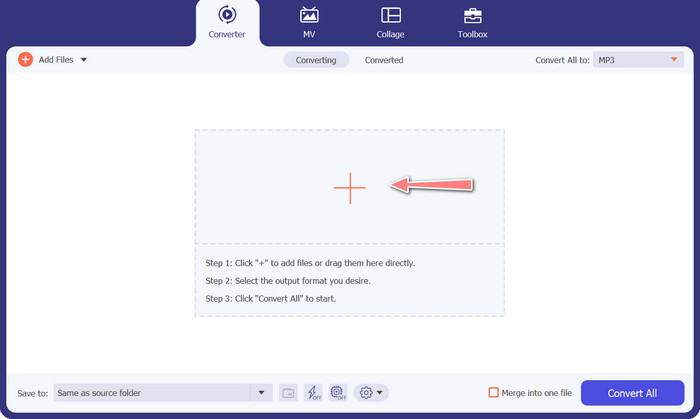
Selanjutnya, tambahkan file audio MIDI atau MP3 yang ingin Anda konversi. Tekan tombol Add Files untuk mengimpor file audio Anda. Setelah audio berhasil ditambahkan ke dalam program, thumbnail yang terkait dengan audio tersebut akan terlihat.
Langkah 3. Pilih format keluaran
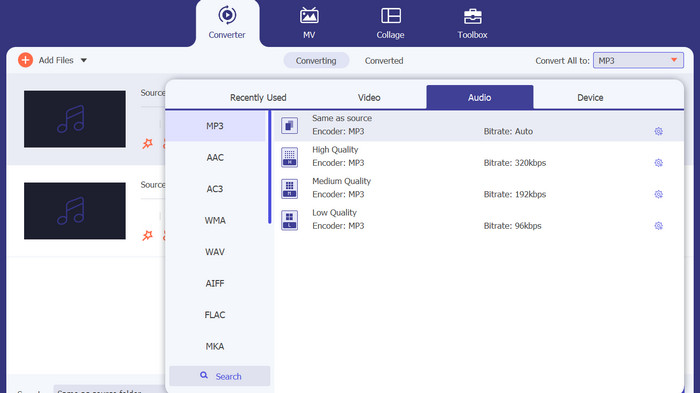
Setelah prosedur di atas, sebaiknya pilih format keluaran yang sesuai. Pilih format MP3 sebagai opsi keluaran dari menu dropdown yang terletak di sebelah bagian Convert All to. Jika Anda ingin melakukan kustomisasi, pengaturan video keluaran dapat diatur dengan memilih tombol Custom Profile.
Langkah 4. Mulai proses konversi
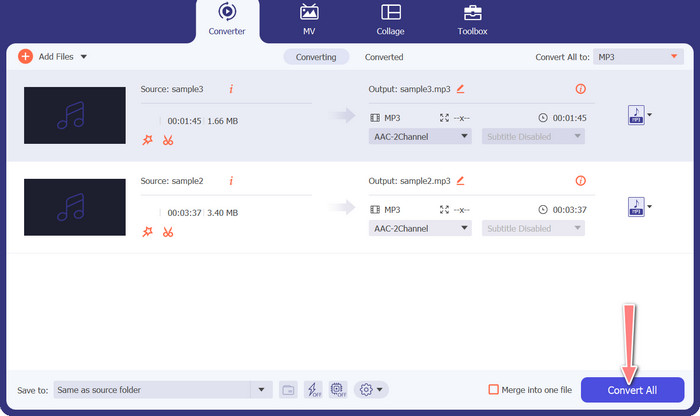
Terakhir, pilih opsi Convert All untuk memulai proses konversi. Setelah proses konversi selesai, file MP3 akan disimpan di direktori keluaran yang telah ditentukan.
2. Pengonversi Audio Daring Gratis
Cara lain yang dapat Anda gunakan adalah Free Audio Converter Online. Sesuai dengan namanya, ini adalah program online yang berjalan langsung di web. Jadi, Anda tidak perlu memiliki aplikasi konverter MP3 ke MIDI terpisah. Semuanya dapat diakses dan dilakukan hanya dengan menggunakan browser Anda. Fitur-fiturnya pun tidak kalah lengkap. Anda juga dapat mengunggah banyak file sekaligus (batch convert) dan menyesuaikan profil video atau file audio. Pelajari lebih lanjut konverter MP3 ke MIDI online terbaik ini dengan mengikuti langkah-langkah di bawah ini.
Fitur Utama
◆ Aksesibilitas online: Sebagai alat online, konverter audio online gratis dapat diakses dari mana saja.
◆ Konversi batch: Alat konversi MIDI ke MP3 online gratis ini memungkinkan pengguna untuk mengonversi banyak file audio secara bersamaan, menghemat waktu dan tenaga.
◆ Kecepatan konversi cepat: Ini adalah server berbasis cloud yang dapat menangani proses konversi, memungkinkan kecepatan konversi yang cepat.
Langkah 1. Untuk mulai menggunakan Free Audio Converter Online, pertama-tama buka peramban web favorit Anda dan kunjungi situs web tersebut secara langsung.
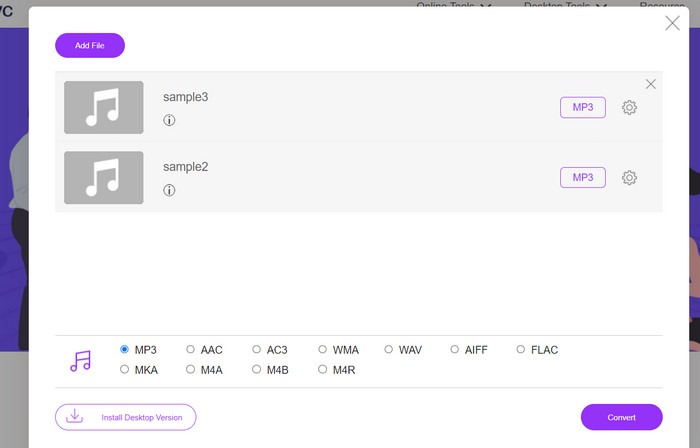
Langkah 2. Klik opsi Add Files to Convert, dan alat ini akan meminta Anda mengunduh dan menginstal launcher berukuran kecil. Setelah instalasi selesai, Anda dapat mengunggah file MIDI atau M3 Anda.
Langkah 3. Dari menu Audio format, pilih MP3 sebagai format yang akan digunakan untuk hasil akhirnya. Kualitas file MP3 yang dihasilkan dapat diatur dengan memilih bitrate yang berbeda.
Langkah 4. Terakhir, klik tombol Convert untuk memulai proses konversi.
Bagian 3. Konversi MP3 ke MIDI atau MIDI ke MP3 di Seluler
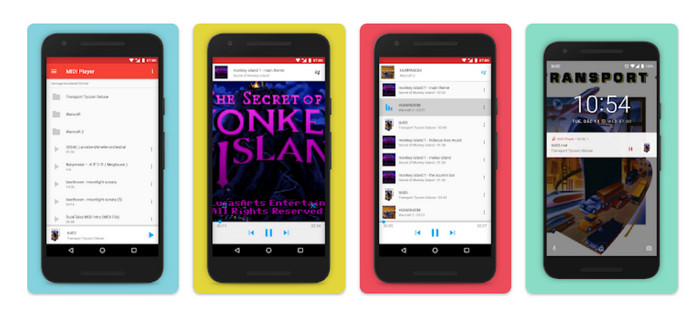
MIDI Player & Converter adalah aplikasi seluler yang dirancang untuk perangkat Android dan terutama digunakan untuk memutar dan mengonversi file MIDI ke format audio lainnya. Program ini gratis untuk diunduh, dan menyediakan antarmuka yang ramah pengguna. Salah satu fitur utama MIDI Player & Converter adalah pemutar MIDI bawaannya, yang memungkinkan pengguna mendengarkan file MIDI dengan suara berkualitas tinggi. Selain kemampuan pemutaran MIDI, MIDI Player & Converter juga menyertakan alat untuk mengonversi file MIDI ke format audio lain, termasuk MP3, WAV, dan AAC.
Fitur Utama
◆ Konversi audio: Aplikasi ini memungkinkan pengguna untuk mengonversi file MIDI ke format audio lain, termasuk MP3, WAV, dan AAC.
◆ Pengaturan keluaran yang dapat disesuaikan: Pengguna dapat menyesuaikan kualitas audio keluaran, kecepatan sampel, dan kecepatan bit sesuai preferensi mereka.
◆ Penyesuaian tempo dan nada: Aplikasi ini juga menyertakan alat untuk menyesuaikan tempo dan nada file audio selama proses konversi.
◆ Konversi batch: MIDI Player & Converter memungkinkan pengguna untuk mengonversi beberapa file MIDI ke format audio secara bersamaan.
Langkah 1. Untuk mengubah file MIDI ke MP3, Anda dapat mengunduh dan memasang MIDI Player & Converter melalui Google Play Store.
Langkah 2. Jalankan aplikasinya dan pilih fitur Convert dari menu utama.
Langkah 3. Buka kategori Source dan pilih opsi MIDI. Lanjutkan dengan memilih file MIDI yang ingin dikonversi. Pada kategori Target, pilih format MP3 sebagai keluaran yang diinginkan.
Langkah 4. Sesuaikan parameter keluaran, termasuk namun tidak terbatas pada kualitas audio, sample rate, dan bitrate, sesuai preferensi Anda. Gunakan alat bawaan untuk mengubah tempo dan pitch audio. Mulai proses konversi dengan memilih opsi Convert.
Bacaan Lanjutan:
Konversi MP3 ke OGG dan Nikmati Kualitas Suara Lebih Baik
FLAC vs. MP3: Format File Audio Mana yang Paling Unggul
Bagian 4. FAQ tentang Konversi MP3 ke MIDI
Apakah legal untuk mengonversi file MIDI ke MP3?
Legalitas konversi file MIDI ke MP3 dapat bervariasi tergantung pada undang-undang hak cipta di negara Anda. Jika Anda memiliki hak atas file MIDI atau memiliki izin dari pemegang hak cipta, mengonversinya menjadi MP3 harus legal. Di sisi lain, selalu merupakan ide bagus untuk memeriksa undang-undang di wilayah Anda untuk memastikan Anda tidak melanggar peraturan hak cipta apa pun.
Bisakah saya menyesuaikan pengaturan keluaran saat mengonversi file MIDI ke MP3?
Ya, sebagian besar alat konversi MIDI ke MP3 memungkinkan Anda menyesuaikan pengaturan keluaran, seperti kualitas audio, kecepatan sampel, dan kecepatan bit. Ini dapat membantu Anda mencapai kualitas suara dan ukuran file yang diinginkan untuk MP3 Anda.
Bisakah saya mengonversi MP3 ke MIDI di Audacity?
A: Audacity tidak bisa langsung mengonversi file MP3 ke file MIDI. Meskipun Audacity adalah perangkat lunak pengeditan dan perekaman audio yang kuat, ia tidak memiliki kemampuan untuk mengenali dan mengekstrak catatan individu dari file MP3, yang diperlukan untuk membuat file MIDI.
Kesimpulan
Proses mengonversi format MIDI ke MP3, atau sebaliknya, dapat menjadi cara praktis untuk memudahkan berbagi dan memutar komposisi musik di berbagai platform dan perangkat. Beragam alat tersedia untuk tujuan ini, seperti perangkat lunak yang dipasang di komputer desktop, konverter yang dapat diakses secara online, dan aplikasi yang dirancang untuk perangkat seluler.
-
 M4A vs MP3: Format File Audio Mana yang Tepat untuk Anda?
 Apakah Anda bingung antara format audio M4A dan MP3? Tinjauan dan perbandingan komprehensif kami tentang M4A vs. MP3 akan membantu Anda memilih jenis file terbaik untuk kebutuhan Anda
-
 Cara Mengonversi MP3 ke M4A untuk Meningkatkan Kualitas Suara
 Tingkatkan kualitas file musik Anda dengan mengonversi MP3 ke M4A dengan tip dan trik ahli kami. Panduan kami menawarkan petunjuk langkah demi langkah dan perangkat lunak yang direkomendasikan
-
 Pengonversi MP3 ke AIFF yang luar biasa untuk Windows dan Mac
 Tutorial ini akan memandu Anda melalui setiap tahap mengonversi MP3 ke AIFF menggunakan alat tepercaya. Kunjungi mereka untuk mengetahui lebih lanjut
