


 Video Converter Ultimate
 Perekam Layar
 Perbaikan Video
 Unduhan Aman
Program Konversi MP2 ke MP3 Teratas untuk Pengguna Offline dan Online
Jadi, Anda memiliki beberapa file audio MP2, dan berpikir untuk mengonversinya menjadi MP3, bukan? Mengonversi format audio dapat menjadi pengubah permainan yang nyata, terutama dalam hal kompatibilitas dan kenyamanan.
Jadi, jika Anda siap untuk membuka potensi file MP2 Anda dan merasakan fleksibilitas format MP3, mari kita mulai! Kami memiliki alat konversi MP2 ke MP3 terbaik beserta pengetahuan yang Anda butuhkan untuk membuat proses konversi berjalan lancar tanpa repot. Cukup duduk santai, dan kami akan memandu Anda melalui setiap langkah, sehingga file audio Anda dapat diubah dengan mudah.

Bagian 1. MP2 vs. MP3
Untuk tabel perbandingan mendetail yang menyoroti perbedaan utama antara MP2 dan MP3, Anda dapat melanjutkan di bawah ini:
| MP2 | MP3 | |
| Format | Lapisan Audio MPEG-1 II | Lapisan Audio MPEG-1 III |
| Kompresi | Lossy | Lossy |
| Ekstensi File | mp2 | mp3 |
| Bitrate | Biasanya 192-256 kbps | Bervariasi (biasanya 128-320 kbps) |
| Ukuran file | Relatif lebih besar | Lebih kecil |
| Kualitas suara | Baik | Sangat bagus |
| Rentang Frekuensi | Hingga 22,05 kHz | Hingga 48 kHz (kualitas CD) |
Bagian 2. Cara Terbaik untuk Mengonversi MP2 ke MP3
Rasakan kenyamanan konversi berkualitas tinggi dengan kecepatan kilat. Video Converter Ultimate memastikan file MP2 Anda dikonversi menjadi MP3 tanpa mengorbankan kualitas suara. Perangkat konverter audio MP2 ke MP3 yang andal ini dirancang untuk memenuhi kebutuhan Anda. Konversi banyak file MP2 ke MP3 sekaligus dalam satu batch, sehingga menghemat waktu dan tenaga Anda. Antarmuka yang ramah pengguna membuat prosesnya sangat mudah, bahkan bagi mereka yang memiliki pengetahuan teknis terbatas.
Fitur Utama
◆ Konversi MP2 ke MP3: Dengan mudah mengonversi file audio MP2 Anda ke format MP3 yang didukung secara luas hanya dengan beberapa klik.
◆ Konversi DVD: Konversi DVD ke berbagai format video dan audio, memperluas perpustakaan media Anda dan membuat film dan acara favorit Anda dapat diakses di berbagai perangkat.
◆ Kompatibilitas Lintas Platform: FVC Video Converter Ultimate kompatibel dengan sistem operasi Windows dan Mac, memastikan aksesibilitas luas bagi pengguna.
Langkah 1. Unduh dan instal aplikasi
Pilih salah satu tombol Unduh Gratis, lalu simpan file ke komputer Anda dengan mengikuti instruksi di layar. Langkah selanjutnya adalah membuka aplikasi dan membiasakan diri dengan kontrolnya yang sederhana.
Free DownloadUntuk Windows 7 atau yang lebih baruUnduhan Aman
Unduh GratisUntuk MacOS 10.7 atau yang lebih baruUnduhan Aman
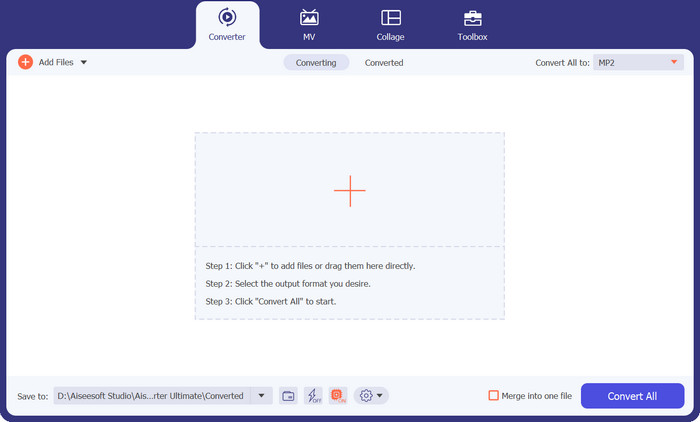
Langkah 2. Tambahkan file MP2
Setelah memilih simbol plus di halaman utama, buka lokasi file audio yang ingin Anda konversi. Ketika file diunggah, pratinjau akan muncul di antarmuka pengguna. Anda dapat melakukan konversi batch MP2 ke MP3 dengan mengunggah satu folder berisi file.
Langkah 3. Pilih format keluaran
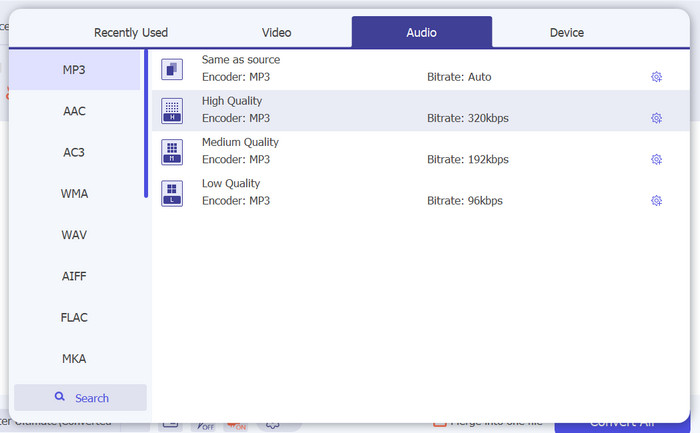
Format keluaran kemudian dapat dipilih dengan membuka tab Audio dari menu tarik-turun di sudut kanan atas alat. Anda dapat menggunakan format apa pun yang tersedia untuk mengonversi antara MP2 dan MP3.
Langkah 4. Simpan hasilnya
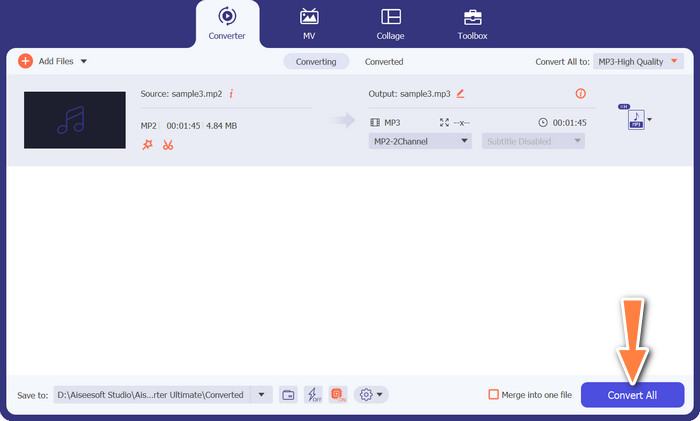
Pilih folder tujuan dari opsi tarik-turun di bagian bawah layar. Ketika Anda siap memulai proses konversi, klik tombol Convert All.
Bagian 3. Cara Terbaik untuk Mengonversi MP2 ke MP3 Online Gratis
Solusi serba ada untuk mengonversi file audio ke format MP3 yang populer, langsung dari kenyamanan browser web Anda. Free MP3 Converter Online menggunakan algoritma canggih untuk memastikan musik Anda tetap mempertahankan kekayaan, kejernihan, dan kedalaman aslinya, sehingga menghadirkan pengalaman mendengarkan yang tak tertandingi. Antarmuka yang ramah pengguna membuat proses konversi menjadi sangat mudah bagi semua tingkat pengguna. Hanya dengan beberapa langkah intuitif, Anda dapat memilih file audio, menentukan pengaturan keluaran yang diinginkan, dan mengonversinya ke MP3 dengan mudah. Cepat, sederhana, dan tanpa repot. Pelajari cara kerja alat ini dengan mengikuti langkah-langkah di bawah ini.
Fitur Utama
◆ Bitrate yang Dapat Disesuaikan: Sesuaikan bitrate audio untuk menyeimbangkan ukuran file dan kualitas suara, memberi Anda kendali atas ukuran dan fidelitas file MP3 yang dikonversi.
◆ Cepat dan Efisien: Manfaatkan waktu konversi yang cepat, memungkinkan Anda mengonversi file audio ke format MP3 dengan cepat dan nyaman.
◆ Gratis dan Nyaman: Nikmati kenyamanan alat online gratis yang memungkinkan Anda mengonversi file audio ke format MP3 tanpa biaya atau kerumitan apa pun.
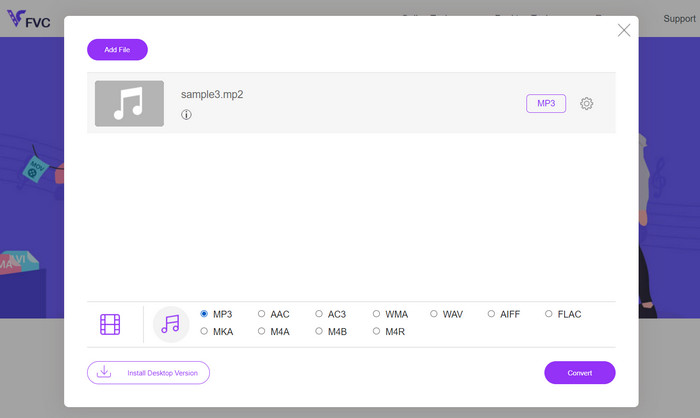
Langkah 1. Pertama-tama, kunjungi situs resmi program menggunakan browser web pilihan Anda. Lalu, tombol Add Files to Convert akan langsung terlihat di beranda.
Langkah 2. Selanjutnya, cari file audio MP2 yang ingin Anda konversi dan pilih format keluarannya. Cukup klik tombol bergambar not musik. Kemudian, pilih tombol radio MP3.
Langkah 3. Setelah selesai, tekan tombol Convert untuk memulai proses konversi.
Bacaan Lanjutan:
MP3 VS MP4: Apa Perbedaan Antara MP3 dan MP4
Panduan Cara Menambahkan Sampul Album ke MP3 dengan Mudah dan Cepat
Bagian 4. FAQ tentang Konversi MP2 ke MP3
Apa perbedaan antara format MP3 dan MP2?
MP3 dan MP2 keduanya adalah format audio, tetapi keduanya menggunakan algoritme kompresi yang berbeda. MP3 menawarkan kompresi dan kualitas suara yang lebih baik dibandingkan dengan MP2. MP3 lebih banyak didukung dan umum digunakan untuk berbagai keperluan, termasuk streaming online, musik digital, dan perangkat portabel.
Apakah ada penurunan kualitas audio saat mengonversi dari MP3 ke MP2?
Ya, ada potensi penurunan kualitas audio saat mengonversi dari MP3 ke MP2. MP3 adalah format yang lebih terkompresi, dan mengubahnya menjadi MP2 dapat mengakibatkan penurunan kualitas lebih lanjut. Disarankan untuk mengonversi dari file sumber berkualitas lebih tinggi untuk meminimalkan kerugian.
Apakah ada batasan ukuran file untuk konversi MP2 ke MP3?
Batas ukuran file untuk konversi MP2 ke MP3 dapat bervariasi tergantung pada alat atau perangkat lunak konversi tertentu yang Anda gunakan. Beberapa alat mungkin memiliki batasan ukuran file, jadi disarankan untuk memeriksa dokumentasi atau fitur alat yang Anda pilih untuk mengetahui batasannya.
Bisakah saya mengonversi file MP2 ke format audio lain selain MP3?
Ya, biasanya ada opsi untuk mengonversi file MP2 ke berbagai format audio lainnya, tergantung pada perangkat lunak atau alat online yang Anda pilih. Format konversi yang biasanya didukung antara lain WAV, AAC, FLAC, OGG, dan WMA. Ketersediaan format tertentu akan bergantung pada fitur dan kemampuan alat konversi yang dipilih.
Bisakah saya mengonversi file MP2 ke MP3 dengan kecepatan bit variabel (VBR)?
Ya, banyak alat konversi menawarkan opsi untuk mengonversi file MP2 ke format MP3 menggunakan kecepatan bit variabel (VBR). Pengkodean VBR menyesuaikan bitrate secara dinamis berdasarkan kompleksitas audio, menghasilkan peningkatan kualitas audio dan ukuran file yang lebih efisien.
Kesimpulan
Sebagai penutup, mengonversi MP2 ke MP3 adalah cara praktis untuk mengubah file audio ke format yang didukung secara luas. Dengan tersedianya berbagai alat dan perangkat lunak konversi, Anda dapat dengan mudah mengonversi file MP2 ke MP3 sembari menyesuaikan pengaturan seperti bitrate, sample rate, dan konfigurasi kanal agar sesuai dengan kebutuhan spesifik Anda.
-
 Cara Mengonversi M4B dan MP3 untuk Keserbagunaan Buku Audio
 Rasakan kemudahan menikmati buku audio favorit Anda di platform apa pun dengan pengonversi MP3 dan M4B kami yang andal.
-
 Daftar Perekam MP2 Terbaik untuk Menyimpan Format MP2 (Gratis dan Berbayar)
 Jika Anda mengalami masalah saat merekam audio MP2. Daftar di bawah ini adalah perekam MP2 yang dapat Anda gunakan sebagai perekam audio Anda.
-
 Konversikan MP3 ke MIDI dan Sesuaikan Lagu Anda Tidak Seperti Sebelumnya
 Ubah MP3 favorit Anda menjadi file MIDI yang dapat disesuaikan dalam hitungan detik dengan pengonversi MP3 ke MIDI kami yang mudah digunakan. Lihat mereka untuk mempelajari lebih lanjut.
