


 Video Converter Ultimate
 Perekam Layar
 Perbaikan Video
 Unduhan Aman
Panduan Utama tentang 5 Konverter OGV ke MP4 Terbaik di tahun 2023
Mengunggah secara online berkas-berkas berharga Anda, terutama rekaman yang penuh kenangan, sangat populer belakangan ini. Selain itu, format yang umum digunakan seperti MP4 dan WebM memudahkan Anda untuk berbagi secara online dibandingkan dengan format lossless seperti WAV dan MOV. Namun tahukah Anda bahwa ada format lain yang juga sangat cocok untuk diunggah ke situs web? Format itu disebut OGV. Dalam artikel ini, kami telah mengkurasi beberapa alat terbaik untuk mengonversi MP4 ke OGV atau sebaliknya. Tetap ikuti, dan mari kita langsung ke pokok pembahasan.

Bagian 1. Bagan Perbandingan Konverter MP4 ke OGV
Sebelum membahas inti ulasan ini, kami telah menyusun tabel perbandingan keseluruhan konverter OGV ke MP4 yang akan kami tangani. Di sini, Anda akan melihat harganya, pengguna yang sesuai, dan persyaratan pemasangan.
| Alat | Harga | Pengguna yang Cocok | Perangkat yang Kompatibel |
| Video Converter Ultimate | 49,96 / seumur hidup | Pemula hingga Ahli | Windows & Mac |
| Konverter MP4 Gratis Online | Gratis | Pemula hingga Ahli | Semua Platform |
| Convertio | Gratis | Pemula- Rata-rata | Semua Platform |
| Ffmpeg.dll | Gratis | Pakar | Windows, Mac, Linux |
| Konverter VideoPro | $25.95/tahunan | Rata-rata – Ahli | Windows & Mac |
Bagian 2. 5 Alat Teratas untuk Mengonversi OGV ke MP4
1. Video Converter Ultimate
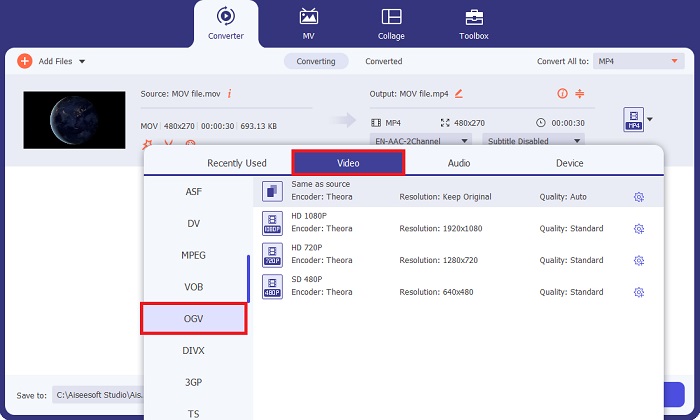
Yang pertama dalam daftar adalah program serbaguna yang dapat mengubah banyak file MP4 menjadi OGV, berkat fitur konversi batch-nya. Video Converter Ultimate adalah alat all-in-one yang tidak hanya memenuhi kebutuhan konversi Anda, tetapi juga memungkinkan Anda mengedit rekaman untuk sentuhan tambahan. Selain itu, alat ini memanfaatkan teknologi akselerasi GPU, sehingga menghasilkan proses konversi yang lancar dan 50x lebih cepat.
Pro
- Video Converter Ultimate hadir dengan pengaturan output yang dapat disesuaikan.
- Alat ini menawarkan lebih dari 1000+ format keluaran.
- Akses kotak peralatan praktis yang berisi fitur manipulasi video dan audio lainnya.
Kontra
- Fitur lengkap alat ini memerlukan langganan berbayar untuk mengaksesnya.
Langkah 1. Mulailah dengan memasang program setelah mengklik tombol Unduh Gratis di bawah ini. Pastikan Anda menekan tombol yang sesuai dengan perangkat komputer Anda.
Free DownloadUntuk Windows 7 atau yang lebih baruUnduhan Aman
Free DownloadUntuk MacOS 10.7 atau yang lebih baruUnduhan Aman
Langkah 2. Setelah program muncul di layar Anda, menuju ke tombol Plus untuk mengunggah file target Anda. Atau, Anda dapat menggunakan fitur seret dan lepas agar lebih mudah.
Langkah 3. Terakhir, pilih terlebih dahulu output untuk file Anda. Buka tab pilihan Output, pergi ke panel Video, dan pilih OGV. Setelah preferensi Anda diatur, konversikan MP4 ke OGV dengan mengklik tombol Convert.
2. Pengonversi MP4 Online Gratis
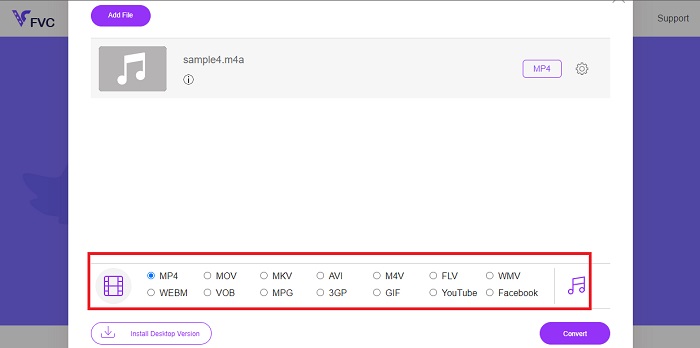
Cara lain untuk mengubah file video Anda ke format lain adalah dengan menggunakan Free MP4 Converter Online. Program ini menjanjikan, terutama bagi pengguna yang memerlukan cara alternatif tanpa memasang alat offline di perangkat mereka. Free MP4 Converter Online juga dapat bekerja dengan format audio dan memungkinkan Anda menyesuaikan kualitas Output sebelum melakukan konversi.
Pro
- Konverter MP4 Online Gratis memiliki antarmuka yang ramping dan ramah pengguna.
- Program ini menawarkan lebih dari 20+ format video seperti MOV, OGV, MP4, dan FLV.
- Alat ini dapat digunakan tanpa membayar biaya tersembunyi dan tidak menambahkan tanda air pada file MPG ke OGV Anda yang dikonversi.
Kontra
- Batas waktu koneksi dapat mengganggu proses konversi.
- Program ini tidak menyediakan fitur lain seperti kompresor dan pemangkas.
Langkah 1. Untuk memulai, buka mesin pencari yang biasa Anda gunakan dan masuk ke halaman utama Free MP4 Converter Online.
Langkah 2. Untuk mengunggah file MP4 Anda, tekan tombol Add Files to Convert di bagian tengah. Setelah itu, direktori komputer Anda akan muncul, dan pilih file yang akan dikerjakan.
Langkah 3. Setelah file Anda muncul sebagai thumbnail, buka daftar output di bagian bawah layar. Setelah memilih format OGV, centang tombol Convert untuk memulai proses.
3. Convertio
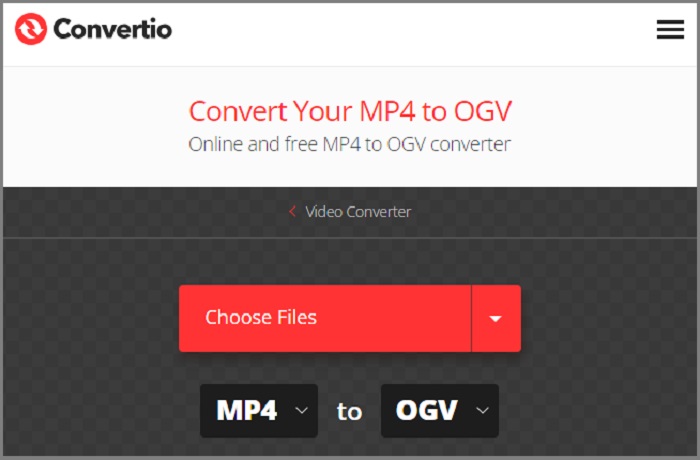
Salah satu cara tercepat untuk mengubah file MP4 ke OGV adalah CONvertio. Solusi online ini tidak hanya bekerja pada konversi langsung, namun saat Anda memilih keluaran asli dan proyeksi, program ini memberikan deskripsi format agar pengguna tetap dipandu. Selain itu, alat ini memiliki fitur konversi massal dan pengaturan keluaran yang dapat dimodifikasi.
Pro
- Ini memungkinkan pengguna untuk mengedit file video mereka menggunakan Editor Videonya.
- Alat ini menawarkan kompresor video untuk meminimalkan file besar.
Kontra
- Alat ini hanya dapat mengkonversi file dengan ukuran maksimal 300 MB.
4. Ffmpeg
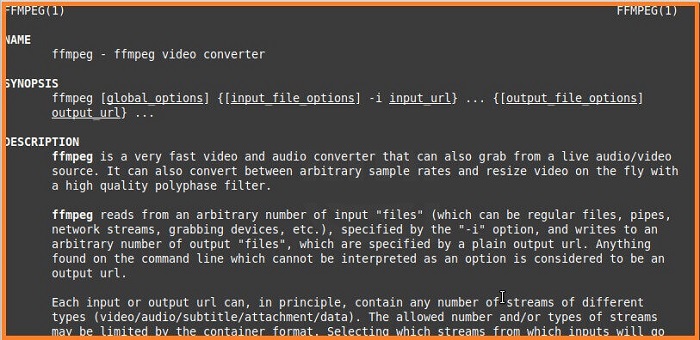
Tahukah Anda bahwa Anda juga dapat mengonversi file menggunakan baris perintah? Fast Forward MPEG, atau disingkat Ffmpeg, adalah solusi lintas platform untuk memenuhi kebutuhan perekaman, konversi, dan streaming Anda. Anda dapat mengonversi MP4 ke OGG dalam beberapa klik menggunakan baris perintah tertentu. Selain itu, alat ini juga dapat bekerja pada decoding, transcoding, streaming, dan pengkodean file media.
Pro
- Selain sebagai alat untuk mengkonversi OGV ke MP4 Ffmpeg.
Kontra
- Anda tidak dapat menyesuaikan kualitas keluaran menggunakan solusi baris perintah.
- Pemula mungkin menganggap program ini cukup menantang untuk dinavigasi.
5. Konverter VideoProc
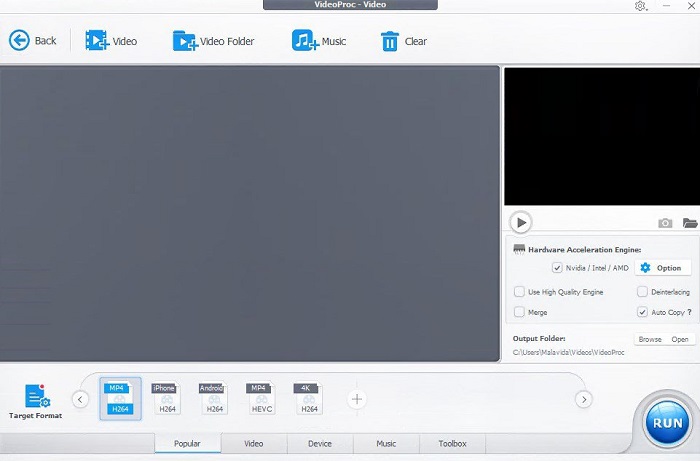
Dengan lebih dari 420+ format yang tersedia, VideoProc Converter juga memenuhi kriteria konverter 5 MP4 ke OGV terbaik. Alat komprehensif ini didukung oleh akselerasi GPU yang memanfaatkan pengalaman konversi Anda. Selain itu, ini dapat bekerja dengan baik dengan konversi Audio selain file video. Di sisi lain, VideoProc Converter memungkinkan Anda memotong, memotong, memutar, dan menyempurnakan file MP4 sebelum mengonversinya ke OGV.
Pro
- Ini adalah program yang mudah digunakan.
- VideoProc Converter memungkinkan Anda melampirkan tanda air yang dipersonalisasi pada video.
- Ini memungkinkan Anda mengatur kualitas keluaran hingga resolusi 1080p dan 4k.
Kontra
- Uji coba gratis dibatasi hanya 7 hari.
Bacaan Lanjutan:
Cara Mengesankan untuk Mengonversi OGV ke MKV Secara Efisien dan Mudah
Cara Mengonversi OGV ke M4V di Mac dan Windows [Cara Praktis]
Bagian 3. FAQ Tentang konverter MP4 ke OGV
Apa format OGVnya?
Video OGV adalah ekstensi file lossy sumber terbuka yang diproduksi oleh Xiph.org.
Bisakah saya mengonversi video MP4?
Pasti ya! Meskipun video MP4 sangat kompatibel, video tersebut juga dapat dikonversi ke format seperti FLV, OGG, WAV, dan lainnya untuk memenuhi kebutuhan Anda.
Apakah MP4 sama dengan OGV?
OGV dan MP4 keduanya merupakan format standar saat menyimpan video. Namun, memilih mana yang lebih baik tergantung pada kebutuhan menonton Anda. Jika Anda menggunakan pemutar HTML5 seperti Firefox, Anda harus menggunakan OGG.
Apakah OGG merupakan file audio?
Format OGV pada dasarnya adalah wadah file. Dengan kata lain, dapat mendukung berbagai media seperti audio, video, dan metadata.
Apakah OGG dapat dimainkan di Chrome?
Pastinya ya! Selain format AAC, mesin pencari seperti Chrome dan Safari mengizinkan OGV dapat dimainkan 100%.
Kesimpulan
Anda memiliki platform-platform terbaik untuk mengonversi OGV ke MP4 secara online maupun offline! MP4 dan OGG adalah format yang dapat disesuaikan dengan kebutuhan Anda, tergantung pada apa yang sedang Anda kerjakan.
-
 Cara Mengompres File OGV tanpa Kehilangan Kualitas
 Tidak dapat mengirim file OGV besar ke orang lain? Nah, artikel ini akan memperkenalkan Anda 2 cara mudah untuk membantu Anda mengompres file OGV dengan mudah.
-
 Konverter OGV ke FLV Hebat yang Tidak Boleh Anda Lewatkan [Terbukti]
 Jika Anda ingin tahu cara cepat mengonversi file OGV ke FLV, artikel ini akan menunjukkan kepada Anda satu-satunya konverter yang Anda perlukan.
-
 2 Pengonversi Pilihan Paling Banyak yang Dapat Diakses untuk Mengonversi File OGV ke AVI [2023]
 Ingin mengonversi file OGV ke AVI? Artikel ini memberikan dua solusi terbaik yang dapat Anda gunakan untuk membuat konversi Anda aman dan cepat tanpa kehilangan kredibilitas video.
