


 Video Converter Ultimate
 Perekam Layar
 Perbaikan Video
 Unduhan Aman
Konversi MP4 ke MPG: Beralih Format Video dengan Mudah dengan Pengonversi Terbaik
Pernah menemukan diri Anda dalam situasi serba salah ketika video MP4 keren Anda tidak bisa diputar di perangkat tertentu? Kami paham! Tapi tenang saja, karena kami punya solusi jitu: konversi MP4 ke MPG. Ya, inilah kunci untuk membuka kompatibilitas universal bagi video berharga Anda. Bayangkan skenario ini: Anda ingin memamerkan petualangan perjalanan Anda di TV lama tante saat kumpul keluarga. Sayangnya, TV itu hanya mendukung file MPG, membuat Anda kecewa berat. Di sinilah keajaiban MP4 ke MPG berperan!
Sekarang, inilah bagian terbaiknya. Kami akan memandu Anda melalui beberapa program terbaik yang melakukan tugasnya dengan sangat baik.

Bagian 1. MPG vs MP4
Baiklah, mari kita bicara tentang format video – MP4 dan MPG! Keduanya memiliki kelebihannya masing-masing, tetapi terkadang Anda mungkin perlu melakukan sedikit peralihan format. Berikut tabel untuk Anda teliti:
| MP4 | MPG | |
| Kualitas video | Video berkualitas tinggi dengan kompresi efisien | Kualitas video bagus, tetapi ukuran file lebih besar |
| Kesesuaian | Didukung secara luas oleh perangkat dan aplikasi modern | Sangat kompatibel dengan perangkat lama |
| Ukuran file | Ukuran file lebih kecil agar mudah dibagikan secara online | Ukuran file yang lebih besar, mungkin memerlukan penyimpanan lebih besar |
| Streaming Web | Sangat baik untuk streaming web dan berbagi | Dukungan terbatas untuk streaming online |
| Dukungan Perangkat | Mungkin tidak berfungsi pada beberapa perangkat lama | Berfungsi dengan baik di sebagian besar perangkat, termasuk perangkat lama |
| Mengedit | Memungkinkan pengeditan dengan kehilangan kualitas minimal | Pengeditan dapat menyebabkan penurunan kualitas |
| Penggunaan | Ideal untuk konten online dan media sosial | Cocok untuk DVD, perangkat lawas, dan pemutaran TV |
Bagian 2. Konversi MP4 ke MPG dengan Kualitas Tinggi
Kami punya satu alat mantap untuk Anda – konverter MP4 ke MPEG terbaik: Video Converter Ultimate! Jika Anda lelah terus-terusan terhalang karena video MP4 tidak bisa diputar di perangkat tertentu, alat ini adalah penyelamat Anda. Ini adalah “penyihir” konversi yang dengan mudah mengubah file MP4 Anda menjadi format MPG, sehingga bisa diputar mulus di perangkat apa pun, baik yang baru maupun yang lama.
Pembangkit tenaga listrik kecil ini bukan hanya kuda poni satu trik. Seiring dengan keajaiban MP4 hingga MPG, ia memamerkan serangkaian trik lain. Perlu mengonversi format video yang berbeda? Tidak masalah. Ingin mengekstrak audio dari video? Sepotong kue. Dan hei, ini bahkan memungkinkan Anda melakukan beberapa pengeditan video dasar untuk sentuhan pribadi itu. Bagian terbaik? Ini dirancang dengan mempertimbangkan kesederhanaan. Tidak ada sakit kepala teknis atau jargon yang rumit. Hanya kehebatan yang bisa ditangani oleh siapa pun.
Sekarang, berikut adalah langkah mudah untuk membuat keajaiban video Anda.
Langkah 1. Unduh dan Instal
Kunjungi situs resmi atau toko aplikasi favorit Anda untuk mendapatkan Video Converter Ultimate. Demi kenyamanan Anda, kami sudah menyiapkan tautan unduhan di bawah. Cukup klik tombol Free Download. Setelah terunduh, ikuti petunjuk instalasi yang sederhana – Anda pasti sudah paham. Dalam sekejap, alat ini akan siap digunakan di perangkat Anda.
Free DownloadUntuk Windows 7 atau yang lebih baruUnduhan Aman
Unduh GratisUntuk MacOS 10.7 atau yang lebih baruUnduhan Aman
Langkah 2. Tambahkan File MP4 Anda
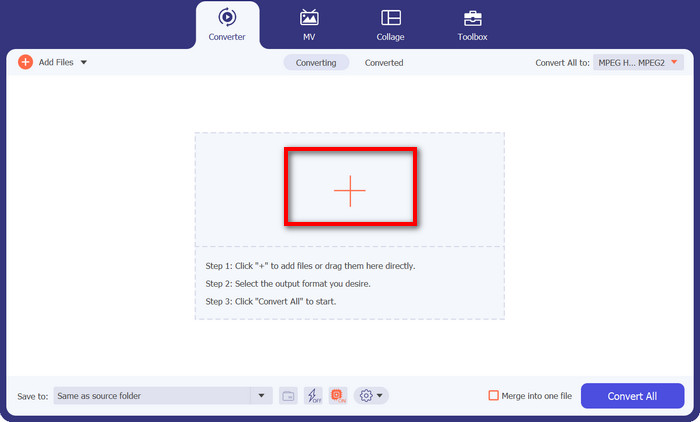
Luncurkan program, dan Anda akan melihat antarmuka yang bersih dan mudah digunakan. Tidak ada istilah teknis yang bikin pusing! Sekarang, klik tombol dengan tanda plus itu. Anda bisa memilih satu atau beberapa file MP4 – sesuka Anda.
Langkah 3. Pilih MPG sebagai Output
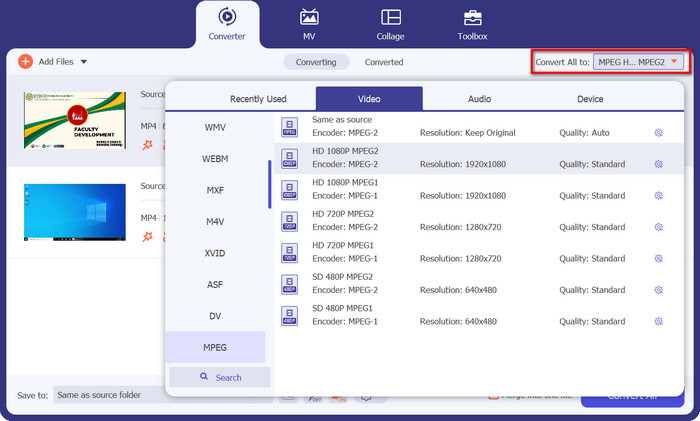
Saatnya memilih format keluaran yang Anda inginkan. Pergi ke bagian Convert All to dan cari MPEG dari menu drop-down. Anda akan melihat MPG di sana, dan itulah tiket ajaib Anda menuju kompatibilitas tanpa batas.
Langkah 4: Klik Convert, dan Jadi!
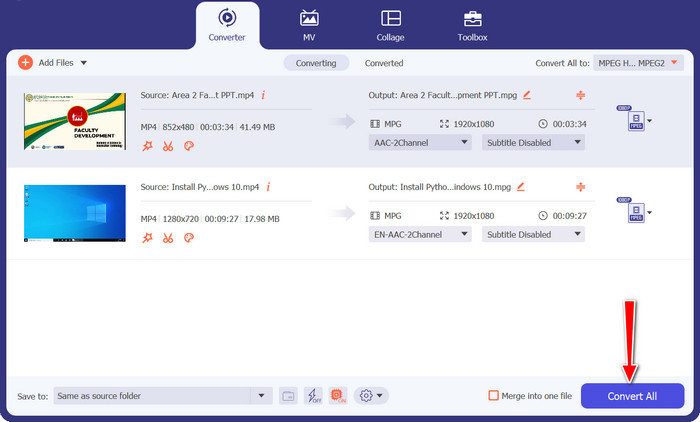
Siap melihat keajaibannya? Mantap! Cukup klik tombol Convert All yang besar dan ramah, lalu biarkan Video Converter Ultimate bekerja. Santai saja, dan dalam waktu singkat, video MP4 Anda akan berubah menjadi format MPG.
Bagian 3. Konversi MP4 ke MPG Online Gratis
Bersiaplah merasakan pengalaman konversi video yang mulus tanpa perlu mengunduh perangkat lunak apa pun atau melakukan pengaturan yang rumit. Konverter online yang andal ini dirancang dengan kesederhanaan sebagai prioritas, sehingga memudahkan Anda mengonversi video MP4 ke format MPG dan format lainnya. Baik Anda menggunakan PC Windows, Mac, atau bahkan perangkat seluler, Free MP4 Converter Online dapat diakses dari browser apa saja. Konversi MP4 ke MPG secara online, kapan saja, di mana saja.
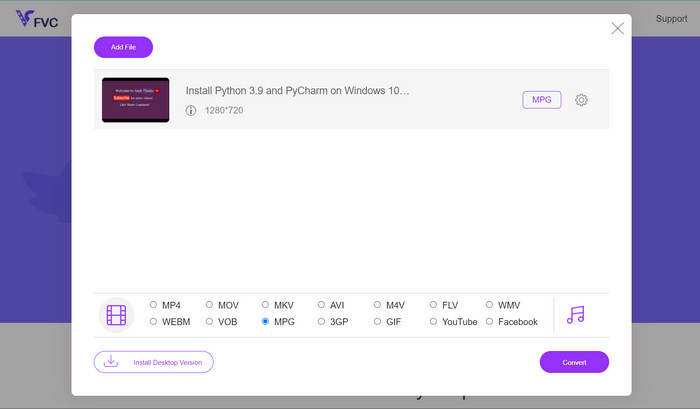
Langkah 1. Pertama, buka situs Free MP4 Converter Online menggunakan browser andalan Anda. Setelah sampai di sana, Anda akan melihat tombol Add Files to Convert yang ramah di mata.
Langkah 2. Setelah video MP4 Anda siap, saatnya memilih format keluaran yang diinginkan. Cari MPG dari daftar format yang tersedia, lalu klik dengan mantap.
Langkah 3. Siap untuk sentuhan akhir yang ajaib? Cukup tekan tombol Convert, dan biarkan konverter online ini bekerja. Dalam waktu singkat, video MP4 Anda akan berubah menjadi format MPG.
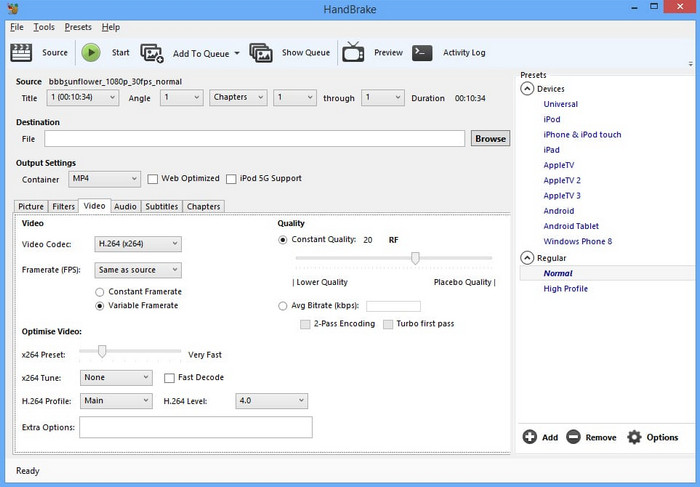
Bagian 4. Konversi MP4 ke MPG dengan Handbrake
Khawatir tentang kompatibilitas? Jangan! Handbrake mendukung berbagai format output, menjadikannya pendamping serbaguna untuk semua kebutuhan video Anda. Konversi MP4 ke MPG dengan freeware, atau bahkan sebaliknya. Konverter ini memiliki fleksibilitas untuk menangani semuanya.
Langkah 1. Luncurkan Handbrake dan Anda akan disambut dengan antarmuka sederhana tanpa banyak basa-basi. Klik tombol Open Source dan pilih video MP4 yang ingin Anda konversi dari komputer Anda.
Langkah 2. Cari MPG di tab Summary di bawah Format. Jika Anda perlu mengatur pengaturan tertentu, Anda juga bisa melakukannya di sini.
Langkah 3. Terakhir, klik tombol Start Encode, dan Handbrake akan mulai bekerja! Video MP4 Anda akan dikonversi ke format MPG dalam sekejap.
Bagian 5. Konversi MP4 ke MPG di VLC
Tidak perlu menjadi ahli teknologi di sini. VLC menawarkan antarmuka yang sederhana dan lugas yang tidak akan membuat Anda menggaruk-garuk kepala. Ini dirancang dengan mempertimbangkan kemudahan pengguna, sehingga Anda dapat langsung terjun ke konversi video tanpa kesulitan. Kami menyediakan panduan cepat dan mudah untuk Anda dalam sekejap dengan program ini untuk mengonversi MP4 ke MPG secara gratis.
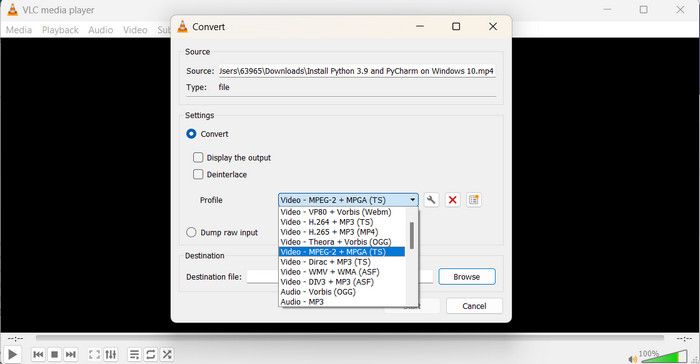
Langkah 1. Setelah Anda menginstal VLC, buka pemutar tersebut. Lalu klik Media di menu atas dan pilih Convert/Save. Di jendela Open Media, tekan tombol Add dan pilih video MP4 yang ingin Anda konversi.
Langkah 2. Di jendela Convert, klik menu drop-down Profile, lalu pilih Video - MPEG-1 sebagai format keluarannya, sesuai kebutuhan Anda. Terakhir, pilih folder tujuan untuk video yang sudah dikonversi dan klik Start.
Bacaan Lanjutan:
7 Konverter MP4 ke MOV Teratas yang Tak Tertandingi (PC/Online/Mobile)
FLV ke MPG – Cara Mengonversi FLV ke MPG di Mac, PC, dan Online secara Gratis
Bagian 6. FAQ tentang MP4 ke MPG
Untuk apa format MPG digunakan?
Format MPG (MPEG) biasanya digunakan untuk pemutaran video pada perangkat lama seperti pemutar DVD dan TV.
Bisakah saya mengonversi video tanpa kehilangan kualitas?
Beberapa konverter video menawarkan opsi konversi lossless, namun sebagian besar konversi menyebabkan penurunan kualitas.
Apakah konverter video online aman digunakan?
Sebagian besar pengonversi video online terkemuka aman digunakan, namun penting untuk menggunakan situs web tepercaya dan berhati-hati saat mengunggah file.
Apa perbedaan antara format kontainer dan codec?
Format wadah (misalnya, MP4) menampung video, audio, dan data lainnya, sedangkan codec (misalnya, H.264) mengompresi dan mendekompresi data video dan audio.
Bisakah saya mengonversi video ke resolusi 4K?
Beberapa konverter video mendukung konversi video ke resolusi 4K, namun kualitas keluarannya mungkin berbeda-beda berdasarkan video sumbernya.
Kesimpulan
Baik, semua, sampai di sini dulu! Kita sudah mempelajari semua hal tentang konversi video dan bagaimana cara membuat video kita bisa diputar dengan baik di perangkat apa pun. Dari mengonversi MP4 ke MPG hingga menjelajahi berbagai format dan alat, semuanya sudah kita bahas.
-
 4 Pemutar MPG/MPEG Terbaik untuk Windows/Mac/Android/iPhone [2023]
 Jika Anda ingin memutar file MPG atau MPEG favorit Anda dengan lancar, Anda dapat mempelajari lebih lanjut tentang 4 pemutar MPG / MPEG teratas untuk komputer dan ponsel dari artikel ini.
-
 AVI VS MP4 - Perbedaan dan Persamaan antara Format AVI dan MP4
 Mana yang lebih baik format video, AVI atau MP4? Jika Anda ingin mendapatkan perbandingan mendetail, Anda dapat memeriksa artikel AVI VS MP4 ini. Anda dapat mengetahui perbedaan dan persamaan antara AVI dan MP4 dalam banyak aspek.
-
 Cara Convert MOV ke MPG dengan Mudah (Offline dan Online)
 Dalam panduan ini, Anda akan menemukan cara tercepat untuk mengonversi MOV ke MPG. Kami telah menciptakan solusi offline dan online terbaik untuk Anda.
