


 Video Converter Ultimate
 Perekam Layar
 Perbaikan Video
 Unduhan Aman
Cara Mengonversi MP4 ke OGG Gratis & Online
MP4 adalah wadah multimedia digital yang menyimpan video, audio dan subtitle. OGG adalah format wadah gratis dan terbuka untuk streaming yang efisien dan kompresi file. Terkadang Anda perlu mengonversi format MP4 ke OGG untuk diputar di beberapa pemutar audio. Posting ini akan membagikan 3 konverter MP4 ke OGG gratis untuk mengonversi MP4 ke OGG tanpa kerumitan.

Bagian 1. Cara Profesional untuk Mengonversi MP4 ke OGG secara Gratis
Jika Anda ingin menemukan konverter MP4 ke OGG terbaik, Anda dapat mencoba FVC Free FLV to MP4 Converter. Ini adalah perangkat lunak konversi video gratis dan mudah digunakan untuk Windows dan Mac. Anda dapat mengonversi berbagai video seperti MP4, FLV, MOV, MKV, MTS, M2TS, dan lain-lain ke OGG dengan mudah. Selain itu, perangkat lunak ini menawarkan fitur pengeditan untuk menambahkan tema, menyesuaikan penulis, waktu, penyedia di bagian awal/akhir video.

- Konversikan video dalam format MP4, MKV, AVI, MOV, MP3, AAC, AIFF, dll. Ke OGG.
- Ekspor video OGG dan file audio lossless dari file MP4 dalam 1 klik.
- Izinkan pengguna untuk mengedit penyedia, judul, penulis, waktu dan menambahkan tema.
- Batch mengkonversi MP4 ke OGG untuk diputar di beberapa pemutar audio portabel.
Unduh GratisUntuk Windows 7 atau yang lebih baruUnduhan Aman
Unduh GratisUntuk MacOS 10.7 atau yang lebih baruUnduhan Aman
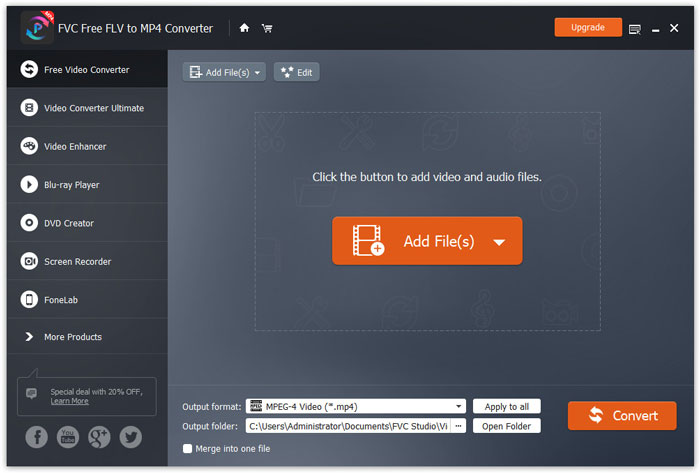
Langkah 1. Setelah mengunduh, instal dan jalankan FVC Free FLV to MP4 Converter di Windows atau Mac Anda. Klik tombol Add Files untuk memuat file MP4 dari komputer Anda. Jika Anda ingin mengonversi beberapa file MP4 sekaligus, cukup unggah semuanya.
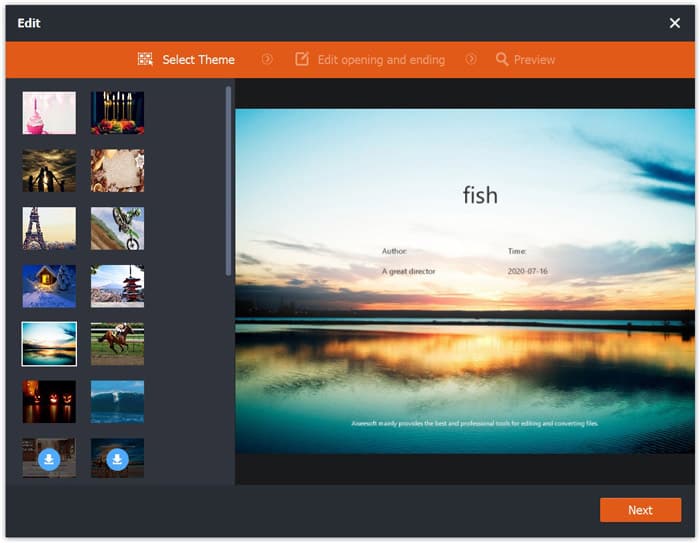
Langkah 2. Klik pada file MP4 Anda dan klik tombol Edit. Anda dapat menambahkan tema ke file MP4 Anda, serta mengedit konten pembuka dan penutup. Lalu klik Next untuk pratinjau dan menyimpan perubahan.
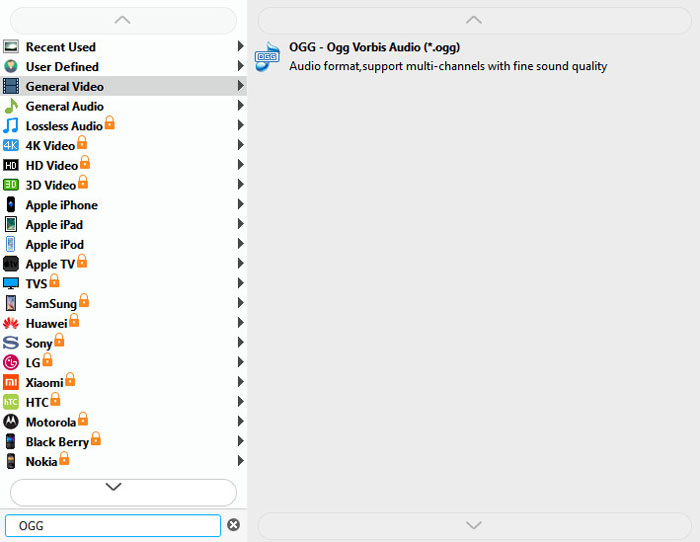
Langkah 3. Klik tombol tarik-turun Output format di bagian bawah, lalu cari format OGG dari daftar. Anda dapat memilih OGG - Ogg Vorbis Audio (*.ogg) sebagai format keluarannya.
Langkah 4. Telusuri folder keluaran di komputer Anda dan klik tombol Convert untuk mulai mengubah MP4 ke OGG.
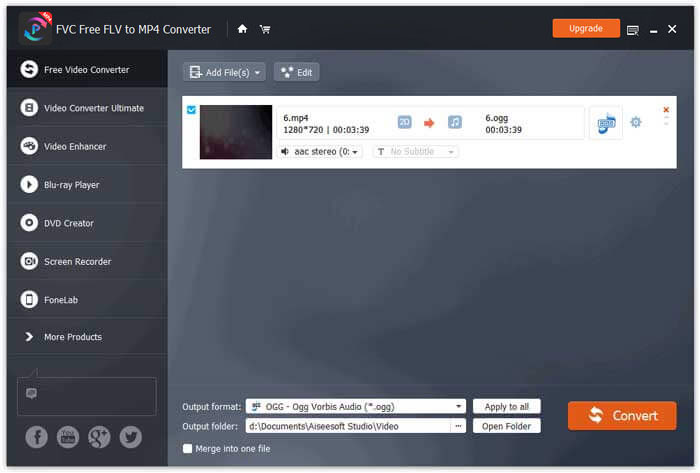
Dengan FVC Free FLV to MP4 Converter, Anda juga dapat menggabungkan beberapa file MP4 menjadi satu.
Bagian 2. Bagaimana Mengubah MP4 ke OGG Online
Dibandingkan dengan pengonversi desktop, menggunakan pengonversi online adalah metode hemat waktu untuk mengonversi MP4 ke OGG. Ada banyak konverter MP4 ke OGG online yang dapat Anda pilih. Pada bagian ini, kami akan membagikan 2 konverter MP4 ke OGG untuk mengubah file MP4 Anda menjadi OGG online gratis.
1. Zamzar
Zamzar adalah platform online multifungsi untuk konverter video, konverter audio, konverter gambar, dan konverter e-book. Dengan Zamzar, Anda dapat dengan mudah mengonversi MP4 ke berbagai format lain seperti OGG. Berikut adalah langkah-langkah sederhana untuk mengonversi MP4 ke OGG dengan Zamzar online.
Langkah 1. Buka www.zamzar.com/convert/mp4-to-ogg/, dan klik tombol Add Files untuk mengunggah file MP4 Anda.
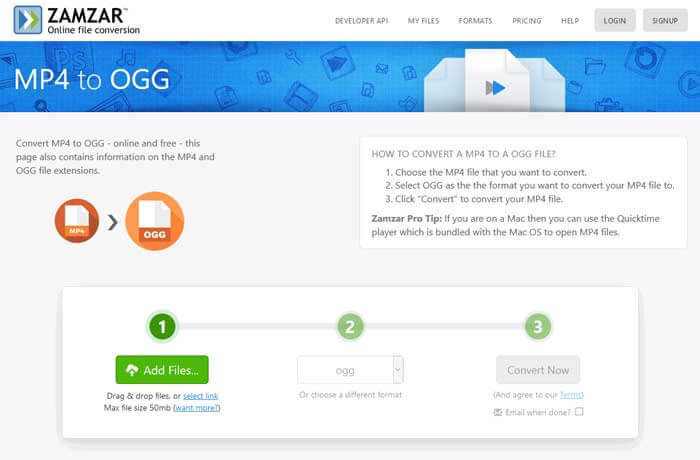
Langkah 2. Format keluaran bawaan sudah diatur ke ogg. Klik tombol Convert Now untuk mulai mengonversi MP4 ke OGG.
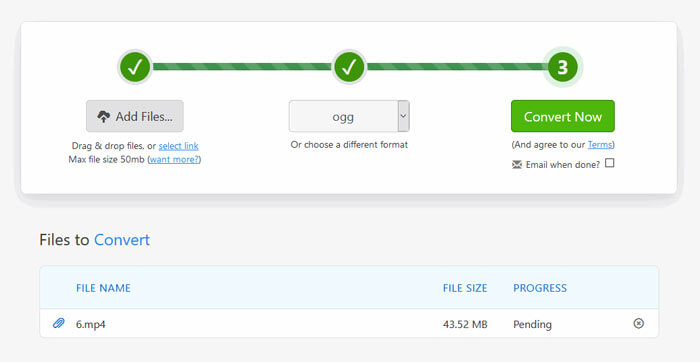
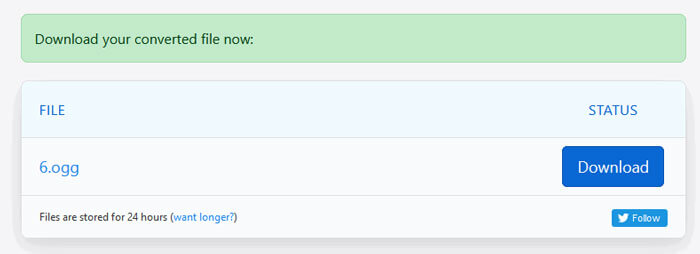
Langkah 3. Lalu Anda akan diarahkan ke halaman lain. Anda dapat mengklik tombol Download untuk menyimpan file OGG yang telah dikonversi ke komputer Anda.
Saat Anda mengonversi file MP4 dengan ukuran besar, proses konversi menggunakan Zamzar mungkin macet. Anda perlu menyegarkan halaman dan mengonversinya lagi. Jika Anda menginginkan proses konversi yang lebih lancar, FVC Free FLV to MP4 Converter bisa sangat membantu. (Lihat lebih banyak pemutar MP4 di sini)
2. Convertio
Convertio adalah alat yang mudah untuk mengkonversi file dokumen, gambar, spreadsheet, ebook, audio dan video. Menggunakan Convertio, file MP4 dapat diubah menjadi MP3 dengan akurasi yang sangat baik. Ikuti langkah-langkah di bawah ini untuk mengekspor OGG dari MP4 dengan Convertio.
Langkah 1. Buka Convertio MP4 to OGG Converter (convertio.co/mp4-ogg/). Klik tombol Choose Files untuk mengunggah file MP4 Anda. Anda juga dapat menambahkan file MP4 dari Dropbox, Google Drive, atau menyalin URL.
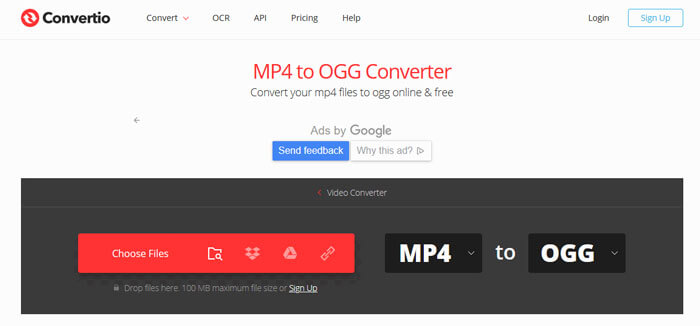
Langkah 2. Pilih OGG dari ikon tarik-turun, lalu klik ikon roda gigi untuk mengatur codec, kualitas, saluran audio, frekuensi, dan volume. Anda dapat memotong file MP4 ke bagian yang diinginkan.
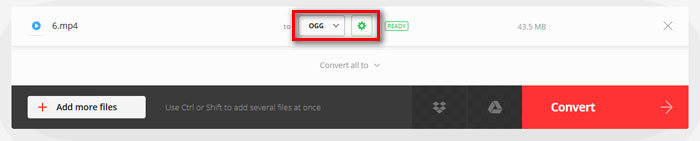
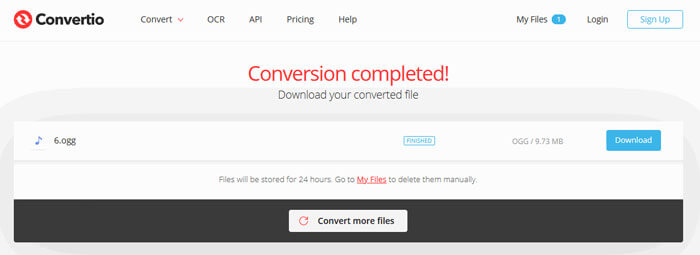
Langkah 3. Setelah semua diatur, klik tombol Convert untuk mengonversi MP4 ke OGG. Setelah konversi selesai, klik tombol Download untuk menyimpan file OGG yang telah dikonversi ke komputer Anda.
Bagian 3. Tanya Jawab tentang Mengonversi MP4 ke OGG
1. Apakah format video OGG itu?
OGG adalah format wadah gratis dan terbuka yang dapat berisi musik, video, teks seperti subtitle, dan metadata.
2. Pemain mana yang bisa memainkan file OGG?
Ada banyak pemain portabel yang dapat memainkan file OGG seperti VLC, Windows Media Player, Adobe Audition, Audials, MPlayer dan banyak lagi.
3. Bagaimana cara mengkonversi MP4 ke MP3?
Dengan bantuan FVC Free Online Video Converter, Anda dapat dengan mudah mengonversi MP4 ke MP3 secara online. Buka situs online ini dan klik tombol Add Files to Convert untuk memasang peluncurnya. Lalu pilih file MP4 dari komputer, dan centang MP3 sebagai format keluaran. Klik tombol Convert untuk mengonversi MP4 ke MP3.
Kesimpulan
Kami terutama memperkenalkan 3 konversi MP4 ke OGG untuk mengonversi file MP4 ke OGG secara online dan offline. Dengan FVC Free FLV to MP4 Converter desktop, Anda dapat dengan mudah mengekspor file OGG open source dari MP4. Jika Anda memiliki solusi yang lebih baik, jangan ragu untuk memberikan komentar.
-
 WebM ke MP4 | Gratis Konversi WebM ke MP4
 Bagaimana cara menonton file WebM tanpa browser web? Anda perlu mengonversi WebM ke MP4. Berikut adalah 10 konverter WebM ke MP4 gratis teratas untuk mengubah WebM ke MP4 online dan di komputer Mac dan Windows.
-
 MP4 ke FLV | 3 Konverter Gratis Teratas
 Posting ini adalah panduan lengkap untuk konversi MP4 ke FLV. Anda dapat menggunakan 3 konverter gratis teratas untuk mengubah MP4 menjadi FLV secara online, di komputer Windows atau Mac dengan mudah.
-
 6 Cara Teratas untuk Menggabungkan File MP4 di Windows / Mac / Online
 Ingin menggabungkan file MP4 mentah untuk proyek Anda? Posting ini mengumpulkan 6 cara teratas untuk membantu Anda menggabungkan video MP4 di Windows, Mac, dan online dengan mudah.
