


 Video Converter Ultimate
 Perekam Layar
 Perbaikan Video
 Unduhan Aman
4 Konverter MP4 ke SWF Terbaik untuk Mengonversi MP4 ke SWF dengan Kualitas Tinggi
Saat Anda membagikan beberapa video MP4 ke situs web atau situs media sosial, Anda harus memiliki foto yang menarik. Tentu saja, Anda juga dapat mengonversi file MP4 ke SWF, yang dapat diputar secara otomatis. Pelajari lebih lanjut tentang 4 konverter MP4 ke SWF gratis dan pilih yang diinginkan sesuai kebutuhan Anda.

Bagian 1: 4 Metode Terbaik untuk Mengonversi MP4 ke SWF
Top 1: Konversi MP4 ke SWF melalui FVC Free Online Video Converter
FVC Free Online Video Converter adalah konverter MP4 ke SWF serbaguna untuk mengonversi format video/audio populer apa pun ke SWF dengan mudah. Selain itu, alat ini memungkinkan Anda mengedit bitrate video, sampel, frame rate, dan resolusi sesuai kebutuhan Anda.
- 1. Antarmuka pengguna yang sederhana untuk mengonversi file MP4 ke SWF secara online dalam beberapa klik.
- 2. Sesuaikan bitrate video, laju sampel, laju bingkai, resolusi, volume, dan lainnya.
- 3. Dukungan untuk mengkonversi sebagian besar video utama dengan kualitas asli.
- 4. Konversi MP4 ke SWF tanpa batasan ukuran, tanda air, atau registrasi.
Langkah 1. Buka konverter MP4 ke SWF online, Anda dapat mengklik tombol Add Files to Convert. Jika ini pertama kalinya Anda mengonversi file MP4, Anda harus mengunduh peluncur pengunduh video terlebih dahulu.

Langkah 2. Setelah itu, Anda dapat memilih video MP4 yang diinginkan yang ingin Anda konversi dari komputer Anda. Selain itu, Anda juga dapat mengklik tombol Add File untuk memuat lebih banyak file MP4 untuk konversi batch.
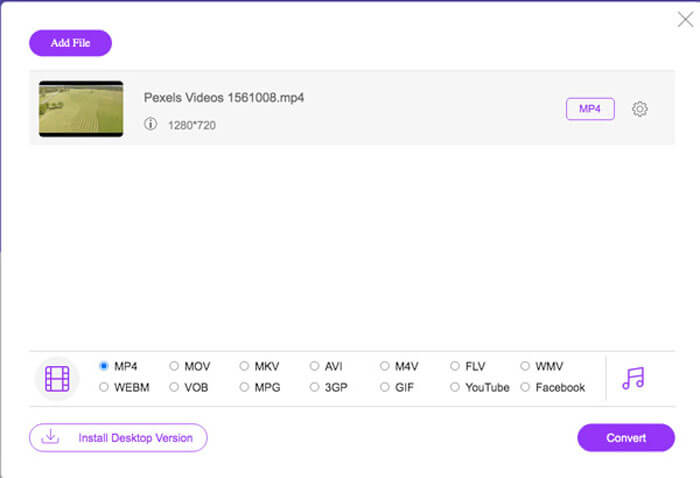
Langkah 3. Pilih SWF atau FLV sebagai format keluaran dari bagian bawah. Anda juga dapat mengklik ikon Gear untuk menyesuaikan encoder video, frame rate, video bitrate, sample rate, dan pengaturan lainnya.
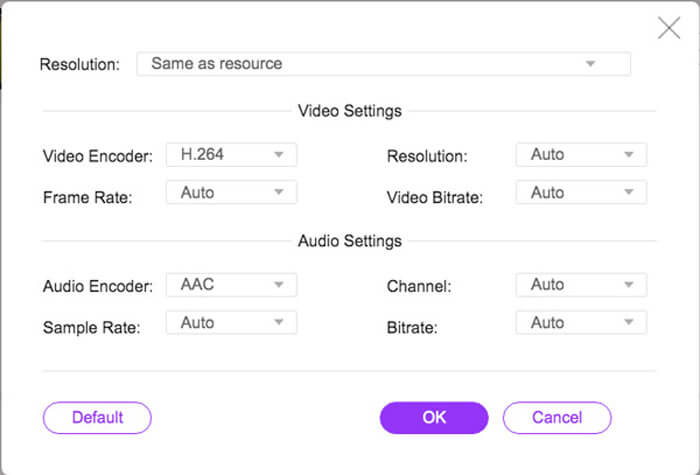
Langkah 4. Setelah itu, Anda dapat mengklik tombol Convert untuk mengonversi MP4 ke SWF di komputer Anda. Alat ini memungkinkan Anda mengonversi beberapa file MP4 ke format video yang diinginkan dalam satu proses batch. (Lihat cara mengonversi SWF ke MP4)
2 Teratas: Transkode MP4 ke SWF dengan Convertio
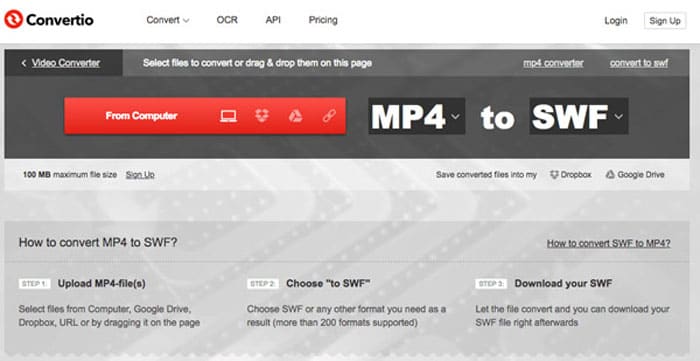
Convertio adalah pengonversi MP4 ke SWF online lainnya yang mendukung lebih dari 45 format file. Ini memungkinkan Anda memuat file MP4 dari berbagai sumber, seperti hard drive, Dropbox, Google Drive, dan lainnya. Anda juga dapat mengubah pengaturan untuk video keluaran.
1. Sediakan berbagai metode untuk menambahkan file MP4, seperti hard drive, cloud, dll.
2. Mendukung lebih dari 200 format, termasuk MP4, SWF, audio, dan lainnya.
3. Kirim email untuk memberi tahu Anda saat konversi MP4 ke SWF selesai.
4. Sesuaikan kualitas video, frame rate, CBR, codec audio, dan lainnya.
Langkah 1. Buka Convertio di browser apa pun, Anda dapat memilih opsi MP4 sebagai format input dan SWF sebagai format output. Lalu Anda dapat memilih video MP4 dari hard drive komputer, Google Drive, dan Dropbox.
Langkah 2. Jika Anda perlu menyesuaikan pengaturan video, Anda dapat mengklik opsi Advanced untuk mengatur frame rate, CBR, VBR, codec audio, volume audio, dan pengaturan lainnya agar konversi MP4 ke SWF sesuai keinginan.
Langkah 3. Setelah itu, Anda dapat mengklik tombol Convert untuk mengubah video yang dimuat menjadi format SWF. Proses konversi akan memakan waktu tertentu. Anda dapat mengklik tombol Download untuk menyimpan file SWF.
3 Teratas: Alihkan MP4 ke SWF melalui CloudConvert
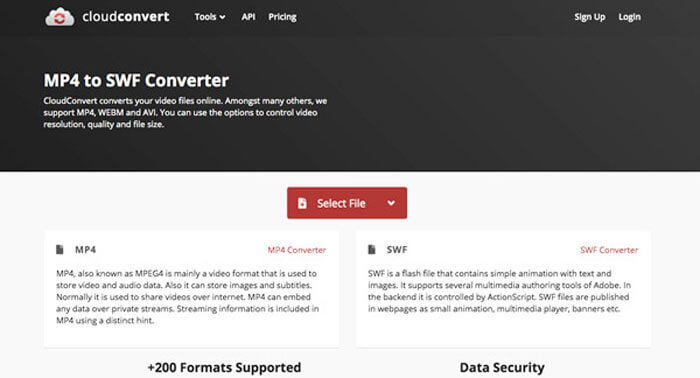
CloudConvert memungkinkan Anda mengonversi sebagian besar format file, seperti MP4, SWF, WebM, AVI, dan lainnya. Selain itu, Anda juga dapat menggunakan opsi konverter MP4 ke SWF untuk mengontrol resolusi video, kualitas video, dan ukuran file dengan mudah.
1. Mendukung lebih dari 200 format file, seperti audio, video, dokumen, dll.
2. Tidak perlu khawatir tentang keamanan data saat mengonversi file.
3. Pengaturan yang disesuaikan, kualitas video dan banyak pilihan lainnya sesuai kebutuhan Anda.
4. Sediakan API lanjutan yang memungkinkan integrasi khusus dengan aplikasi Anda.
Langkah 1. Buka CloudConvert dan pilih MP4 sebagai format input dan SWF sebagai format output. Tentu saja, Anda juga dapat memasukkan tautan berikut ke browser https://cloudconvert.com/mp4-to-swf.
Langkah 2. Klik tombol Select File, Anda dapat memilih file MP4 dari komputer, URL, Google Drive, Dropbox, dan bahkan OneDrive. Anda dapat mengklik Add more Files untuk memuat lebih banyak video.
Langkah 3. Alat ini juga memungkinkan Anda menyesuaikan pengaturan video dan audio. Setelah itu, Anda cukup mengklik tombol Convert untuk mengonversi file MP4 menjadi video SWF sesuai kebutuhan Anda.
Top 4: Ubah MP4 ke SWF dengan XMedia Recode
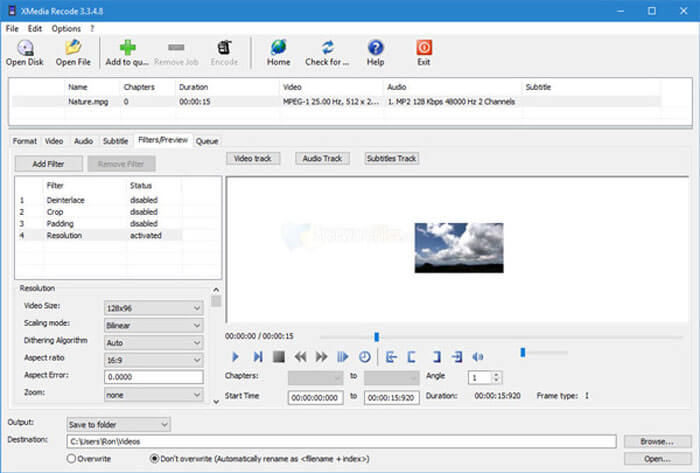
XMedia Recode adalah pengonversi MP4 ke SWF Windows gratis untuk mengonversi beberapa video MP4 ke format SWF dengan proses batch. Ini juga memungkinkan Anda untuk mengedit video dengan beberapa fitur canggih, seperti Box Blur, Color Curves, Denoise dan banyak lagi.
1. Mendukung lebih banyak format video input dan output untuk konversi.
2. Sediakan alat Kalkulator Bitrate untuk menyesuaikan file SWF keluaran.
3. Fitur pengeditan video lanjutan untuk menghilangkan noise, flip, koreksi warna, dll.
4. Sesuaikan kecepatan bingkai, mode warna, kecepatan bit, panjang GOP, dan pengaturan lainnya.
Langkah 1. Setelah Anda meluncurkan program, Anda dapat mengklik tombol Open File untuk menambahkan semua video MP4 yang ingin Anda konversi ke SWF. Lalu atur format keluaran ke SWF dari tab Format.
Langkah 2. Saat Anda ingin mengedit video, Anda dapat masuk ke Filters dan menggunakan berbagai opsi pengeditan yang tersedia. Untuk menyesuaikan file keluaran SWF, Anda dapat membuka tab Video and Audio dan mengatur konfigurasi masing-masing.
Langkah 3. Setelah itu, Anda dapat mengklik tombol Encode untuk memulai konversi MP4 ke SWF. Hanya perlu waktu singkat untuk mentranskode MP4 ke format video yang diinginkan.
Bagian 2: Tanya Jawab tentang Mengonversi MP4 ke SWF
1. Apa itu Format File SWF?
File SWF adalah format file Adobe Flash yang dikembangkan oleh Macromedia dan sistem Adobe. Ia juga dikenal sebagai ShockWave Flash, tetapi kemudian diubah menjadi Small Web Format. Saat Anda mengonversi MP4 ke SWF secara langsung, itu mungkin tidak berisi animasi atau applet interaktivitas dan fungsi.
2. SWF VS MP4, Apa Perbedaannya?
Baik SWF dan MP4 adalah format video populer untuk situs streaming online. Tetapi perangkat seluler, seperti iPhone dan iPad tidak mendukung file SWF. Satu-satunya keuntungan untuk mengonversi MP4 ke SWF adalah format video dapat berinteraksi lebih baik dengan audiens Anda.
3. Mungkinkah Mengonversi MP4 ke SWF dengan VLC Media Player?
Tidak. VLC Media Player adalah konverter video serbaguna, yang memungkinkan Anda untuk mengubah SWF menjadi MP4, tetapi tidak mendukung SWF sebagai format keluaran. Tentu saja, Anda dapat menggunakan beberapa plugin untuk mengonversi MP4 ke SWF dengan mudah, atau memilih alternatif online.
Kesimpulan
Bila Anda ingin mengonversi MP4 ke SWF, Anda dapat mempelajari lebih lanjut tentang 5 konverter MP4 ke SWF gratis terbaik dari artikel. Jika Anda perlu mengonversi beberapa file MP4 secara online tanpa batasan, FVC Free Online Video Converter harus menjadi pilihan pertama yang harus Anda pertimbangkan.
-
 Cara Mengkonversi File Video FLV Anda ke MP4 tanpa Membayar sepeser pun
 Panduan ini membagikan empat metode gratis untuk mengonversi file video FLV Anda ke format MP4 di Windows 10/8/7 / XP dan Mac OS X, sehingga Anda dapat menikmati video di perangkat apa pun.
- Dari 50MB hingga 5MB - Cara Mengompres File MP4 dalam Hitungan Detik
Anda dapat menemukan perangkat lunak pengonversi video gratis dari studio FVC. Semua format video / audio didukung, termasuk MP4, MOV, TS, AVI, WMV, FLAC, MP3, dll.
-
 Bagaimana cara mengonversi MP4 ke WAV Online secara Gratis
 Berusaha keras untuk mengonversi MP4 ke WAV? Tidak tahu konverter mana yang dapat membantu Anda dengan sempurna tanpa membayar sepeser pun? Baca posting ini dan semua pertanyaan Anda akan dijawab.
