


 Video Converter Ultimate
 Perekam Layar
 Perbaikan Video
 Unduhan Aman
Konversi MP4 ke WebP Online dengan Alat Gratis Terbaik
Video yang hanya berdurasi satu detik terdiri dari beberapa gambar terpisah. Gambar atau bingkai ini biasanya muncul saat Anda mengedit video. Dan jika Anda seorang blogger yang mengkhususkan diri dalam bidang makanan, salah satu cara yang baik untuk membuat konten video Anda menarik adalah dengan membuat gambar mini untuk video tersebut. Tidak hanya itu, Anda juga perlu memilih bingkai yang tepat untuk digunakan sebagai gambar mini untuk video Anda. Untuk mengatasi hal ini, Anda dapat memilih gambar terbaik dari konten video Anda untuk dijadikan gambar pratinjau yang sempurna melalui konversi video ke foto. Dan jika Anda bertanya kepada kami, WebP akan menjadi format gambar yang baik untuk dicoba.
Untungnya, artikel ini akan menunjukkan kepada Anda tiga cara berbeda untuk mengonversi MP4 ke WebP secara online. Lihatlah konten di bawah ini dan cari tahu metode mana yang paling cocok untuk Anda guna mendapatkan foto dari video Anda.

Bagian 1. Ketahui Lebih Banyak tentang WebP
Apa itu WebP?
WebP adalah jenis format gambar yang dirancang oleh Google. Format ini dibuat untuk memperkecil ukuran gambar web dan mempercepat pemuatannya. Selain itu, jenis format ini menggunakan metode kompresi canggih yang membantu mengurangi ukuran file gambar tanpa mengubah kualitasnya terlalu banyak.
Hal ini menguntungkan bagi situs web untuk dimuat lebih cepat, dan ini juga penting bagi pengguna dengan koneksi internet lambat atau perangkat seluler. Karena file WebP mendukung kompresi lossy dan lossless, ini juga memberi Anda fleksibilitas untuk memilih keseimbangan yang tepat antara ukuran dan kualitas file. Tahukah Anda bahwa Anda dapat mengonversi MP4 ke WebP secara daring? Ini hanya disarankan jika Anda ingin meningkatkan pengalaman menjelajah web dengan membuat gambar lebih efisien dan dapat dimuat sambil mempertahankan kualitas yang layak dari file video yang saat ini Anda miliki. Karena itu, mari kita lanjutkan ke konverter video-ke-gambar yang layak, yang proses konversinya disajikan di bawah ini.
Bagian 2. 3 Cara Terbaik untuk Mengonversi MP4 ke WebP Online
1. MP4.ke
Jika Anda ingin membuka potensi video MP4 Anda menjadi gambar web, maka konverter pertama yang harus Anda coba adalah MP4.to ini. Ini adalah alat konversi file online yang secara khusus dirancang untuk mengonversi berbagai jenis file multimedia ke dalam format MP4. Dengan alat yang luar biasa ini, Anda dapat mengonversi MP4 ke WebP online dan ke format lain yang berbeda seperti GIF, MOV, WAV, AVI, MP3, MPEG, dan banyak lagi. Di sisi lain, Anda dapat mengunggah berbagai jenis file, seperti video, klip audio, dan bahkan gambar, dan mengonversinya ke dalam format MP4. Ini dapat berguna untuk mempersiapkan video untuk streaming online dan memastikan kompatibilitas di berbagai perangkat dan platform yang mendukung format MP4. Sementara itu, berikut adalah langkah-langkah sederhana yang dapat Anda ikuti dalam menggunakan MP4.to untuk mengonversi video Anda ke WebP.
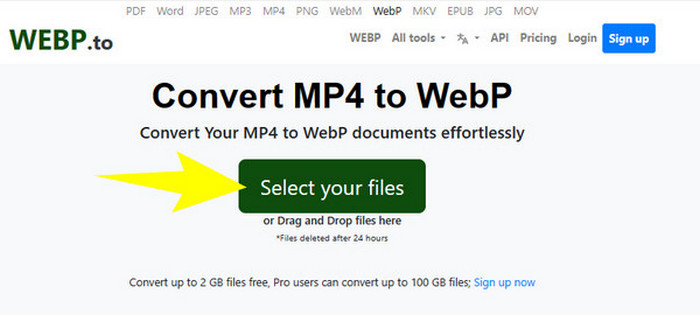
Langkah 1. Di situs web alat tersebut, klik tombol Select your files untuk mengunggah file MP4 Anda.
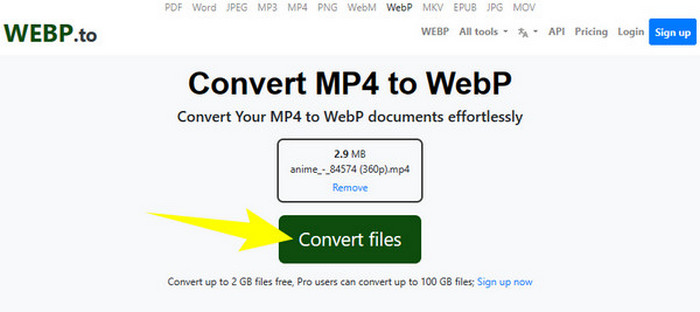
Langkah 2. Setelah file MP4 diunggah, alat ini akan menampilkan tombol Convert Files, yang perlu Anda klik untuk memproses konversi.
Langkah 3. Tunggu sementara proses berlangsung. Setelah itu, unduh file yang telah dikonversi dan ekspor ke komputer Anda.
2. MConverter
Konverter MP4 ke WebP atau WebP ke MP4 gratis secara online berikutnya yang wajib Anda coba adalah MConvert. Konverter online ini menyediakan solusi praktis bagi Anda yang perlu mengubah file ke berbagai format, karena juga mendukung berbagai jenis format untuk video, audio, dan gambar. Selain itu, konverter online ini menawarkan antarmuka yang ramah pengguna dan sering kali tidak memerlukan instalasi perangkat lunak, sehingga dapat diakses oleh siapa saja yang memiliki koneksi internet. Namun, seperti masalah pada banyak alat online lainnya, MConverter juga menampilkan iklan pada antarmukanya. Oleh karena itu, jika hal ini sama sekali bukan masalah bagi Anda, lanjutkan dengan langkah-langkah sederhana yang kami buat di bawah ini.
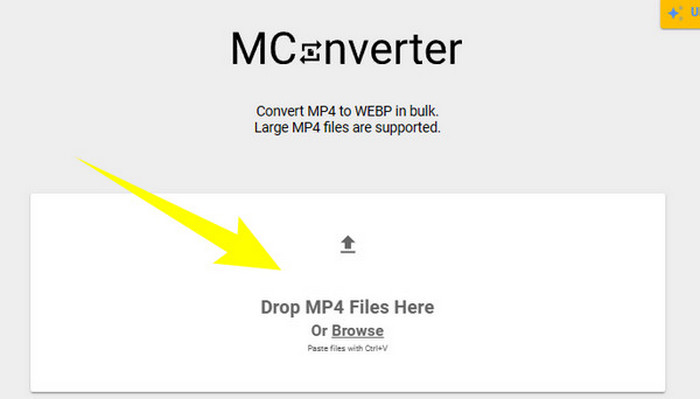
Langkah 1. Setelah Anda masuk ke situs web konverter, Anda dapat menjatuhkan (drag and drop) file MP4 yang perlu Anda konversi ke sana.
Langkah 2. Setelah menjatuhkan file, klik WebP dari opsi di bagian kuning sebagai format keluaran Anda.
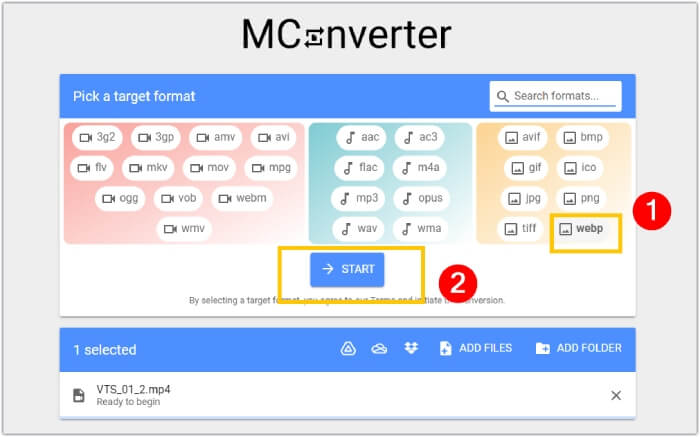
Langkah 3. Lalu, klik tombol START untuk memulai proses konversi.
3. Ezgif.com
Dengan alat Video to WebP dari Ezgif, Anda dapat dengan mudah mengonversi file MP4 Anda secara gratis ke format WebP. Selain itu, dengan alat online ini, Anda dapat melakukan tugas seperti mengubah ukuran, mengoptimalkan, memotong, dan menambahkan efek pada file multimedia Anda. Lebih jauh, perangkat lunak konverter MP4 ke WebP ini populer karena kesederhanaan dan kemudahan penggunaannya. Ini merupakan opsi yang praktis bagi siapa pun yang ingin mengedit atau mengonversi file multimedia tanpa perlu perangkat lunak yang rumit atau keahlian teknis. Dengan demikian, alat ini juga dapat menjadi konverter media, editor, dan pembuat GIF Anda dalam satu paket! Sementara itu, untuk fokus pada tujuan kita, berikut adalah langkah-langkah mengubah file video menjadi gambar dengan Ezgif.
Langkah 1. Di halaman utama situs alat tersebut, pilih tab Video to WebP di antara alat yang ditawarkannya. Unggah file MP4 menggunakan tombol Upload File.
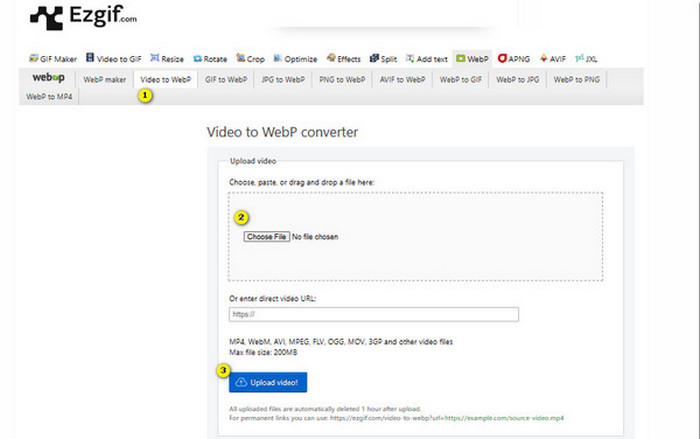
Langkah 2. Setelah itu, klik tombol Upload Video untuk melanjutkan.
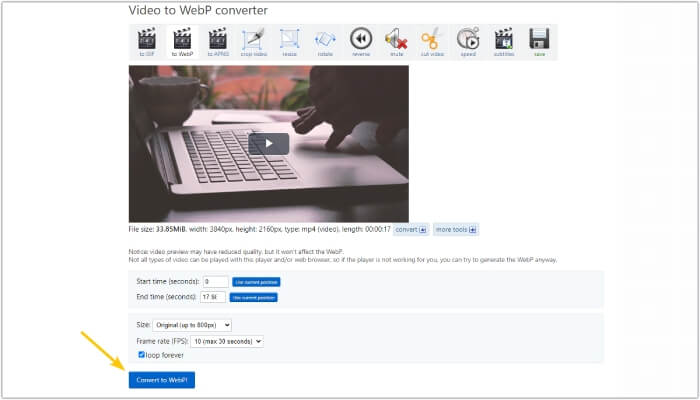
Langkah 3. Ketika file sudah dimuat, klik tombol Convert to WebP dan tunggu hingga proses selesai.
Bagian 3. Tip Bonus: Cara Terbaik Mengonversi MP4 ke Berbagai Format Video dan Audio
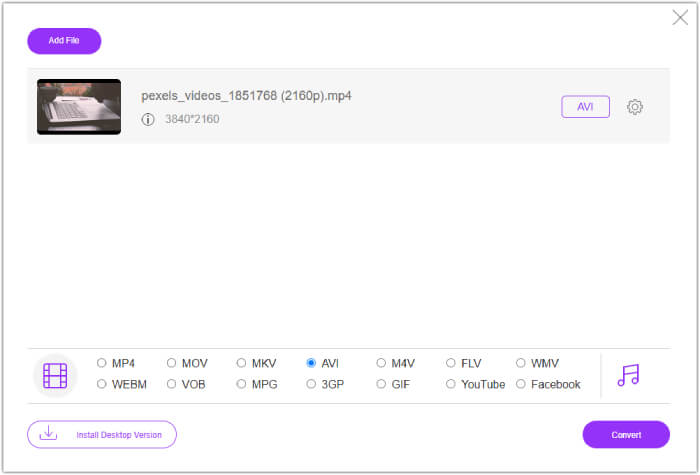
Sekarang setelah Anda mengenal tiga konverter MP4 ke WebP di atas, kami dengan senang hati memberikan bagian bonus di mana Anda akan menemukan cara terbaik untuk mengonversi MP4 ke format video atau audio lainnya. FVC Free Video Converter Online juga merupakan alat berbasis web yang menyediakan cara hebat untuk mengonversi banyak file sekaligus dengan sangat cepat. Ya, berbeda dengan konverter online di atas, konverter video ini memiliki kecepatan konversi yang sangat tinggi, yang menghasilkan proses konversi yang cepat. Selain itu, Anda tidak perlu mengunduh file yang telah dikonversi, karena alat ini bekerja dengan mengekspor file secara otomatis tepat setelah konversi selesai. Hal lain yang lebih menarik adalah ketiadaan iklan dan watermark, sehingga penggunaannya terasa ringan dan lebih nyaman.
Bagian 4. FAQ tentang Konversi MP4 dan WebP
Bisakah saya benar-benar mengubah MP4 menjadi gambar seperti WebP?
Konversi video ke gambar tidak dapat dilakukan secara langsung. Sebaliknya, hal itu dilakukan melalui ekstraksi bingkai.
Manfaat apa yang saya dapatkan dari mengonversi video ke WebP?
Dibandingkan dengan format tradisional seperti JPEG dan PNG, mengonversi video ke format WebP menawarkan beberapa keunggulan. Di antaranya adalah ukuran file yang lebih kecil, yang dapat membantu meningkatkan waktu pemuatan situs web.
Bisakah saya menggunakan semua WebP di semua peramban web?
Format WebP tidak sepenuhnya didukung di beberapa browser lama. Namun, sebagian besar browser web modern mendukung gambar WebP, termasuk Google Chrome, Opera, Firefox, dan Edge.
Kesimpulan
Postingan ini adalah pengenalan untuk tiga konverter MP4 ke WebP yang efektif dan dapat Anda gunakan secara online. Selain itu, kami juga menyertakan konverter video-ke-video/audio online yang pasti akan meningkatkan proses konversi media Anda. Jadi, bagikanlah dengan teman-teman Anda dan nikmati proses konversi berkualitas profesional bersama-sama!
-
 Pelajari Pendekatan termudah untuk Mengonversi WebP ke JPG dengan Cepat
 Pelajari Pendekatan termudah untuk Mengonversi WebP ke JPG dengan Cepat
-
 Metode Sempurna untuk Mengonversi WebP ke PNG dengan Mudah
 Ketahuilah tentang metode luar biasa untuk mengonversi WebP ke PNG. Panduan ini akan memberi Anda pengonversi gambar paling berguna yang dapat Anda coba.
-
 Review Pengonversi MP4 Terbaik Online dan Offline
 Maksimalkan jangkauan dan pengaruh konten video Anda dengan MP4 terbaik
