


 Video Converter Ultimate
 Perekam Layar
 Perbaikan Video
 Unduhan Aman
Cara Gratis & Online untuk Mengonversi RMVB ke MP4
RMVB (RealMedia Variable Bitrate) adalah file video RealMedia yang tidak didukung oleh semua aplikasi. Banyak orang ingin mengubah format file dari RMVB ke MP4 agar mudah diputar di ponsel. Panduan ini akan menunjukkan tiga cara gratis dan online untuk mengonversi file RMVB ke MP4 dengan cepat sehingga Anda dapat terus menikmati video tanpa hambatan.

Bagian 1. Bagaimana Mengkonversi RMVB ke MP4 dengan RMVB ke MP4 Converter
Untuk mengonversi RMVB ke MP4 di Windows 10 atau Mac, sebuah konverter RMVB ke MP4 adalah solusi yang cukup cepat dan andal. Free RMVB to MP4 Video Converter adalah konverter video gratis dan fungsional untuk melakukan konversi cepat dari RMVB ke MP4. Perangkat ini juga mendukung konversi RMVB ke AVI, FLV, MOV, atau format lainnya. Di bawah ini adalah langkah-langkah untuk mengubah RMVB ke MP4.
Unduh GratisUntuk Windows 7 atau versi lebih baruUnduhan Aman
Unduh GratisUntuk MacOS 10.7 atau versi lebih baruUnduhan Aman
Langkah 1. Sebelum mulai, Anda perlu mengunduh dan memasang freeware ini di komputer Anda. Lalu, jalankan Free RMVB to MP4 Converter, dan impor file RMVB ke dalam program dengan mengeklik tombol Add File(s). Selain itu, alat ini memungkinkan Anda melakukan konversi batch sehingga Anda dapat mengonversi beberapa file RMVB sekaligus.
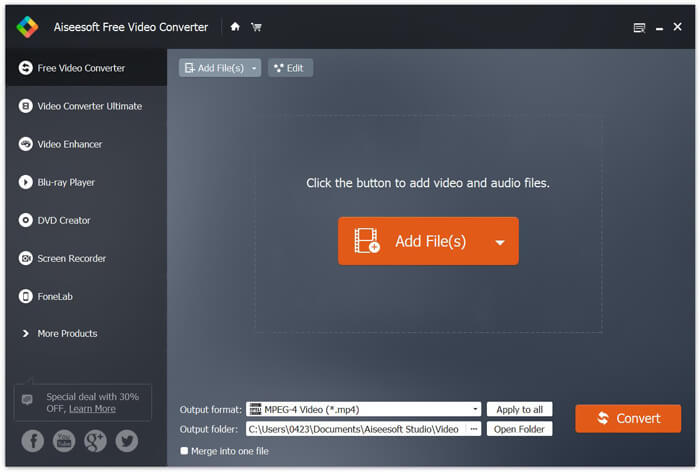
Langkah 2. Setelah menambahkan file ke program, buka bagian Output format lalu pilih format MP4.

Langkah 3. Klik tombol Convert. Tunggu beberapa menit, dan Anda akan mendapatkan file MP4 yang diinginkan.
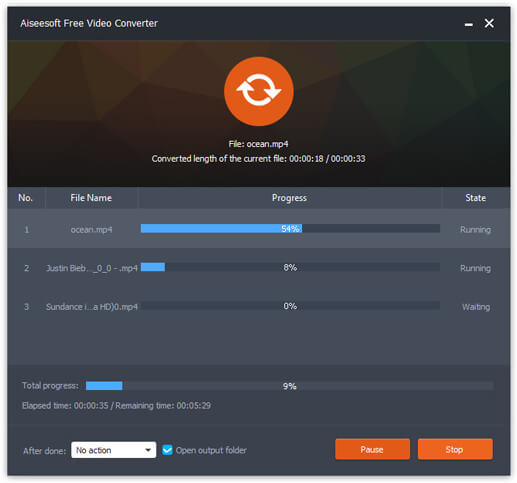
Setelah mendapatkan file MP4, Anda dapat memutarnya di komputer atau perangkat seluler. Selain itu, Anda juga dapat menggunakan Free RMVB to MP4 Converter ini untuk mengubah RM ke MP4, atau mengonversi WMV ke MP4.
Bagian 2. Bagaimana Mengkonversi RMVB ke MP4 dengan VLC
VLC juga berfungsi sebagai alat konversi video praktis, dan Anda dapat dengan mudah mengonversi file RMVB Anda ke MP4 dalam kualitas tinggi. Mari kita lihat cara menggunakan VLC untuk melakukan pekerjaan ini.
Langkah 1. Pertama, Anda perlu mengunduh dan memasang program VLC Media Player di komputer, kemudian jalankan.
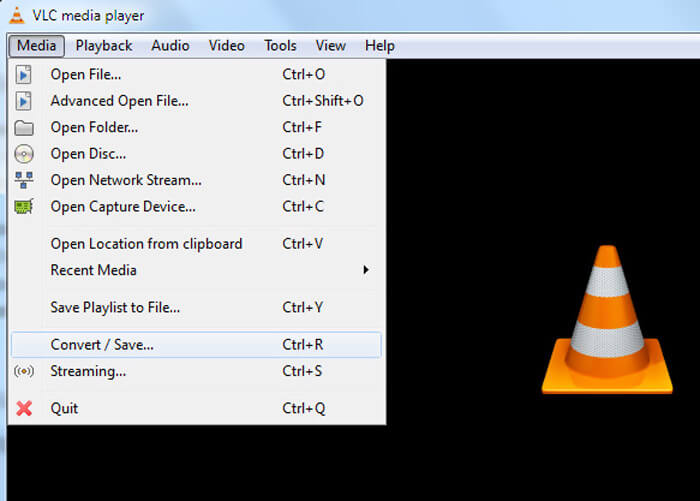
Langkah 2. Arahkan ke tab Media, lalu pilih Convert/Save untuk melanjutkan.
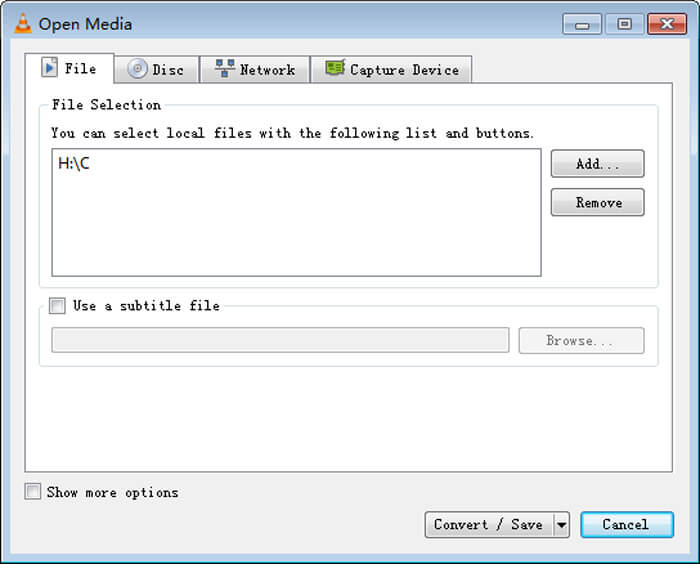
Langkah 3. Saat jendela Open Media muncul, Anda perlu menambahkan file RMVB ke VLC dengan mengeklik tombol Add… pada opsi File. Lalu, klik tombol Convert/Save di bagian bawah jendela.
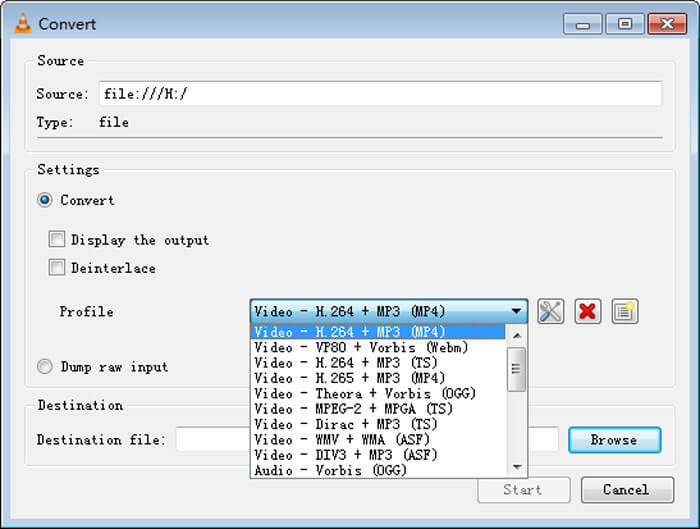
Langkah 4. Setelah itu, Anda akan masuk ke jendela Convert. Di sini Anda perlu menemukan bagian Settings, buka Profile, lalu pilih MP4 sebagai format keluaran dari menu tarik-turun. Terakhir, klik Start untuk mengonversi RMVB ke MP4 agar mudah diputar.
Bagian 3. Bagaimana Mengubah RMVB ke MP4 Online
Konverter video online juga mendukung konversi video RMVB ke MP4 dengan kecepatan tinggi. Free Online Video Converter adalah konverter video berbasis web yang dapat mengonversi berbagai file video atau audio populer ke MP4, MOV, FLV, AVI, MP3, AAC, dan banyak lagi secara gratis. Alat ini memungkinkan pengguna mengubah file dari RMVB ke MP4 langsung melalui browser dengan mudah.
Langkah 1. Kunjungi https://www.free-videoconverter.net/free-online-video-converter/ dan klik tombol Add Files to Convert untuk mengaktifkan peluncur.
Unduh Versi Desktop untuk mengonversi file secara batch.

Langkah 2. Setelah itu, impor file RMVB Anda ke alat online ini. Lalu, pilih format MP4 di bawah tab Video. Ketika Anda siap melakukan konversi, klik tombol Convert untuk memulai proses. Setelah konversi selesai, file yang telah dikonversi akan otomatis disimpan ke komputer Anda.

Perbedaan antara RMVB dan MP4
RMVB, variasi yang lebih baru dari format Real Media (.RM) standar, adalah format file video Real Media yang dikompres menggunakan bitrate variabel. Ini adalah format populer untuk film dan anime Asia. File RMVB berukuran lebih kecil dan memiliki bitrate lebih rendah tetapi kualitas lebih baik.
Dirilis oleh Moving Picture Experts Group (MPEG) pada tahun 2001, format MP4 dapat membantu Anda menyimpan data video, audio, subtitle, dan gambar dalam trek terpisah. Ini adalah kependekan dari MPEG-4 Part 14. Plus, ini adalah salah satu format paling populer yang digunakan untuk streaming dan berbagi video.
Bagian 4. Tanya Jawab RMVB ke MP4
Apa itu file RMVB?
RMVB (RealMedia Variable Bitrate) adalah format file video Real Media menggunakan kecepatan bit variabel. Itu pernah populer untuk mendistribusikan anime Asia, film, episode, torrent, dll di web karena ukuran file lebih kecil dan kualitasnya jauh lebih baik.
Bagaimana cara membuka file RMVB?
RealPlayer mendukung pemutaran file RMVB di Windows, Mac OS X, dan Linux. Atau Anda dapat menggunakan VLC untuk memutar file RMVB.
Bisakah HandBrake mengonversi RMVB ke MP4?
HandBrake adalah alat hebat untuk mengonversi video agar berfungsi di sejumlah perangkat yang didukung. Ini adalah pilihan tepat bagi siapa saja untuk mengubah RMVB menjadi MP4.
Jadi, begitulah cara Anda mengonversi file RMVB ke MP4. Apakah Anda mengalami masalah saat mengikuti langkah-langkah yang disebutkan di atas? Jangan ragu untuk memberi tahu kami pendapat Anda.
-
 3 Langkah Mudah untuk Membakar File / Folder TS Video ke DVD di Mac / Windows
 Bagaimana cara mengonversi dan membakar file TS ke disk DVD? Panduan langkah demi langkah ini akan menunjukkan cara menyalin file dan folder TS ke DVD pada Windows / Mac sehingga Anda dapat menonton file TS di pemutar DVD atau TV.
-
 6 Cara Mudah untuk Mengonversi TS ke AVI / MKV / MOV / WMV di Windows / Mac
 Ingin mengonversi file TS ke AVI / MKV / MOV / WMV dengan cepat? Artikel ini menunjukkan konverter video online dan offline dengan panduan lengkap. Mungkin Anda bisa mendapatkan konverter TS gratis terbaik di sini.
-
 Cara Mengonversi MP4 ke M4A di Windows / Mac (Gratis & Online)
 Bagaimana cara mengonversi MP4 ke M4A secara online? Bisakah saya mengekstrak audio dari file MP4? Baca posting ini, dan Anda akan mendapatkan semua jawaban tentang konversi dari MP4 ke M4A.

