


 Video Converter Ultimate
 Perekam Layar
 Perbaikan Video
 Unduhan Aman
Konverter WTV ke MP4: Cara Mengonversi WTV ke MP4
WTV, sebagai penerus format DVR-MS, dikembangkan oleh Microsoft untuk menyimpan konten TV yang direkam oleh Windows Media Center. Dienkode dengan standar MPEG-2 dan MPEG-4 dan MPEG-1 Layer II atau Dolby Digital AC-3, WTV didukung oleh beberapa perangkat lunak seperti FFMPEG, Windows Media Center, CyberLink PowerDVD 12, Nero 12, HandBrake, CCextractor, dll.

Jika Anda ingin menonton atau membagikan file WTV dengan mudah, sebaiknya Anda mengonversi WTV ke MP4, format paling populer untuk hampir semua perangkat.
Kami telah menjelajahi Internet untuk mencari konverter WTV ke MP4 dan menemukan 2 konverter WTV ke MP4 gratis terbaik untuk mengubah WTV ke MP4.
Bagian 1. Gratis Video Converter - Konversi WTV ke MP4 Online
Sebenarnya, sangat mudah untuk mengonversi WTV ke MP4. Cara termudah untuk mengubah WTV ke MP4 adalah dengan menyelesaikannya secara online. Free Online Video Converter adalah perangkat lunak gratis untuk mengonversi WTV ke MP4 dan format video serta audio arus utama lainnya. Alat online gratis ini kompatibel dengan Windows 10/8/7 dan Mac OS X 10.7 atau yang lebih baru, dan Anda dapat dengan mudah mentranskode WTV ke MP4 hanya dalam beberapa langkah.
Untuk menyederhanakan prosesnya, Anda dapat mengikuti panduan ini:
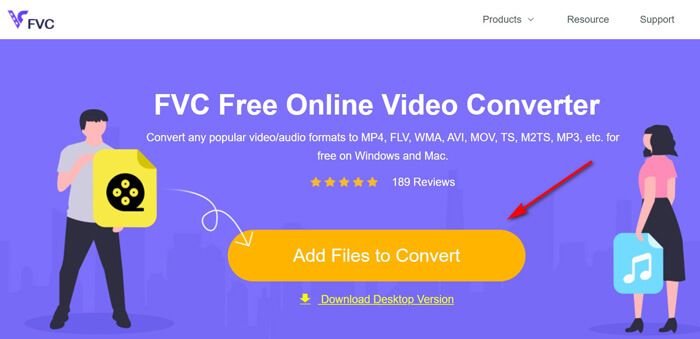
1. Klik tombol Add Files to Convert untuk mengunggah file WTV dari PC.
2. Pilih MP4 dari kotak centang.
3. Klik Convert untuk mengonversi dan mengunduh file WTV secara otomatis.
Sekarang, kami di sini untuk memandu Anda tentang cara mengonversi WTV ke MP4 secara detail.
Langkah 1. Tambahkan file WTV
Buka konverter WTV ke MP4 online gratis ini melalui browser Anda. Klik tombol Add Files to Convert, dan jendela pop-up akan muncul yang meminta Anda mengunduh dan menginstal peluncur. Cukup unduh, dan jendela sumber terbuka akan muncul setelah instalasi berhasil. Lalu Anda dapat memilih rekaman WTV di komputer Anda untuk diunggah. Perangkat lunak gratis ini mendukung konversi batch dan Anda dapat menambahkan lebih dari satu file WTV secara online.
Langkah 2. Pilih MP4
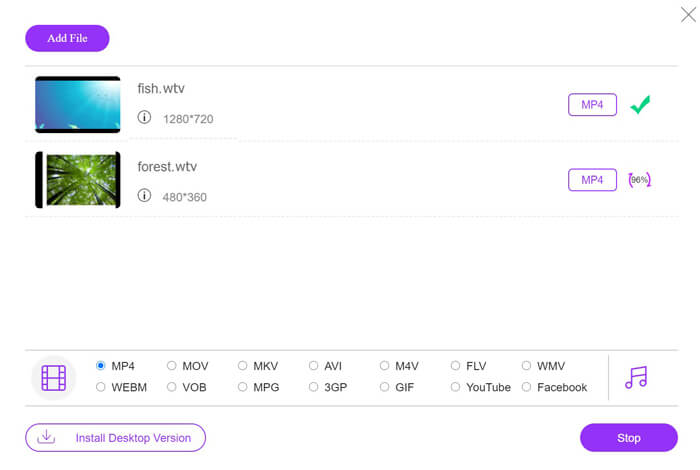
Centang kotak MP4 di bagian bawah, di mana Anda dapat menemukan berbagai opsi keluaran seperti MKV, AVI, M4V, FLV, VOB, GIF, YouTube, Facebook, MP3, AAC, WMA, WAV, FLAC, dan lain-lain.
Selain itu, Anda dapat mengklik ikon Settings di sebelah panel keluaran MP4 untuk menyesuaikan encoder, frame rate, resolusi, bit rate, dan parameter lainnya.

Langkah 3. Konversi WTV ke MP4
Setelah semuanya selesai, klik tombol Convert dan sebuah jendela akan muncul yang meminta Anda memilih lokasi tujuan untuk menyimpan file MP4 yang telah dikonversi. Pilih lokasi tujuan dan kembali ke konverter online gratis ini, lalu klik Convert lagi untuk mulai mengonversi dan mengunduh file MP4 secara otomatis. Anda dapat melihat persentase progres konversi secara langsung.
Bagian 2. HandBrake - Ubah WTV ke MP4 di PC / Mac
Cara gratis lain untuk mengonversi WTV ke MP4 menggunakan HandBrake. HandBrake adalah beberapa perangkat lunak yang dapat membaca file WTV. Selain itu, ini juga dapat mentranskode WTV ke MP4 / MKV di komputer Windows dan Mac Anda.
HandBrake adalah perangkat lunak desktop sumber terbuka, jadi Anda harus mengunduh konverter gratis ini terlebih dahulu di komputer Anda.
Sekali lagi, langkah-langkah sederhana untuk mengonversi WTV ke MP4 di HandBrake adalah sebagai berikut:
1. Tambahkan file WTF atau seluruh folder ke HandBrake.
2. Profil MP4 kustom di HandBrake.
2. Pratinjau dan ubah WTV ke MP4.
Berikut adalah panduan lengkap untuk mengubah WTV ke MP4 di HandBrake.
Langkah 1. Tambahkan file WTV ke HandBrake
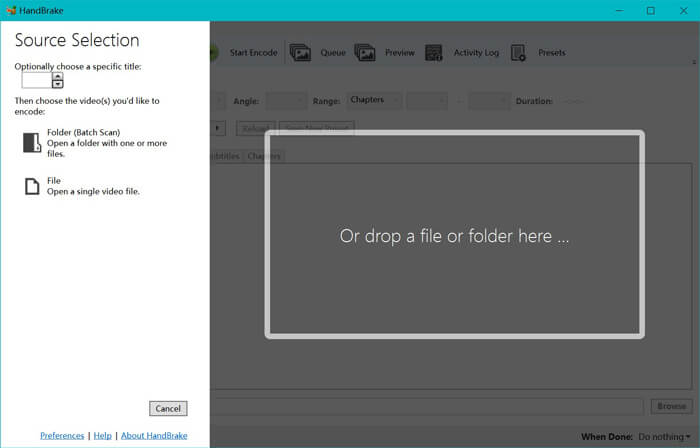
Setelah Anda menginstal HandBrake di komputer, HandBrake akan menampilkan dialog sumber terbuka secara default. Di sini Anda dapat mengklik Folder atau File untuk memilih file atau folder WTV ke jendela utama. Sebagai alternatif, Anda juga dapat menyeret dan melepas file WTV ke perangkat lunak ini.
Langkah 2. Pilih format MP4
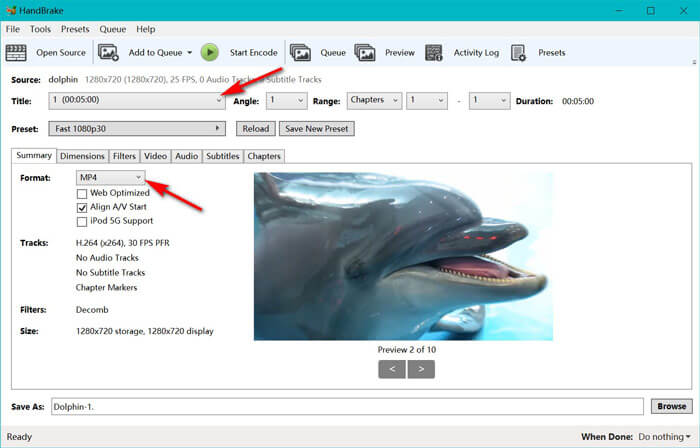
Setelah Anda memuat file WTV, Anda dapat memilih file WTV yang tepat dari opsi drop-down Title. Lalu pilih MP4 di tab Summary sebagai keluaran untuk file WTV yang dipilih. Selain itu, HandBrake memungkinkan Anda menyesuaikan dimensi, filter, codec/kualitas video, trek audio, dan lain-lain. Bukan hanya MP4, perangkat ini juga dapat mengonversi format lain seperti AVI, MOV, M2TS, dan sebagainya, ke MKV.
Langkah 3. Pratinjau dan konversi WTV ke MP4
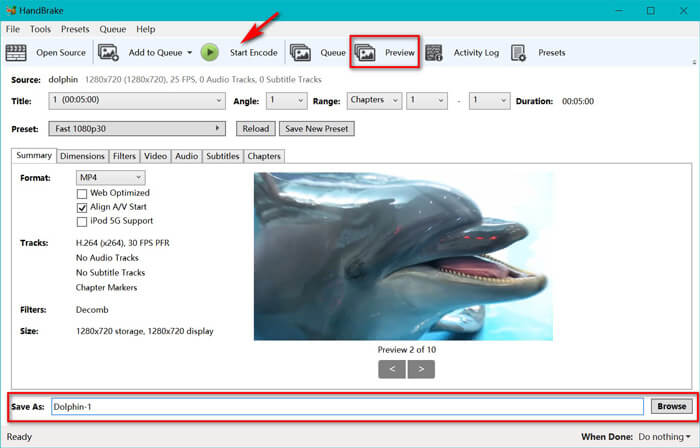
Fitur Preview di toolbar HandBrake memungkinkan Anda melihat seperti apa tampilan video MP4 baru Anda sebelum proses encoding. Setelah semua pengaturan sudah tepat, beri nama file MP4 yang dikonversi dan pilih lokasi video baru Anda dengan mengklik tombol Browse di bagian bawah. Terakhir, cukup klik tombol Start Encode di toolbar untuk mengonversi WTV ke MP4.
Bagian 3. Tanya Jawab WTV ke MP4
Mengapa HandBrake menyimpan MP4 sebagai M4V?
Untuk file MP4, HandBrake akan file MP4 secara otomatis menggunakan ekstensi M4V, ketika Anda memilih audio AC3 dan subtitle SRT atau memiliki penanda bab untuk menyesuaikan file MP4. Tetapi Anda dapat mengubah ekstensi .m4v menjadi .mp4 secara langsung.
Bisakah VLC player memutar file WTV?
VLC tidak dapat memutar file WTV secara langsung. Anda harus menginstal Paket Kode K-Lite untuk menginstal paket kode WTV dan kemudian memutar file WTV di VLC.
Dapatkah saya mengonversi file WTV yang dilindungi?
Ya kamu bisa. Namun, hanya MCEBuddy yang mendukung pengeditan dan konversi file WTF komersial yang dilindungi. Anda harus menggunakan perangkat lunak ini untuk menyalin dan mengonversi file WTV yang dilindungi.
Kesimpulan
Untuk menggunakan file rekaman WTV Window Media Center dengan nyaman, Anda harus mengonversi WTV ke MP4 terlebih dahulu. Posting ini membagikan 2 cara gratis untuk mengonversi WTV ke MP4 online melalui Pengonversi Video Online Gratis dan HandBrake. Pengonversi Video Online Gratis memungkinkan Anda mengonversi WTV ke MP4 dan format populer lainnya, sementara HandBrake memberi Anda lebih banyak kontrol pengeditan dengan opsi format keluaran terbatas.
Cara mana yang Anda pilih?
Atau mungkin Anda memiliki konverter WTV ke MP4 yang lebih baik?
Bagaimanapun, saya ingin mendengar dari Anda. Jadi, silakan tinggalkan komentar di bawah.
-
 Cara Mengonversi MXF ke MP4 melalui Konverter Gratis
 Posting ini adalah panduan rinci untuk mengubah MXF ke MP4 di komputer. Anda bisa mendapatkan 4 konverter MXF ke MP4 gratis untuk transcode camcorder MXF ke MP4 dalam langkah sederhana.
-
 3 Cara Teratas untuk Mengonversi MP4 ke MOV secara Gratis
 Bagaimana cara mengubah MP4 ke MOV di Mac? Apakah ada cara gratis untuk mengonversi MP4 ke MOV tanpa kehilangan kualitas? Posting ini membagikan 3 cara sederhana untuk membantu Anda melakukan konversi video dari MP4 ke MOV di Mac, Windows PC, dan online.
-
 Cara Mengonversi M2TS ke WMV di Windows / Mac / Online (Sepenuhnya Gratis Digunakan)
 Berikut adalah 3 cara mudah untuk mengkonversi video M2TS ke WMV. Anda dapat mengubah format video dari M2TS ke WMV secara gratis di Windows, Mac, dan online dengan cepat. Konversi batch didukung.
