


 Video Converter Ultimate
 Perekam Layar
 Perbaikan Video
 Unduhan Aman
Ulasan tentang 5 Pemutar DVD Gratis Terbaik untuk Mac
DVD drive adalah salah satu jenis fungsi lama yang ditinggalkan oleh sebagian besar komputer modern termasuk Mac. Kecuali MacBook Pro tanpa Retina Display, semua Mac baru tidak lagi memiliki DVD SuperDrives fisik. Jadi, Anda akan merasa kesulitan untuk memutar DVD atau CD di Mac.
Dalam kasus itu, sangat diperlukan untuk menemukan pemutar DVD yang andal untuk memutar film DVD atau Blu-ray secara gratis di Mac. Adakah perangkat lunak pemutar DVD gratis untuk Mac?

Dalam artikel ini, kami memilih 5 pemutar DVD terbaik untuk Mac yang bisa diunduh gratis. Anda dapat melihat fitur utama dari masing‑masing perangkat lunak pemutar DVD, lalu memilih yang paling Anda sukai untuk menonton DVD di Mac Anda.
Bagian 1. Pemutar DVD Resmi untuk Mac - Pemutar DVD Apple
Apple DVD Player adalah perangkat lunak pemutar DVD resmi dan bawaan yang gratis untuk Mac. Aplikasi ini dapat secara otomatis memutar film DVD Anda segera setelah Anda memasukkan cakram ke Mac. Mengingat Mac Anda tidak memiliki drive DVD, Anda perlu menghubungkan drive DVD eksternal seperti SuperDrive. Itu adalah teknologi Apple untuk membaca dan menulis cakram optik.
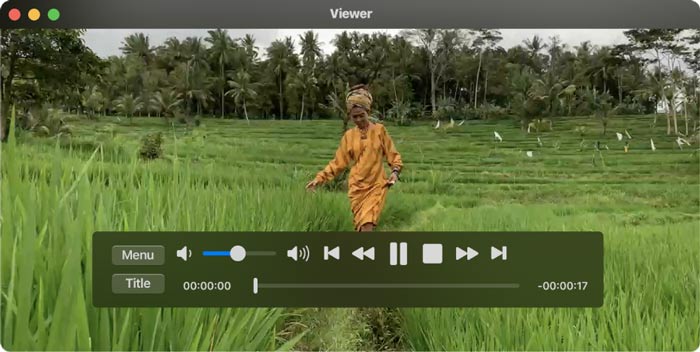
Secara umum, aplikasi Apple DVD Player akan otomatis mulai memutar cakram setelah Anda memasukkan DVD. Jika tidak, Anda dapat menekan tombol Spasi setelah cakram dikenali. Pemutar DVD gratis untuk Mac ini juga dapat memutar folder DVD. Anda dapat mengklik File pada bilah menu atas, memilih opsi Open DVD Media lalu memilih folder VIDEO_TS yang berisi film DVD yang ingin Anda putar. Saat DVD diputar, Anda dapat menggunakan kontrol di layar untuk mengatur seluruh pemutaran.
Bagian 2. Pemutar DVD Gratis untuk Mac dan Windows 10/8/7 PC
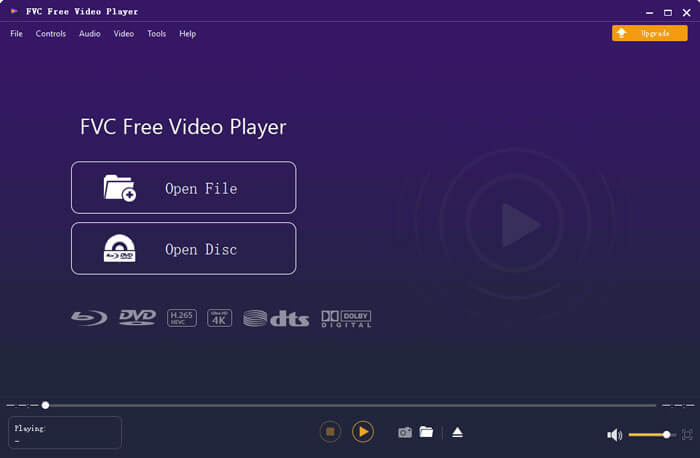
FVC Free DVD Player adalah perangkat lunak pemutar DVD online gratis yang memungkinkan Anda menonton cakram DVD, folder DVD, dan file image ISO di Mac maupun PC Windows. Saat ingin memutar film DVD, Anda dapat membuka situs pemutar DVD gratis ini dan mulai memutarnya. Aplikasi ini kompatibel dengan semua browser web yang umum digunakan termasuk Safari, Chrome, IE, dan Firefox.

Perangkat lunak pemutar DVD gratis untuk Mac ini dilengkapi teknologi enkoding video canggih yang memastikan Anda mendapatkan pemutaran DVD berkualitas tinggi. Selain itu, ia mendukung DTS-HD dan Dolby TrueHD untuk memberikan suara tanpa kehilangan kualitas. Untuk memutar folder DVD, Anda dapat langsung mengklik tombol Play Now dan mengunduh gratis sebuah berkas peluncur kecil. Setelah itu, Anda dapat dengan mudah menikmati film DVD Anda. Untuk cakram DVD, Anda juga perlu menghubungkan drive DVD eksternal.
Bagian 3. Pemutar DVD sumber terbuka untuk Mac Unduh Gratis - VLC Media Player
VLC media player adalah alat pemutar video dan audio yang sangat populer dan juga memiliki fitur pemutaran DVD. Sebagai pemutar DVD gratis, VLC menawarkan berbagai versi untuk menonton film DVD di komputer Mac, Windows, dan Linux. Anda dapat membuka situs resminya, memilih versi yang tepat sesuai sistem Anda, lalu memasangnya secara gratis di komputer. VLC media player dapat memutar DVD, VCD, dan CD Audio di Mac Anda.
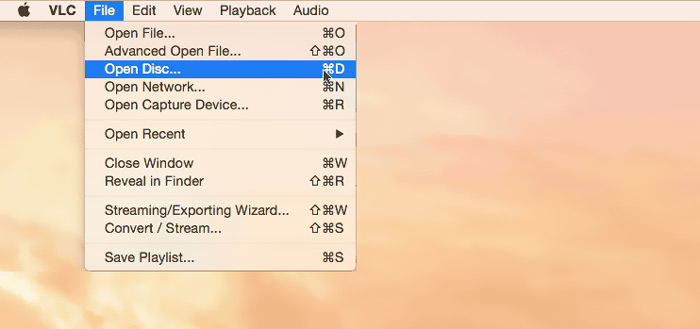
Perangkat lunak pemutar DVD gratis untuk Mac ini dapat dengan mudah mengakses menu DVD, bab, dan konten terkait lainnya. Ia memberi Anda kendali penuh atas pemutaran DVD. Selain itu, VLC media player memungkinkan Anda mengambil tangkapan layar untuk menyimpan momen tertentu sebagai berkas gambar. Bukan hanya pemutar DVD gratis, VLC juga dapat memutar cakram Blu-ray.
Bagian 4. Perangkat Lunak Pemutar DVD Gratis untuk Mac - KMPlayer
KMPlayer adalah pemutar multimedia open-source lain yang dapat memutar DVD di Mac. Pemutar DVD gratis untuk Mac ini dirancang dengan fitur decoding multi‑core untuk memutar film DVD apa pun dengan kualitas tinggi namun menggunakan memori CPU yang rendah. Aplikasi ini juga memiliki fungsi pemutaran format 3D untuk menawarkan hiburan bioskop 3D di rumah.
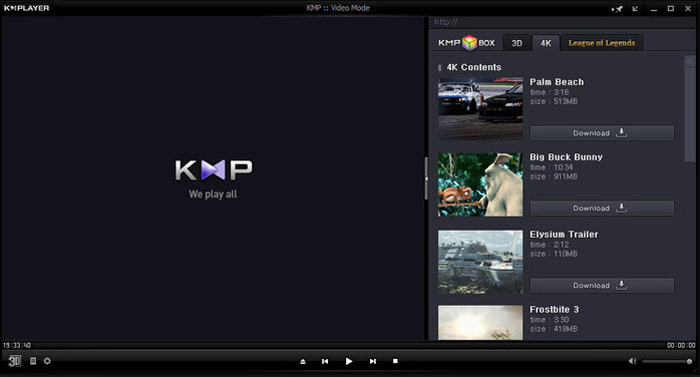
KMPlayer dapat membantu Anda mengelola koleksi DVD dengan mudah. Saat film DVD diputar di Mac, ini memungkinkan Anda untuk menyesuaikan menu DVD, memilih trek audio dan subtitle, efek video khusus, dan melakukan lebih banyak pengaturan. Satu hal yang harus Anda ketahui adalah, Anda dapat dengan mudah melihat beberapa iklan pop-up saat menggunakan perangkat lunak pemutar DVD gratis ini.
Bagian 5. Wilayah Pemutar DVD Gratis untuk Mac - PowerDVD
PowerDVD adalah pemutar multimedia premium serba‑guna yang memungkinkan Anda memutar berbagai berkas media, DVD, dan film Blu-ray dengan kualitas tinggi. Pemutar DVD untuk Mac ini dilengkapi teknologi TrueTheater yang kuat yang dapat menghadirkan detail yang lebih tajam dan pemutaran yang mulus. Aplikasi ini memungkinkan Anda memutar cakram Ultra HD Blu-ray dan konten HDR di Mac.
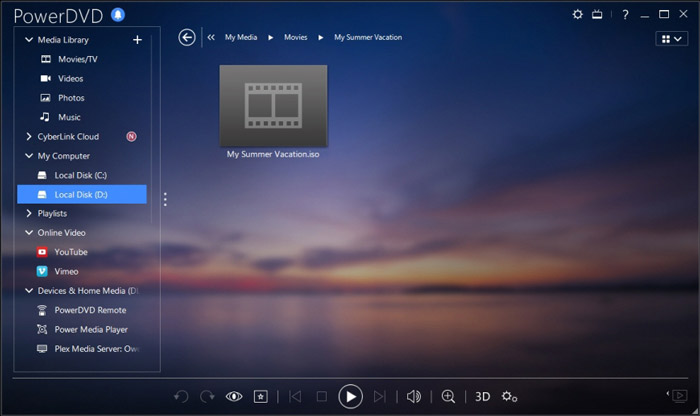
PowerDVD dilengkapi dengan pemutaran disk HD dan mode hemat daya untuk komputer Anda. Tetapi Anda harus tahu itu, itu bukan alat pemain yang sepenuhnya gratis. Beberapa fungsi dibatasi dalam uji coba gratis. Meski begitu, PowerDVD masih merupakan pilihan yang baik untuk menikmati DVD di Mac.
Bagian 6. FAQ Perangkat Lunak Pemutar DVD Gratis untuk Mac
Pertanyaan 1. Bagaimana cara menggunakan pemutar DVD eksternal dengan Mac saya?
Cukup sambungkan drive eksternal ke Mac Anda dan Anda dapat menggunakannya seperti drive optik internal. Saat Anda ingin memutar disk DVD, Anda dapat memasukkannya ke dalam drive eksternal. Aplikasi pemutar media yang relevan akan meluncurkan dan memutar DVD secara otomatis.
Pertanyaan 2. Dapatkah Anda menghubungkan pemutar DVD lama ke TV baru?
Untuk menghubungkan pemutar DVD lama ke TV baru, Anda harus memeriksa port HDMI. Jika TV baru dilengkapi dengan port HDMI yang tepat, Anda dapat dengan mudah membuat sambungan antara pemutar DVD dan TV.
Pertanyaan 3. Bagaimana cara menyalin DVD ke video MP4 digital?
Jika Anda ingin mengekstrak DVD ke video digital MP4 atau MOV, Anda dapat mengunduh konverter DVD untuk mengonversi DVD Anda ke berkas video tanpa kehilangan kualitas.
Pertanyaan 4. Bagaimana cara mengubah wilayah drive DVD di DVD Player di Mac?
Ketika kode wilayah DVD tidak cocok dengan kode wilayah saat ini dari drive DVD Anda, Anda akan diminta untuk mengubah kode untuk pemutaran DVD. Anda dapat memilih wilayah yang cocok yang cocok dengan wilayah DVD. Anda harus tahu bahwa, Wilayah 0 dapat dimainkan di semua wilayah dan Wilayah 1 dapat dimainkan di Kanada, Amerika Serikat, dan wilayah AS.
Kesimpulan
Kami terutama membahas tentang pemutar DVD gratis untuk Mac dalam posting ini. Kami telah merekomendasikan 5 pemutar DVD hebat untuk Anda agar dapat menonton film DVD di Mac Anda. Anda dapat memilih yang paling Anda sukai untuk mendapatkan pemutaran DVD. Jika Anda memiliki rekomendasi perangkat lunak pemutar DVD lain yang lebih baik, silakan bagikan di kolom komentar kepada pembaca lainnya.
-
 Ulasan 10 Pemutar Video WMV Terbaik Tahun 2025 (Komputer dan Ponsel)
 Bagaimana cara memutar video WMV? Apakah VLC memainkan WMV? Aplikasi apa yang memutar file WMV? Posting ini membuat daftar 10 pemutar video WMV terbaik untuk Anda mainkan WMV di Mac, Windows PC, Android dan iPhone.
-
 10 Pemain HD Terbaik untuk Menonton Film HD di Windows / Mac / iOS / Android
 Ini adalah ulasan pemutar video HD terbaru Anda. Anda bisa mendapatkan keuntungan dan kerugian yang tidak bias dari 10 pemain HD teratas di pasar. Cukup baca dan pilih pemutar HD terbaik Anda dengan semua dukungan format.
-
 Pemutar DivX - Ulasan 5 Pemutar Codec DivX Terbaik Tahun 2025
 Untuk apa DivX player digunakan? Apa pemutar DivX terbaik untuk Android? Dapatkan review dari 5 pemain DivX terbaik dari postingan ini.
