


 Video Converter Ultimate
 Perekam Layar
 Perbaikan Video
 Unduhan Aman
Review dari 10 Pemutar Musik MP3 Gratis Terbaik
You can easily access various hot songs and artists from online music streaming services like Apple Music, SoundCloud, Pandora and more. Besides the streaming music, you also have a big need to play local songs offline. What is the best MP3 player?
Jika Anda seorang pencinta musik, Anda pasti mendapatkan banyak sekali koleksi musik yang terkumpul di komputer Anda. Dibandingkan dengan streaming musik, kualitas audio mungkin lebih tinggi dan menawarkan pengalaman suara yang lebih baik. Mengingat hal itu, sangatlah perlu memiliki pemutar musik yang bagus.

Music player is the media file playing software that specifically designed to play all types of audio files. We usually call the music player an MP3 player. Surely MP3 player should support a wide range of music formats including MP3, WAV, WMA, M4A, AAC, FLAC, and more. Here we make a list of 10 best free MP3 music players for you to enjoy music on computer.
1. MP3 Player Gratis Terbaik untuk PC / Mac - Pemutar Video Gratis
Free Video Player is a very popular video and audio playing tool which can help you play music in any frequently-used audio format like MP3, AAC, M4A, WAV, OGG, FLAC, APE, ALAC, AIFF, and WMA, and so on. More than just a great MP3 music player, it also supports many different video formats including MP4, MOV, FLV, AVI, MKV, and more.
Unduh GratisUntuk Windows 7 atau yang lebih baruUnduhan Aman
Unduh GratisUntuk MacOS 10.7 atau yang lebih baruUnduhan Aman
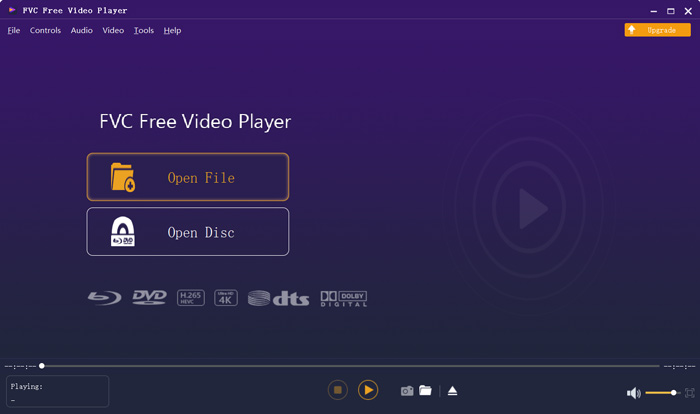
Sebagai pemutar MP3, Anda dapat menikmati lagu-lagu favorit Anda di PC Windows 10/8/7 atau Mac. Seperti yang disebutkan di atas, pemutar MP3 ini mendukung pemutaran audio lossless. Dengan mengadopsi teknologi pengkodean audio DTS-HD dan Dolby TrueHD yang canggih, ini dapat memberikan efek suara yang hebat. Apalagi pemutar musik MP3 ini memiliki kemampuan untuk secara otomatis meningkatkan kualitas musik yang Anda putar.
For the MP3 player download part, you can navigate to the official site and click the Play Now button to install a small size launcher for the music playing. After that, you can rely on it to play any music and audio track including audiobook on your computer. It can work as a free online music player.
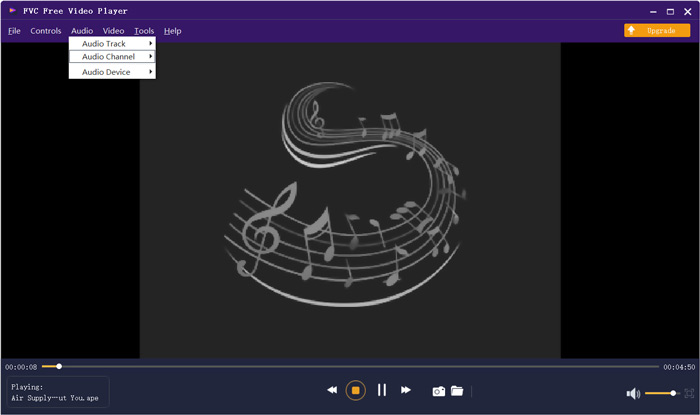
Akan ada jendela pop-up yang muncul di layar untuk Anda memilih file audio yang ingin Anda putar. Setelah ditambahkan, musik akan diputar secara otomatis dengan kualitas tinggi. Anda memiliki semua kontrol pemutaran musik. Selain itu, Anda dapat mengatur trek audio, saluran audio, dan perangkat audio berdasarkan kebutuhan Anda.
2. Konverter Pemutar MP3 - VLC Media Player
VLC media player is free and open-source video and audio playing tool which allows you to enjoy music in different audio format. As an MP3 music player, it is compatible with many popular lossy and lossless audio formats including MP3, AAC, Vorbis, AC3, WMA, FLAC, ALAC, Speex, Musepack/MPC, ATRAC 3, Wavpack, Mod, TrueAudio, APE, Real Audio, AMR, MIDI, LPCM, ADPCM, QCELP, DV Audio, QDM2/QDMC, MACE, WAV, Raw Audio, and more.
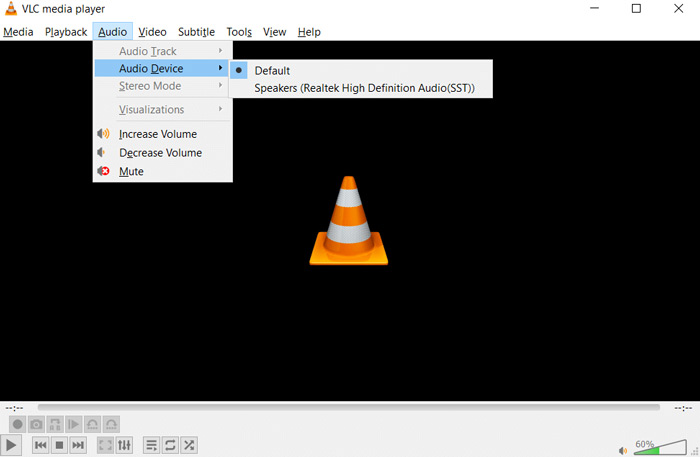
Pemutar media VLC dirancang dengan banyak fitur berguna seperti konversi, perekaman, filter video dan audio, sinkronisasi subtitle dan banyak lagi. Ini juga memungkinkan Anda untuk memutar berbagai file video dengan lancar di komputer Anda. Terlebih lagi, VLC menawarkan berbagai saluran populer seperti ESPN, National Geographic, dan Reuters dan banyak lagi untuk Anda streaming secara online. Pemutar musik MP3 sumber terbuka ini memberi Anda versi Windows, macOS dan iOS, Android.
For more MP3 player applications for iPhone and Android, you can check it here.
3. Pemutar Musik MP3 default untuk PC - Windows Media Player
Windows Media Player is the native video and music player software for Windows platform. Whether you are using Windows 10, Windows 8, Windows 7 or Windows XP, you can rely on it to play various songs on your PC. It offers the basic MP3 music playback features. It allows you to manage your songs, playlists, set up the preferences and collect different audio files. This MP3 player is pre-installed in all Windows computers. You don’t need to install it.
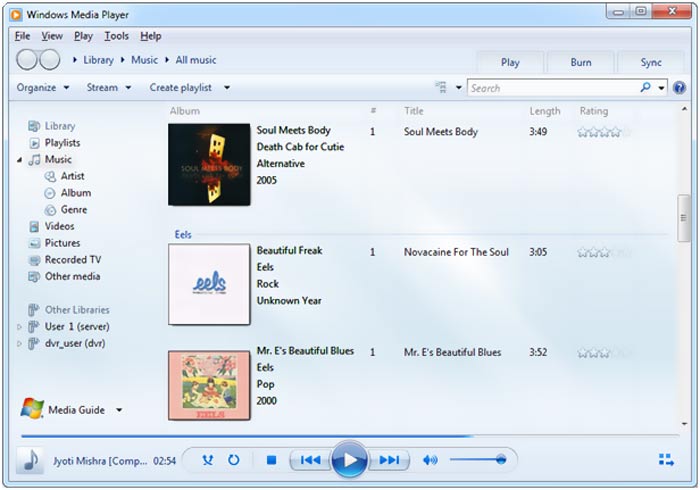
Pemutar musik MP3 untuk Windows ini mendukung banyak format audio populer seperti WAV, MP3, AIFF, FLAC, M4A, AAC, dan banyak lagi. Namun dibandingkan dengan pemutar MP3 lain, format audio yang didukung terbatas.
4. Pemutar Musik MP3 default untuk Mac - QuickTime Player
QuickTime Player is the official media file player for macOS users. It is a pre-installed MP3 music player for Mac. But it also offers a Windows version for you to play various video and audio files on PC. Also, you can play MP3 songs with it on your portable iOS devices like iPhone and iPad.
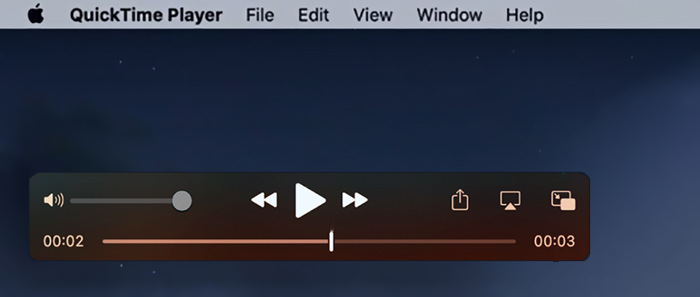
QuickTime Player hanya mendukung beberapa format audio populer seperti MP3, M4A, AAC, AIFF, dan WAV. Jika Anda hanya perlu memutar musik MP3 di Mac Anda, Anda dapat mengandalkan QuickTime. Sementara jika Anda juga ingin menikmati lagu dalam format lossless seperti FLAC atau APE, Anda harus beralih ke pemutar MP3 lainnya.
5. Pemutar dan Pengunduh Musik MP3 - Spotify
Spotify is one of the most music players which allows you to listen to MP3 music and play millions of songs and podcasts. Different with the MP3 music players above, Spotify is one kind of streaming music player app which allows you to stream various music and podcasts online. It gathers numerous songs, episodes and audio tracks. You can handily search for and discover new songs, hot music and podcasts.

Sebagai pemutar musik streaming, Spotify memungkinkan Anda untuk mengelola, membuat, dan membagikan daftar putar Anda sendiri. Ini memungkinkan Anda untuk mencari lagu top dari genre, tempat, dan dekade yang berbeda. Sebagai pemutar MP3, ia menawarkan fitur shuffle dan putar otomatis untuk mencampur lagu. Saat memutar musik, Anda diperbolehkan untuk melihat lirik dan melihat profil artisnya. Spotify mendukung banyak platform seperti Windows, Mac, Linux, iOS, Android, PlayStation, Chromecast, TV, dan speaker. Spotify dapat membuka file musik lokal di komputer dan ponsel pintar Anda. Tapi itu hanya mendukung audio dalam format MP3.
6. Pemutar Musik MP3 Gratis - foobar2000
foobar2000 once was one of the most popular MP3 players because it can offer high quality music playback. But it is designed with a poor interface. This advanced freeware MP3 player is only compatible with the Windows platform. This MP3 music player highly supports many frequently-used audio formats like MP3, AAC, CD Audio, WMA, Vorbis, Opus, FLAC, WavPack, WAV, AIFF, Musepack, Speex, AU, SND, and more.
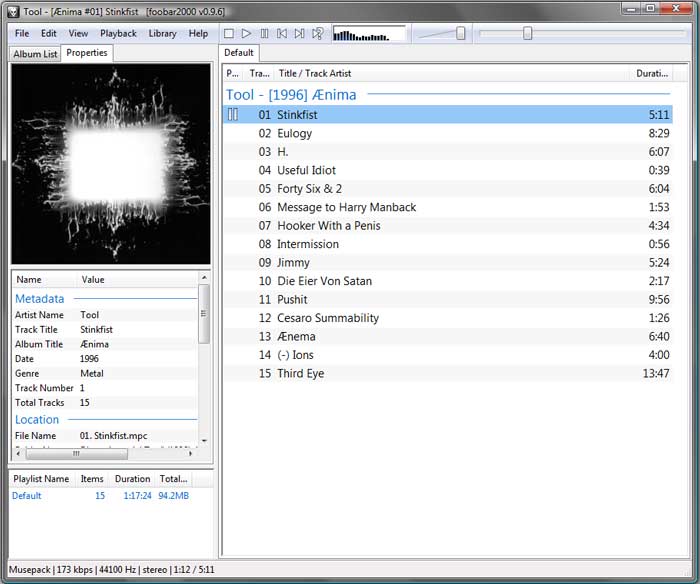
foobar2000 dilengkapi dengan kemampuan penandaan lanjutan, ReplayGain, dan pemutaran tanpa celah. Pemutar MP3 ini memungkinkan Anda dengan mudah menyesuaikan tata letak antarmuka pengguna. Selain fitur pemutaran musik dasar, foobar2000 mendukung ripping CD dan konversi format audio. Terlebih lagi, ini memungkinkan pengembang pihak ketiga untuk memperluas fungsinya.
7. Unduh MP3 Player - Winamp
Winamp is a free MP3 music player which can play all kinds of music files in any popular audio formats including MP3, AAC, M4A, WAV, AIFF, ALAC, and more. You can make this MP3 player download on both Windows PC, Mac, iOS and Android devices. Winamp has a lot of skins and plug-ins.
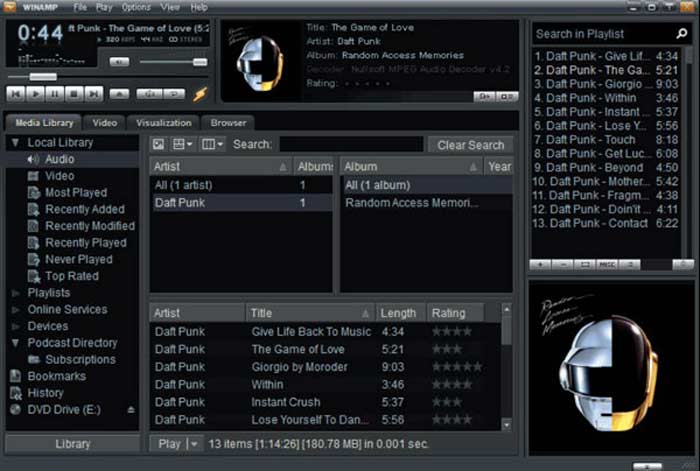
Winamp dapat berfungsi sebagai pemutar musik streaming untuk Anda mencari dan mendengarkan semua jenis lagu dan radio. Ini juga memberi Anda versi pembelian yang membawa lebih banyak fitur seperti pembakaran CD, ripping CD dan pengkodean MP3.
8. Pemutar Download Musik MP3 Gratis - RealPlayer
RealPlayer is one of the most popular video and audio playing software which allows you to enjoy music and movies on Windows PC, Mac and Android phone. It is a totally free MP3 music player. It can work as a free MP3 music download player to download online music.
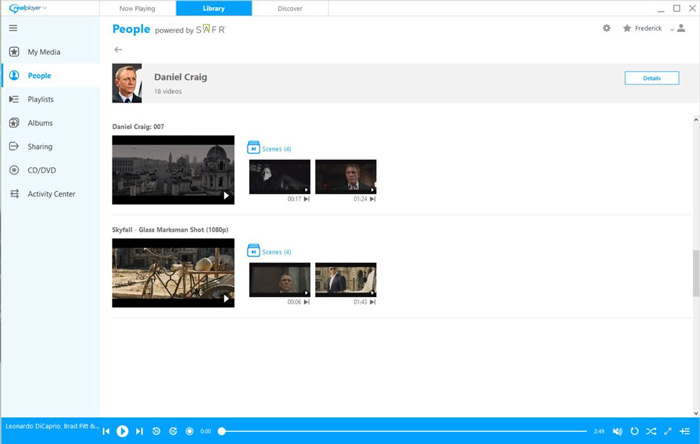
Sebagai pemutar MP3 yang bagus, ini mendukung format audio apa pun, seperti MP3, AAC, AIFF, M4A, ALAC, WMA, FLAC, dan banyak lagi. RealPlayer dirancang dengan banyak fitur yang ramah pengguna seperti pemutaran musik layar kunci dan kontrol headphone. Ini juga dapat berfungsi sebagai konverter pemutar MP3 untuk mengonversi file video ke audio MP3. Melalui pengujian kami, dibutuhkan waktu lama untuk menginstal RealPlayer ke komputer.
9. Konverter MP3 Player Gratis - MediaMonkey
MediaMonkey is an all-featured video and audio player. It is able to play any media files with high image and sound quality. As an MP3 player, it allows you to browse, search for and organize various music by Artist, Genre, Rating, Year, and more. This MP3 music player highly supports many audio formats including MP3, AAC, ALAC, M4A, OGG, WMA, FLAC, and CDA.
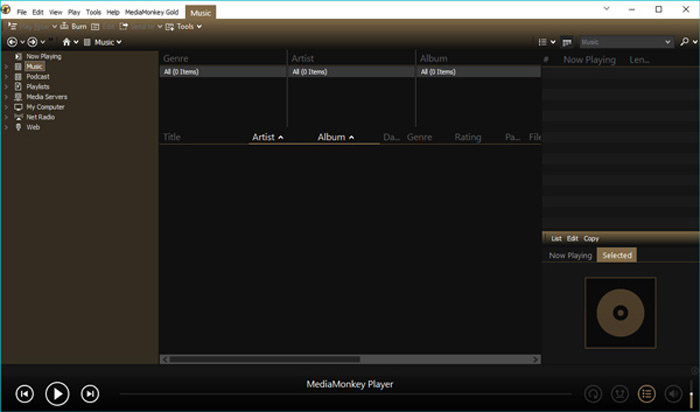
MediaMonkey dirancang dengan fungsi organisasi yang kuat. Anda dapat dengan mudah mengelola ribuan file media tanpa macet. Selain itu, bahkan dapat mengatur volume secara otomatis. Selain itu, dapat menyinkronkan iOS, Android dan perangkat lain, mengonversi dan meratakan trek. Selain dari fitur bermain, itu membawa fungsi berguna lainnya seperti CD ripping, CD dan DVD burning dan audio converting.
10. Pemutar dan Manajer Musik - MusicBee
MusicBee is our last recommendation in the list of 10 best free MP3 players. It is a great music manager and player that helps you to play various audio files with ease. This MP3 music player is available on Windows PC and Android phone. Besides songs, it also supports online radio station, podcasts, and SoundCloud integration.
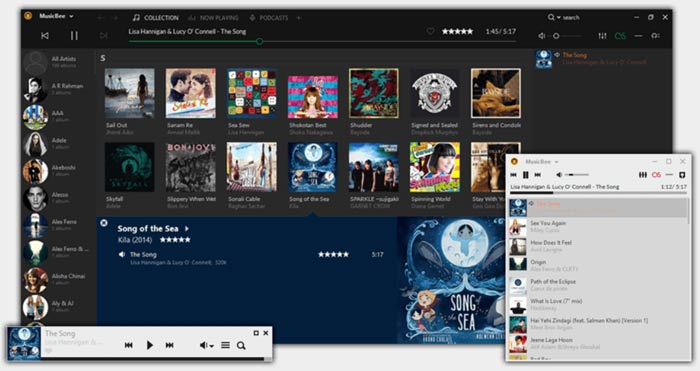
MusicBee memperhatikan pengalaman suara. Ini dapat menyempurnakan suara dengan efek Equalizer dan DSP 10-band atau 15-band. Pemutar musik ini mendukung kartu audio kelas atas, dan dapat menawarkan suara surround 5.1. MusicBee juga dirancang dengan fitur sinkronisasi hebat untuk menyinkronkan file dengan cepat dari komputer, ponsel, iTunes, Windows Media Player, dan lainnya. Ini memberi Anda fitur pemutaran tanpa celah untuk menikmati musik tanpa gangguan.
Tanya Jawab tentang Pemutar Musik MP3
Pertanyaan 1. Bagaimana cara menambahkan musik lokal Anda ke Spotify?
Untuk mengimpor lagu Anda dari komputer ke Spotify, Anda dapat pergi ke Menu, klik Edit lalu pilih opsi Preferensi. Gulir ke bawah untuk menemukan opsi Show Local Files dan mengaktifkannya. Sekarang Anda diizinkan untuk memeriksa lebih banyak lagu dari folder Unduhan dan Perpustakaan Musik. Di sebelah kiri, Anda juga dapat mengklik tombol Add a Source untuk menambahkan musik lokal Anda ke Spotify.
Pertanyaan 2. Bagaimana cara mengunduh musik gratis dari Amazon?
Saat Anda ingin mengunduh beberapa lagu gratis dari Amazon, Anda harus membuka halaman web Musik Digital Gratis Amazon terlebih dahulu. Anda dapat menemukan daftar lagu gratis di semua genre. Cari lagu yang ingin Anda unduh dan klik tombol Gratis. Setelah itu, Anda diharuskan masuk ke akun Amazon Anda. Pergi ke layar Review Your Order dan klik tombol Place Your Order. Kemudian klik tombol Unduh pembelian untuk mengunduh musik dari Amazon secara gratis.
Pertanyaan 3. Bagaimana cara gratis mengkonversi video ke MP3?
If you want to extract MP3 audio track from a video, you can rely on the popular Free Online Video Converter to convert any video to MP3 with high audio quality.
Kesimpulan
Here in this post, we have made a list of 10 best free MP3 music players for you to choose from. You can know the main information and key features of each MP3 player, and then choose your preferred one to play audio files. If you still have any questions about the music player and MP3 player download, you can leave us a message.
-
 10 Pemutar FLV Teratas untuk Windows, Mac, iOS dan Android pada tahun 2025
 FLV player membantu Anda dengan mudah mengakses file FLV di perangkat Windows, Mac, Android, iOS Anda. Lihat pemutar file FLV terbaik yang dapat Anda unduh sekarang.
-
 8 Pemain MOV Terbaik untuk Memutar File MOV QuickTime dengan Kualitas Asli
 Pelajari lebih lanjut tentang 8 pemutar MOV terbaik yang tersedia untuk Windows dan Mac. Anda dapat memilih yang diinginkan dan sesuai untuk memutar file MOV dengan kualitas asli.
-
 Dapatkan Pemutar MP4 Terbaik Anda untuk Memutar File MP4 dengan Kualitas Visual Tinggi
 Baca dan dapatkan pemutar MP4 terbaik Anda dari rekomendasi 10 perangkat lunak pemutar video MP4 terbaru. Anda dapat memutar file video MP4 di Windows dan Mac dengan lancar tanpa lag.
